
Introduction
Thank you for purchasing the URAQT ST-6645C 3-in-1 Cordless Portable Mini Vacuum Cleaner. This versatile device is designed for efficient cleaning in various environments, including cars, homes, and offices. It functions as a powerful vacuum, an air duster, and a vacuum compression pump, offering a comprehensive cleaning solution.
Please read this manual carefully before operation to ensure proper use, maintenance, and to maximize the product's lifespan.

Figure 1: The URAQT Mini Vacuum Cleaner is designed for quiet operation, with a working volume below 84 decibels, making it suitable for use without disturbing others.
Product Overview
Components
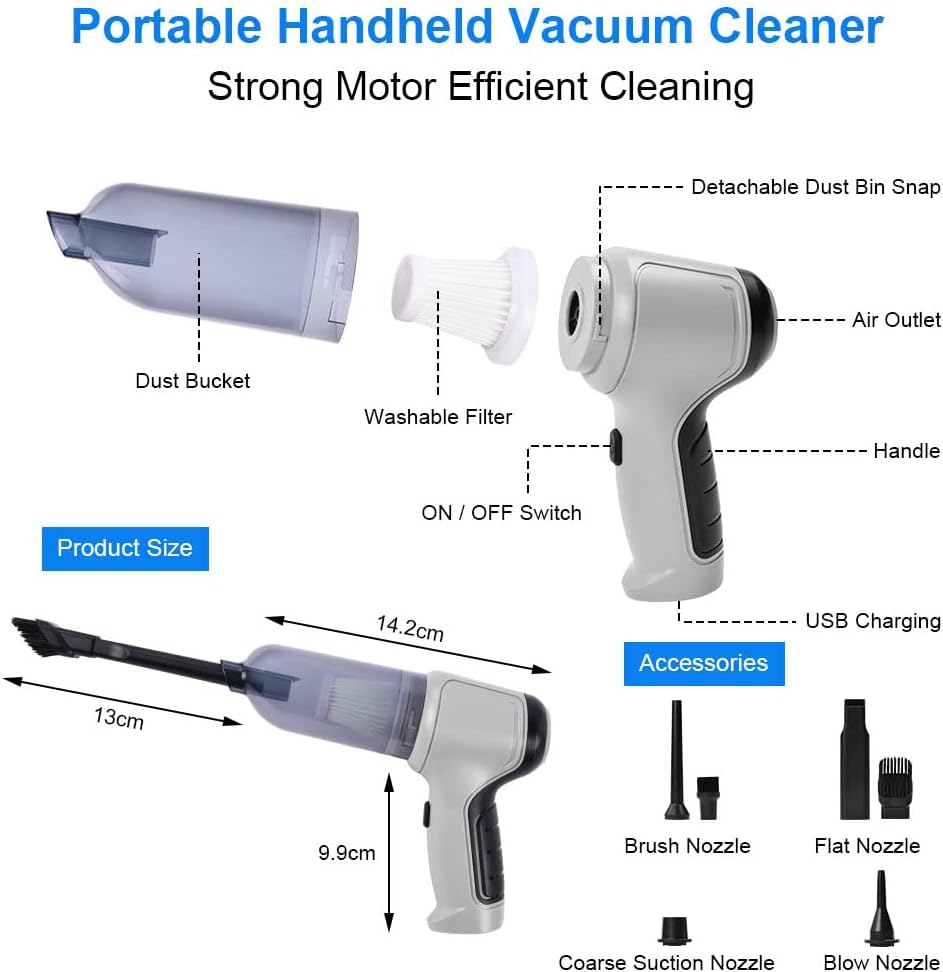
Figure 2: Detailed view of the vacuum cleaner's main parts and dimensions.
- Main Unit: Contains the motor, handle, ON/OFF switch, air outlet, and USB charging port.
- Dust Bucket: Transparent container for collecting dust and debris.
- Washable Filter (HEPA): Captures fine dust particles and is reusable.
Accessories
The vacuum cleaner comes with a variety of nozzles to suit different cleaning tasks:
- Brush Nozzle: Ideal for cleaning irregular surfaces, keyboards, and pet hair.
- Flat Nozzle: Suitable for narrow gaps and corners.
- Coarse Suction Nozzle: For general vacuuming of larger debris.
- Blow Nozzle: Used for the air duster function and inflating.
- USB Charging Cable: For recharging the device.

Figure 3: The URAQT Mini Vacuum Cleaner and its complete set of accessories.
Setup
Charging the Device
Before first use, fully charge the vacuum cleaner. The device is powered by two built-in 2000 mAh lithium batteries.
- Locate the USB charging port on the main unit.
- Connect the provided USB charging cable to the vacuum cleaner.
- Connect the other end of the USB cable to a compatible 5V USB power source, such as a laptop, mobile power bank, car charger, or a power adapter.
- The charging time is approximately 2 to 3 hours for a full charge.
- A full charge provides approximately 20 to 30 minutes of continuous usage time.

Figure 4: Charging options for the URAQT Mini Vacuum Cleaner.
Assembly
Attach the desired nozzle for your cleaning task:
- For vacuuming, attach the dust bucket with the filter, then select and attach the appropriate suction nozzle (brush, flat, or coarse suction nozzle) to the front opening.
- For air dusting or inflation, attach the blow nozzle to the air outlet at the rear of the device.
Operating Instructions
Vacuuming Mode
The vacuum cleaner provides a powerful 9000 Pa suction for effective cleaning.
- Ensure the dust bucket and filter are correctly installed.
- Select the appropriate suction nozzle for the surface you are cleaning (e.g., brush nozzle for keyboards or pet hair, flat nozzle for crevices, coarse suction nozzle for general debris).
- Press the ON/OFF switch to start the vacuum.
- Move the nozzle over the area to be cleaned.
- After cleaning, press the ON/OFF switch again to turn off the vacuum.

Figure 5: Applications of the vacuuming mode, including car, pet fur, sofa, and keyboard cleaning.
Air Duster Mode
The device can be used as an air duster to blow away dust from hard-to-reach areas.
- Attach the blow nozzle to the air outlet at the rear of the main unit.
- Press the ON/OFF switch to activate the air duster.
- Direct the airflow to blow dust from surfaces like keyboards, car vents, or window gaps.
- After use, turn off the device.

Figure 6: Using the device as an air duster for various applications.
Inflation and Vacuum Compression Mode
Beyond cleaning, the device can also inflate small items or compress storage bags.
- For Inflation: Attach the blow nozzle to the air outlet. Use it to inflate items like swimming rings or balloons.
- For Vacuum Compression: Attach the coarse suction nozzle to the front opening. Use it to remove air from vacuum storage bags for clothes or other items.
- Press the ON/OFF switch to activate the function.
- After use, turn off the device.

Figure 7: Demonstrating the inflation and vacuum compression capabilities.
Maintenance
Regular maintenance ensures optimal performance and extends the life of your vacuum cleaner.
Emptying the Dust Bucket
- Ensure the vacuum cleaner is turned off.
- Detach the dust bucket from the main unit.
- Empty the collected dust and debris into a waste bin. The transparent dust bucket allows you to easily see when it needs emptying.
Cleaning the Washable Filter
The HEPA filter is washable and reusable, contributing to better filtration and sustained suction power.
- After emptying the dust bucket, remove the filter.
- Rinse the filter under running water until it is clean.
- Allow the filter to air dry completely before reinserting it into the dust bucket. Do not use the vacuum cleaner with a wet filter.

Figure 8: The washable filter can be easily removed and cleaned.
Troubleshooting
| Problem | Possible Cause | Solution |
|---|---|---|
| Device does not turn on. | Battery is depleted. | Charge the device fully using the provided USB cable. |
| Low suction power. | Dust bucket is full. Filter is clogged. Nozzle is blocked. | Empty the dust bucket. Clean or replace the filter. Check and clear any blockages in the nozzle or main unit. |
| Short operating time after full charge. | Battery degradation over time. | Ensure full charge cycle. If problem persists, contact customer support. |
| Device makes unusual noise. | Obstruction in the motor or fan. | Turn off the device immediately. Check for any visible obstructions and remove them carefully. If noise persists, discontinue use and contact customer support. |
Specifications
| Brand | URAQT |
| Model Number | ST-6645C |
| Color | Grey |
| Dimensions (L x W x H) | 23 x 16 x 6 cm (9.06 x 6.3 x 2.36 inches) |
| Item Weight | 500 grams (1.1 lbs) |
| Power | 120 Watts |
| Voltage | 5 Volts (USB Charging) |
| Material | ABS |
| Noise Level | < 84 dB |
| Battery Capacity | 2 x 2000 mAh Lithium Batteries |
| Charging Time | 2-3 hours |
| Runtime | 20-30 minutes |
| Suction Power | 9000 Pa |
| Rated Speed | 36000 rpm |
| Filter Type | Washable HEPA Filter |
| Special Features | 3-in-1 (Vacuum, Air Duster, Vacuum Compression), Cordless, Washable Filter |
Warranty and Support
Specific warranty information is not provided in this manual. For details regarding warranty coverage, returns, or technical support, please refer to the product packaging, the seller's website, or contact the seller directly through the platform where the product was purchased.
If you have any questions about the product, you can contact the seller via Amazon, and they will resolve the problem for you within 24 hours as per product information.