
Product Overview
The ALLPOWERS R4000 is a high-capacity portable power station designed for versatile power needs, from home backup to outdoor adventures. It features a durable LiFePO4 battery, multiple output options, and fast charging capabilities.
Key Features
- 3456Wh LiFePO4 Battery with 3600W AC Output (6000W Peak)
- Ultra-Fast Charging: 0-100% in 1.2 hours
- Long-lasting LiFePO4 Battery: Over 3500 cycles to 80% capacity
- Portable Design with Extendable Handle and Wheels
- Uninterruptible Power Supply (UPS) Function
- Multiple Charging Inputs: AC, Solar, EV
- Smart Control: Touch Screen, Voice Control, APP Control

Front view of the ALLPOWERS R4000 Portable Power Station, showcasing its robust design and various output ports.
Getting Started
Unpacking and Initial Inspection
Carefully remove the ALLPOWERS R4000 from its packaging. Ensure all components listed in the package contents are present and undamaged.
Charging the Power Station
Before first use, fully charge the R4000. The unit can be charged via AC wall outlet, solar panels, or an EV charger.

Diagram illustrating five different methods to recharge the ALLPOWERS R4000: Wall Outlet + Solar, EV Charger + Solar, Wall Outlet, Solar, and EV Charge.
AC Wall Charging
Connect the provided AC charging cable to the AC input port on the rear of the R4000 and then to a standard wall outlet. The intelligent fast charging technology allows for a 0-100% charge in approximately 1.2 hours.
Solar Charging
The R4000 supports up to 2000W total solar input across three independent solar charging ports. Connect compatible solar panels using the appropriate cables.

The ALLPOWERS R4000 connected to multiple solar panels in an outdoor setting, demonstrating its solar charging capability.
EV Charging
For rapid charging, the R4000 can be charged using an EV charging station. Locate the EV charging port on the rear of the unit and connect the appropriate cable.
This video demonstrates various charging methods for the ALLPOWERS R4000, including AC wall charging, solar charging, and EV charging, highlighting its versatility.
Ergonomic Design and Portability
The R4000 features an extendable handle and sturdy wheels for easy transport, making it highly portable despite its capacity.

A person pulling the ALLPOWERS R4000 using its extendable handle and wheels, illustrating its ergonomic and portable design.
Operation Guide
Powering On/Off
Press and hold the main power button on the front panel to turn the unit on or off. The LCD display will illuminate upon activation.
Understanding the LCD Display
The intuitive touch screen display provides real-time information on battery level, input/output wattage (PV, Grid, DC Load, AC Load), and operational modes.
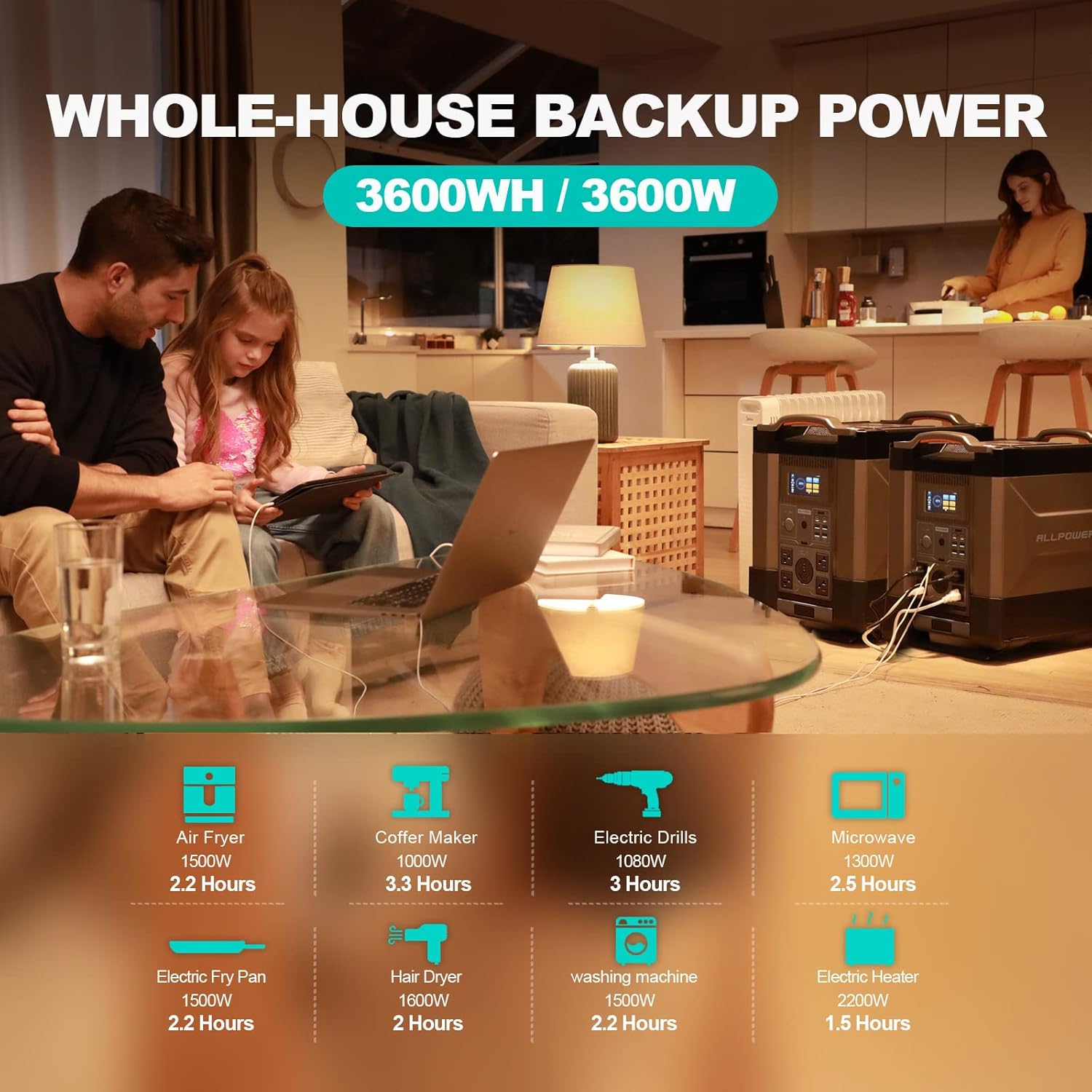
The ALLPOWERS R4000 providing power to various household appliances, with icons indicating estimated run times for air fryers, coffee makers, electric drills, microwaves, electric fry pans, hair dryers, washing machines, and electric heaters.
Output Ports
The R4000 offers a wide array of output ports:
- 1x 30A RV AC Output
- 4x 110V 3600W Pure Sine Wave AC Outputs (6000W Peak)
- 2x 100W USB-C Ports
- 4x USB-A Ports
- 1x 12V/10A Car Cigarette Lighter Output
Smart Control Features
Voice Control
The R4000 supports unique voice control commands for hands-free operation. Simply activate the voice control feature and issue commands like "Hello ALLPOWERS, turn on output."
This video demonstrates the UPS function of the ALLPOWERS R4000 during a power outage, showing how it seamlessly provides backup power to essential home appliances and features voice control.
APP Control
Download the ALLPOWERS app to remotely monitor and control your R4000 via Bluetooth or Wi-Fi. The app allows for detailed power management and settings adjustments.

A composite image showing the R4000's sensitive touch screen, a visual representation of its unique voice control feature, and a smartphone displaying the convenient APP control interface.
Uninterruptible Power Supply (UPS) Function
When connected to an AC power source, the R4000 acts as a UPS. In the event of a power failure, it automatically switches to internal battery power within 15ms, ensuring continuous operation for connected devices like CPAP machines, refrigerators, and computers.
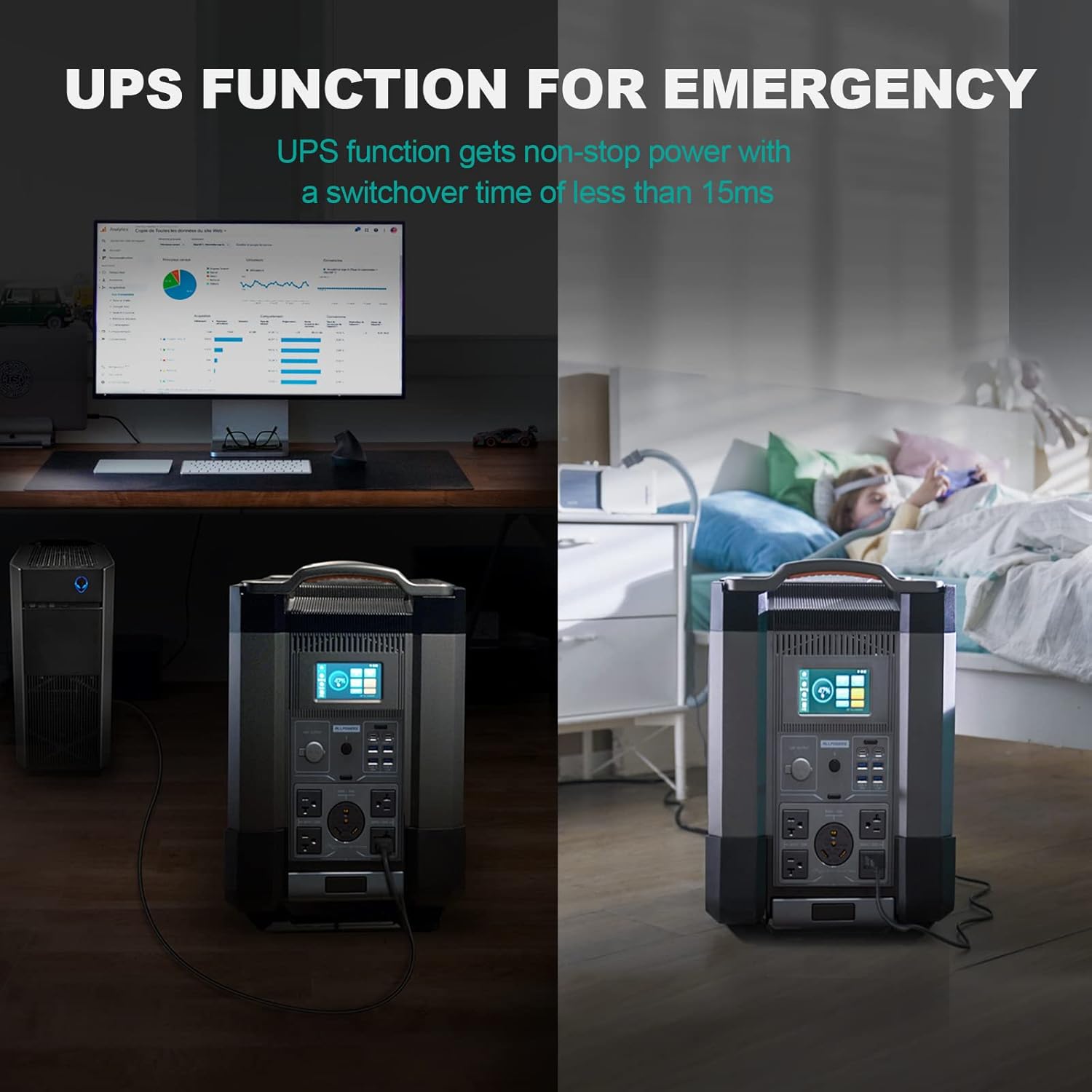
A split image demonstrating the UPS function of the ALLPOWERS R4000, showing a computer and a CPAP machine operating normally during a power outage thanks to the power station.
Expandable Capacity
The R4000's capacity can be expanded from 3600Wh up to 21600Wh by connecting additional battery packs, providing extended power for larger demands.
An illustration showing how the ALLPOWERS R4000's capacity can be expanded by connecting additional battery units, reaching up to 21600Wh.
Care and Maintenance
Battery Longevity
The R4000 utilizes a LiFePO4 battery, designed for long-term durability. It maintains over 80% of its maximum capacity after 3500 charge cycles and over 50% after 6500 cycles, ensuring a service life exceeding 10 years.
Storage
Store the unit in a cool, dry place away from direct sunlight and extreme temperatures. For long-term storage, it is recommended to charge the unit to approximately 50-80% every 3-6 months.
Cleaning
Use a soft, dry cloth to clean the exterior of the unit. Do not use abrasive cleaners or immerse the unit in water.
Troubleshooting
Common Issues
If the unit is not charging or powering devices, check the following:
- Ensure all cables are securely connected.
- Verify that the input source (AC, solar, EV) is active and providing power.
- Check the LCD display for any error messages or fault codes. Refer to the user manual for specific code interpretations.
- Ensure the correct output modes (AC/DC) are enabled on the display.
Error Messages
The R4000's display will show specific fault messages if an issue occurs. Consult the detailed troubleshooting section in the included User Manual for comprehensive guidance on resolving these errors.
Technical Specifications
| Feature | Specification |
|---|---|
| Brand | ALLPOWERS |
| Model Name | AP-SS-011-BLA-US |
| Battery Type | LiFePO4 |
| Capacity | 3456Wh |
| AC Output | 3600W (Pure Sine Wave, 6000W Peak) |
| USB-C Output | 2x 100W |
| USB-A Output | 4x |
| Car Output | 1x 12V/10A |
| Max Solar Input | 2000W |
| Dimensions | 21.25"L x 19.29"W x 11.81"H |
| Weight | Approximately 100 lbs (45 kg) |
Warranty and Support
The ALLPOWERS R4000 Portable Power Station comes with a 6-year warranty. For any support inquiries, please contact ALLPOWERS customer service.
For more information and support, visit the official ALLPOWERS website or refer to the contact details provided in your product packaging.


