
ienRon 5 Port丨5x Gigabit Port V2
ienRon 5 Ports Gigabit Network Switch User Manual
Model: 5 Port丨5x Gigabit Port V2
Brand: ienRon
Introduction
This manual provides essential information for the proper setup, operation, and maintenance of your ienRon 5 Ports Gigabit Network Switch. Designed for high-forwarding network environments, this unmanaged switch offers a simple, plug-and-play solution for expanding your network connectivity.
Product Features
- 5 Gigabit Ethernet Ports: Features 5*1000M Ethernet ports with auto-negotiation and Auto MDI/MDIX, allowing any port to function as an uplink. (Note: This is not a PoE Switch).
- Plug and Play: Requires no software installation or configuration, making it ideal for home, small office, and small-medium business environments.
- 4KV Lightning Protection: Built-in protection circuit designed to withstand over 4000 volts of lightning, preventing circuit failure and protecting the switch and other connected ports.
- Compact Design: Tiny size (3.92 x 2.01 x 1.06 inches) saves space and integrates discreetly into any setting.
- Durable Metal Case & Fanless: The robust metal body provides excellent resistance to accidental falls. The fanless design ensures silent operation and superior heat dissipation, with a normal operating temperature range of -10 to 55 ℃.
- Versatile Application: Suitable for various scenarios including schools, families, SMEs, and mini-monitoring systems.
What's in the Box
Upon unboxing your ienRon 5 Ports Gigabit Network Switch, please ensure all the following items are present:
- 1 x 5-Port Gigabit Switch
- 1 x Power adapter
- 1 x Manual

Image: The ienRon 5 Ports Gigabit Network Switch, showing its five Ethernet ports and power input, alongside its power adapter.
Setup
The ienRon 5 Ports Gigabit Network Switch is designed for simple plug-and-play operation. No complex software installation or configuration is required.
Step 1: Connect Power
Connect the included power adapter to the "POWER" port on the switch and then plug the adapter into a standard electrical outlet.

Image: Step-by-step diagram illustrating how to connect the power adapter to the switch and then to a wall outlet.
Step 2: Connect Devices
Connect your network devices (e.g., computers, gaming consoles, IP cameras, printers, routers) to any of the five Gigabit Ethernet ports using standard Ethernet cables. The switch supports Auto MDI/MDIX, so you don't need to worry about cable types (straight-through or crossover).

Image: Diagram illustrating how to connect multiple devices like a router, IP camera, IPTV, and HD printer to the 5-port network switch.
Mounting Options
The compact design of the switch allows for both desktop placement and wall mounting to suit your space requirements.
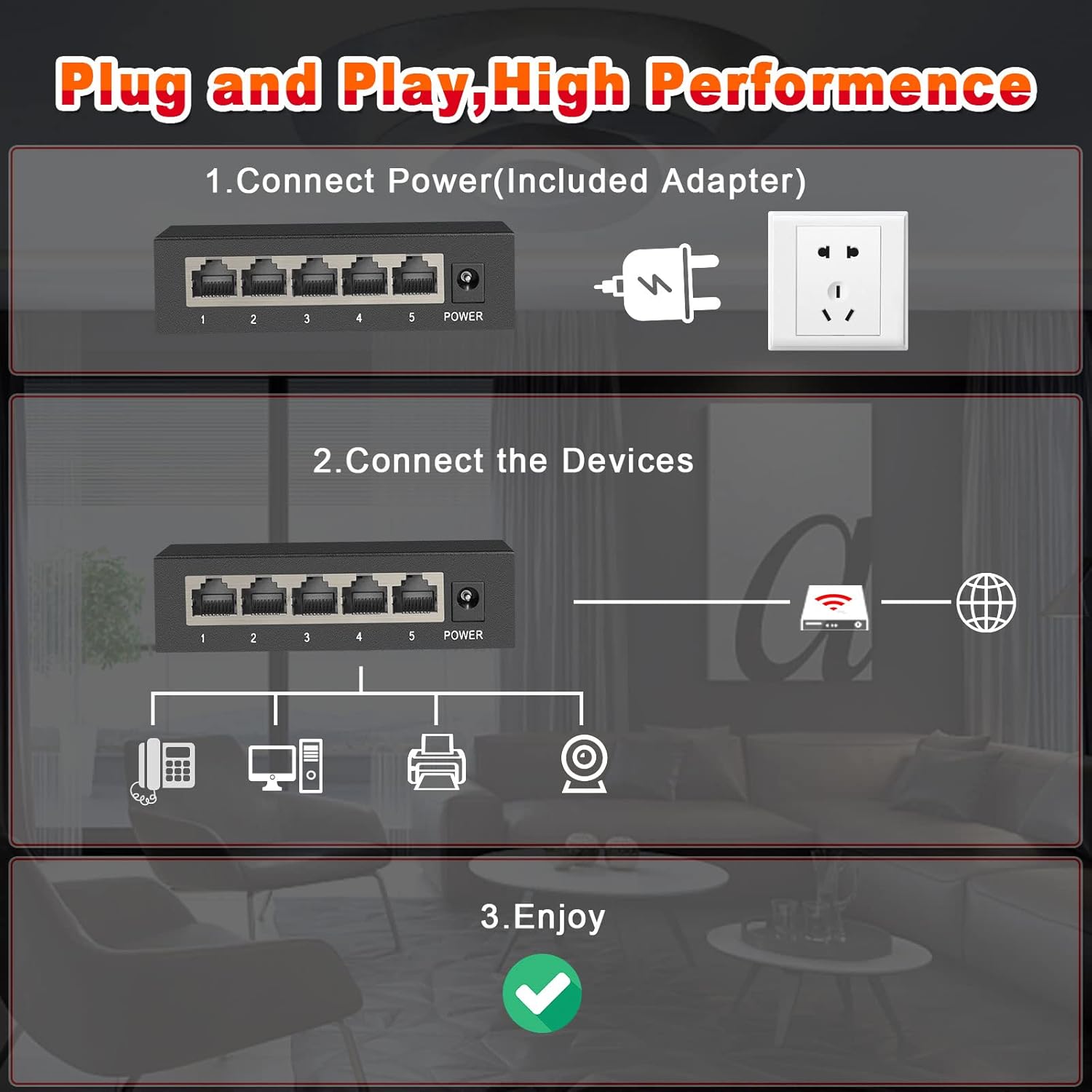
Image: Visual representation of the network switch being used on a desktop next to a laptop and mounted vertically on a wall next to a television.
Operating Instructions
Once powered on and devices are connected, the ienRon 5 Ports Gigabit Network Switch operates automatically. It is an unmanaged switch, meaning it requires no user intervention for basic network functions.
- Automatic Operation: The switch automatically detects the speed and duplex mode of connected devices (10/100/1000Mbps) and adjusts accordingly.
- LED Indicators: Each port has an LED indicator that shows connection status and data activity. A solid light typically indicates a stable link, while a blinking light indicates data transmission.

Image: Detailed views of the switch's front and back, highlighting the numbered Ethernet ports, power input, and LED indicators for link/activity and data transmission.
Maintenance
The ienRon 5 Ports Gigabit Network Switch is designed for durability and minimal maintenance.
- Cleaning: Use a soft, dry cloth to clean the exterior of the switch. Do not use liquid or aerosol cleaners.
- Ventilation: Ensure the vents on the sides of the metal case are not obstructed to allow for proper heat dissipation. The fanless design ensures quiet operation while maintaining optimal temperature.
- Environmental Conditions: Operate the switch within its specified temperature range of -10 to 55 ℃ (14 to 131 ℉). Avoid exposing the device to extreme temperatures or humidity.
- Lightning Protection: The integrated 4KV lightning protection helps safeguard the device from electrical surges.

Image: Visual summary of key features: Quiet Design, 1000Mbps speed, 4KV Lightning Protection, and Metal Case construction.
Troubleshooting
If you encounter issues with your ienRon 5 Ports Gigabit Network Switch, consider the following basic troubleshooting steps:
- No Power: Ensure the power adapter is securely connected to both the switch and a working electrical outlet. Check the power LED indicator on the switch.
- No Link/Activity:
- Verify that the Ethernet cables are securely plugged into both the switch and the connected device.
- Try a different Ethernet cable.
- Ensure the connected device (e.g., computer, router) is powered on and functioning correctly.
- Check the LED indicator for the specific port on the switch. If it's off, there might be an issue with the cable or the connected device.
- Slow Network Speed:
- Ensure all connected devices and cables support Gigabit Ethernet (Cat5e or Cat6 recommended for optimal performance).
- Verify that your internet service provider (ISP) plan supports the desired speeds.
- Intermittent Connection:
- Check for loose cable connections.
- Ensure the switch is placed in a well-ventilated area to prevent overheating.
- Temporarily disconnect and reconnect the power to the switch.
Specifications
| Feature | Detail |
|---|---|
| Switch Type | Unmanaged |
| Number of Ports | 5 |
| Data Transfer Rate | 1000 Megabits Per Second (Gigabit) |
| Product Dimensions | 3.94"L x 1.97"W x 0.98"H |
| Item Weight | 0.4 Pounds (6.4 ounces) |
| Voltage | 5 Volts |
| Case Material | Metal |
| Maximum Power | 10 Watts |
| Upper Temperature Rating | 55 Degrees Celsius |
| Interface Type | RJ45 |
| Current Rating | 2 Amps |
| Color | Black |
| Compatible Devices | Gaming Console, Desktop, Router, Camera, Printer |
Warranty and Support
For warranty information and technical support, please refer to the documentation included with your product or visit the official ienRon website. As an unmanaged device, the switch is designed for straightforward operation without complex configurations.
If you require assistance beyond the scope of this manual, it is recommended to contact ienRon customer service through their official channels for the most accurate and up-to-date support.
Related documents5 Port丨5x Gigabit Port V2

Ask a question about this manual
Ask about setup, troubleshooting, compatibility, parts, safety, or missing instructions. Manuals+ will review the question and use this page’s manual context to help answer it.