
Product Overview
The Merkury Innovations Smart RGB LED Strip Lights offer versatile and customizable lighting for both indoor and outdoor environments. This 10-foot flexible strip features color-changing capabilities, adhesive backing for easy installation, and smart control via a dedicated app, compatible with voice assistants like Alexa and Google Assistant. The built-in Wi-Fi eliminates the need for an additional hub.

Image: Packaging for the Merkury Innovations Smart Wi-Fi LED Strip, highlighting its length, power adapter, and app control features.
Key Features
- No Hub Required: Integrated Wi-Fi connectivity for direct control.
- Weather Resistant: Suitable for both indoor and outdoor use.
- Flexible and Trimmable: 10-foot length can be cut to desired size.
- Color Changing: Full RGB spectrum and tunable white light (2700K Warm White, 3500K Cool White, 6500K Daylight).
- Dimmable: Adjust brightness levels from 0% to 100%.
- App Control: Manage settings, colors, and schedules via the Merkury Smart app.
- Voice Control: Compatible with Amazon Alexa and Google Assistant for hands-free operation.
- Schedule Settings: Automate lighting operation for specific times and days.
- Adhesive Backing: Strong adhesive for secure installation on various surfaces.

Image: Visual representation of the key features, including color change, dimmable light, schedule settings, voice control, app control, share access, and trimmable design.

Image: Demonstrates the customizable color spectrum, including warm, cool, and daylight white options, and the dimmable brightness feature.
What's in the Box
- 10ft Smart Wi-Fi LED Strip
- Power Adapter
- Wi-Fi Enabled Controller with USB Port
- Adhesive Back Clips (for optional mounting)
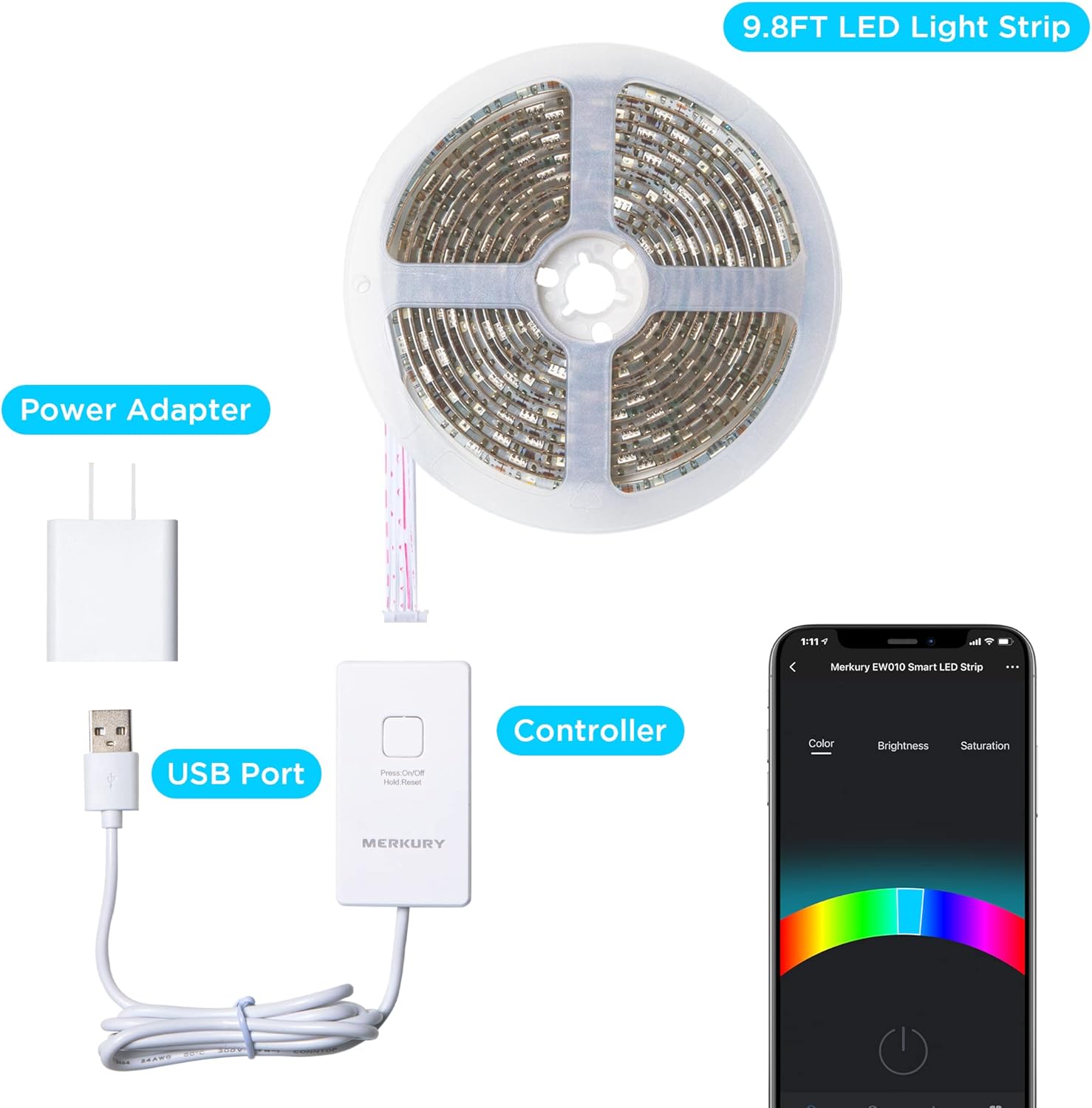
Image: All components included in the package: the LED strip, power adapter, USB port, and controller.
Setup Instructions
1. Download the App
Download the "Merkury Smart" app from the Apple App Store or Google Play Store. Search for "Merkury Smart".
2. Physical Installation
Before peeling the adhesive, plan the layout of your LED strip. Ensure the surface is clean and dry for optimal adhesion. The strip can be trimmed at designated cut marks to fit your desired length. For additional security, use the included adhesive back clips.

Image: A person demonstrating the easy peel-and-stick installation of the LED strip lights.

Image: Details on stick-on installation, how to cut and adjust the strip, and the use of optional mounting clips.
3. Connect to Power
Connect the LED strip to the Wi-Fi enabled controller, and then plug the power adapter into a standard electrical outlet. The controller has an on/off button for manual control if needed.
4. Pair with App
Follow the in-app instructions to pair your LED strip lights with your home Wi-Fi network. Ensure your Wi-Fi network is 2.4 GHz for compatibility.
Operating Instructions
App Control
Once paired, use the Merkury Smart app to:
- Change colors across the full RGB spectrum.
- Adjust brightness (dimming).
- Select tunable white light options (Warm, Cool, Daylight).
- Set custom scenes and lighting effects.
- Create schedules for automated on/off times.

Image: The smartphone app interface for setting daily schedules for automated lighting.
Voice Control
Integrate your LED strip lights with Amazon Alexa or Google Assistant for convenient voice commands. Examples include:
- "Alexa, turn on the living room lights."
- "Hey Google, set the kitchen lights to blue."
- "Alexa, dim the strip lights to 50%."

Image: Demonstrates voice control compatibility with Google Assistant and Amazon Alexa.
Maintenance
To ensure optimal performance and longevity of your LED strip lights:
- Keep the strip clean by gently wiping with a dry, soft cloth. Avoid abrasive cleaners or solvents.
- Ensure the power adapter and controller are kept in a dry environment.
- Regularly check for any loose connections or damage to the strip.
- If used outdoors, ensure connections are secure and protected from direct heavy rainfall, though the strip itself is weather resistant.
Troubleshooting
| Problem | Possible Cause | Solution |
|---|---|---|
| Lights not turning on. | No power, loose connection, app issue. | Check power adapter connection. Ensure outlet is working. Verify app settings and try restarting the app. |
| Cannot connect to Wi-Fi. | Incorrect Wi-Fi password, 5GHz network, too far from router. | Ensure correct 2.4 GHz Wi-Fi network is selected. Move closer to router. Restart router and try pairing again. |
| Lights flickering or inconsistent colors. | Loose connection, damaged strip, power supply issue. | Check all physical connections. If the strip is damaged, it may need replacement. Ensure power supply is stable. |
| Voice control not working. | Incorrect voice command, integration issue with Alexa/Google. | Verify the exact commands in the Merkury Smart app. Re-link the Merkury Smart skill/service in your Alexa or Google Home app. |
Specifications
- Brand: Merkury Innovations
- Model Number: MI-EW010-999WW
- Light Source Type: LED
- Light Color: RGB (Color Changing)
- Length: 10 ft (approx. 3 meters)
- Indoor/Outdoor Usage: Outdoor (Weather Resistant)
- Connectivity Technology: Wi-Fi (2.4 GHz)
- Controller Type: App Control
- Number of Light Sources: 150
- Wattage: 60 watts
- Water Resistance Level: Waterproof
- Item Weight: 0.55 Pounds (approx. 8.8 ounces)
- UPC: 194383023074
Warranty and Support
For warranty information, technical support, or further assistance, please refer to the official Merkury Innovations website or contact their customer service. Keep your purchase receipt for warranty claims.
Visit: www.merkuryinnovations.com