
Introduction
This instruction manual provides detailed guidance for the installation, usage, and maintenance of the Havis FlexiPole Backplate, Model W126273071. This backplate is specifically designed to securely attach Ingenico Lane/3000, Ingenico Lane/7000, and Ingenico Lane/8000 payment terminals to a compatible FlexiPole mounting solution (sold separately). Proper installation ensures stability and accessibility for your payment terminal.
Product Overview
The Havis FlexiPole Backplate serves as an essential component for integrating Ingenico Lane series payment terminals into a professional point-of-sale setup. It provides a robust and precise connection point, ensuring the terminal remains firmly in place during transactions.
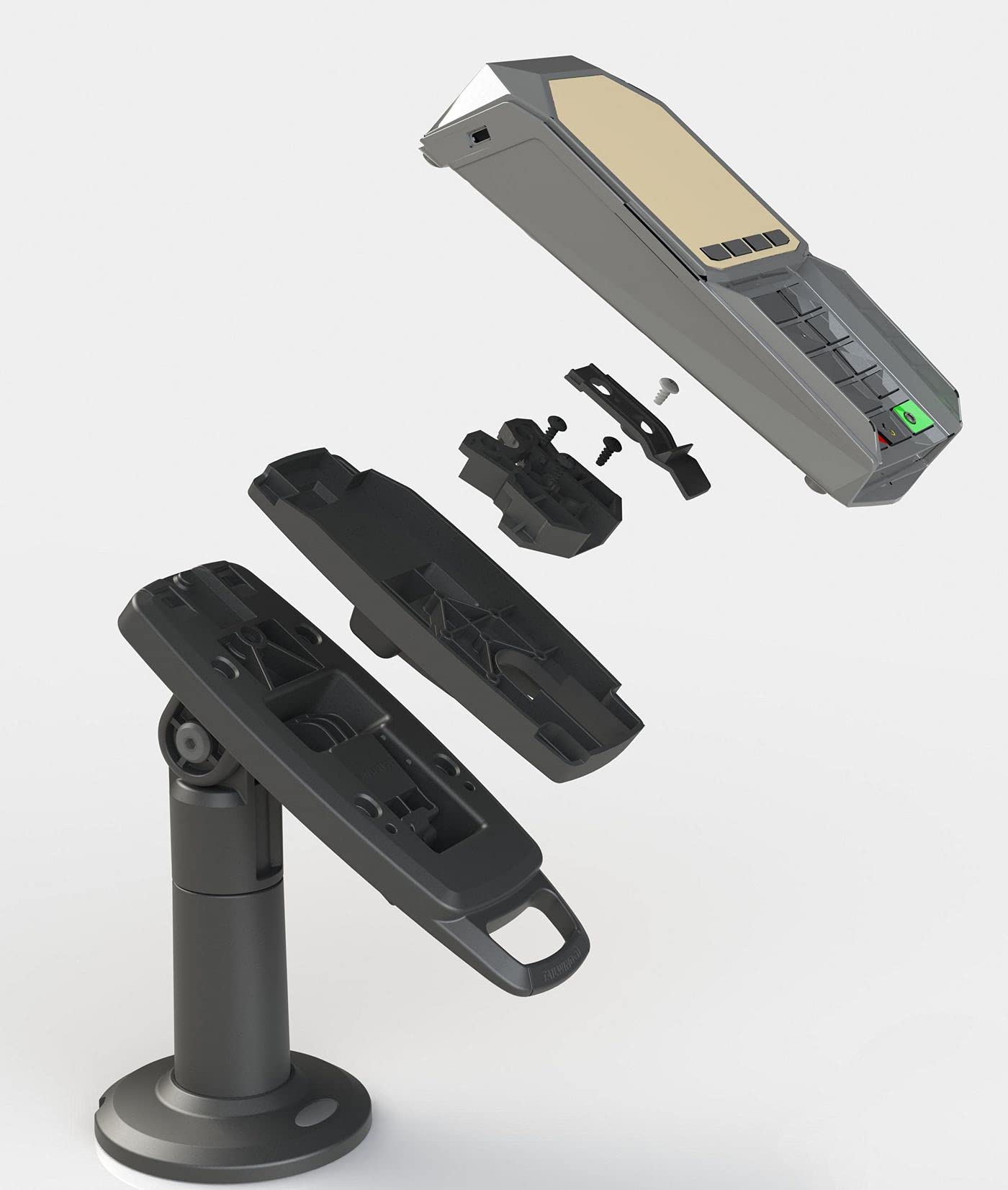
Image 1: Havis FlexiPole Backplate. This image shows the front view of the backplate, highlighting its design for attaching to Ingenico Lane series payment terminals and a FlexiPole mount.
Setup and Installation
Before beginning installation, ensure you have the Havis FlexiPole Backplate (W126273071), your Ingenico Lane/3000, 7000, or 8000 payment terminal, and a compatible FlexiPole mounting solution (e.g., a pole mount or wall mount) and any necessary tools (e.g., screwdriver).
- Prepare the Payment Terminal: Ensure your Ingenico Lane series payment terminal is powered off and disconnected from any cables.
- Attach Backplate to Terminal: Align the Havis FlexiPole Backplate with the mounting points on the rear of your Ingenico Lane payment terminal. Secure the backplate to the terminal using the screws provided with the backplate or terminal, if applicable. Ensure a snug fit without overtightening.
- Mount to FlexiPole Solution: Once the backplate is securely attached to the payment terminal, align the backplate with the mounting mechanism of your FlexiPole stand or mount. Follow the specific instructions provided with your FlexiPole mounting solution to securely attach the backplate and terminal assembly. This typically involves a click-in mechanism or screws.
- Verify Security: Gently tug on the payment terminal to ensure it is firmly attached to the FlexiPole mount and does not wobble.
- Reconnect Cables: Reconnect all necessary cables (power, data) to your payment terminal.
Note: This backplate is designed to be used with a FlexiPole mounting solution. It is not intended for standalone use or direct attachment to surfaces without a compatible pole or stand.
Usage and Compatibility
The Havis FlexiPole Backplate (W126273071) is designed for use with the following Ingenico payment terminal models:
- Ingenico Lane/3000
- Ingenico Lane/7000
- Ingenico Lane/8000
Once installed, the backplate facilitates the secure and ergonomic positioning of your payment terminal, improving customer experience and operational efficiency at the point of sale. It allows for easy rotation and tilting when used with a compatible FlexiPole mount, providing flexibility for both customers and staff.
Maintenance
The Havis FlexiPole Backplate requires minimal maintenance. Follow these guidelines to ensure its longevity and proper function:
- Cleaning: Wipe the backplate with a soft, damp cloth. Avoid abrasive cleaners or solvents, as these can damage the finish.
- Inspection: Periodically check all screws and connection points to ensure they remain tight. If any looseness is detected, gently tighten the screws.
- Environmental Conditions: Ensure the backplate and payment terminal are used in a dry environment, away from extreme temperatures and direct sunlight.
Troubleshooting
If you encounter issues with your Havis FlexiPole Backplate, refer to the following common problems and solutions:
- Problem: The payment terminal feels loose or wobbly after installation.
Solution: Ensure all screws attaching the backplate to the terminal and the backplate to the FlexiPole mount are securely tightened. Re-check the alignment of the backplate with the mounting points on both the terminal and the FlexiPole solution. - Problem: The backplate does not fit the payment terminal.
Solution: Verify that your payment terminal is an Ingenico Lane/3000, 7000, or 8000 model. This backplate is specifically designed for these models. If your terminal is a different model, this backplate may not be compatible. - Problem: Difficulty attaching the backplate to the FlexiPole mount.
Solution: Refer to the installation instructions provided with your specific FlexiPole mounting solution. Ensure the backplate is correctly oriented and aligned with the mount's attachment mechanism.
Specifications
| Feature | Detail |
|---|---|
| Model Number | W126273071 |
| Compatible Terminals | Ingenico Lane/3000, 7000, 8000 |
| Manufacturer | Havis |
| Item Weight | 10.6 ounces (approx. 300 grams) |
| Package Dimensions | 8.15 x 6.46 x 3.94 inches (approx. 20.7 x 16.4 x 10 cm) |
| ASIN | B0BR82P6W4 |
Warranty Information
Specific warranty details for the Havis FlexiPole Backplate (Model W126273071) are typically provided by the manufacturer, Havis, or the authorized reseller at the time of purchase. Please refer to the documentation included with your product or visit the official Havis website for the most current and accurate warranty terms and conditions. Keep your proof of purchase for warranty claims.
Customer Support
For technical assistance, installation queries, or further information regarding the Havis FlexiPole Backplate, please contact Havis customer support directly. You can usually find contact information, including phone numbers and email addresses, on the official Havis website (www.havis.com) or through your product's reseller.
When contacting support, please have your product model number (W126273071) and any relevant purchase information readily available.