
Product Overview
The MAODANER Dreamcolor Acrylic Interior Car LED Strip Light kit provides customizable ambient lighting for your vehicle's interior. This 18-in-1 system features RGB Smart IC technology for dynamic lighting effects, controlled via a wireless mobile application. It includes multiple acrylic light strips, footwell lamps, door handle lights, and storage box lights, designed for a uniform and bright illumination.

Image: Overview of the MAODANER Dreamcolor 18-in-1 LED Interior Car Light Kit, showing all included components and an example of the installed lighting in a car interior.
Package Contents
Verify that all components are present in your package before beginning installation:
- 18 in 1 Acrylic car light kit (4x 29.5-inch strips, 1x 43.3-inch strip, 1x 14-inch strip)
- 4x Footwell lamps (2x 44.5-inch, 2x 64.2-inch)
- 4x Door handle lights
- 4x Door storage box lights
- 1x Main controller
- 4x Sub-controllers
- 1x Host power cord/touch button (19.7-inch)
- 1x Auxiliary power cord (19.7-inch)
- 1x Extension cord (78.7-inch)
- 1x Car tape
- 1x Scraper/Pry tool
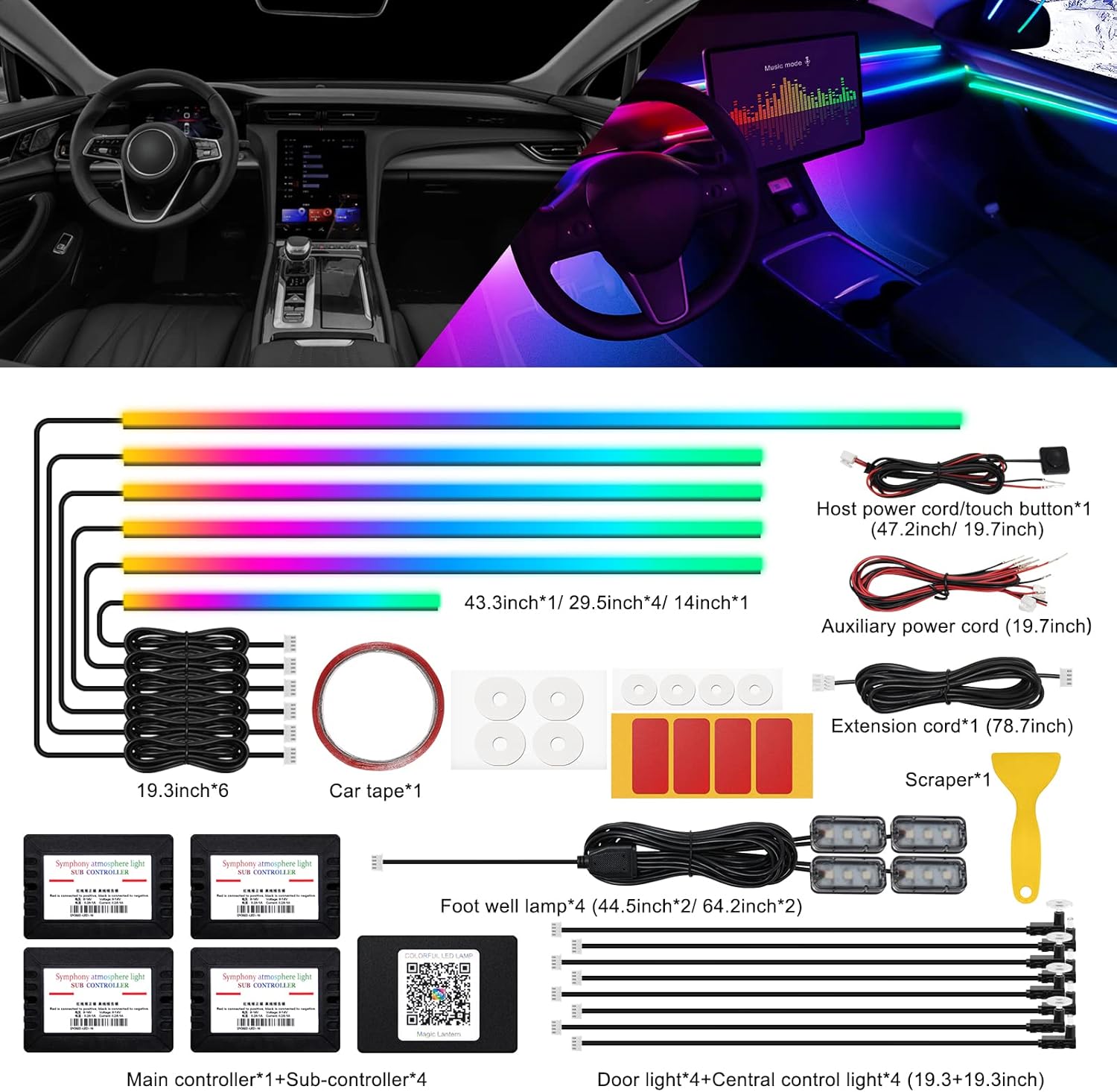
Image: A comprehensive layout of all parts included in the kit, including light strips, controllers, wiring, and installation tools.
Setup and Installation
Careful installation ensures optimal performance and appearance. It is recommended to test all components before final installation.
- Preparation: Lay out all components and test them by connecting them to the main controller and power source. Ensure all lights illuminate and respond to the app or touch button. This step is crucial for verifying functionality and light pattern orientation.
- Identify Installation Locations: Determine the desired placement for each light strip and component within your vehicle's interior. Common areas include the dashboard, door panels, footwells, door handles, and storage boxes.
- Create Gaps: Use the provided pry tool to carefully open gaps in the vehicle's interior panels where the acrylic light strips will be inserted.
- Insert Light Strips: Gently squeeze the acrylic LED light strips into the prepared gaps. Ensure a secure and flush fit.
- Connect Components:
- Connect the main controller to your vehicle's 12V power source.
- Connect the sub-controllers to the main controller. The main controller must be energized to control sub-controllers.
- Connect the acrylic light strips, footwell lamps, door handle lights, and storage box lights to the appropriate main or sub-controllers.
- Secure Wiring: Use car tape, double-sided tape, or zip ties to secure all wiring, preventing rattling noises and ensuring a clean, organized installation.
- Final Check: Once all components are installed and wired, perform a final test to confirm all lights are functioning correctly and responding to controls.

Image: Visual guide demonstrating the process of installing the acrylic LED light strips into car interior gaps using the pry tool.
Important Note on Cutting Strips: If cutting light strips for custom fit, ensure cuts are straight (90 degrees) to allow light to emit fully to the end. Angled cuts may prevent light emission in that section.
Operating Instructions
The MAODANER Dreamcolor LED Strip Light system offers multiple control methods for a personalized lighting experience.
1. Mobile Application Control
The system is controlled via the "Magic Lantern" wireless application, compatible with both iOS and Android devices.
- Download App: Scan the QR code provided on the main controller or search for "Magic Lantern" in your device's app store.
- Connect: Open the app and connect to the LED light system via Bluetooth.
- Color Selection: Choose from 16 million colors using the color wheel or preset options.
- Dynamic Modes: Select from various built-in color chase modes, including bouncing, dancing, and flashing effects. Static color modes are also available.
- Music Sensor Function: Activate the music sensor function to synchronize the lights with any sound captured by the microphone. The lights will change colors according to the music rhythm or voice.
- Brightness Adjustment: Adjust the brightness level of the lights through the app.
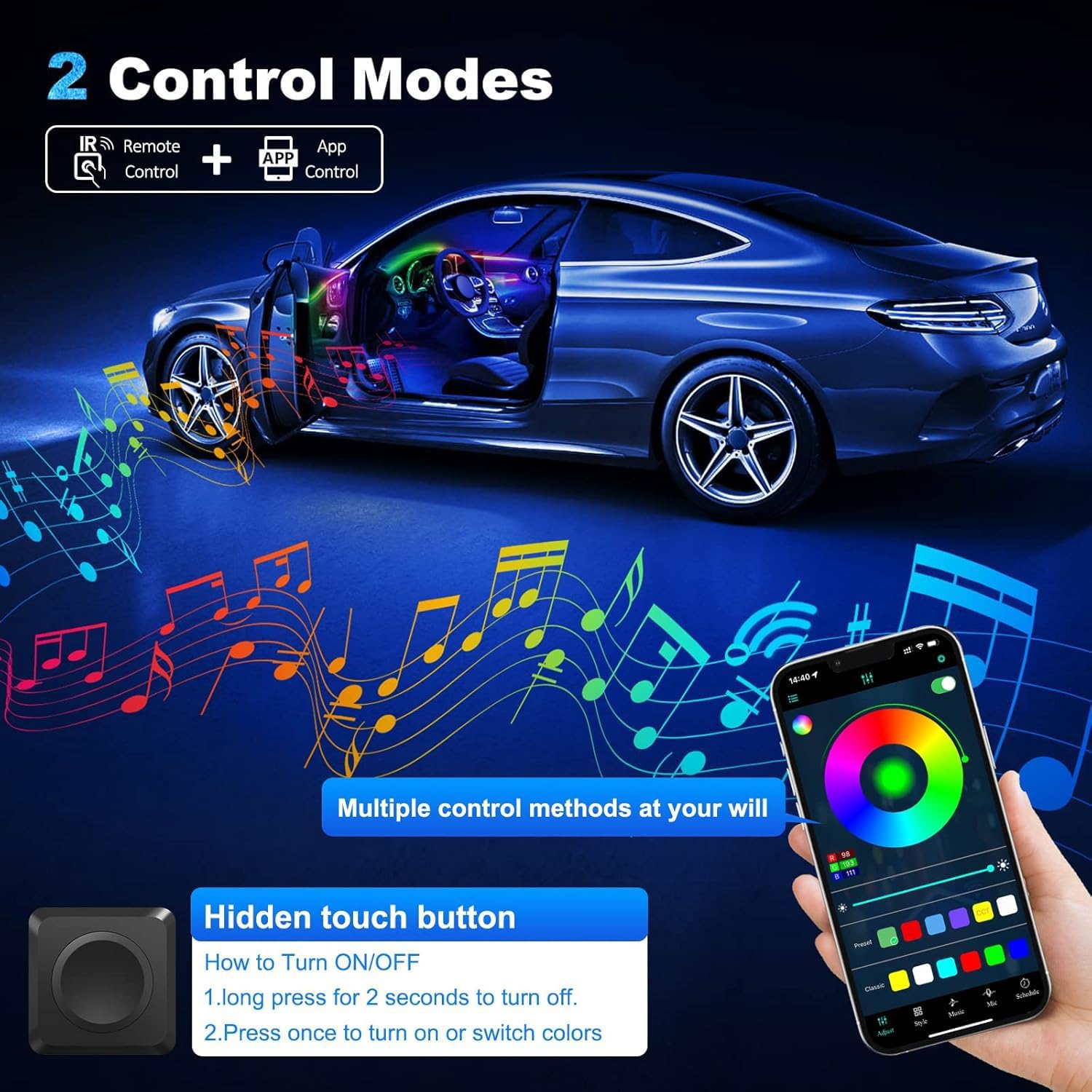
Image: A smartphone screen displaying the "Magic Lantern" app interface, showing color selection and various control options for the LED lights.
2. Hidden Touch Button Control
A hidden touch button provides basic control without needing the app.
- Turn ON/OFF: Long press the touch button for 1-2 seconds to turn the lights off.
- Change Color/Turn ON: Press the touch button once to turn the lights on or to switch between different colors/modes.
Maintenance
The MAODANER Dreamcolor LED Strip Lights are designed for durability and minimal maintenance.
- Cleaning: Use a soft, dry cloth to gently wipe the acrylic light strips and other components. Avoid abrasive cleaners or solvents.
- Water Resistance: The product is waterproof, but avoid submerging components or exposing them to high-pressure water jets.
- Heat: The LED lights operate with extremely low heat output, ensuring safety and longevity.
- Wiring Inspection: Periodically check wiring connections to ensure they remain secure and free from damage.
Troubleshooting
If you encounter issues with your MAODANER Dreamcolor LED Strip Light kit, refer to the following common solutions:
- Lights Not Turning On:
- Check all power connections to the main controller and ensure it is receiving 12V power.
- Verify that all sub-controllers and light strips are securely connected to the main controller.
- Ensure the main controller is energized.
- App Connectivity Issues:
- Ensure Bluetooth is enabled on your mobile device.
- Restart the "Magic Lantern" app.
- Restart your mobile device.
- Ensure the main controller is powered on and within Bluetooth range.
- Incorrect Colors or Non-Responsive Lights:
- Check for loose connections between the light strips and controllers.
- If a specific color channel (e.g., blue) is not working on a strip, inspect the strip for damage or a faulty connection.
- Reset the system by disconnecting and reconnecting power to the main controller.
- Lights Not Syncing with Music:
- Ensure the music sensor function is enabled in the "Magic Lantern" app.
- Verify that your mobile device's microphone is active and not obstructed.
- Adjust microphone sensitivity settings within the app if available.
Specifications
| Feature | Detail |
|---|---|
| Brand | MAODANER |
| Model | dreamcolor 18 in 1 (LB-Acrylic) |
| Color | Dreamcolor (RGB Smart IC) |
| Form Factor | Strip |
| Recommended Use | Vehicle Interior Ambient Lighting |
| Auto Part Position | Inside Center |
| Special Features | Breath Effect, Multi-Color, App Control, Music Sensor |
| Material | Acrylic |
| Water Resistance Level | Waterproof |
| Operating Voltage | 12V |
| Control Modes | Wireless APP ("Magic Lantern"), Hidden Touch Button |
| Included Components | 18 in 1 Acrylic car light kit (4*29.5inch+1*43.3inch+1*14inch), Foot well lamp*4(44.5inch*2/64.2inch*2), Door handle light*4+doors storage box light*4 (19.3+19.3inch), 1*Pry tool |
Warranty and Support
Specific warranty information for the MAODANER Dreamcolor Acrylic Interior Car LED Strip Light (18 in 1) is not provided in this manual. For warranty details, technical support, or further assistance, please contact MAODANER customer service directly or refer to the product packaging and official website.
A relevant link for app download or further information, as indicated on some product images, is: http://www.easytrack.net.cn/download_Mgc/139HUIZHOURONGSHUO