
1. Safety Information
Please read this manual thoroughly before installation and use. Keep this manual for future reference.
- Weight Capacity: This mount is designed for TVs weighing up to 132 lbs (60 kg). Do not exceed this weight limit.
- TV Size Compatibility: Suitable for 32-75 inch flat and curved LED, LCD, and Plasma screens.
- Mounting Surface: For stud mounting, use lag bolts only. For concrete, stone, or masonry installations, use plastic anchors. DO NOT install into drywall alone.
- Professional Installation: If you are unsure about the installation process, consult a qualified professional.
- Regular Checks: Periodically check that the mount and TV are securely fastened.
2. Package Contents
Verify all components are present and undamaged before proceeding with installation.
- Full Motion TV Wall Mount Assembly
- TV Brackets (2)
- Instruction Manual
- Mounting Template
- Hardware Kit (various screws, washers, spacers, lag bolts, plastic anchors)
- Bubble Level
- Cable Management Straps

3. Setup and Installation
The ProMounts POMA6401 features an effortless setup with clear, demonstrative images in the included manual. It is suitable for both indoor and outdoor installation.
Installation Steps:
- Attach Mount to Wall: Use the provided mounting template to mark drill points. Ensure you are mounting into wood studs, solid concrete, stone, or masonry. Do not install into drywall alone. Secure the wall plate using appropriate lag bolts or anchors.
- Attach Brackets to TV: Select the correct machine screws and spacers from the hardware kit based on your TV's VESA pattern (200x100 to 600x400). Secure the TV brackets to the back of your television.
- Attach TV to Mount: Carefully lift the TV and hook the brackets onto the wall plate. Engage the audible locking system and use the quick-release pull-tabs to secure the TV.

Installation Video:
4. Operating Instructions
The ProMounts POMA6401 offers total adjustability for optimal viewing angles.
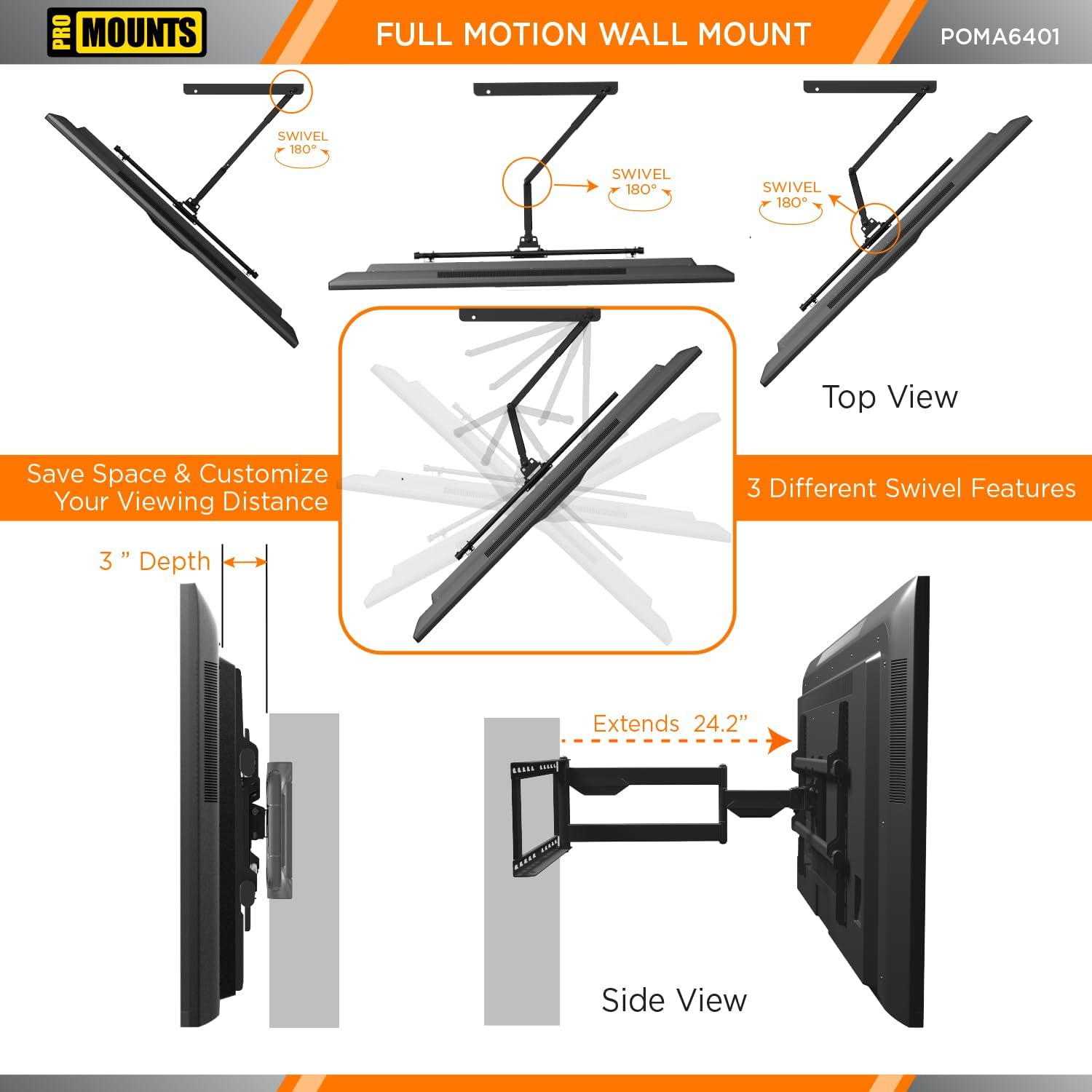
- Extension: Extend your TV up to 24.2 inches (61.5 cm) from the wall or retract it to a low profile of just 3 inches (7.6 cm).
- Tilt Adjustment: Adjust the tilt from -15° to 5° to reduce glare and achieve the perfect viewing angle. This mount features TouchTilt technology for tool-less adjustments.
- Swivel Range: Swivel your TV up to +/-180° to direct the screen towards any part of your room or outdoor area.
- Reversible Mounting: The mount can be configured for left or right mounting to suit your space.
- Cable Management: Utilize the integrated cable management system to keep cables organized and out of sight, enhancing both aesthetics and cable longevity.


5. Maintenance
The ProMounts POMA6401 is constructed from high-quality matte-finish steel and stainless steel, designed for durability in both indoor and outdoor environments.
- Cleaning: Wipe the mount with a soft, damp cloth to remove dust and dirt. Avoid using abrasive cleaners or harsh chemicals, as these can damage the finish.
- Inspection: Periodically inspect all screws and connections to ensure they remain tight and secure.
- Weather Resistance: The weatherproof design ensures resistance to outdoor elements. However, regular inspection for any signs of wear or corrosion is recommended, especially in harsh weather conditions.

6. Troubleshooting
If you encounter any issues with your ProMounts POMA6401 TV mount, please refer to the following common solutions:
- TV Not Level: Use the built-in bubble level during installation to ensure the wall plate is perfectly horizontal. Minor adjustments can often be made by slightly loosening and re-tightening the mounting screws on the TV brackets.
- Difficulty Adjusting Movement: Ensure all locking mechanisms and adjustment knobs are sufficiently loosened before attempting to move the TV. If movement is still stiff, apply a small amount of silicone-based lubricant to the pivot points.
- Cables Tangled: Re-route cables using the integrated cable management clips or additional cable ties to prevent tangling during movement.
- Mount Feels Loose: Immediately remove the TV and re-check all wall and TV connections. Ensure all screws are tightened to the recommended torque and that the mounting surface is structurally sound.
7. Specifications
| Brand Name | Promounts |
| Item Model Number | POMA6401 |
| Item Weight | 13.17 pounds |
| Product Dimensions | 26.8 x 24.2 x 16.9 inches |
| Color | Black |
| Mounting Type | Indoor/Outdoor Wall Mount |
| Movement Type | Articulating/Swivel/Tilt/Full Motion |
| Material | Alloy Steel, Stainless Steel |
| Compatible Devices | Monitor, Samsung, LG, TCL, Vizio, Sony, Toshiba, Sharp, Philips, and more, Tablet, Television |
| Maximum Tilt Angle | 15 Degrees |
| VESA Compatibility | 200x100 to 600x400 |
| TV Size Range | 32-75 inches |
| Weight Capacity | 132 lbs (60 kg) |
| Manufacturer | Scadlock |

8. Warranty and Support
For warranty information or any questions regarding your ProMounts POMA6401 TV mount, please contact Promounts AV Products USA directly. Their contact information can typically be found on their official website or through the retailer where the product was purchased.
If you have any questions along the way, just message us.


