
1. Introduction
The ciciglow OBD2 HUD Head-Up Display is designed to project essential vehicle information directly onto your windshield, enhancing driving safety and convenience. This device connects to your vehicle's On-Board Diagnostics (OBD2) port to display real-time data such as vehicle speed, water temperature, voltage, and trip mileage.
Key features include adaptive light detection for clear visibility in various lighting conditions, and a comprehensive alarm system to alert you to potential issues like overspeed, high water temperature, low voltage, and driver fatigue.

Image 1.1: The ciciglow OBD2 HUD Head-Up Display in use, projecting vehicle speed onto the windshield, alongside a view of the device.
2. Setup and Installation
Follow these steps to properly install your ciciglow OBD2 HUD Head-Up Display:
- Locate the OBD2 Interface: Identify your car's OBD2 diagnostic port. This is typically located under the dashboard, near the steering wheel, or in the center console.
- Connect the OBD Cable: Connect one end of the provided OBD cable to the HUD unit and the other end to your vehicle's OBD2 interface.
- Apply Reflective Film (Optional but Recommended): For optimal display clarity and to prevent ghosting, stick the reflective film onto the front windshield where you intend the display to be projected. Ensure the area is clean and dry before application.
- Position the HUD Unit: Place the HUD unit on your dashboard. Start the car to power on the device. Adjust the angle of the host unit until the projection is clear and visible on the windshield (or reflective film).
- Secure the Unit and Cable: Fix the HUD unit in place using the provided double-sided tape. Carefully route and hide the wiring harness to ensure it does not obstruct your view or interfere with driving controls.

Image 2.1: Visual guide for the installation process of the HUD unit.

Image 2.2: The ciciglow HUD device and its included accessories.
OBD2 Compatibility Notes:
The HUD is compatible with vehicles using the OBD2 protocol. Generally, this includes gasoline vehicles manufactured in the USA after 2004 and gasoline vehicles manufactured in other regions after 2008.
Incompatible Models: Please note that this device may not be compatible with certain vehicle models, including but not limited to:
- US models manufactured in 2004 and earlier.
- French/Italian models such as Peugeot, Citroën, DS, Simca, Amilka.
- Japanese models such as Suzuki, some Mazda 6, Infiniti (QX50, Q501), Avanza 2013, Lexus (IS250, EX250, ES300H), Honda (Jazz, CRV).
- Korean models including some Hyundai (e.g., Sonata 2013) and Kia (e.g., Soul PS 2017).
- Vehicles manufactured before 2008.
- Non-gasoline vehicles (electric, diesel), modified vehicles, pickups, RVs, and vehicles with modified car computers.
If you are unsure about your vehicle's compatibility, please consult your vehicle's manual or contact the manufacturer.
3. Operating Instructions
Once installed and powered on, the ciciglow HUD will automatically display vehicle information. The device features adaptive light detection to adjust its brightness for optimal visibility.
Display Functions:
- Vehicle Speed: Displays current driving speed in Km/H.
- Water Temperature: Shows the engine's coolant temperature.
- Voltage: Indicates the vehicle's battery voltage.
- Trip Mileage: Tracks the distance covered during the current trip.

Image 3.1: The HUD display adapting its brightness for day and night driving conditions.

Image 3.2: Visibility of the HUD display under strong light and sunny conditions.
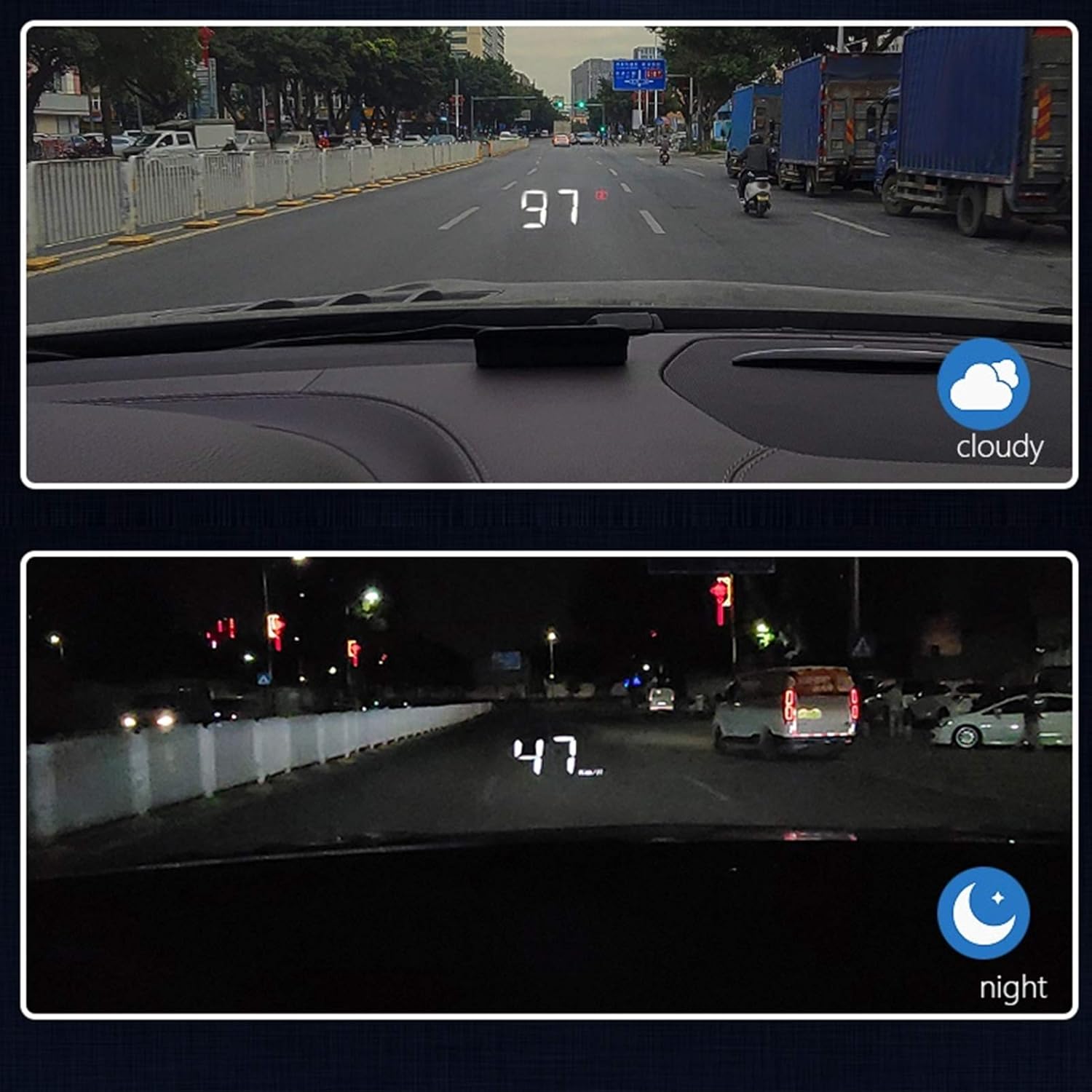
Image 3.3: Visibility of the HUD display under cloudy and night conditions.
Alarm Functions:
The device includes several alarm features to enhance driving safety:
- Overspeed Alarm: Alerts you if your vehicle exceeds a preset speed limit.
- Water Temperature Alarm: Warns of abnormally high engine coolant temperatures.
- Voltage Alarm: Notifies you of low or unstable battery voltage.
- Fatigue Reminder: Prompts you to take a break after extended driving periods.
- Fault Alarm: Indicates detected vehicle system faults.
4. Maintenance
To ensure the longevity and optimal performance of your ciciglow OBD2 HUD, follow these maintenance guidelines:
- Cleaning: Use a soft, dry cloth to clean the display surface and the unit's exterior. Avoid abrasive cleaners or solvents that could damage the device.
- Reflective Film: If using the reflective film, ensure it remains clean and free of smudges for clear projection. Replace if it becomes damaged or loses adhesion.
- Cable Management: Periodically check the OBD cable for any signs of wear or damage. Ensure it is securely connected and not pinched or strained.
- Environmental Conditions: Avoid exposing the device to extreme temperatures, direct sunlight for prolonged periods when not in use, or excessive moisture.
5. Troubleshooting
If you encounter issues with your ciciglow OBD2 HUD, refer to the following common troubleshooting steps:
- No Display/Power:
- Ensure the OBD cable is securely connected to both the HUD unit and the vehicle's OBD2 port.
- Verify that your vehicle's ignition is on.
- Check if your vehicle is OBD2 compatible (refer to Section 2: Setup and Installation).
- Display is Too Bright/Dim:
- The device features adaptive light detection. Allow it a moment to adjust to ambient light.
- If the display remains too bright, especially at night, check if there are manual brightness settings on the device. Some users report that the manual adjustment buttons might be difficult to access once installed.
- Ghosting/Double Image:
- Ensure the reflective film is properly applied to the windshield. This film is crucial for eliminating ghosting.
- Adjust the angle of the HUD unit to optimize the projection.
- Inaccurate Readings:
- Confirm that the HUD is correctly configured for your region's units (e.g., Km/H). Refer to the device's specific settings menu if available.
- Ensure your vehicle's OBD2 system is functioning correctly.
- Alarms Not Functioning:
- Check the device's settings to ensure alarms are enabled and configured to your preferences.
If these steps do not resolve the issue, please contact customer support.
6. Specifications
| Feature | Detail |
|---|---|
| Product Type | OBD2 HUD Head-Up Display |
| Brand | ciciglow |
| Model Number | ciciglowycaeh6gg1v |
| Material | Electron |
| Dimensions (L x W x H) | 12.4 x 8.9 x 4.3 cm (approx. 4.88 x 3.5 x 1.69 inches) |
| Weight | 130 grams (approx. 0.29 lbs) |
| Display Functions | Vehicle Speed, Water Temperature, Voltage, Trip Mileage |
| Alarm Functions | Overspeed, Water Temperature, Voltage, Fatigue Reminder, Fault Alarm |
| Compatibility | OBD2 protocol compliant vehicles (refer to Section 2 for details) |
| Country of Origin | China |
7. Warranty and Support
Information regarding specific warranty terms is not provided in this manual. For warranty details, please refer to the product packaging or contact your retailer or the manufacturer directly.
For technical support, troubleshooting assistance beyond what is covered in this manual, or inquiries about replacement parts, please contact ciciglow customer service through the platform where you purchased the product.