
Bestier L Shaped Standing Desk (Washed White)
Bestier L Shaped Standing Desk Instruction Manual
Model: L Shaped Standing Desk (Washed White)
1. Introduction
This manual provides detailed instructions for the assembly, operation, and maintenance of your Bestier L Shaped Standing Desk. Designed for versatility and ergonomics, this desk features an adjustable lift-top section, ample storage, and a reversible configuration to suit various office or home environments. Please read all instructions carefully before beginning assembly and retain this manual for future reference.
2. Safety Information
- Always ensure all screws and fasteners are securely tightened before use.
- Do not exceed the maximum weight recommendation of 100 pounds on the desk surface, especially on the lift-top section.
- Assembly requires two people to prevent injury and ensure proper alignment.
- Keep small parts and packaging materials away from children and pets.
- Avoid placing hot items directly on the desk surface. Use coasters or protective pads.
- When adjusting the lift-top, ensure no objects are obstructing the mechanism's path.
3. Package Contents
Before assembly, verify that all components listed below are present and undamaged. Refer to the assembly video for visual identification of parts and hardware.

Figure 3.1: All parts and hardware included in the package. Each component is clearly labeled with a number for wooden parts and a letter for hardware, as detailed in the assembly instructions.
Parts List:
- Numbered wooden panels (e.g., 1, 2, 3, 4, 5, 6, 7, 8, 9, 10, 11, 12)
- Metal frame components (e.g., 13, 14, 15, 16, 17, 18, 19, 20, 21)
- Lift mechanism components (e.g., 22, 23, 24, 25)
Hardware List:
- Various screws (A, D, E, F, G, J, K, L, M)
- Cam locks (B)
- Wooden dowels (C)
- Washers (S)
- Nuts (H)
- Adjustable shelf pins (O)
- Tools: Allen wrench, screwdriver, small wrench
4. Setup and Assembly
Follow these step-by-step instructions for assembling your Bestier L Shaped Standing Desk. It is highly recommended to watch the official assembly video for visual guidance, especially for the lift-top mechanism.
Video 4.1: Official assembly guide for the Bestier L Shaped Standing Desk. This video provides a comprehensive visual walkthrough of each assembly step, including the reversible configurations and the lift-top installation.
Assembly Steps:
- Prepare Wooden Panels: Attach cam locks (B) and wooden dowels (C) to panels 4, 5, 6, and 7 as shown in the video (approx. 0:08 - 0:29).
- Assemble Storage Cabinet Base: Connect panel 7 to panel 5 using cam locks and dowels. Secure with screws (approx. 0:32 - 0:44).
- Complete Storage Cabinet Structure: Attach panel 6 and panel 9 (back panel with cable cutout) to form the cabinet. Secure with cam locks and screws (approx. 0:45 - 0:54).
- Install Cabinet Door: Attach hinges to the cabinet door (panel 10) and the cabinet frame using screws (J, K, L, M). Ensure the door opens and closes smoothly (approx. 0:55 - 1:12).
- Add Adjustable Shelf: Insert shelf pins (O) into the desired height holes inside the cabinet and place panel 11 (adjustable shelf) on top (approx. 1:15 - 1:20).
- Assemble Metal Frames: Connect metal frame components (13, 14, 15, 16, 17) using screws (D, E, F) and the provided Allen wrench. Ensure all connections are tight (approx. 1:22 - 1:51).
- Attach Desk Tops: Place panels 2 and 3 onto the assembled metal frames and cabinet. Secure them using cam locks (B) and screws (E, F) (approx. 1:52 - 2:01).
- Install Lift-Top Mechanism: Attach the lift mechanisms (24, 25) to the underside of panel 1 (lift-top surface) using screws (G) and washers (S). Ensure they are securely fastened (approx. 2:02 - 2:08).
- Integrate Lift-Top to Desk: Carefully align the assembled lift-top (panel 1 with mechanisms) onto the designated section of the desk frame. Secure it using screws (F) and the provided tools (approx. 2:09 - 2:28).
Reversible Configuration:
The Bestier L Shaped Standing Desk is designed for flexibility. You can assemble it in either a left-hand or right-hand L-shape, or even as a long straight desk, by adjusting the placement of the cabinet and desk sections during assembly. Refer to the initial steps of the assembly video for guidance on choosing your preferred configuration.
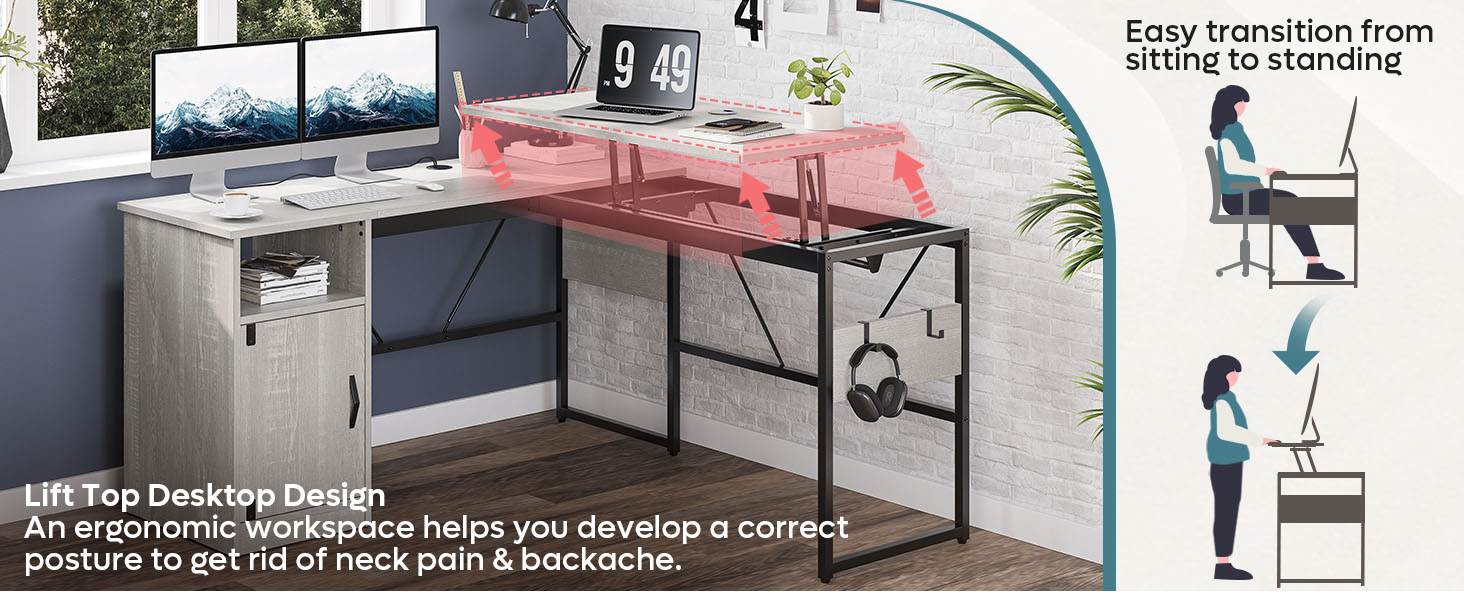
Figure 4.2: The integrated storage solutions, including an open cubby, a closed cabinet with an adjustable shelf, and convenient removable hooks for accessories.
5. Operating Instructions
Adjusting the Lift-Top:
The desk features a manual lift-top mechanism for easy transition between sitting and standing positions. To raise the lift-top, gently pull it upwards. The gas springs will assist in the lifting motion. To lower it, apply gentle downward pressure. The mechanism is designed for smooth and controlled movement.
- Ensure the lift-top is clear of any objects before adjusting its height.
- Avoid sudden forceful movements when raising or lowering the top.
- The lift-top is designed to support a maximum of 100 pounds. Distribute weight evenly.

Figure 5.1: Detail of the smooth and noiseless lift mechanism, featuring gas springs for effortless height adjustment.
Utilizing Storage Features:
The desk includes a versatile storage cabinet and an open cubby shelf. The cabinet door provides concealed storage, while the open cubby is ideal for frequently accessed items. The cabinet also features an adjustable height board, allowing you to customize the internal storage space.
- Adjust the shelf height by removing the pins, repositioning the shelf, and reinserting the pins into the desired holes.
- Use the removable hooks on the side of the desk to hang headphones, bags, or other accessories.

Figure 5.2: The integrated storage solutions, including an open cubby, a closed cabinet with an adjustable shelf, and convenient removable hooks for accessories.
6. Maintenance
To ensure the longevity and appearance of your Bestier L Shaped Standing Desk, follow these simple maintenance guidelines:
- Cleaning: Wipe the desk surfaces with a dry, soft cloth. For stubborn marks, a slightly damp cloth can be used, followed immediately by a dry cloth. Avoid harsh chemicals or abrasive cleaners.
- Spills: Promptly clean up any spills to prevent damage to the laminated surface.
- Hardware: Periodically check all screws and fasteners to ensure they remain tight. Retighten as necessary.
- Lift Mechanism: The manual lift mechanism is designed for durability and typically requires no special maintenance. Keep the moving parts free from dust and debris.
- Placement: Avoid prolonged exposure to direct sunlight or extreme temperature changes, which can affect the material.
7. Troubleshooting
If you encounter any issues with your Bestier L Shaped Standing Desk, refer to the common problems and solutions below:
| Problem | Possible Cause | Solution |
|---|---|---|
| Lift-top is difficult to raise or lower. | Excessive weight on the lift-top; obstruction in the mechanism; loose screws. | Reduce weight on the lift-top (ensure it's within 100 lbs capacity). Check for any obstructions. Verify all screws securing the lift mechanism are tight. |
| Desk feels wobbly after assembly. | Loose connections; uneven floor. | Ensure all screws and fasteners are fully tightened. Check if the floor is even; use shims if necessary. |
| Missing parts or hardware. | Packaging error. | Contact Bestier customer support immediately with your purchase details and the specific missing components. |
| Cabinet door does not close properly. | Hinges are misaligned or loose. | Adjust or tighten the screws on the hinges until the door aligns and closes correctly. |
8. Specifications
- Brand:
- Bestier
- Product Dimensions (Overall L-Shape):
- 95.2" (W) x 20" (D) x 30" (H) (Base Height)
- Lift-Top Height Adjustment:
- Raises approximately 10 inches from base height
- Color:
- Washed White
- Style:
- Modern
- Base Material:
- Metal
- Top Material Type:
- Engineered Wood (PB particle board)
- Finish Type:
- Laminated
- Special Feature:
- Reversible configuration, Manual Lift-Top, Storage Cabinet, Open Cubby, Removable Hooks
- Maximum Weight Recommendation:
- 100 Pounds
- Recommended Number of People for Assembly:
- 2
- UPC:
- 810117532215
- Product Care Instructions:
- Wipe with Dry Cloth
Figure 8.1: Detailed product dimensions for various configurations, including height, depth, and width measurements.
9. Warranty and Support
Bestier is committed to providing high-quality products and excellent customer service. Your Bestier L Shaped Standing Desk comes with a 12-month guarantee for your peace of mind.
For any product issues, missing parts, or assembly assistance, please do not hesitate to contact Bestier customer support. Our team is dedicated to offering satisfying solutions and is always ready to help.
Contact Information:
- Refer to your purchase documentation or the Bestier official website for the most current contact methods.
- When contacting support, please have your product model (L Shaped Standing Desk, Washed White) and purchase details ready.
We value your satisfaction and strive to ensure a comfortable home environment with our products.
Ask a question about this manual
Ask about setup, troubleshooting, compatibility, parts, safety, or missing instructions. Manuals+ will review the question and use this page’s manual context to help answer it.