
Zokop WAC-12000
Zokop WAC-12000 Portable Air Conditioner User Manual
Model: WAC-12000 | Brand: Zokop
1. Introduction
The Zokop WAC-12000 Portable Air Conditioner is designed to provide efficient cooling, dehumidification, and fan functions for your home, office, or apartment. Its quiet operation and user-friendly design ensure maximum comfort. This manual will guide you through the installation, operation, and maintenance of your new air conditioner, helping you get the most out of your appliance.
2. Important Safety Information
Please read all instructions carefully before using this appliance and retain for future reference. Failure to follow these instructions may result in electric shock, fire, or serious injury.
- Always unplug the unit from the power outlet before cleaning or performing any maintenance.
- Do not operate the unit with a damaged cord or plug. If the power cord is damaged, it must be replaced by the manufacturer, its service agent, or similarly qualified persons to avoid a hazard.
- Ensure the voltage and frequency of the power supply match the specifications on the rating label of the unit.
- Do not block the air inlets or outlets. Maintain at least 20 cm (8 inches) clearance around the unit.
- Do not insert fingers or foreign objects into the air inlets or outlets.
- This appliance is not intended for use by persons (including children) with reduced physical, sensory or mental capabilities, or lack of experience and knowledge, unless they have been given supervision or instruction concerning use of the appliance by a person responsible for their safety.
- Do not use the unit in wet environments such as bathrooms or laundry rooms.
- Place the unit on a flat, stable surface to prevent tipping.
3. Package Contents
Carefully unpack your air conditioner and check that all items are present and in good condition. If any items are missing or damaged, contact your retailer immediately.
- Zokop WAC-12000 Portable Air Conditioner Unit
- Remote Control
- Exhaust Hose
- Window Sealing Kit (Adjustable Window Slider Kit)
- Drain Hose (for continuous drainage, if applicable)
- User Manual
4. Product Features
The Zokop WAC-12000 Portable Air Conditioner offers a range of features designed for optimal comfort and convenience:
- 12000 BTU Cooling Capacity: Provides powerful cooling for medium to large rooms.
- Multi-functional Operation: Offers Cooling, Fan, and Dehumidifier (Dry) modes.
- Remote Control: Conveniently adjust settings from across the room.
- Washable and Reusable Air Filter: Easy to clean, ensuring fresh and healthy air.
- Quiet Operation: Designed to operate with minimal noise for undisturbed comfort.
- Energy Saving Design: Efficient operation to help reduce energy consumption.
- 220V Power Supply: Compatible with standard 220-volt electrical outlets.
- Portable Design: Equipped with wheels for easy movement between rooms.
5. Setup and Installation
Follow these steps to set up your portable air conditioner:
5.1 Placement
Place the air conditioner on a firm, level surface in the desired room. Ensure there is at least 20 cm (8 inches) of space around the unit for proper airflow.
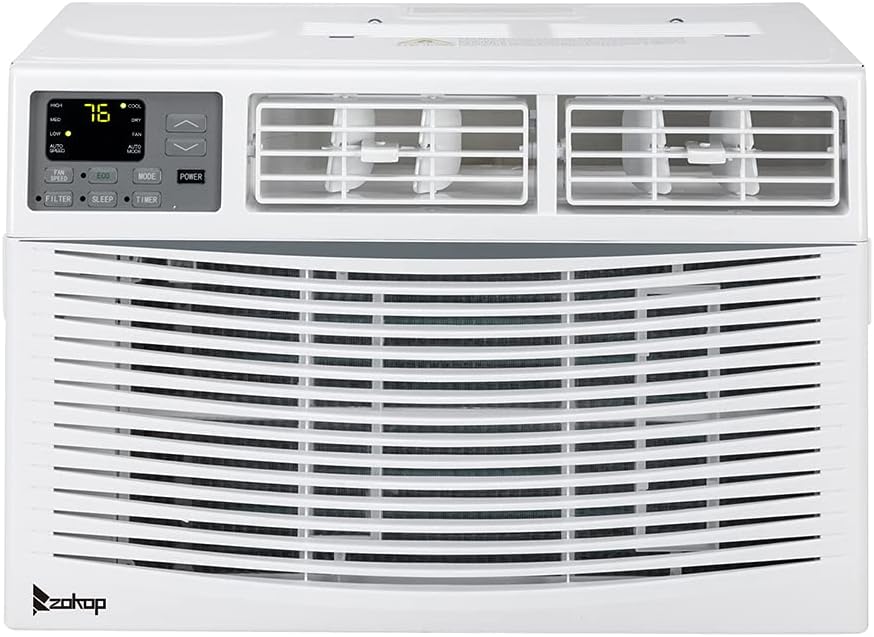
Image: Front view of the Zokop WAC-12000 Portable Air Conditioner, showing the main grille and control panel.
5.2 Exhaust Hose and Window Kit Installation
- Attach the exhaust hose connector to the exhaust outlet on the back of the air conditioner.
- Assemble the window sealing kit according to your window type (sliding or casement). Extend the window slider kit to fit your window opening and secure it.
- Attach the other end of the exhaust hose to the adapter on the window sealing kit. Ensure a tight seal to prevent hot air from re-entering the room.

Image: The Zokop WAC-12000 Portable Air Conditioner shown with its adjustable side panels extended, illustrating how it fits into a window opening for exhaust.
5.3 Power Connection
Plug the power cord into a grounded 220V electrical outlet. Do not use extension cords or power strips with this appliance.
6. Operating Instructions
Your Zokop WAC-12000 can be operated using the control panel on the unit or the included remote control.

Image: The Zokop WAC-12000 Portable Air Conditioner unit with its remote control, showing the display and buttons.
6.1 Control Panel and Remote Control Functions
| Button/Indicator | Function |
|---|---|
| POWER | Turns the unit On or Off. |
| MODE | Cycles through operating modes: Cool, Fan, Dry (Dehumidify). |
| TEMP ▲/▼ | Adjusts the desired temperature in Cool mode. |
| FAN SPEED | Adjusts fan speed: Low, Medium, High (available in Cool and Fan modes). |
| TIMER | Sets the auto-on or auto-off timer (0-24 hours). |
| SLEEP | Activates Sleep mode for quiet, energy-efficient operation during sleep. |
| FILTER | Filter indicator light. Press to reset after cleaning the filter. |
| DISPLAY | Toggles the display light on/off (remote control only). |
| ECO | Activates energy-saving mode (remote control only). |
6.2 Operating Modes
- Cool Mode: For cooling the room. Set desired temperature and fan speed.
- Fan Mode: Circulates air without cooling. Choose desired fan speed.
- Dry (Dehumidify) Mode: Removes moisture from the air. Fan speed is typically fixed to low in this mode.
7. Maintenance
Regular maintenance ensures optimal performance and extends the lifespan of your air conditioner.
7.1 Cleaning the Air Filter
The air filter should be cleaned every two weeks or more frequently depending on usage and air quality. A dirty filter can reduce cooling efficiency and airflow.
- Unplug the air conditioner from the power outlet.
- Locate the air filter (usually at the back or side of the unit) and slide it out.
- Wash the filter with warm water and mild dish soap, or vacuum it to remove dust and debris.
- Rinse thoroughly and allow the filter to air dry completely before reinserting it. Do not expose to direct sunlight.
- Once the filter is reinserted, plug in the unit and press the 'FILTER' button on the control panel or remote to reset the filter indicator.
7.2 Draining Water
During dehumidification or cooling, water will accumulate inside the unit. The unit has a self-evaporative system, but in high humidity conditions, the water tank may fill up. When the tank is full, the unit will stop operating and display an error code (e.g., 'FL').
- Unplug the unit.
- Place a shallow pan or tray under the drain port at the back of the unit.
- Remove the drain plug to allow water to flow out.
- Once drained, replace the drain plug firmly.
- For continuous drainage in Dry mode, attach the drain hose (if included) to the continuous drain port and lead it to a floor drain.
7.3 Cleaning the Exterior
Wipe the exterior of the unit with a soft, damp cloth. Do not use harsh chemicals, abrasives, or solvents.
7.4 Storage
If the unit will not be used for an extended period:
- Drain all accumulated water.
- Clean the air filter.
- Run the unit in Fan mode for a few hours to dry the interior.
- Store the unit in a dry, cool place, covered to protect it from dust.
8. Troubleshooting
Before contacting customer support, please refer to the following troubleshooting guide for common issues:
| Problem | Possible Cause | Solution |
|---|---|---|
| Unit does not turn on. | No power supply; Power cord unplugged; Circuit breaker tripped; Full water tank. | Check power connection; Reset circuit breaker; Drain water tank. |
| Unit does not cool. | Dirty air filter; Exhaust hose not properly installed; Room too large; Doors/windows open. | Clean air filter; Ensure exhaust hose is sealed; Close doors/windows; Consider room size. |
| Unit is noisy. | Unit not on a level surface; Air filter dirty; Obstruction in fan. | Place on a level surface; Clean air filter; Check for obstructions. |
| Water leakage. | Drain plug loose; Unit tilted; Drain hose clogged. | Secure drain plug; Place unit on level surface; Clear drain hose. |
| Remote control not working. | Batteries dead; Obstruction between remote and unit. | Replace batteries; Remove obstruction; Point remote directly at unit. |
9. Specifications
| Specification | Value |
|---|---|
| Brand | Zokop |
| Model | WAC-12000 |
| Cooling Capacity | 12000 BTU |
| Power Source Type | Corded Electric |
| Voltage | 220 Volts |
| Special Features | Dehumidifier |
| Control Method | Remote Control |
| ASIN | B0BR29RGZM |
| First Available Date | November 30, 2023 |
10. Warranty and Support
This Zokop WAC-12000 Portable Air Conditioner comes with a Limited Warranty. Please refer to the warranty card included in your package for specific terms and conditions, including coverage period and limitations.
For technical support, troubleshooting assistance, or warranty claims, please contact Zokop Customer Service. Keep your purchase receipt and model number handy when contacting support.
Customer Service Contact:
Please visit the official Zokop website or refer to your product packaging for the most up-to-date contact information.
Ask a question about this manual
Ask about setup, troubleshooting, compatibility, parts, safety, or missing instructions. Manuals+ will review the question and use this page’s manual context to help answer it.