
Introduction
This manual provides essential instructions for the Generic replacement infrared remote control. This remote is designed to be compatible with various Thomson Smart LED TV models, including 55UC6406, 55US6106, 32HB5426, 32HD5506, 32HD5526, 32HTR5506, 40FD5406, and 40FD5416. It functions as a direct replacement and typically requires no programming for immediate use after battery installation.
Important: This remote is not universal. Please ensure your original remote or TV manual confirms compatibility with this specific replacement model before use. If your original remote looks different, this replacement may not be compatible.
Setup
1. Battery Installation
The remote control requires two (2) AAA alkaline batteries (not included). Follow these steps to install them:
- Locate the battery compartment on the back of the remote control.
- Slide the battery compartment cover downwards or press the latch and lift to open.
- Insert two AAA batteries, ensuring the positive (+) and negative (-) terminals align correctly with the markings inside the compartment.
- Replace the battery compartment cover, sliding it back into place until it clicks securely.
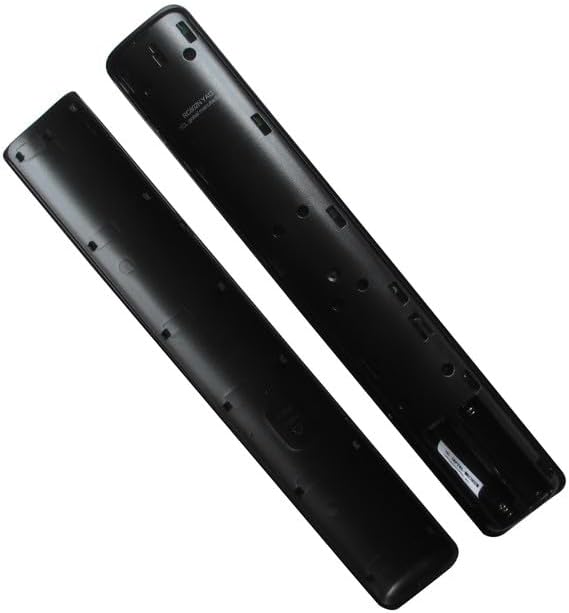
Figure 1: Back of the remote control with the battery compartment open for battery insertion.
2. Initial Use
This replacement remote control is designed for immediate use with compatible Thomson Smart LED TVs. No programming or code entry is required. After installing the batteries, point the remote control directly at your television and press the Power button to test its functionality.
Operating Instructions
The remote control utilizes infrared (IR) technology. Ensure there is a clear line of sight between the remote control and the IR receiver on your television for optimal performance.

Figure 2: Front view of the remote control with button layout.
Button Functions:
- Power (Red Button): Turns the TV on or off.
- Mute: Mutes or unmutes the TV sound.
- Number Buttons (0-9): Selects channels directly.
- LIST: Accesses the channel list.
- Volume Up/Down (+/-): Adjusts the volume level.
- Channel Up/Down (P^/P˅): Changes channels sequentially.
- Settings (Gear Icon): Opens the TV's settings menu.
- Home (House Icon): Returns to the Smart TV home screen.
- Navigation Buttons (Up, Down, Left, Right): Navigates through menus and options.
- OK: Confirms selections.
- Back (Arrow Icon): Returns to the previous screen or menu.
- EXIT: Exits the current menu or application.
- GUIDE: Displays the electronic program guide.
- TEXT: Activates or deactivates Teletext.
- SUBT: Toggles subtitles on or off.
- Color Buttons (Red, Green, Yellow, Blue): Specific functions within certain menus or applications.
- Media Control Buttons (Play, Pause, Stop, Rewind, Fast Forward): Controls media playback.
- ZOOM: Adjusts screen zoom.
- NETFLIX (NE Button): Direct access to the Netflix application.
Maintenance
Battery Replacement:
Replace batteries when the remote control's response becomes sluggish or stops working. Always replace both batteries at the same time with new AAA alkaline batteries. Do not mix old and new batteries, or different types of batteries.
Cleaning:
To clean the remote control, gently wipe it with a soft, dry cloth. For stubborn dirt, slightly dampen the cloth with water. Do not use harsh chemicals, abrasive cleaners, or immerse the remote in water.
Storage:
Store the remote control in a cool, dry place away from direct sunlight and extreme temperatures. If the remote will not be used for an extended period, remove the batteries to prevent leakage and potential damage.
Troubleshooting
- Remote control is not working:
- Check if the batteries are inserted correctly with the correct polarity (+/-).
- Replace the batteries with fresh AAA alkaline batteries.
- Ensure there are no obstructions between the remote control and the TV's IR receiver.
- Make sure you are within the effective range of the TV's IR receiver.
- Some buttons are not working or functions are incorrect:
- Verify that this remote control is indeed compatible with your specific Thomson TV model. This remote is not universal.
- Refer to your television's original instruction manual for specific remote control functions and compatibility.
Specifications
| Brand | Generic |
| Model Number | Easytry17005 |
| Compatible Devices | Thomson Smart LED Televisions (Specific models listed in Introduction) |
| Connectivity Technology | Infrared (IR) |
| Controller Type | Button Control |
| Number of Batteries Required | 2 |
| Battery Type | AAA Alkaline |
| Manufacturer | SZHKHXD |
Warranty Information
This product comes with a 90-day warranty from the date of purchase. This warranty covers manufacturing defects. Please retain your proof of purchase for any warranty claims.
Support
For further assistance or if you encounter issues not covered in this manual, please:
- Consult your television's original instruction manual for specific remote control compatibility and TV settings.
- Contact the seller directly through the platform where the purchase was made.