
Hozard B
Hozard Smart Home Alarm System User Manual
Model: B
Product Overview
The Hozard Smart Home Alarm System is a reliable wireless all-in-one solution designed to secure your home or office. This comprehensive package includes a control panel, 5 motion detectors, 8 window/door sensors, 3 remote controls, 3 RFID tags, and 1 siren. The entire system is designed for easy self-installation within 15 minutes and can be expanded indefinitely with additional sensors and accessories.
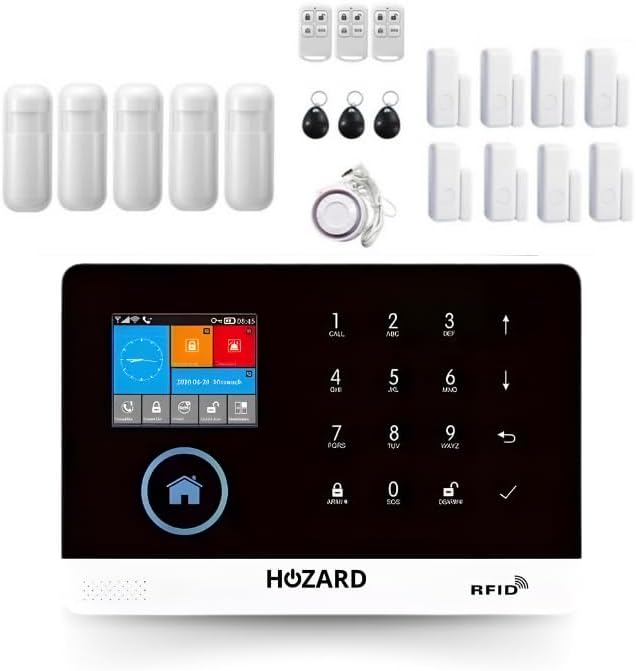
Image: The complete Hozard Smart Home Alarm System kit, showing the central control panel, motion sensors, door/window sensors, remote controls, and RFID tags.
Setup and Installation
The Hozard Smart Home Alarm System is designed for quick and straightforward installation, typically completed within 15 minutes.
Package Contents:
- 1x Control Panel with LCD Screen
- 5x Motion Detectors
- 8x Window/Door Sensors
- 3x Remote Controls
- 3x RFID Tags
- 1x Siren
- 1x Power Adapter
- Mounting Hardware (not specified but commonly included)
Initial Setup Steps:
- Power Connection: Connect the control panel to a power source using the provided adapter. Ensure the panel is placed in a central location for optimal signal coverage.
- Battery Backup: The system features a rechargeable lithium battery backup, ensuring continuous operation even during power outages.
- Sensor Pairing: Follow the on-screen instructions on the LCD panel to pair the motion detectors and window/door sensors. Place sensors strategically at entry points and high-traffic areas.
- Remote Control & RFID Tag Pairing: Pair the remote controls and RFID tags with the system for convenient arming and disarming.
- Siren Placement: Install the siren in a suitable location within your property to ensure its 100 dB alarm signal is effective.
- App Integration: Download the free Hozard app (compatible with Alexa and Google Home) from your smartphone's app store. Connect the system to your home Wi-Fi network via the app for remote control and notifications.
- Password Setup: For new users, set up a secure password for system access and management.
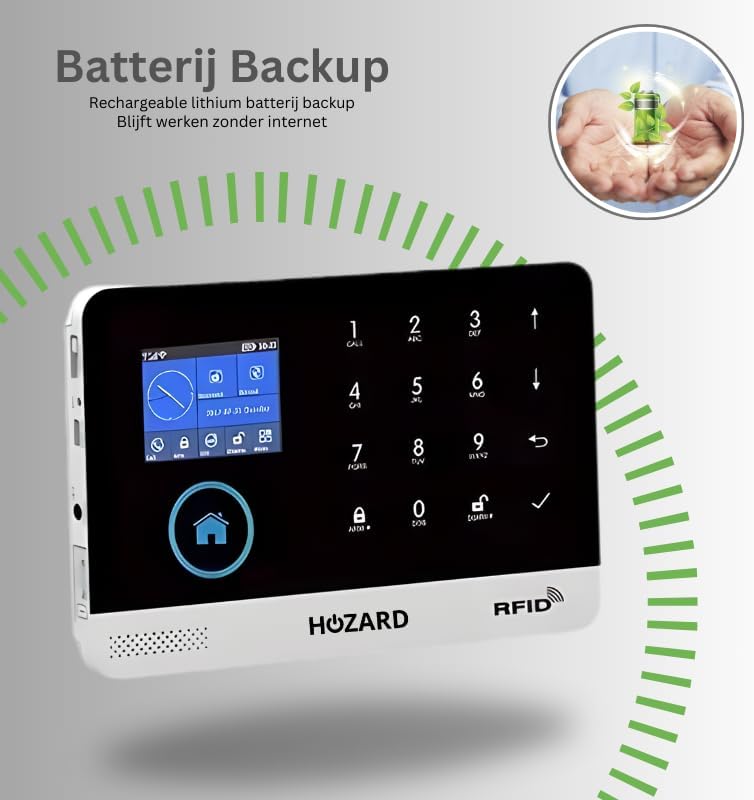
Image: The Hozard control panel displaying the battery backup feature, indicating continued functionality without internet.

Image: A user interacting with the Hozard alarm system via voice commands through Amazon Alexa and Google Home devices, demonstrating smart home integration.

Image: The Hozard control panel displaying a password input screen, illustrating the password protection feature for new users.
Operating the System
Arming and Disarming:
- Control Panel: Use the LCD screen and keypad to arm or disarm the system.
- Remote Control: Press the designated buttons on the remote control for quick arming (home/away) and disarming.
- RFID Tag: Tap an authorized RFID tag on the control panel's reader to disarm the system.
- Smartphone App: Remotely arm or disarm the system via the Hozard app from anywhere.
- Voice Commands: Utilize Alexa or Google Home for voice-activated arming and disarming (e.g., "Alexa, turn off the alarm system").
Notifications and Alerts:
In the event of an intrusion, the system will trigger a loud 100 dB alarm and send immediate alerts to your smartphone.
- App Notifications: Receive instant push notifications through the Hozard app.
- SMS Alerts: The system can also send SMS alerts to pre-configured phone numbers.

Image: Diagram illustrating the alarm trigger process, showing how a sensor activation leads to an alarm and subsequent notifications via phone call, app, and SMS.
Zone Management:
The Hozard system allows you to set up different security zones (e.g., garden, attic, bedroom, living room) to monitor specific areas independently. This feature provides flexible control over your security.
Scheduling:
Program the system to automatically arm or disarm at specific times, enhancing convenience and security routines.

Image: The Hozard control panel displaying a time-based scheduling interface for automatic arming and disarming of the system.
Expandability and Integration:
The system is highly expandable and can integrate with additional security devices, including camera surveillance for voice intercom and video storage capabilities.

Image: Diagram showing the Hozard control panel connected to a security camera, illustrating voice intercom and video storage functionalities.
Maintenance
- Battery Check: Regularly check the battery status of the control panel and all wireless sensors. Replace batteries in sensors as needed to ensure continuous operation. The main panel has a rechargeable backup battery.
- Cleaning: Gently wipe the control panel and sensors with a soft, dry cloth. Avoid using abrasive cleaners or solvents.
- Software Updates: The system receives automatic security updates to ensure optimal performance and protection. Ensure your system is connected to Wi-Fi to receive these updates.
- Sensor Placement: Periodically verify that all sensors are securely mounted and free from obstructions.
Troubleshooting
| Problem | Possible Cause | Solution |
|---|---|---|
| System not arming/disarming | Incorrect password/PIN, remote control battery low, RFID tag not recognized. | Verify password/PIN. Replace remote control batteries. Re-pair RFID tag if necessary. |
| Sensors not triggering alarm | Sensor battery low, sensor out of range, sensor faulty, system not armed. | Check/replace sensor batteries. Relocate sensor closer to the control panel. Test sensor functionality. Ensure system is armed. |
| No app notifications | No internet connection, app permissions not granted, incorrect app settings. | Check Wi-Fi connection. Ensure app has notification permissions. Verify app settings for alerts. |
| Siren not sounding | Siren not connected, siren faulty, volume set too low. | Check siren connection to the control panel. Test siren. Adjust volume settings. |
Specifications
- Model Number: B
- Manufacturer: Hozard
- Dimensions (Control Panel): 10 x 2 x 4 cm
- Power Source: Battery (with adapter/charger included)
- Sound Level (Siren): 100 dB
- Compatible Devices: Alexa, Google Home, Smartphone
- Warning Type: Audio and Motion
- Connectivity: Wi-Fi, GSM (for SMS alerts)
Warranty and Support
Information regarding product warranty and specific support contact details is not provided in the available product data. Please refer to the product packaging or the official Hozard website for the most current warranty terms and customer support information.
For general inquiries or technical assistance, you may visit the Hozard Store on Amazon.