
ZXU B0BQM9H6YV
ZXU Large Weighted Heating Pad
Instruction Manual
1. Introduction
Thank you for choosing the ZXU Large Weighted Heating Pad. This product is designed to provide targeted heat therapy for your neck, shoulders, and back, offering comfort and relief from muscle pain. Its unique weighted design ensures optimal contact and even heat distribution. Please read this manual thoroughly before use to ensure safe and effective operation.

Image: The ZXU Large Weighted Heating Pad, grey in color, being worn on the back and shoulders of a person, with the white controller visible next to it. The pad is designed to cover a large area of the upper body.
2. Safety Information
Your safety is paramount. Please adhere to the following safety guidelines:
- Do not lie on or lean on the heating pad during use. This can cause overheating and potential burns.
- Be careful not to burn yourself. Always check the temperature before prolonged contact with skin.
- Do not use while sleeping.
- Do not use on infants, incapacitated persons, or anyone insensitive to heat.
- Do not use with liniments, salves, or ointments that contain heat-producing ingredients, as skin burns could result.
- Never pull the heating pad by the supply cord.
- Do not use if the cord or plug is damaged.
- Unplug the heating pad from the electrical outlet when not in use.
- Keep out of reach of children.
3. Product Features
The ZXU Large Weighted Heating Pad is equipped with several features designed for your comfort and convenience:
- Full Weighted Design: Contains 3lb non-toxic micro glass beads distributed throughout the pad, ensuring it stays close to your body for even heat distribution.
- Fast Heating Technology: Heats up in seconds, providing quick relief.
- 12 Heat Levels: Offers a wide range of temperatures from 101℉ to 167℉ (40.5℃ to 75℃) to suit your preference.
- Adjustable Auto-Off Timer: Features 8 timer settings (1, 2, 4, 6, 8, 10, 12, 24 hours) for energy saving and safety.
- Extra-Long 11ft Cord: Provides flexibility and convenience for use in various locations.
- Ultra-Soft Fabric: Made with skin-friendly material for maximum comfort.
- Large Coverage Area: Measures approximately 38" x 24" to cover neck, shoulders, and back effectively.

Image: A visual representation of the heating pad's internal heating coils and how they distribute heat across the neck, shoulders, and back for comprehensive pain relief.

Image: A diagram illustrating the large dimensions of the heating pad (38 inches by 24 inches) and highlighting its full coverage with glass beads for enhanced heating effect.
4. Setup
Follow these simple steps to set up your heating pad:
- Unpack: Carefully remove the heating pad and controller from its packaging.
- Inspect: Check the heating pad and power cord for any signs of damage. Do not use if damaged.
- Connect: Ensure the controller is securely connected to the heating pad.
- Position: Place the heating pad on the desired area of your body (neck, shoulders, or back). The weighted design will help it conform.
- Plug In: Plug the power cord into a standard 120V AC electrical outlet.
5. Operating Instructions
Operating your ZXU heating pad is straightforward:
- Power On: Press the power button (⏻) on the controller to turn on the heating pad. The display will light up.
- Select Heat Level: The default setting is usually a medium heat. Use the + and - buttons to adjust the heat level from 1 (lowest) to 12 (highest). The current heat level will be displayed.
- Set Timer (Optional): Press the "SET" button to switch to timer mode. Use the + and - buttons to select your desired auto-off time (1, 2, 4, 6, 8, 10, 12, or 24 hours). The display will show the selected hours. Press "SET" again to confirm or wait a few seconds for it to automatically set.
- Enjoy Heat Therapy: Allow the pad to heat up. It will reach your desired temperature quickly.
- Power Off: When finished, press the power button (⏻) to turn off the heating pad and unplug it from the outlet.
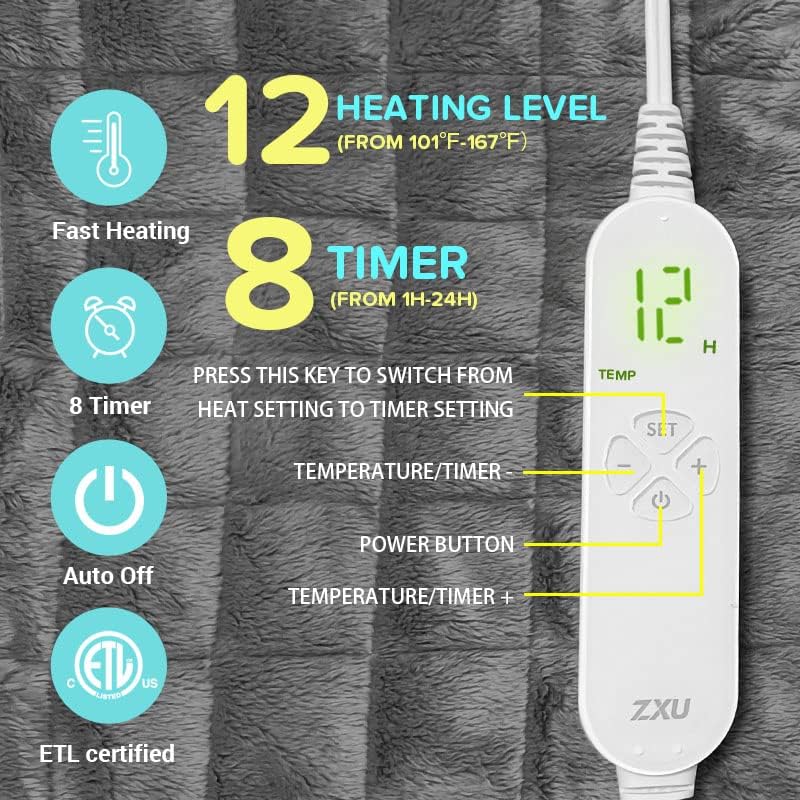
Image: A detailed view of the digital controller, showing the power button, set button, and plus/minus buttons for adjusting heat levels and timer settings.
6. Care and Maintenance
Proper care will extend the life of your heating pad:
- Cleaning: Unplug the heating pad and allow it to cool completely before cleaning. The ultra-soft fabric can be gently spot cleaned with a damp cloth and mild detergent. Do not machine wash or submerge the controller or pad in water.
- Drying: Air dry thoroughly before storing or re-using. Do not wring or tumble dry.
- Storage: When not in use, store the heating pad in a cool, dry place. Avoid folding tightly or placing heavy objects on it, which could damage the internal wiring.
- Inspection: Periodically inspect the heating pad and cord for any signs of wear or damage.

Image: A close-up view of the heating pad's ultra-soft fabric, highlighting its plush texture for comfortable use.
7. Troubleshooting
If you encounter any issues with your heating pad, please refer to the following common problems and solutions:
| Problem | Possible Cause | Solution |
|---|---|---|
| Heating pad does not turn on. | Not plugged in securely; power outlet issue; damaged cord/controller. | Ensure the cord is fully plugged into the outlet and the pad. Test the outlet with another device. If still not working, contact customer support. |
| Heating pad is not hot enough. | Heat setting is too low; environmental factors. | Increase the heat level using the + button on the controller. Allow a few minutes for the pad to reach the desired temperature. |
| Heating pad turns off unexpectedly. | Auto-off timer activated; overheating protection. | Check the timer setting. If the timer has expired, simply restart the pad. If it's turning off due to overheating, unplug it, let it cool down, and ensure it's not folded or covered excessively during use. |
If the problem persists after trying these solutions, please contact ZXU customer support.
8. Specifications
| Feature | Detail |
|---|---|
| Brand | ZXU |
| Model Number | B0BQM9H6YV |
| Dimensions | Approx. 38" x 24" (96.5 cm x 61 cm) |
| Weight | 3.39 Pounds (approx. 1.54 kg) |
| Material | Microplush |
| Heat Levels | 12 (101℉-167℉ / 40.5℃-75℃) |
| Auto Shut-Off Timer | 1, 2, 4, 6, 8, 10, 12, 24 Hours |
| Cord Length | 11 feet (approx. 3.35 meters) |
| Power Source | AC 120V (Standard US Outlet) |
9. Warranty and Support
For warranty information or technical support, please refer to the product packaging or contact ZXU customer service directly. Keep your purchase receipt for warranty claims.
Manufacturer: ZXU
ASIN: B0BQM9H6YV
Ask a question about this manual
Ask about setup, troubleshooting, compatibility, parts, safety, or missing instructions. Manuals+ will review the question and use this page’s manual context to help answer it.