
TELESIN Power Grip 35.4" Extension Selfie Stick Handler
TELESIN Power Grip 35.4" Extension Selfie Stick Handler Instruction Manual
Model: Power Grip 35.4" Extension Selfie Stick Handler
1. Introduction
Thank you for choosing the TELESIN Power Grip 35.4" Extension Selfie Stick Handler. This versatile device combines an extendable selfie stick with a high-capacity power bank, designed to provide extended power and flexible shooting options for your cameras and smartphones. Please read this manual carefully before use to ensure proper operation and maintenance.
2. Product Overview and Key Features
The TELESIN Power Grip is engineered for durability and convenience, offering a robust solution for content creators on the go.
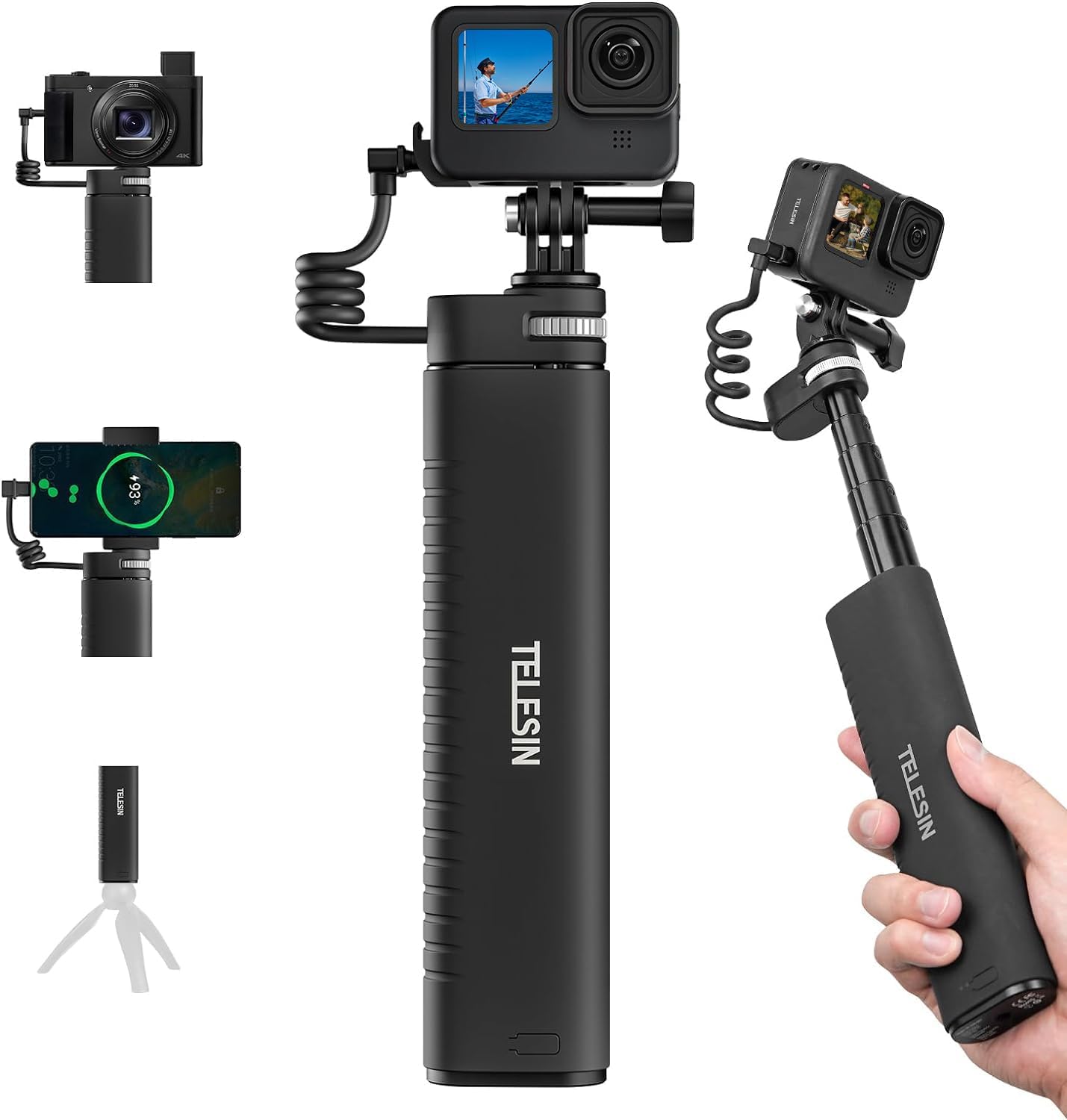
Image: The TELESIN Power Grip shown with a GoPro, mirrorless camera, and smartphone attached, demonstrating its versatility.
Key Features:
- Waterproof Extendable Design: Extends from 21.6cm (8.5 inches) to 90cm (35.4 inches). Features IP52 water resistance for use in light rain.
- High Capacity Power Bank: Built-in 10000mAh battery, equivalent to approximately 7 GoPro batteries, supporting up to 7 hours of 5.3K/30fps recording.
- Fast Charging Support: Supports QC/PD3.0 fast charging protocols, allowing simultaneous charging and shooting without a camera battery.
- Automatic Charging with Indicator: Automatically detects and charges connected devices. LED indicators show charging status and power level.
- Wide Compatibility: Includes a battery cover for GoPro Hero 9/10/11/12 and a 1/4" adapter mount/screw port for compatibility with GoPro Max, Hero 13/12/11/10/9/8/7/6/5, Insta360 X2/X3/X4/X5/GO2/GO3/Ace Pro 2, DJI Action 3/4/5, DJI Pocket 2/3, AKASO, smartphones, and mirrorless cameras.

Image: Visual representation of the 10000mAh battery capacity, indicating power for over 5 batteries and 7 hours of recording.

Image: The TELESIN Power Grip demonstrating its IP52 dust and drip-proof design, suitable for rain and snow conditions.
3. Package Contents
Please check the package to ensure all items are present:
- Chargeable Selfie Stick x1
- 3-prong Adapter x1
- Screw x1
- Phone Clip x1
- Weather-resistant Pass Through Door x1 (for GoPro Hero 9/10/11/12)
- Instruction Manual x1
- Packing Box x1
- Fast Charging Cable x1

Image: An exploded view diagram illustrating all components included in the product package, along with their names.
4. Setup Guide
Attaching Your Device:
- For GoPro Cameras (Hero 9/10/11/12):
- Remove the original battery door from your GoPro camera.
- Install the provided weather-resistant pass-through door onto your GoPro. This allows the USB-C cable to connect while maintaining water resistance.
- Attach the GoPro to the 3-prong adapter on the top of the Power Grip using the screw.
- Connect the integrated USB-C spring cable from the Power Grip to your GoPro's USB-C port.
- For Other Action Cameras/Mirrorless Cameras:
- Ensure your camera has a 1/4" screw thread.
- Screw your camera directly onto the 1/4" adapter mount on the top of the Power Grip.
- If your camera supports USB-C charging, connect it using the integrated spring cable or your own USB-C cable to the bottom output/input port.
- For Smartphones:
- Attach the provided phone clip to the 1/4" adapter mount on the Power Grip.
- Secure your smartphone within the phone clip.
- Connect your smartphone to the Power Grip using the integrated spring cable (if compatible) or your own charging cable to the bottom output/input port. (Note: Type-C to Lightning adapter required for iPhone users, not included).

Image: The selfie stick extended to its full 90cm length, illustrating how the integrated charging cable remains connected to the camera even when fully extended.
5. Operating Instructions
Extending the Selfie Stick:
Gently pull the top section of the Power Grip upwards to extend the selfie stick. It can be extended incrementally up to 90cm (35.4 inches). To retract, push the sections back down until fully collapsed.
Using as a Power Bank:
- Automatic Charging: Once a compatible device is connected via the USB-C cable (either the integrated spring cable or a cable connected to the bottom port), the Power Grip will automatically detect the device and begin charging. No button press is required to initiate charging.
- Power Indicator: The LED lights at the bottom of the Power Grip indicate the remaining battery level and charging status. Refer to the "Charging the Power Grip" section for details on LED indicators.
- Simultaneous Charging and Shooting: The Power Grip supports charging your camera while it is actively recording or shooting, providing extended operational time.

Image: Detailed view of the Power Grip's top output port with its integrated spring cable and the bottom Type-C input/output port, both supporting up to 18W PD charging.
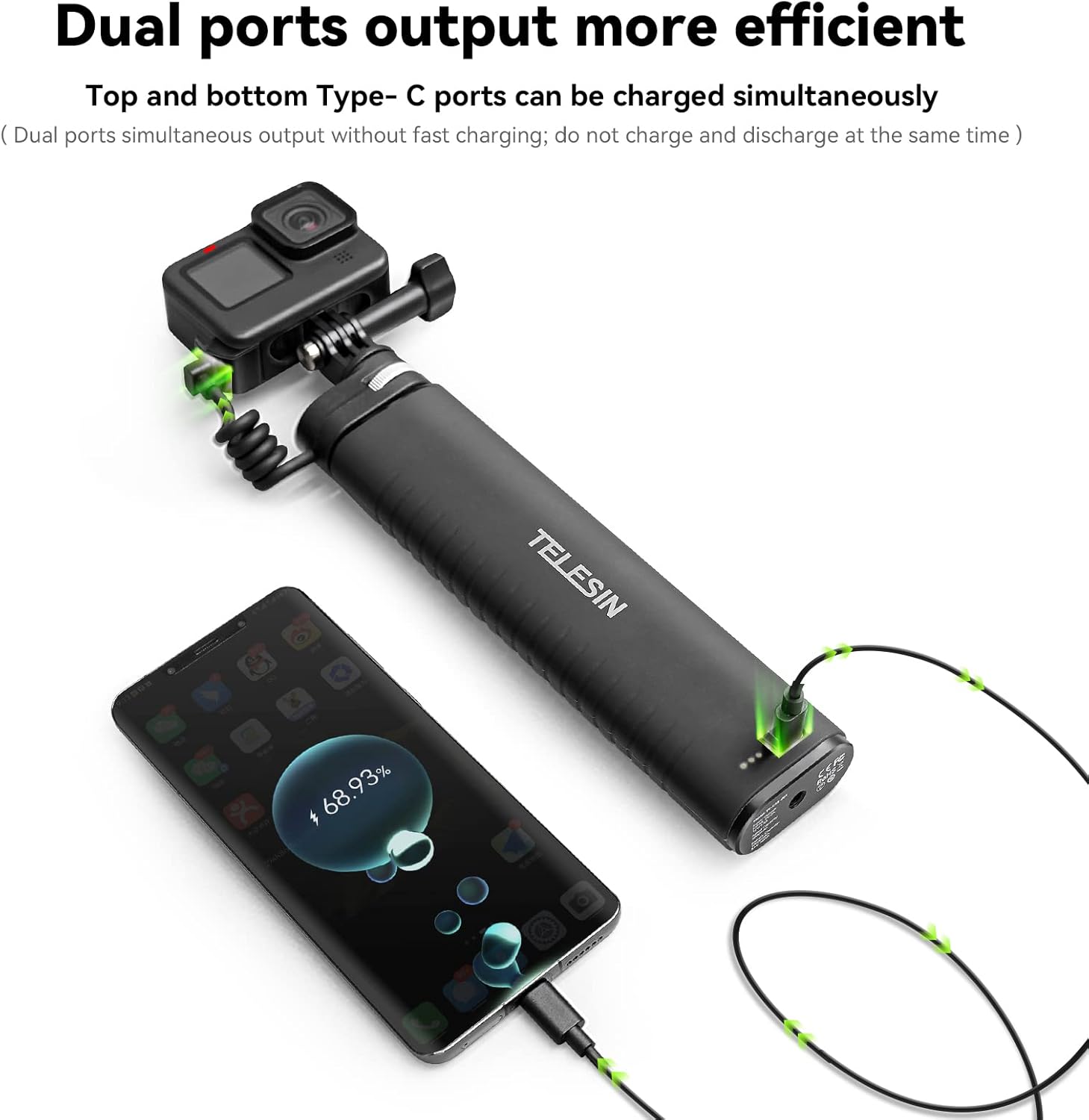
Image: The Power Grip demonstrating its dual port output capability, simultaneously charging a GoPro camera and a smartphone.
6. Charging the Power Grip
To charge the internal 10000mAh battery of the TELESIN Power Grip:
- Connect the provided fast charging cable to the Type-C input/output port at the bottom of the Power Grip.
- Connect the other end of the cable to a compatible USB power adapter (QC/PD3.0 fast charger recommended for optimal charging speed).
- The LED indicator lights at the bottom will illuminate to show the charging progress.
LED Indicator Status:
- Solid LEDs: Indicate remaining battery level.
- Flashing LEDs: Indicate current charging progress.
- All LEDs solid when fully charged.

Image: A close-up showing the power reminder LED lights at the bottom of the grip, which display the power level during charging and use.
7. Device Compatibility
The TELESIN Power Grip is designed for broad compatibility with various cameras and mobile devices:
- GoPro Cameras: GoPro Max, Hero 13, Hero 12, Hero 11, Hero 10, Hero 9, Hero 8, Hero 7, Hero 6, Hero 5 (requires specific battery door for Hero 9/10/11/12 for full waterproofing).
- Insta360 Cameras: Insta360 X2, X3, X4, X5, GO2, GO3, Ace Pro 2.
- DJI Action Cameras: DJI Action 3, Action 4, Action 5.
- DJI Pocket Cameras: DJI Pocket 2, Pocket 3.
- Other Action Cameras: AKASO Wearable Action Camera.
- Smartphones: iPhone, Android phones (Type-C to Lightning adapter required for iPhone users, not included).
- Mirrorless/SLR Cameras: Sony, Canon, and other mirrorless/SLR cameras with a 1/4" screw port and USB-C charging capability.

Image: An array of compatible devices including various action cameras, mirrorless cameras, and smartphones, highlighting the Power Grip's broad compatibility.
8. Care and Maintenance
- Cleaning: Wipe the Power Grip with a soft, dry cloth. Do not use harsh chemicals or abrasive cleaners.
- Water Resistance: The device is IP52 water resistant, meaning it is protected from limited dust ingress and water spray less than 15 degrees from vertical. Do not submerge the device in water. Ensure all ports are securely closed when exposed to moisture.
- Storage: Store the Power Grip in a cool, dry place away from direct sunlight and extreme temperatures.
- Battery Care: For optimal battery life, fully charge the device at least once every three months if not in regular use. Avoid fully discharging the battery frequently.
9. Troubleshooting
| Problem | Possible Cause | Solution |
|---|---|---|
| Device not charging from Power Grip. | Cable not properly connected; Power Grip battery depleted; Incompatible device/cable. | Ensure cables are securely connected. Check Power Grip battery level and recharge if necessary. Verify device compatibility and use appropriate cables. |
| Power Grip not charging. | Charging cable or adapter faulty; Port obstruction. | Try a different USB-C cable and power adapter. Ensure the charging port is clean and free of debris. |
| Selfie stick extension is stiff or stuck. | Dust/debris in extension mechanism; Infrequent use. | Gently clean the extending sections. Apply minimal force when extending/retracting. Avoid forcing it. |
| GoPro overheating during charging/use. | GoPro battery still installed (if not needed); Prolonged high-resolution recording. | For GoPro Hero 9/10/11/12, use the provided weather-resistant pass-through door and remove the internal GoPro battery for extended shooting without overheating. Reduce recording resolution or take breaks during long sessions. |
10. Product Specifications
| Feature | Specification |
|---|---|
| Unexpanded Length | 216mm (8.5 inches) |
| Extending Length | 900mm (35.4 inches) |
| Battery Capacity | 10000mAh |
| Rated Capacity | 5000mAh, 3.6V, 36Wh |
| Product Net Weight | 400g (0.88 lbs) |
| Product Gross Weight | 540g (1.19 lbs) |
| Power Input | 5V/3A, 9V/2A, 12V/1.5A |
| Power Output | 5V/3A, 9V/2A, 12V/1.5A |
| Fast Charging Protocol Support | QC3.0 / PD3.0 / FPC / AFC / Apple2.4A MAX18W |
| Water Resistance Rating | IP52 |
| ASIN | B0BQJDYFLD |
| Manufacturer | TELESIN |
11. Warranty and Support
TELESIN products are manufactured to the highest quality standards. For warranty information and customer support, please refer to the official TELESIN website or contact your local distributor. Keep your purchase receipt as proof of purchase for any warranty claims.
For further assistance, please visit: TELESIN Official Store on Amazon