
1. Product Overview
This manual provides instructions for the Lelukee Bluetooth and Voice Control Remote Control, designed for use with Xiaomi TV models P1, P1E, Q1, and Q1E. It features an ergonomic design, Bluetooth connectivity, and voice control capabilities.

Figure 1: Front view of the Lelukee Bluetooth Voice Remote Control. This image shows the layout of the buttons, including number keys, navigation pad, and dedicated Netflix and Prime Video buttons.

Figure 2: Side view of the Lelukee Bluetooth Voice Remote Control, highlighting its ergonomic shape.
2. Setup and Pairing
Follow these steps to pair your Lelukee remote control with your Xiaomi TV:
- Step 1: Power On TV. Manually switch on your Xiaomi TV.
- Step 2: Initiate Pairing. Place the remote control near the TV. Simultaneously hold down the red wired button (often the power button or a dedicated pairing button, refer to your TV's manual if unsure) for 15 to 30 seconds.
- Step 3: Confirm Pairing. Once the TV displays the pairing interface, release the button. Wait for the TV to confirm "successful pairing."
- Step 4: Test Functionality. After successful pairing, the remote control can be used normally.
If pairing fails, please repeat the above steps.
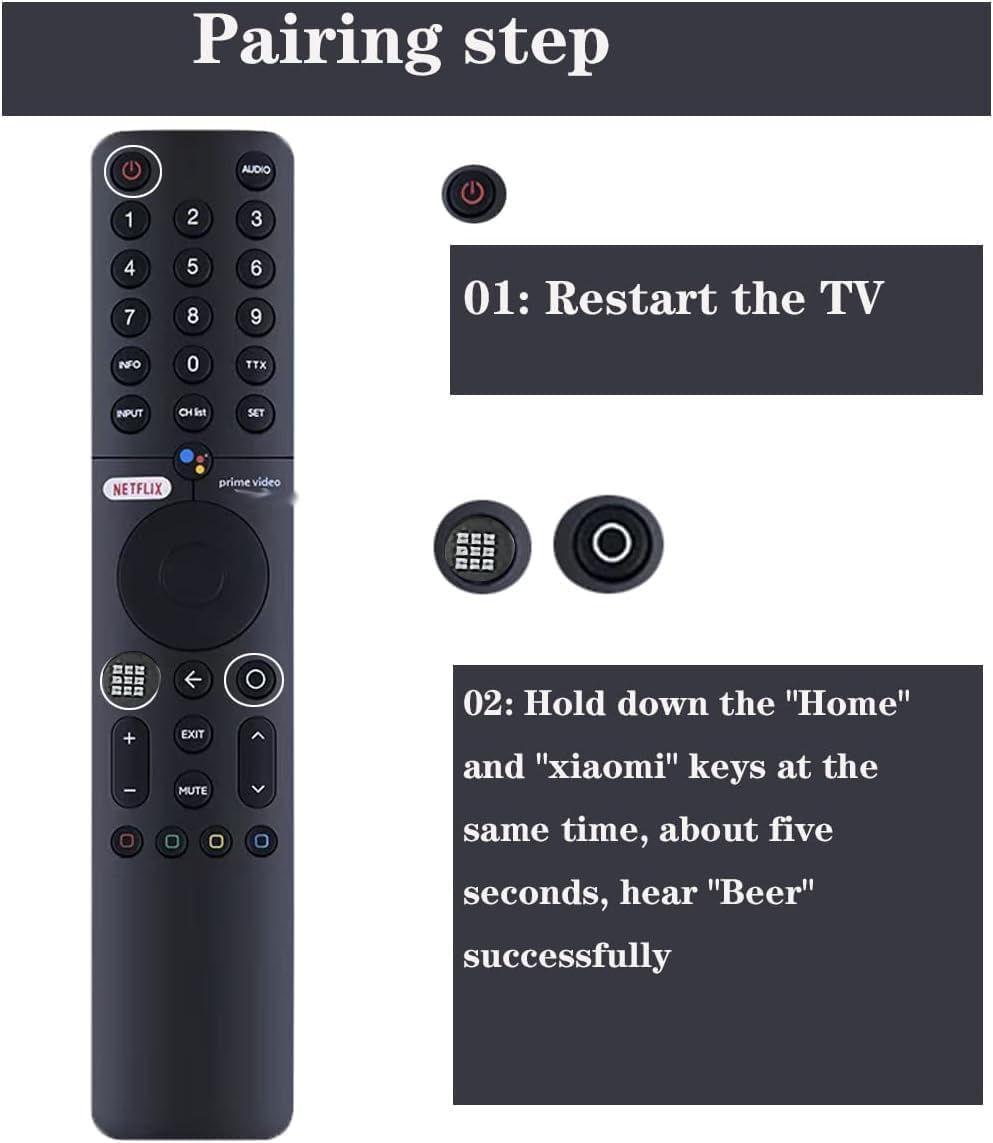
Figure 3: Visual guide for the pairing process. This image illustrates the steps to connect the remote control to the TV.
3. Operating Instructions
The Lelukee remote control offers intuitive operation for your Xiaomi TV. It features Bluetooth connectivity for reliable control and includes voice control functionality.
- Voice Control: This remote supports voice control, allowing you to use Google Assistant for commands. Press the dedicated voice control button (often indicated by a microphone icon) and speak your command clearly.
- Dedicated App Buttons: Quick access buttons for popular streaming services like Netflix and Prime Video are included for convenience.
- Navigation: Use the directional pad and central 'OK' button for menu navigation and selection.
- Range: The remote operates effectively within a maximum range of 10 meters (approximately 33 feet) from the TV.

Figure 4: The remote control highlighting the voice control microphone icon and dedicated Netflix and Prime Video buttons.
4. Battery Installation and Maintenance
The remote control requires two AAA batteries (not included).
- Battery Installation: Open the battery compartment cover on the back of the remote control. Insert two AAA batteries, ensuring correct polarity (+ and -). Close the cover securely.
- Battery Replacement: Replace batteries when the remote's performance degrades or it stops responding. Always replace both batteries at the same time with new ones.
- Storage: If the remote control will not be used for an extended period, remove the batteries to prevent leakage.
5. Troubleshooting
- Remote not responding:
- Check if the batteries are correctly installed and have sufficient charge. Replace with new AAA batteries if necessary.
- Ensure there are no obstructions between the remote control and the TV.
- Verify that the remote is within the operating range (up to 10 meters).
- Pairing failure:
- Ensure the TV is powered on manually before attempting to pair.
- Repeat the pairing steps carefully, holding the pairing button for the specified duration (15-30 seconds).
- Try restarting the TV and then attempting the pairing process again.
- Voice control not working:
- Ensure the remote is successfully paired via Bluetooth. Voice control requires a Bluetooth connection.
- Check your TV's settings to ensure voice control/Google Assistant is enabled.
- Speak clearly and directly into the microphone on the remote.
6. Specifications
| Brand | Lelukee |
| Compatible Devices | Xiaomi TV P1, P1E, Q1, Q1E |
| Connectivity Technology | Bluetooth |
| Special Features | Ergonomic design, Voice Control (Google Assistant support) |
| Controller Type | Button Control |
| Color | Black |
| Power Supply | 2 x AAA Batteries (not included) |
| Maximum Range | 10 Meters |
| Approximate Weight | 42g (0.07 Kilograms) |
| Material | ABS Shell |

Figure 5: Image illustrating the compatibility of the remote control with various Xiaomi TV models.
7. Warranty and Support
Specific warranty information for this product is not provided in the available data. For warranty claims or technical support, please contact the manufacturer, Lelukee, directly or refer to the retailer's return policy where the product was purchased.
You may visit the Lelukee Store on Amazon for more information.


