Introduction
Thank you for choosing the Paul Neuhaus Q-Etienne Smart Home LED Floor Lamp. This manual provides essential information for the safe and efficient use of your new floor lamp. The Q-Etienne lamp features a modern design with a round, domed glass shade and a copper-colored frame. It offers continuous dimming and color temperature control from warm white (2700 K) to cool white (5000 K) via the included infrared remote control or a compatible Smart Home system (ZigBee). It also includes a memory function to retain your last settings.
Safety Instructions
- Read all instructions carefully before installation and use.
- Keep this manual for future reference.
- This product is for indoor use only (IP20). Do not expose to moisture or extreme temperatures.
- Ensure the power supply is disconnected before installation, cleaning, or maintenance.
- Do not attempt to modify or repair the lamp yourself. Contact qualified personnel for service.
- The integrated LED light source of this luminaire is not replaceable. When the light source reaches its end of life, the entire luminaire shall be replaced.
- This product contains a light source of energy efficiency class F.
Package Contents
Please check that all components are present and undamaged:
- Paul Neuhaus Q-Etienne LED Floor Lamp (main body with integrated LED)
- Infrared Remote Control
- User Manual (this document)

Image: The Q-Etienne floor lamp, its remote control, and a smartphone displaying the Smart Home Lights app interface. This image illustrates the product and its primary control methods.
Setup
- Unpack: Carefully remove all components from the packaging.
- Assembly: Assemble the lamp according to any provided diagrams. Ensure all sections are securely connected.
- Placement: Place the floor lamp on a stable, level surface indoors. Ensure it is not in a location where it could be easily knocked over.
- Power Connection: Plug the power cable into a standard electrical outlet. The lamp is equipped with a cord switch for basic on/off functionality.
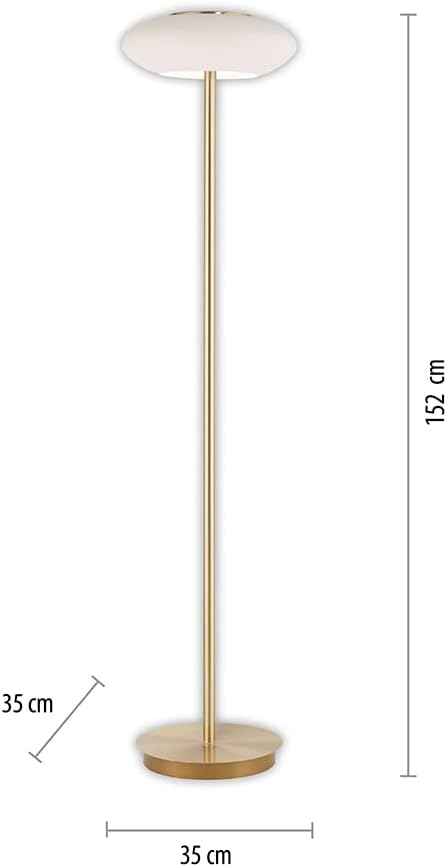
Image: A diagram illustrating the dimensions of the Q-Etienne floor lamp, showing a height of 152 cm and a base/shade width of 35 cm.
Operating Instructions
Using the Infrared Remote Control
The included infrared remote control allows you to fully control the lamp's functions. Point the remote control directly at the lamp for optimal response.

Image: Close-up of the remote control for the Q-Etienne lamp, showing various buttons and their functions, including power, dimming, color temperature adjustment, and scene selection.
- ON/OFF: Press the ON or OFF buttons to switch the lamp on or off.
- Dimming: Use the Dimming up and Dimming down buttons to adjust the brightness continuously from 10% to 100%.
- Color Temperature:
- Use the Increase color temperature and Reduce color temperature buttons to adjust the light from warm white (2700 K) to cool white (5000 K).
- Dedicated buttons for 2700 K, 3000 K, 4000 K, 5000 K allow direct selection of common color temperatures.
- Automatic Color Change: Press the Automatic colour change button to cycle through color temperatures. Press Stop colour change to pause at the desired setting.
- Pre-assigned Scenes: The remote features several buttons for Pre-assigned scenes, offering various lighting moods.
- Memory Function: The lamp retains the last selected brightness and color temperature settings when switched off and on again.

Image: The Q-Etienne floor lamp displayed with three different lighting effects, demonstrating its ability to adjust from warm white to cool white and varying brightness levels.
Smart Home Integration
The Q-Etienne lamp is designed for easy integration into existing Smart Home systems based on the ZigBee wireless standard. This allows for advanced control options via smartphone apps or voice assistants like Alexa and Google Assistant (requires a compatible ZigBee gateway).
- ZigBee Gateway: To use Smart Home features, you will need a separate ZigBee-compatible gateway (e.g., from Magenta SmartHome, Philips Hue, or other third-party providers).
- Pairing: Follow the instructions provided with your specific ZigBee gateway to pair the Q-Etienne lamp. Typically, this involves putting the gateway into pairing mode and then powering on the lamp.
- App Control: Once paired, you can control the lamp's brightness, color temperature, and scenes through your Smart Home app.
- Voice Control: If your Smart Home system is linked to a voice assistant (e.g., Amazon Alexa, Google Assistant), you can control the lamp using voice commands.
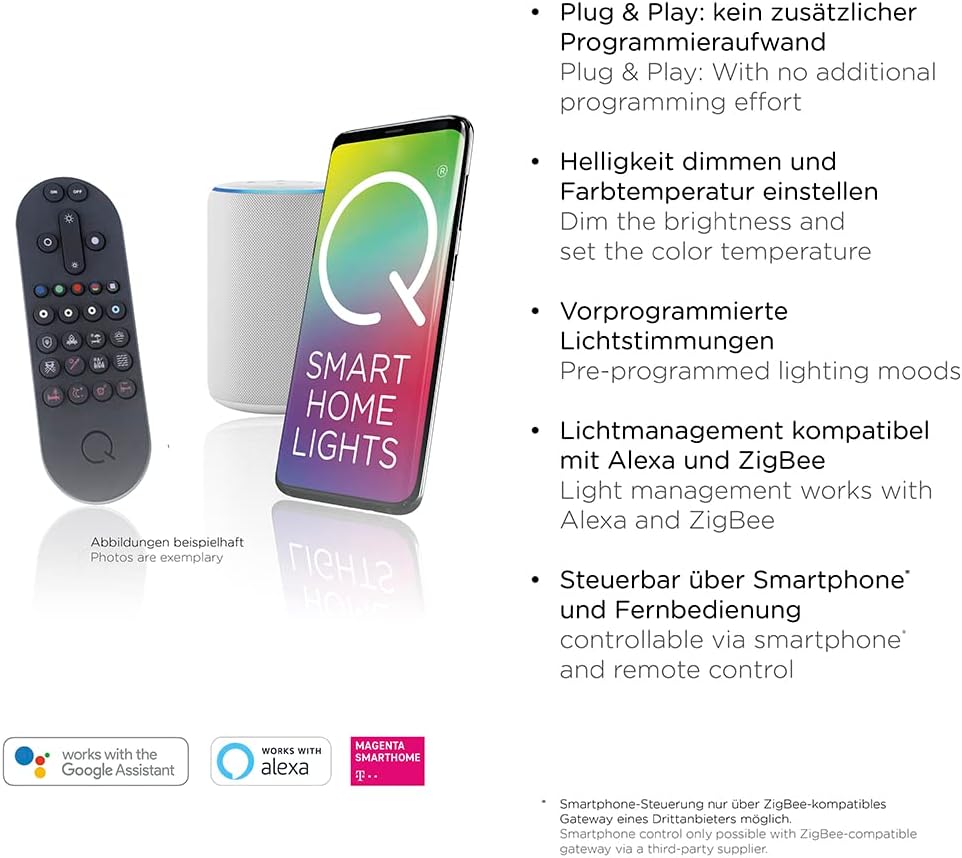
Image: An illustration showing the Q-Etienne remote control, a smart speaker, and a smartphone displaying the "Smart Home Lights" app, along with logos indicating compatibility with Google Assistant, Alexa, and Magenta SmartHome.
Maintenance
- Cleaning: Disconnect the lamp from the power supply before cleaning. Use a soft, dry, or slightly damp cloth to wipe the surfaces. Do not use abrasive cleaners or solvents.
- Light Source: The integrated LED light source is designed for a long lifespan (up to 25,000 hours) and is not user-replaceable. If the light source fails, the entire luminaire must be replaced.
- Storage: If storing the lamp for an extended period, ensure it is clean and dry, and store it in its original packaging or a protective cover in a cool, dry place.
Troubleshooting
| Problem | Possible Cause | Solution |
|---|---|---|
| Lamp does not turn on. | No power supply. Cord switch is off. Remote control batteries are dead. | Check if the power plug is securely inserted into the outlet. Ensure the cord switch is in the ON position. Replace the batteries in the remote control. |
| Remote control not responding. | Remote control batteries are dead. Obstruction between remote and lamp. Remote control out of range. | Replace the batteries. Ensure a clear line of sight to the lamp's receiver. Move closer to the lamp. |
| Smart Home control not working. | Lamp not paired with gateway. Gateway not connected to network. App issues. | Refer to your ZigBee gateway's manual for pairing instructions. Check your gateway's network connection. Restart the Smart Home app or your smartphone. |
| Light flickers or changes unexpectedly. | Unstable power supply. Interference from other devices. Software glitch (Smart Home). | Try plugging the lamp into a different outlet. Move the lamp away from other electronic devices. If using Smart Home, try resetting the lamp or re-pairing it with the gateway. |
Specifications
| Brand: | Paul Neuhaus |
| Model: | Q-Etienne |
| Dimensions (H x W x D): | 152 cm x 35 cm x 35 cm |
| Material: | Glass (shade), Metal (frame - copper finish) |
| Style: | Modern |
| Light Source Type: | Integrated LED |
| Wattage: | 24 Watts |
| Voltage: | 24 Volts |
| Luminous Flux: | 2850 lumens (effective 1700 lumens) |
| Color Temperature: | 2700 K (Warm White) to 5000 K (Cool White) - CCT Control |
| Dimmable: | Yes, continuous dimming |
| Lifespan: | Up to 25,000 hours |
| Beam Angle: | 120° |
| IP Rating: | IP20 (for indoor use) |
| Control Methods: | Infrared Remote Control, Smart Home (ZigBee compatible, Alexa/Google Assistant via gateway) |
| Special Features: | Memory Function, Cord Switch |
| Energy Efficiency Class: | F |
Warranty and Support
For warranty information and technical support, please refer to the documentation provided with your purchase or visit the official Paul Neuhaus website. Keep your proof of purchase for any warranty claims.
Manufacturer: Paul Neuhaus