
1. Introduction
The Cecotec Pumba 8000 CleanKitty Smart is an advanced self-cleaning litter box designed to simplify pet care. It features an automatic cleaning system, a triple deodorization system, Wi-Fi connectivity for app control, and an infrared sensor for enhanced safety. This manual provides detailed instructions for setup, operation, maintenance, and troubleshooting to ensure optimal performance and a clean environment for your pet.

Figure 1: The Cecotec Pumba 8000 CleanKitty Smart Self-Cleaning Litter Box.
2. Safety Information
Please read all safety instructions carefully before using the appliance. Keep this manual for future reference.
- Ensure the appliance is placed on a stable, level surface.
- Do not immerse the main unit in water or other liquids.
- Keep children and pets away from the appliance during operation, although the infrared sensor provides significant protection.
- Use only the recommended power adapter.
- Do not attempt to disassemble or repair the appliance yourself. Contact customer support for assistance.
- Infrared Safety Sensor: The Pumba 8000 CleanKitty Smart is equipped with an intelligent infrared detection system. If your pet attempts to enter the litter box while a cleaning cycle is in progress, the sensor will detect its presence and automatically stop the operation to prevent any accidents.
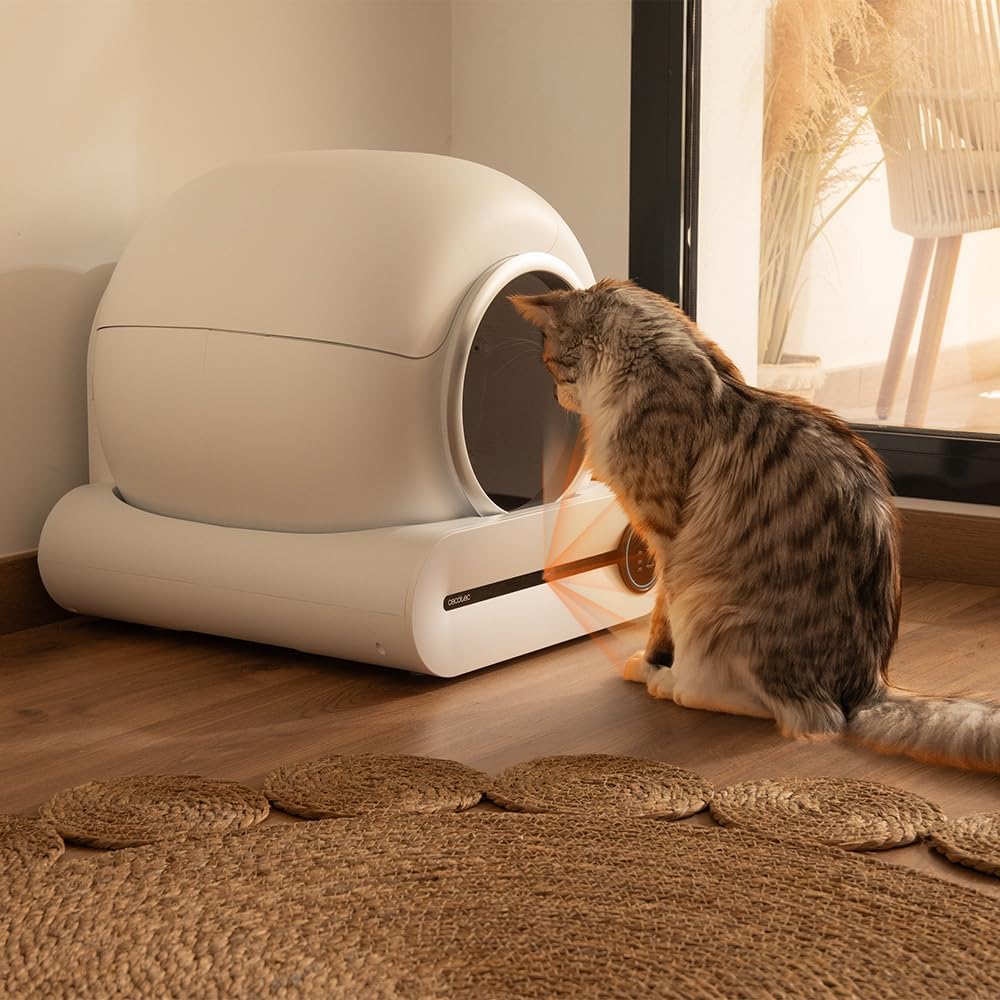
Figure 2: The infrared sensor detects pet presence, ensuring safety during operation.
3. Product Components
The Cecotec Pumba 8000 CleanKitty Smart consists of the following main components:
- Main Unit: Houses the rotating drum and electronic components.
- Rotating Drum: The interior compartment where the litter is placed and cleaning occurs. It has an extra-large capacity of 65 liters for your cat's comfort.
- Waste Bin: Located in the base, collects waste from the cleaning cycles. It has a 9-liter capacity, allowing for up to 15 days without needing to empty.
- Control Panel: Located on the front of the base, with buttons and indicators for manual control and status.
- Power Adapter: For connecting the unit to an electrical outlet.
- Ionic Sterilizer: Integrated system for triple deodorization.

Figure 3: Internal view of the Pumba 8000 CleanKitty Smart, highlighting the rotating drum and waste collection area.
4. Setup
Follow these steps to set up your self-cleaning litter box:
- Unpack the Unit: Carefully remove all components from the packaging. Retain packaging for future transport or storage.
- Placement: Place the litter box on a firm, level surface indoors, away from direct sunlight and heat sources. Ensure there is enough space around the unit for proper operation and access.
- Install Waste Bag: Open the waste bin compartment and insert a compatible waste bag. Ensure the bag is properly secured.
- Add Litter: Pour clumping cat litter into the rotating drum. Do not exceed the maximum fill line indicated inside the drum.
- Connect Power: Plug the power adapter into the unit and then into a wall outlet. The unit will perform an initial calibration cycle.
- Wi-Fi Connection: Download the Cecotec app on your smartphone. Follow the in-app instructions to connect your Pumba 8000 CleanKitty Smart to your home Wi-Fi network. This will enable remote control and monitoring.

Figure 4: Visual guide for initial setup, including waste bag installation and litter addition.
5. Operating Instructions
The Pumba 8000 CleanKitty Smart offers multiple operating modes:
- Automatic Cleaning: The unit will automatically detect when your cat has used the litter box and initiate a cleaning cycle after a set delay. This is the default and most convenient mode.
- Manual Cleaning: Press the 'Clean' button on the control panel or in the app to start a cleaning cycle immediately.
- Programmable Cleaning: Use the Cecotec app to set specific cleaning schedules based on your preferences and your cat's habits.
- Triple Deodorization System: The integrated ionic sterilizer actively eliminates unpleasant odors, ensuring a fresh environment. This system operates automatically or can be activated manually via the app.
- Wi-Fi Control and Monitoring: The dedicated mobile application allows you to control all functions remotely, monitor your cat's usage, and track its weight for advanced health monitoring.
- Silent Operation: The unit is designed to operate quietly, minimizing disturbance to your pet and household.

Figure 5: The intuitive control panel for easy operation.

Figure 6: Control and monitor your litter box using the Cecotec mobile application.
6. Maintenance
Regular maintenance ensures the longevity and hygiene of your Pumba 8000 CleanKitty Smart:
- Emptying the Waste Bin: The 9-liter waste bin can hold waste for up to 15 days for a single cat. When the 'Full' indicator lights up on the control panel or in the app, it's time to empty the bin. Simply remove the waste bag, tie it securely, and dispose of it. Replace with a new waste bag.
- Adding Litter: Periodically check the litter level and add fresh clumping litter as needed, ensuring it does not exceed the maximum fill line.
- Cleaning the Unit: For thorough cleaning, unplug the unit. Wipe down the exterior with a damp cloth. The interior of the rotating drum can be cleaned with a mild, pet-safe detergent and water. Ensure all parts are completely dry before reassembling and plugging in the unit. Do not use abrasive cleaners.
- Sensor Cleaning: Gently wipe the infrared sensor area with a soft, dry cloth to ensure it remains free of dust and debris, which could affect its performance.
Figure 7: Key maintenance procedures, such as replacing the waste bag and adding litter.
7. Troubleshooting
If you encounter issues with your Pumba 8000 CleanKitty Smart, refer to the following common problems and solutions:
| Problem | Possible Cause | Solution |
|---|---|---|
| Unit not cleaning automatically. | Infrared sensor blocked or dirty; Litter level too high; Unit in manual mode. | Clean the sensor; Adjust litter level; Check app settings for automatic mode. |
| Bad odor persists. | Waste bin full; Deodorization system off; Unit needs thorough cleaning. | Empty waste bin; Activate deodorization via app; Perform a deep clean of the unit. |
| Wi-Fi connection issues. | Incorrect Wi-Fi password; Router too far; Network interference. | Re-enter Wi-Fi credentials; Move unit closer to router; Restart router and unit. |
| Unit stops mid-cycle. | Pet detected by infrared sensor; Obstruction in rotating drum; Overload. | Ensure pet is clear; Remove any obstructions; Reduce litter amount if overloaded. |
| Weight sensor inaccurate. | Unit not on a level surface; Debris under the unit; Calibration needed. | Ensure level placement; Clean under the unit; Refer to app for calibration options. |
If the problem persists after trying these solutions, please contact Cecotec customer support.
8. Specifications
Key technical specifications for the Cecotec Pumba 8000 CleanKitty Smart:
| Feature | Specification |
|---|---|
| Model Number | 09567 |
| Dimensions (L x W x H) | 48L x 52W x 49H cm |
| Product Weight | 9.87 Kilograms |
| Material | Plastic |
| Color | White |
| Litter Drum Capacity | 65 Liters |
| Waste Bin Capacity | 9 Liters |
| Deodorization System | Triple Ionic Sterilizer |
| Safety Features | Infrared Sensor, Weight Sensor |
| Connectivity | Wi-Fi (App Control) |
| Recommended Use | Indoor |
9. Warranty and Support
Warranty: The Cecotec Pumba 8000 CleanKitty Smart comes with a 10-year availability of spare parts, ensuring long-term support for your product.
Customer Support: For any questions, technical assistance, or warranty claims, please refer to the contact information provided on the official Cecotec website or your purchase documentation. Our support team is available to help you with any issues you may encounter.
