
1. Introduction
This manual provides essential information for the safe and efficient operation of your Geepas 55-inch UHD/4K LED Smart VIDAA TV. Please read these instructions thoroughly before using the product and retain them for future reference.
The Geepas 55-inch LED TV features a slim and elegant design, incorporating energy-saving technology. It is ideal for various display configurations and includes a 4K UHD screen with AV, HDMI, and USB ports, along with smart connectivity features.
2. Safety Information
Always follow basic safety precautions when using this television to reduce the risk of fire, electric shock, and injury.
- Do not expose the TV to rain or moisture.
- Ensure proper ventilation around the TV.
- Do not block ventilation openings with items like newspapers, table-cloths, or curtains.
- Do not place the TV on an unstable cart, stand, tripod, bracket, or table.
- Protect the power cord from being walked on or pinched.
- Unplug the TV during lightning storms or when unused for long periods.
- Refer all servicing to qualified service personnel.
3. Package Contents
Verify that all items are present and in good condition upon unpacking.
- Geepas 55-inch UHD/4K LED Smart VIDAA TV
- Remote Control (English)
- TV Stand
- Power Cable
- User Manual
4. Setup
4.1 Attaching the Stand
Carefully place the TV screen-down on a soft, flat surface. Align the stand with the mounting holes on the bottom of the TV and secure it with the provided screws.
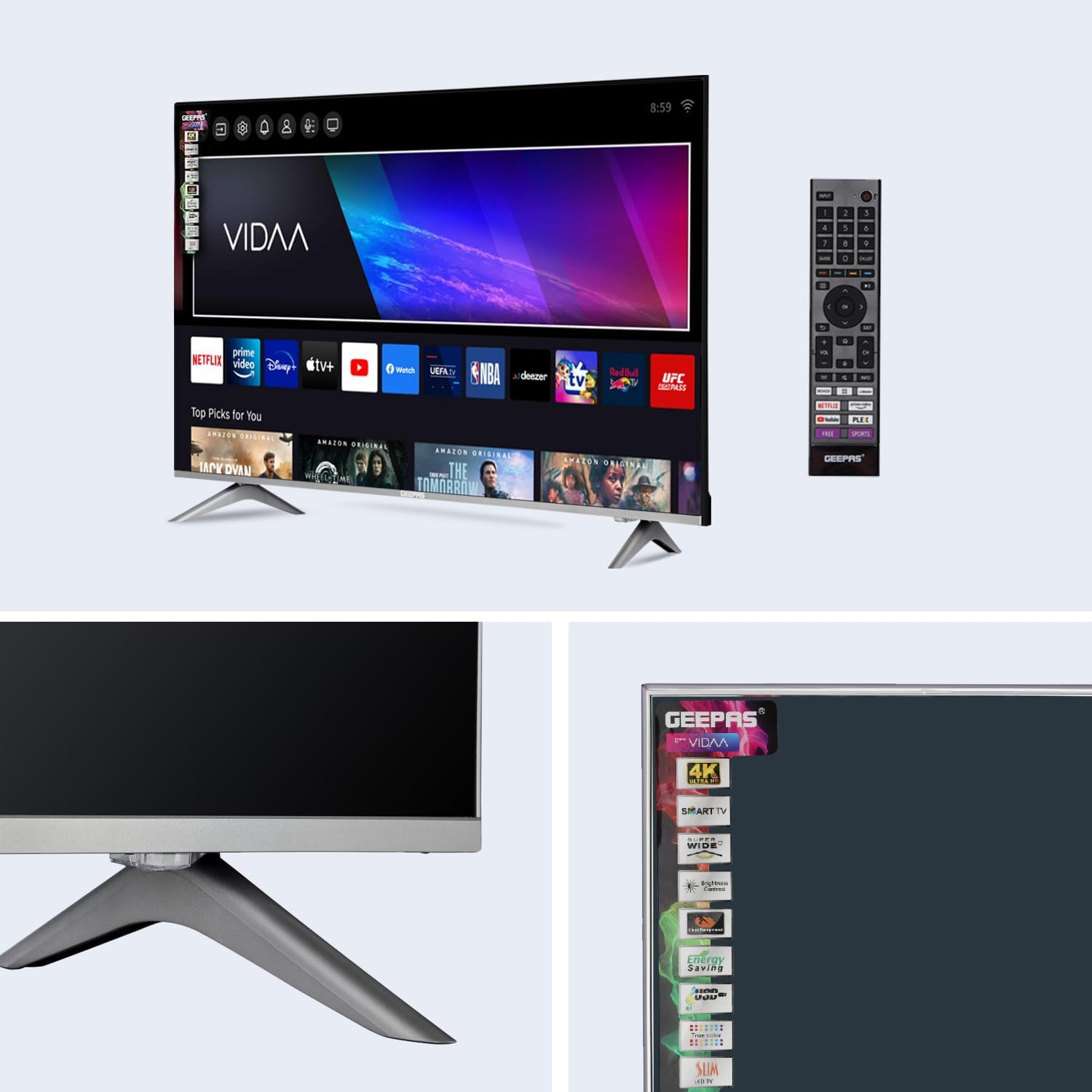
Image: Close-up view of the TV stand, showing its design and how it supports the television.
4.2 Wall Mounting (Optional)
This TV supports VESA mounting standard 600 x 400 mm. A wall-mount bracket is not included. Please purchase a compatible wall-mount bracket separately and follow its installation instructions carefully. Ensure the wall can support the weight of the TV (7.6 kg).
4.3 Connecting Power
Connect the power cable to the TV's power input and then to a suitable AC 100-240V ~ 50/60Hz power outlet.
5. Operating Instructions
5.1 Initial Setup
Upon first power-on, the TV will guide you through the initial setup process, including language selection, network connection (Wi-Fi), and channel scanning.
5.2 Remote Control
Use the provided remote control to navigate menus, adjust settings, and control smart features. The remote uses Infrared (IR) technology.

Image: The Geepas Smart TV displaying its interface, with the remote control positioned next to it, highlighting the Smart Voice Control feature.
5.3 Smart Voice Control
This TV features Smart Voice Control. Press the dedicated voice button on your remote and speak commands to search for content, change channels, or adjust settings.
6. Connectivity
Your Geepas Smart TV offers various connectivity options:
- HDMI Ports (3): Connect external devices such as Blu-ray players, gaming consoles, or set-top boxes.
- USB Ports (2): Connect USB storage devices to play media files.
- AV In (1): For older analog devices.
- Headphone Jack (1): For private listening.
- Coaxial (1): For antenna or cable connection.
- Wi-Fi: Connect to your home network for internet services and smart features.
- Bluetooth: Connect compatible wireless accessories.

Image: The Geepas Smart TV with a visual representation of its key features, including 4K UHD, Dolby Digital audio, screen sharing, HDMI, Bluetooth, smart voice control, USB media playback, and Wi-Fi connectivity.
7. Smart Features (VIDAA U OS)
Your Geepas TV runs on the VIDAA U operating system, providing access to a variety of smart features and applications.
- Supported Internet Services: Access popular streaming platforms like Netflix.
- Smart Home Compatibility: Integrate with compatible smart home systems.
- Parental Control: Utilize V-Chip technology for content restrictions.

Image: The Geepas Smart TV screen showcasing the VIDAA operating system's user interface, featuring a selection of pre-installed and accessible streaming applications.
8. Maintenance
8.1 Cleaning the Screen
Gently wipe the screen with a soft, lint-free cloth. For stubborn marks, lightly dampen the cloth with water or a specialized screen cleaner. Avoid harsh chemicals or abrasive materials.
8.2 Cleaning the Cabinet
Wipe the TV cabinet with a soft, dry cloth. Do not use liquid or aerosol cleaners directly on the TV.
9. Troubleshooting
If you encounter issues, refer to the following common problems and solutions:
| Problem | Possible Solution |
|---|---|
| No power | Check if the power cord is securely plugged into the TV and the wall outlet. Ensure the outlet is active. |
| No picture, but sound is present | Check the input source. Ensure external devices are properly connected and powered on. |
| No sound, but picture is present | Check the volume level and mute settings. Verify audio cables are correctly connected. |
| Remote control not working | Replace the batteries. Ensure there are no obstructions between the remote and the TV's IR sensor. |
| Smart features not working / No internet | Check your Wi-Fi connection. Restart your router and the TV. |
10. Specifications
Detailed technical specifications for the Geepas 55-inch UHD/4K LED Smart VIDAA TV (GLED5509SVUHD).

Image: A comprehensive specification sheet detailing the panel, power, video, connectivity, audio, accessories, and convenience features of the Geepas 55-inch Smart TV.
| Feature | Detail |
|---|---|
| Model Number | GLED5509SVUHD |
| Display Type | LED |
| Screen Size | 55 inches |
| Resolution | 3840 x 2160 (UHD/4K) |
| Aspect Ratio | 16:9 |
| Refresh Rate | 60 Hz |
| Brightness | 280 cd/m² |
| Viewing Angle | 176° x 176° |
| Response Time | 6.5 ms |
| Maximum Colors | 16.5 Million |
| HDR Support | HDR10 |
| Operating System | VIDAA U |
| Connectivity | 3 x HDMI, 2 x USB, 1 x AV In, 1 x Headphone Jack, 1 x Coaxial, Wi-Fi, Bluetooth |
| Audio Output | 2 x 8W Stereo Speakers, Dolby Digital |
| Power Requirement | AC 100-240V ~ 50/60Hz |
| Power Consumption (Operation) | <= 160W |
| Power Consumption (Standby) | <= 0.50W |
| Product Dimensions (DxWxH) | 24.7 x 124.6 x 77.4 cm |
| Item Weight | 7.6 kg |
| VESA Mounting Standard | 600 x 400 mm |
| Color | Black |
| Country of Origin | China |
11. Warranty and Support
This product comes with a 1 Year Limited Warranty from the date of purchase. Please retain your proof of purchase for warranty claims.
For technical support or service inquiries, please contact Geepas customer service. Refer to the official Geepas website or your purchase documentation for contact details.