
HP 7955e
HP Envy Inspire 7955e Wireless Color All-in-One Printer User Manual
Your comprehensive guide to setting up, operating, and maintaining your HP ENVY Inspire 7955e printer.
Product Overview
The HP ENVY Inspire 7955e is a premium multi-purpose home printer designed to meet all your family's needs for learning, working, and creative projects. It is equipped with features to produce high-quality borderless photos in various sizes, homework assignments, and office documents. This model includes the optional HP+ Smart Printing System, ensuring it remains updated and ready to print from virtually any location at any time, without additional cost.
Key Features
- Perfect for Home: Print documents, high-quality borderless photos in multiple sizes, and creative projects. Print speeds up to 10 pages per minute color, 15 pages per minute black.
- Includes Free HP+ Smart Features: Activate HP+ for advanced mobile printing, security, and automatic updates. HP+ requires an HP account, internet connection, and Original HP Ink for the printer's lifetime.
- Core Functions: Print, copy, scan, automatic 2-sided printing, advanced photo features, separate photo tray, auto document feeder, mobile and wireless printing.
- Vibrant Photos: True-to-phone quality prints with custom photo features in the HP Smart app. Optimized for HP 5x5" square and 4x12" panoramic photo paper sizes.
- HP Smart App: Print, scan, and copy from your phone from anywhere. Access additional advanced features with HP+.
- Easy to Use: Features easy wireless setup, customizable touchscreen shortcuts, self-healing Wi-FiTM, and an auto document feeder.
- Sustainable Design: Constructed with over 45% recycled plastic content.
- Cartridge Compatibility: This printer is designed to work exclusively with cartridges containing original HP chips or circuitry. It will block cartridges using non-HP chips or circuitry. Periodic firmware updates will maintain the effectiveness of these measures.

The HP Envy Inspire 7955e All-in-One Printer, highlighting its compact design and ink offer.

Key components and features of the HP Envy Inspire 7955e, including the 2.7" color touchscreen, auto document feeder, flatbed scanner, and paper trays.
What's in the Box
Upon unboxing your HP Envy Inspire 7955e, you should find the following components:
- HP ENVY Inspire 7955e All-in-one Printer
- HP Setup Black Ink Cartridge
- HP Setup Tri-Color Ink Cartridge
- Power cord
- User guide
- Ink Caution Flyer
- Setup poster
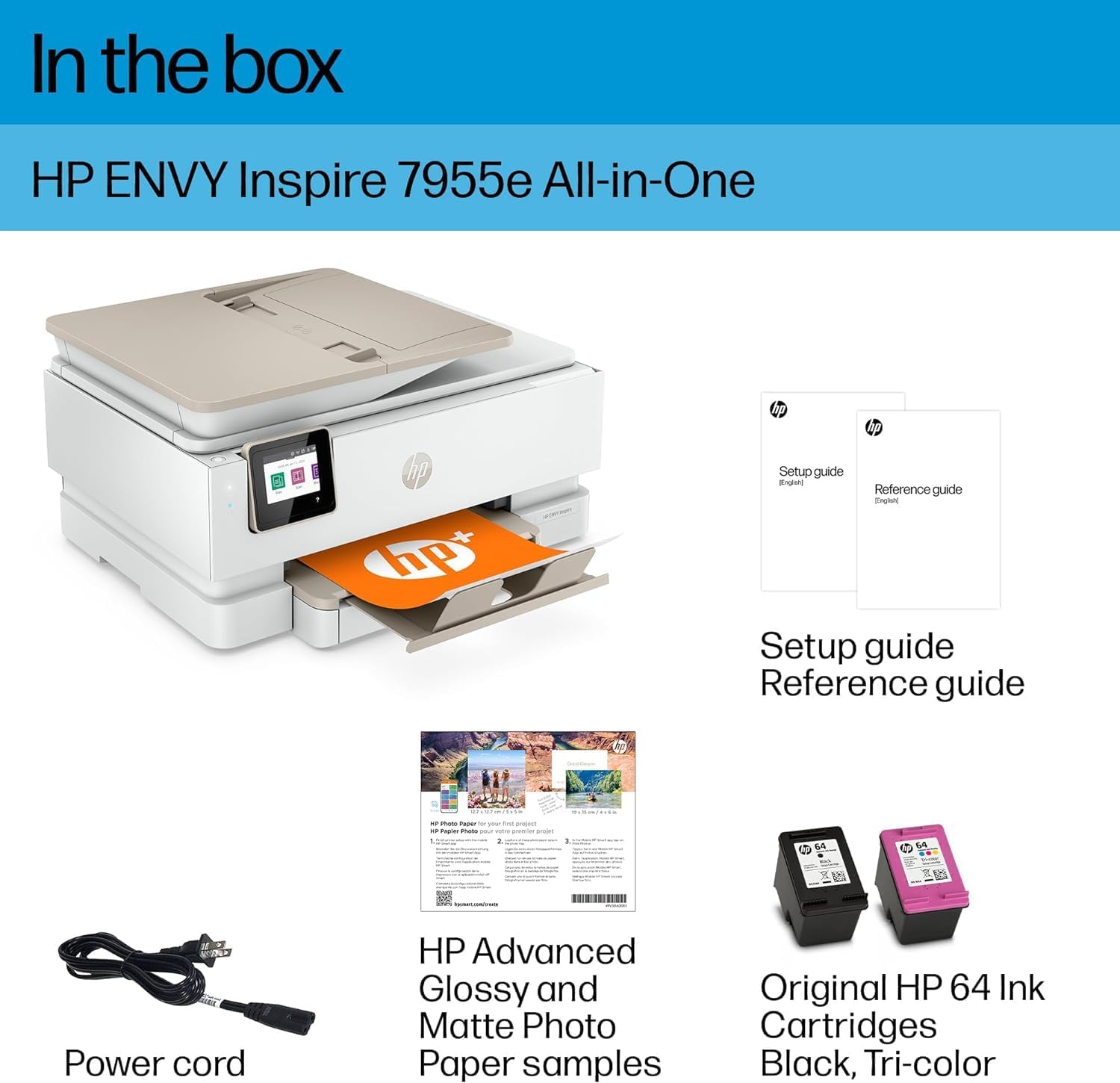
All items included in the HP Envy Inspire 7955e printer package.
Setup
Follow these steps to set up your HP Envy Inspire 7955e printer for the first time:
- Unpack the Printer: Remove all packaging materials, tapes, and protective films from the printer.
- Connect Power: Plug the power cord into the printer and then into a wall outlet. Do not connect a USB cable at this stage.
- Install Ink Cartridges: Open the ink cartridge access door and install the setup ink cartridges provided in the box. Ensure they click into place.
- Load Paper: Load plain white paper into the main input tray.
- Follow On-Screen Prompts: Use the printer's touchscreen display to complete the initial setup, including language selection and network connection.
- Install HP Smart App: Download the HP Smart app on your computer or mobile device from 123.hp.com or your device's app store. This app guides you through connecting your printer to your network and activating HP+.
- Activate HP+: Follow the prompts in the HP Smart app to activate HP+ and unlock advanced features and benefits.
Initial Printer Overview and Setup Tips
This video provides a brief overview of the HP ENVY Inspire 7955e All-in-One printer, highlighting its design and features relevant to initial setup and daily use.
Operating Your Printer
The HP Envy Inspire 7955e offers versatile functionality for printing, copying, and scanning. Utilize the HP Smart app for seamless mobile operation.
Printing
You can print documents and photos from various devices, including smartphones, tablets, and computers, via wireless connection or USB. For best results, use the HP Smart app for mobile printing and photo customization.
- Wireless Printing: Ensure your printer and device are connected to the same Wi-Fi network. Use the HP Smart app or your device's print function to send print jobs.
- Photo Printing: Utilize the dedicated photo tray for specialized photo paper. The HP Smart app offers advanced photo editing and printing features for vibrant, true-to-phone quality prints.
- Duplex Printing: The printer supports automatic 2-sided printing to save paper.
Copying
Use the printer's control panel or the HP Smart app to make copies.
- Place the original document face-down on the scanner glass or face-up in the Automatic Document Feeder (ADF).
- On the printer's touchscreen, select the Copy option.
- Adjust settings such as number of copies, color/black & white, and paper size if needed.
- Press the Start Copy button.
Scanning
Scan documents and photos to your computer, mobile device, or email using the HP Smart app or the printer's control panel.
- Place the original document face-down on the scanner glass or face-up in the ADF.
- On the printer's touchscreen, select the Scan option, or initiate the scan from the HP Smart app on your device.
- Choose your scan destination (e.g., computer, email, cloud service) and adjust scan settings (e.g., resolution, file type).
- Press the Start Scan button.

Overview of the HP Envy Inspire 7955e's core functionalities and capabilities.
Maintenance
Regular maintenance ensures optimal performance and longevity of your HP Envy Inspire 7955e printer.
Replacing Ink Cartridges
When an ink cartridge is low or empty, the printer will notify you. Always use genuine HP ink cartridges for best results and to ensure printer compatibility.
- Ensure the printer is powered on.
- Open the front door and lift the cartridge access door. The print carriage will move to the center.
- Once the carriage is idle and silent, gently press down on the ink cartridge to disengage it, then pull it out of its slot.
- Remove the new cartridge from its packaging and remove the protective tape from the cartridge contacts using the pull tab. Caution: Do not touch the copper-colored contacts or ink nozzles.
- Slide the new ink cartridge into its corresponding slot until it snaps into place.
- Close the cartridge access door, then close the front door.
Watch this video for a visual guide on how to replace ink cartridges in your HP ENVY Inspire 7900/7900e series printer.
Cleaning the Printer
Periodically clean the exterior of your printer with a soft, lint-free cloth. For internal cleaning or printhead issues, refer to the HP Smart app or HP support website for specific instructions.
Troubleshooting
This section addresses common issues you might encounter with your HP Envy Inspire 7955e printer.
- Printer Not Connecting to Wi-Fi: Ensure your Wi-Fi router is on and functioning. Use the printer's touchscreen to re-enter Wi-Fi credentials. The printer features self-healing Wi-Fi, which may automatically resolve minor connectivity issues.
- Print Quality Issues (Streaks, Fades): Check ink levels via the HP Smart app or printer display. Run a printhead cleaning cycle from the printer's maintenance menu or the HP Smart app. Ensure you are using genuine HP ink cartridges.
- Paper Jams: Carefully remove any jammed paper from the input tray, output tray, or rear access door. Refer to the printer's on-screen animations for guidance.
- Printer Not Recognizing Ink Cartridge: Ensure the cartridge is correctly seated in its slot. Remove and reinsert the cartridge. Verify that the cartridge is a genuine HP cartridge with original HP chips, as the printer is designed to block non-HP cartridges.
- Printer is Slow: Ensure sufficient paper is loaded. Check for any pending print jobs in the queue. For large documents, consider printing in draft mode.
Technical Specifications
| Feature | Specification |
|---|---|
| Product Dimensions (D x W x H) | 15.08"D x 18.11"W x 9.21"H |
| Controller Type | Amazon Alexa, Android |
| Printer Media Size Maximum | 8.5 x 14 inch |
| Print Media Types | Envelopes, Paper (plain), Card stock, Labels, Glossy photo paper |
| Scanner Type | Flatbed |
| Max Input Sheet Capacity | 125 |
| Max Copy Speed (Black & White) | 13 ppm |
| Display Type | Capacitive Touchscreen CGD |
| Compatible Devices | Smartphones, PC, Tablets, Laptops |
| Maximum Color Print Resolution | 4800 x 1200 Dots Per Inch |
| Maximum Black and White Print Resolution | 1200 x 1200 Dots Per Inch |
| Dual-sided printing | Yes (Automatic) |
| Item Weight | 17.9 pounds |
| Connectivity Technology | Bluetooth, Wi-Fi, USB |
| Printing Technology | Inkjet |
| Maximum Print Speed (Color) | 10 ppm |
| Max Printspeed Monochrome | 15 ppm |

Physical dimensions of the HP Envy Inspire 7955e printer.
Warranty and Support
Your HP Envy Inspire 7955e printer comes with standard HP warranty. Activating HP+ during setup may provide additional warranty benefits and enhanced support features.
For detailed warranty information, technical support, or to access the full user guide, please visit the official HP support website or refer to the included documentation.
You can also download the comprehensive User Guide (PDF) here.
Ask a question about this manual
Ask about setup, troubleshooting, compatibility, parts, safety, or missing instructions. Manuals+ will review the question and use this page’s manual context to help answer it.