
ZTIANFOTO YT2000
ZIFON YT2000 Motorised Head User Manual
Model: YT2000 | Brand: ZTIANFOTO
1. Introduction
The ZIFON YT2000 is an advanced remote-controlled motorised pan/tilt head designed for cameras, smartphones, LED lights, and other compatible devices. It features intelligent AI face tracking, AB point programming, and versatile control options, making it ideal for live streaming, video recording, time-lapse photography, and more. This manual provides detailed instructions for the proper setup, operation, and maintenance of your YT2000 motorised head.

Figure 1.1: ZIFON YT2000 Motorised Head with remote control and compatible devices.
2. Safety Information
- Do not expose the device to water or excessive humidity.
- Avoid dropping or subjecting the device to strong impacts.
- Do not attempt to disassemble or repair the device yourself. Refer to qualified service personnel.
- Ensure the device is securely mounted before attaching any equipment.
- Keep out of reach of children.
- Use only the specified charging voltage (5V) and Type-C cable.
3. Package Contents
Please check the package contents upon unboxing to ensure all items are present:
- ZIFON YT2000 Motorised Pan/Tilt Head
- Remote Control
- Universal Phone Clip
- USB Type-C Charging Cable
- User Manual (this document)

Figure 3.1: ZIFON YT2000 Package Contents.
4. Product Overview
4.1 Main Features
- AI Smartchip Face Recognition Control: Supports AB point double recognition and intelligent camera follow shots.
- Adjustable Speeds: Horizontal speed (8 levels, 0.05-4 speed), Vertical speed (8 levels, 0.05-0.6 speed).
- Remote Control Operation: Operates via remote, no app download required for basic functions.
- Gesture Control: "OK" gesture to start tracking, "Palm" gesture to pause.
- Time-Lapse Photography: Supports both time-lapse photography and time-lapse video with adjustable parameters.
- Universal Compatibility: 1/4 inch screw interface and non-slip quick mounting plate compatible with cameras, smartphones (4.5-7 inch), and fill lights.
- Built-in Level Meter: For quick horizontal adjustment.
- Long Battery Life: Built-in 2000 mAh battery provides over 10 hours of continuous use.
4.2 Components
Familiarise yourself with the main components of the YT2000 motorised head:

Figure 4.1: YT2000 with Remote Control.

Figure 4.2: Control Panel Display.

Figure 4.3: Base with 1/4 inch Interface.

Figure 4.4: Built-in Level Meter.

Figure 4.5: Universal Phone Clip.

Figure 4.6: Quick Release Plate.
5. Setup
5.1 Mounting the Pan/Tilt Head
- Locate the 1/4 inch universal interface at the base of the YT2000.
- Mount the YT2000 onto a compatible tripod or stand using the 1/4 inch screw. Ensure it is securely tightened.
- Use the built-in level meter to adjust the tripod/stand for a perfectly horizontal setup.
5.2 Attaching Camera or Smartphone
- For Cameras: Attach your camera to the quick release plate using the 1/4 inch screw. Slide the quick release plate into the slot on the YT2000 until it clicks securely into place.
- For Smartphones: Attach the universal phone clip to the quick release plate. Insert your smartphone into the clip, ensuring it is held firmly. The clip supports phones with 4.5-7 inch screens and allows for horizontal or vertical orientation. Slide the quick release plate with the phone clip into the slot on the YT2000.

Figure 5.1: Mounting various devices on the YT2000.
5.3 Powering On
Press and hold the power button on the YT2000 until the display illuminates. The device is now ready for operation.
6. Operating Instructions
6.1 Remote Control Operation
The YT2000 can be fully controlled using the included remote. Ensure the remote has batteries installed. The remote allows for precise control of pan and tilt movements, speed adjustments, and mode selection.
6.2 AI Face Tracking
The YT2000 features an intelligent AI face tracking mode that does not require a separate app. To activate:
- Ensure the YT2000 is powered on.
- Point the camera/smartphone towards the subject to be tracked.
- Perform the "OK" hand gesture (thumb and index finger forming a circle) in front of the camera to initiate tracking. The YT2000 will automatically follow the detected face.
- To pause tracking, perform the "Palm" hand gesture (open hand, palm facing camera).
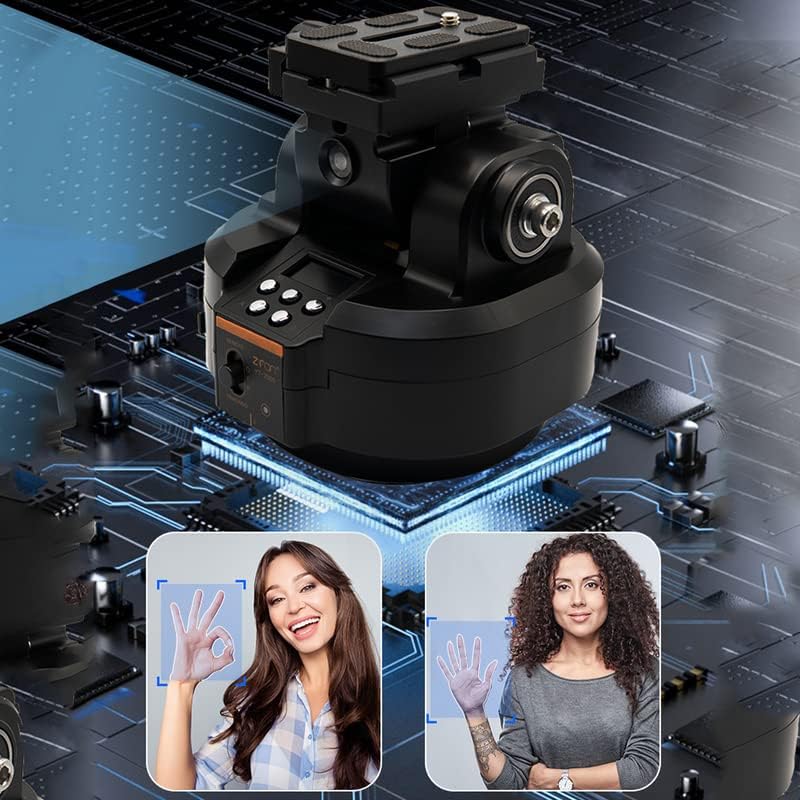
Figure 6.1: Gesture Control for AI Face Tracking.

Figure 6.2: Example of a tracking setup.
6.3 AB Point Setting
The YT2000 allows you to set two specific points (A and B) for automated pan and tilt movements, enabling precise and repeatable camera paths.
- Manually position the camera to your desired starting point (Point A).
- Press the "Set A" button on the control panel or remote to save Point A.
- Manually position the camera to your desired ending point (Point B).
- Press the "Set B" button on the control panel or remote to save Point B.
- Once A and B points are set, you can initiate an automatic cycle between these points. Refer to the control panel display for current settings and options.
6.4 Time-Lapse Photography
The YT2000 supports time-lapse functions. Parameters such as interval and duration can be adjusted via the control panel or remote. Consult the display for specific menu navigation to set up time-lapse sequences.
6.5 Charging
The YT2000 has a built-in 2000 mAh battery. When the battery indicator on the control panel shows low charge, connect the device to a 5V power source using the provided USB Type-C cable. A full charge provides over 10 hours of operation.
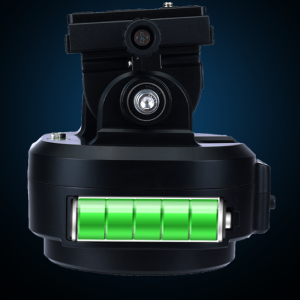
Figure 6.3: Battery Indicator.
7. Maintenance
- Cleaning: Use a soft, dry cloth to clean the exterior of the device. Do not use liquid cleaners or solvents.
- Storage: Store the YT2000 in a cool, dry place away from direct sunlight and extreme temperatures.
- Battery Care: For long-term storage, charge the battery to approximately 50% every three months to maintain battery health.
8. Troubleshooting
| Problem | Possible Cause | Solution |
|---|---|---|
| Device does not power on. | Low battery; Power button not pressed correctly. | Charge the device; Press and hold the power button firmly. |
| Remote control not responding. | Remote battery low/dead; Obstruction between remote and device. | Replace remote batteries; Ensure clear line of sight. |
| AI tracking is inconsistent. | Poor lighting; Subject too far/close; Fast movement. | Ensure adequate lighting; Maintain optimal distance; Reduce subject speed. |
| Device makes unusual noise. | Overload; Mechanical obstruction. | Ensure attached equipment does not exceed 2kg weight limit; Check for obstructions. |
9. Specifications
| Feature | Detail |
|---|---|
| Model Number | YT2000 |
| Brand | ZTIANFOTO |
| Colour | Black |
| Item Weight | 1.15 Kilograms |
| Maximum Weight Recommendation | 2000 Grams (2 kg) |
| Horizontal Speed | 8 levels adjustable (0.05 speed - 4 speed) |
| Vertical Speed | 8 levels adjustable (0.05 speed - 0.6 speed) |
| Battery Capacity | 2000 mAh Lithium Ion (included) |
| Rated Charging Voltage | 5 V |
| Charge Type | Type-C USB |
| Folded Size | 12*12*13 cm |
| Compatible Devices | Camera, Cellphone (4.5-7 inch screen) |
10. Warranty and Support
The ZIFON YT2000 Motorised Head comes with a 1-year warranty from the date of purchase. This warranty covers manufacturing defects and malfunctions under normal use. It does not cover damage caused by misuse, accidents, unauthorized modifications, or improper maintenance.
For technical support, warranty claims, or service inquiries, please contact your retailer or the manufacturer directly. Please retain your proof of purchase for warranty validation.