
Introduction
The LVYUAN ML2440 MPPT Solar Charge Controller is designed to monitor the power generation of solar panels and continuously track the maximum voltage and current values (VI) to maximize battery charging. It is suitable for off-grid solar power systems, regulating the operation of solar panels, batteries, and loads. This controller features an LCD screen that dynamically displays operating status, parameters, controller logs, and control parameters. Users can easily check parameters and modify control parameters to adapt to various system requirements. The controller uses a standard Modbus communication protocol, allowing users to easily view and modify system parameters. For safety, the controller incorporates electronic self-diagnosis and robust electronic protection functions to prevent component damage due to setup errors or system failures.
Key Features
- Dual-Peak/Multi-Peak Tracking Technology: Accurately tracks the maximum power point even when solar panels are partially shaded or damaged, ensuring maximum power output.
- High Tracking Efficiency: Achieves up to 99.9% MPPT tracking efficiency, maximizing power generation and minimizing loss.
- Comprehensive Protection: Includes over-temperature protection. When the temperature exceeds a set value, the charging current is proportionally reduced to prevent damage from overheating.
- Temperature Compensation: Features automatic temperature compensation to adjust charging and discharging parameters, extending battery life.
- TVS Lightning Protection: Equipped with TVS lightning protection for enhanced safety.
- Versatile Charging Programs: Supports automatic battery voltage recognition and is compatible with various battery types including Sealed (SLD), Flooded (FLD), User-defined (USER), Lithium (LI), and Gel (GEL) batteries.
- Current-Limited Charging Mode: Provides stable voltage to loads and handles instantaneous high current startup for capacitive loads by automatically reducing charging power and current to the rated level when solar panel power exceeds a certain amount.
- High Capacity: Maximum charging current of 40A, adjustable maximum input voltage, and maximum input power of 550W for 12V systems and 1100W for 24V systems.
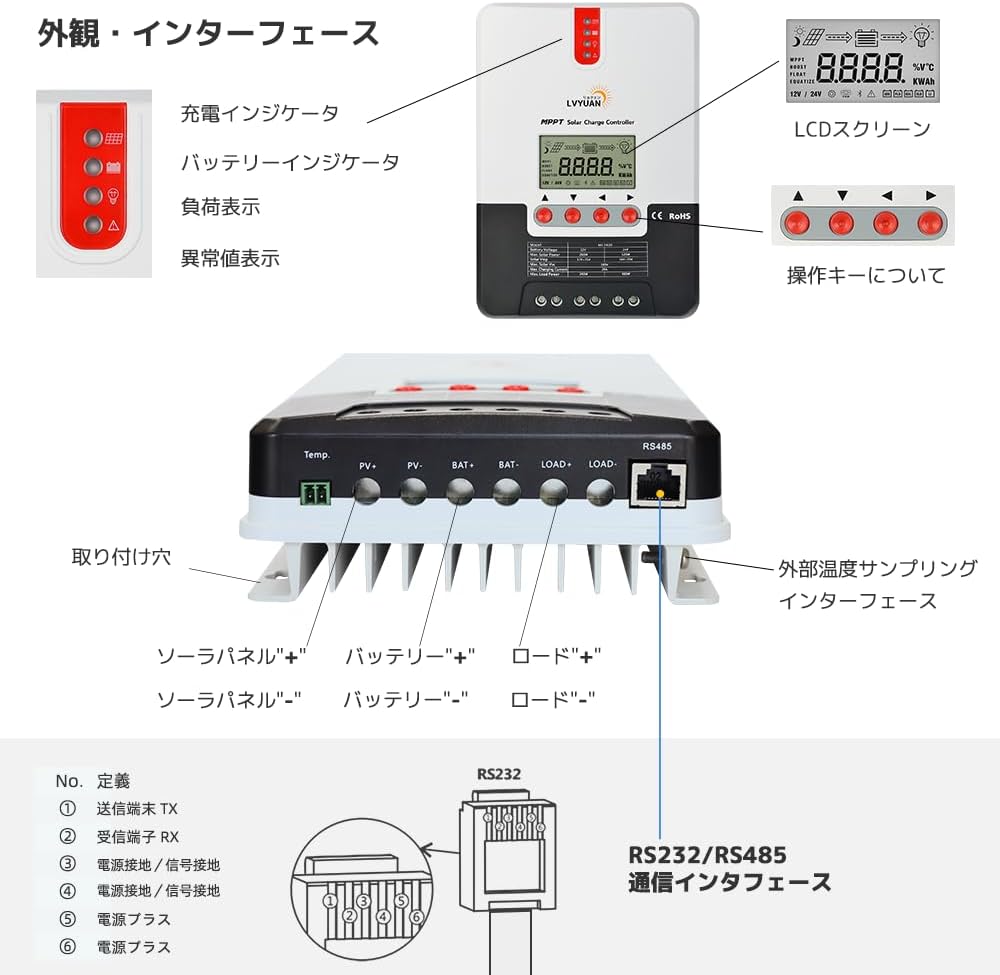
- LED LCD Display: Clear display of charging current, battery voltage, and other statuses. Error codes are displayed for easy troubleshooting.
- Bluetooth Remote Monitoring & Operation: Connects to an optional BT-1 Bluetooth module (sold separately) for remote monitoring and parameter adjustment via a smartphone app, eliminating the need for direct device interaction.
Product Overview
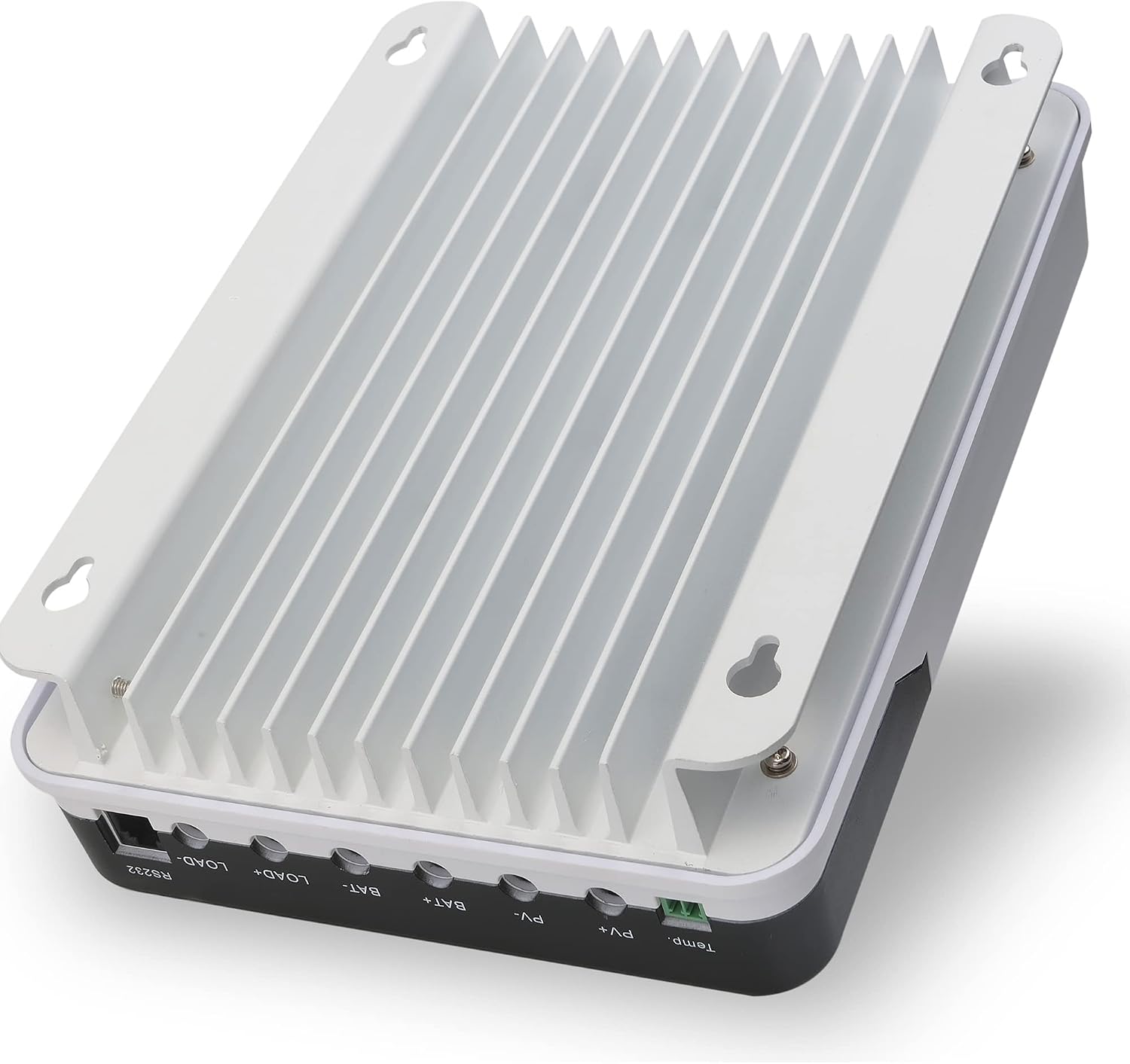
The LVYUAN ML2440 MPPT Solar Charge Controller is a robust device designed for efficient solar power management. Below are visual representations of the product and its key components.



Setup and Installation
Proper installation is crucial for the safe and efficient operation of your solar charge controller. Follow these steps carefully.
1. Connecting the Battery
First, connect the charge controller to a 12V or 24V battery. Ensure correct polarity (positive to positive, negative to negative) to prevent damage.
2. Connecting the Solar Panel
After connecting the battery, connect the solar panel to the controller. Use appropriate cables and ensure secure connections. The controller will display the PV voltage once connected.

Operating Instructions
The controller's LCD display provides real-time information and allows for parameter adjustments. Use the UP and DOWN arrow buttons to navigate through the displays and the ENTER button to confirm selections.
LCD Display Overview


Parameter Settings
To access and modify parameters, navigate to the parameter setting menu. The following video demonstrates how to access and adjust settings.
- Battery Type Setting: Select the appropriate battery type (Sealed, Flooded, Gel, Lithium, User-defined) to ensure optimal charging.
- Rated Battery Voltage Setting: Configure the system voltage (12V or 24V).
- Charge Voltage Setting: Adjust floating charge voltage and equalization charge voltage. Refer to the detailed manual for specific values based on battery type.
- Charge Current Setting: Set the maximum charging current.
- Discharge Limit Setting: Configure under-voltage recovery, under-voltage protection, over-voltage recovery, and over-voltage protection points for DC output.
- Time and Date Adjustment: Set the current time and date for accurate logging.
- Brightness Adjustment: Adjust the brightness of the LCD display.
- Contrast Adjustment: Adjust the contrast of the LCD display.
- Sound Setting: Enable or disable button sounds and alarm sounds.
- Record Query: View power generation records, curve records, and fault records.
- DC Output Setting: Configure DC output mode (OFF, Automatic, Time Control, PV Control, Telecontrol).
- Communication Setting: Adjust baud rate and local address for communication interfaces.
- Language Setting: Select the display language (English or Chinese).
Specifications
| Specification | Value |
|---|---|
| Manufacturer | LVYUAN |
| Product Model Number | ML2440 |
| Package Size | 29.2 x 23.1 x 13.2 cm |
| Item Weight | 2.14 Kilograms |
| Power Source | Solar |
| Included Components | 1.5M Temperature Sensor Cable |
| Voltage | 24 Volts (DC) |
| Display Type | LED LCD |
| UPC | 738349478920 |
Warranty and Support
For warranty information, technical support, or any inquiries regarding your LVYUAN MPPT 40A Solar Charge Controller ML2440, please refer to the documentation included with your product or contact LVYUAN customer service directly. Ensure to have your product model number and purchase details ready for faster assistance.