
1. Introduction
Thank you for choosing the UUYEE Rechargeable LED Headlamp. This manual provides essential information for the safe and efficient operation of your headlamp. This 3-pack of headlamps features a 230° ultra-wide angle COB floodlight and a 300FT LED spotlight, offering versatile illumination. Equipped with a motion sensor, it allows for hands-free control. The headlamps are designed for comfort, durability, and are suitable for various outdoor activities.
2. Package Contents
Please verify that all items are present in your package:
- 3 x UUYEE Rechargeable LED Headlamps
- 3 x USB Type-C Charging Cables
- 12 x Helmet Light Clips
- 1 x Instruction Manual

Figure 2.1: Contents of the UUYEE Headlamp 3-Pack.
3. Product Overview
Familiarize yourself with the components of your UUYEE Headlamp:

Figure 3.1: Labeled components of the UUYEE Headlamp.
- Power Button: Controls power on/off and cycles through lighting modes.
- Sensor Switch: Activates/deactivates motion sensor mode.
- Side LED: Provides a focused spotlight beam.
- COB LED: Provides a wide floodlight beam.
- Comfortable Silicone: Soft material for comfortable wear.
- Elastic Headband: Adjustable for a secure fit.
- Adjustable Buckle: For customizing headband length.
- USB Rechargeable Battery: Integrated power source.
- Power Display: Indicates battery charge status (Red: Charging, Green: Fully Charged, Red/Green: Sensing Mode).
4. Setup
Before first use, please follow these steps:
- Adjust Headband: Use the adjustable buckle to fit the elastic headband comfortably around your head. Ensure it is snug but not too tight.
- Initial Charge: Fully charge the headlamp before its first use. Refer to the "Charging the Headlamp" section for detailed instructions.
- Attach Helmet Clips (Optional): If using with a hard hat or helmet, attach the included helmet clips to secure the headlamp in place.
5. Charging the Headlamp
The UUYEE Headlamp features a built-in rechargeable battery.
- Locate the USB Type-C charging port on the headlamp.
- Connect the provided USB Type-C cable to the headlamp and plug the other end into a standard USB power source (e.g., wall adapter, computer, power bank).
- The power display indicator will show Red while charging.
- Once fully charged, the indicator will turn Green.
- A full charge provides approximately 2.5 to 8 hours of continuous operation, depending on the selected lighting mode.
Figure 5.1: Charging the headlamp and battery indicator.
6. Operating Instructions
6.1 Power On/Off and Lighting Modes
Press the Power Button to cycle through the available lighting modes:
- COB High Mode: Wide floodlight at maximum brightness.
- COB Low Mode: Wide floodlight at reduced brightness.
- LED High Mode: Focused spotlight at maximum brightness.
- LED Low Mode: Focused spotlight at reduced brightness.
To activate the Flashing Mode, press and hold the Power Button for approximately 2 seconds from any active lighting mode.
To turn off the headlamp, continue pressing the Power Button until the light turns off, or press and hold the Power Button from any mode (except flashing) for approximately 2 seconds.
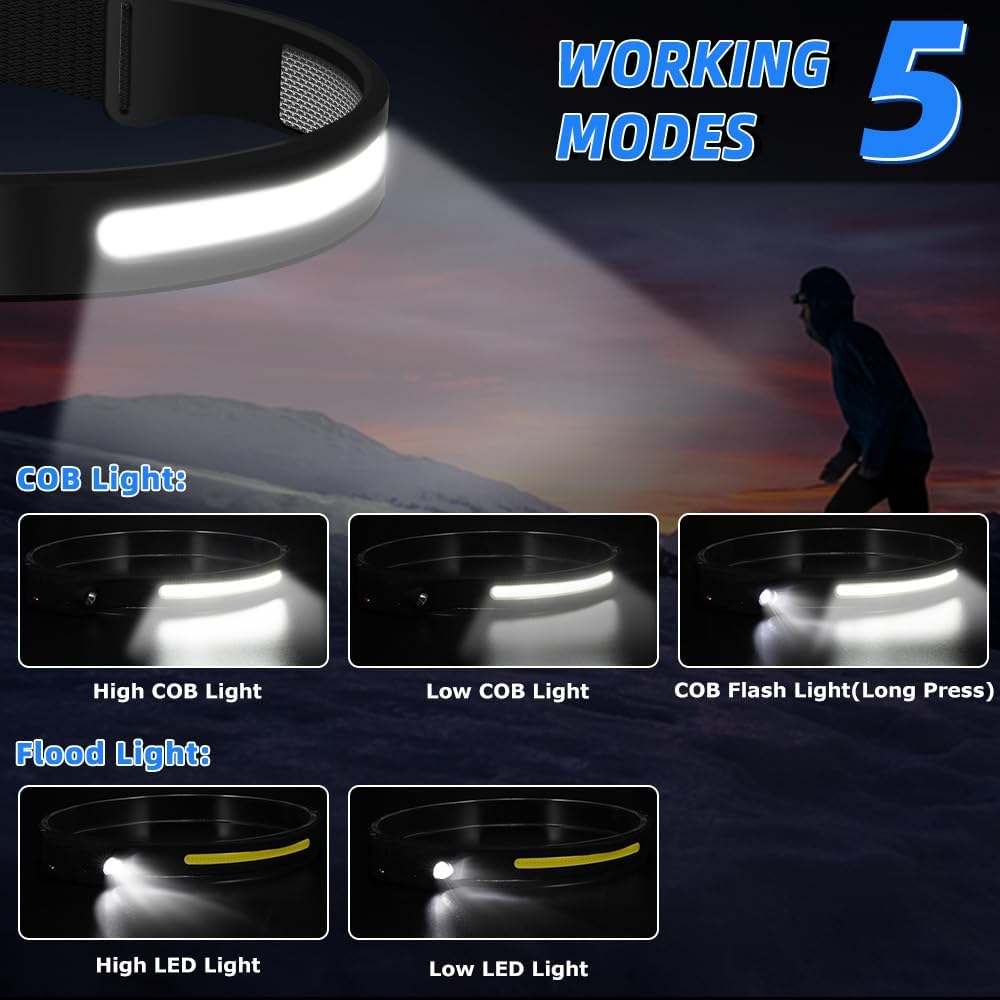
Figure 6.1: Available lighting modes.
6.2 Motion Sensor Function
The motion sensor allows for hands-free operation:
- Press the Sensor Switch button to activate motion sensor mode. The power display indicator will show Red/Green when sensing mode is active.
- Once activated, you can turn the headlamp on or off by waving your hand within approximately 10-15 cm (4-6 inches) in front of the sensor.
- To deactivate motion sensor mode, press the Sensor Switch button again.
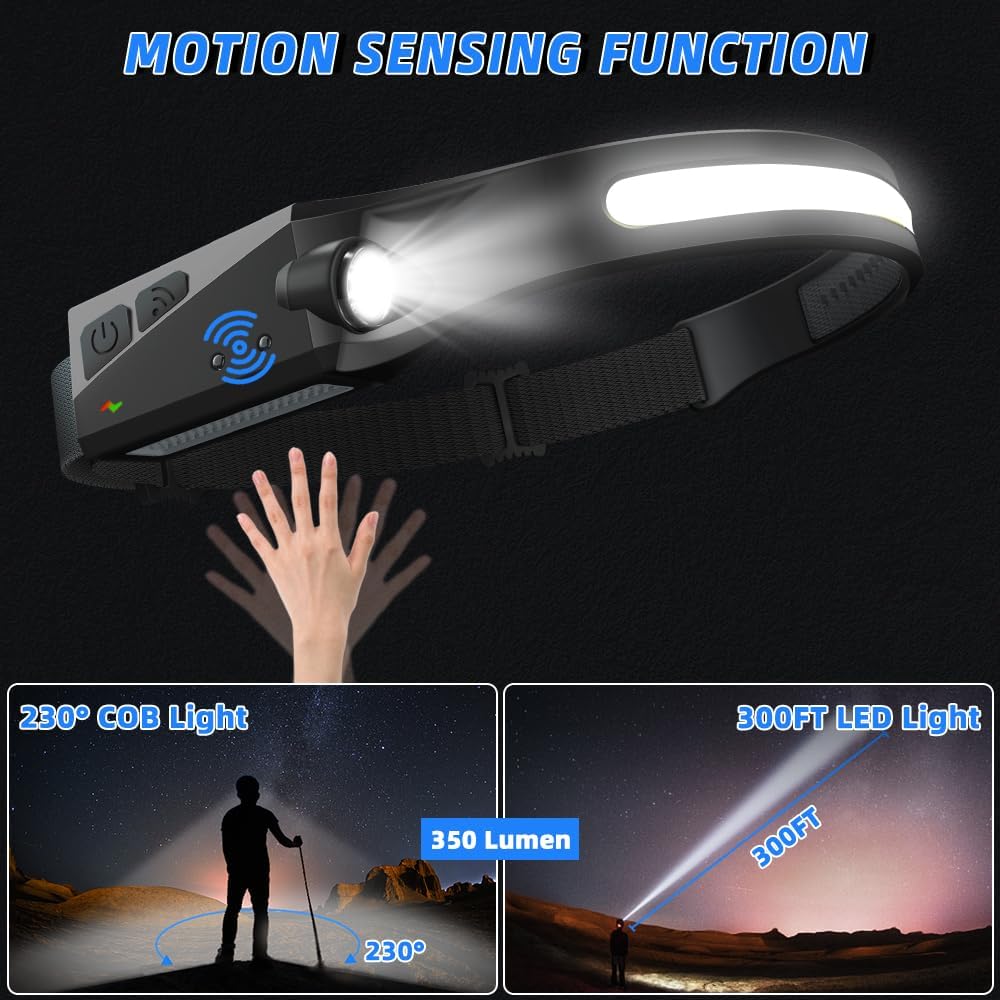
Figure 6.2: Activating the motion sensor function.
7. Maintenance
To ensure the longevity and optimal performance of your headlamp:
- Cleaning: Wipe the headlamp with a soft, damp cloth. Do not use abrasive cleaners or solvents.
- Storage: Store the headlamp in a cool, dry place away from direct sunlight when not in use.
- Battery Care: For extended storage, charge the battery to approximately 50% every 3-6 months to maintain battery health.
- Water Resistance: The headlamp is IPX4 waterproof, meaning it is resistant to splashing water from any direction. Do not submerge the headlamp in water.
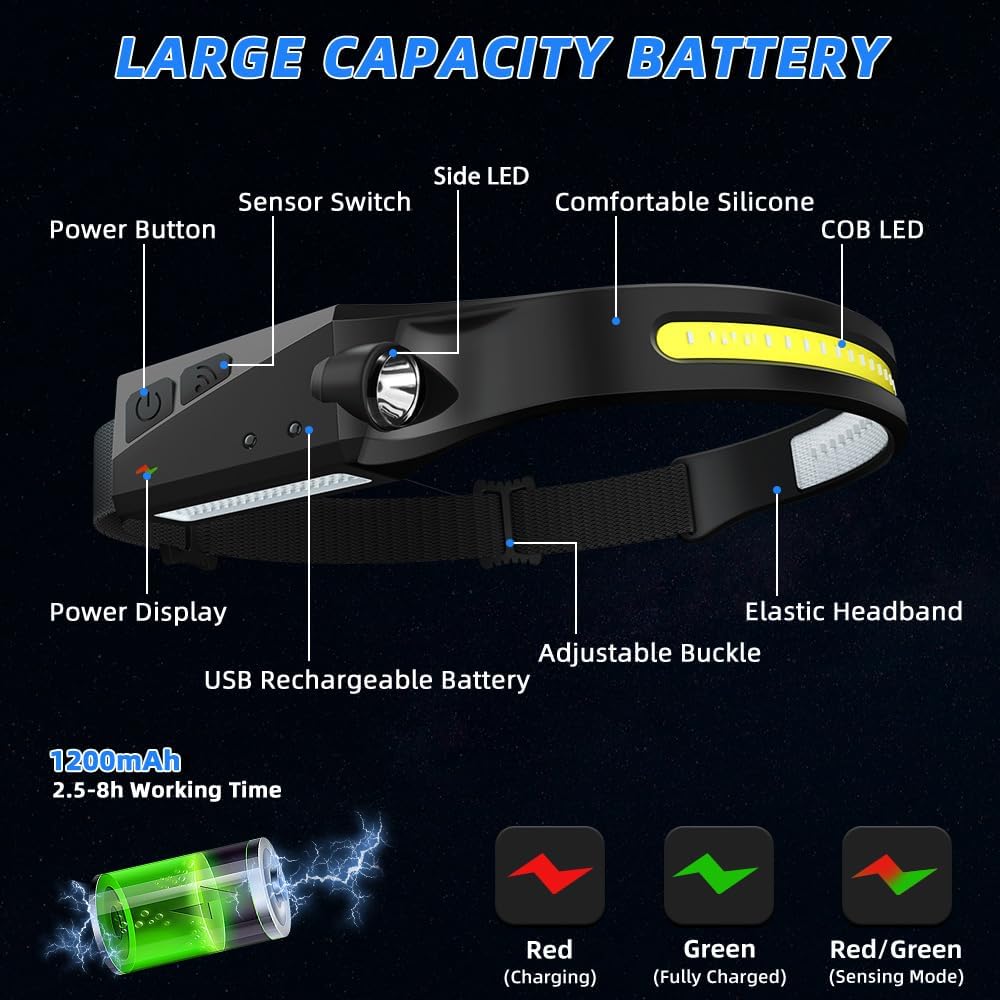
Figure 7.1: Headlamp demonstrating IPX4 water resistance and helmet clip usage.
8. Troubleshooting
If you encounter issues with your headlamp, refer to the following common problems and solutions:
| Problem | Possible Cause | Solution |
|---|---|---|
| Headlamp does not turn on. | Battery is depleted. | Charge the headlamp fully. |
| Light is dim or flickers. | Low battery charge. | Recharge the headlamp. |
| Motion sensor not responding. | Sensor mode not activated or obstruction. | Ensure sensor mode is on (Red/Green indicator). Clear any obstructions in front of the sensor. |
| Headlamp not charging. | Faulty cable or power source. | Try a different USB Type-C cable or power adapter. Ensure connections are secure. |
9. Specifications
| Feature | Detail |
|---|---|
| Light Source Type | LED (COB & Spotlight) |
| White Brightness | 350 Lumens |
| Beam Angle | 230 Degrees (COB) |
| Spotlight Range | Up to 300FT |
| Lighting Modes | COB High, COB Low, LED High, LED Low, Flashing |
| Special Features | Motion Sensor, Adjustable Light Modes, Cordless, Rechargeable |
| Power Source | Battery Powered (Lithium Polymer) |
| Battery Capacity | 1200mAh (estimated from working time) |
| Working Time | 2.5 - 8 hours (depending on mode) |
| Charging Port | USB Type-C |
| Water Resistance Level | IPX4 (Waterproof) |
| Material | Silicone |
| Item Weight | 2.47 ounces (per headlamp) |
| Product Dimensions | 3.9"D x 2.1"W x 1.3"H |
10. Safety Information
Please read and follow these safety guidelines:
- Do not look directly into the LED light when it is on, as it may cause temporary vision impairment.
- Keep out of reach of children.
- Do not attempt to disassemble or modify the headlamp. This will void the warranty and may cause damage or injury.
- Use only the provided charging cable or a certified USB Type-C cable for charging.
- Avoid exposing the headlamp to extreme temperatures or open flames.
- Dispose of the product and its battery responsibly according to local regulations.
11. Warranty and Support
UUYEE offers a 12-month replacement policy for its products. If you experience any issues or have questions regarding your UUYEE Rechargeable LED Headlamp, please contact our customer support team. For assistance, refer to the contact information provided with your purchase or visit the official UUYEE store on Amazon.
Online Support: Visit the UUYEE Store on Amazon