
1. Introduction
This manual provides comprehensive instructions for the JKHFDDIG LED Thermometer Thermo-Hygrometer, a multifunction electronic device designed to display real-time temperature, humidity, time, and date, and includes an alarm clock function. Please read this manual carefully before use to ensure proper operation and longevity of your device.
Package Contents:
- 1 x LED Thermometer Thermo-Hygrometer (White)
2. Setup
2.1 Battery Installation
The device requires AAA batteries for operation (not included). To install batteries:
- Locate the battery compartment cover on the back of the device.
- Slide the cover open.
- Insert 2 AAA batteries, ensuring correct polarity (+/-).
- Close the battery compartment cover.
Note: Before first use, please peel off any transparent protective film from the display screen.
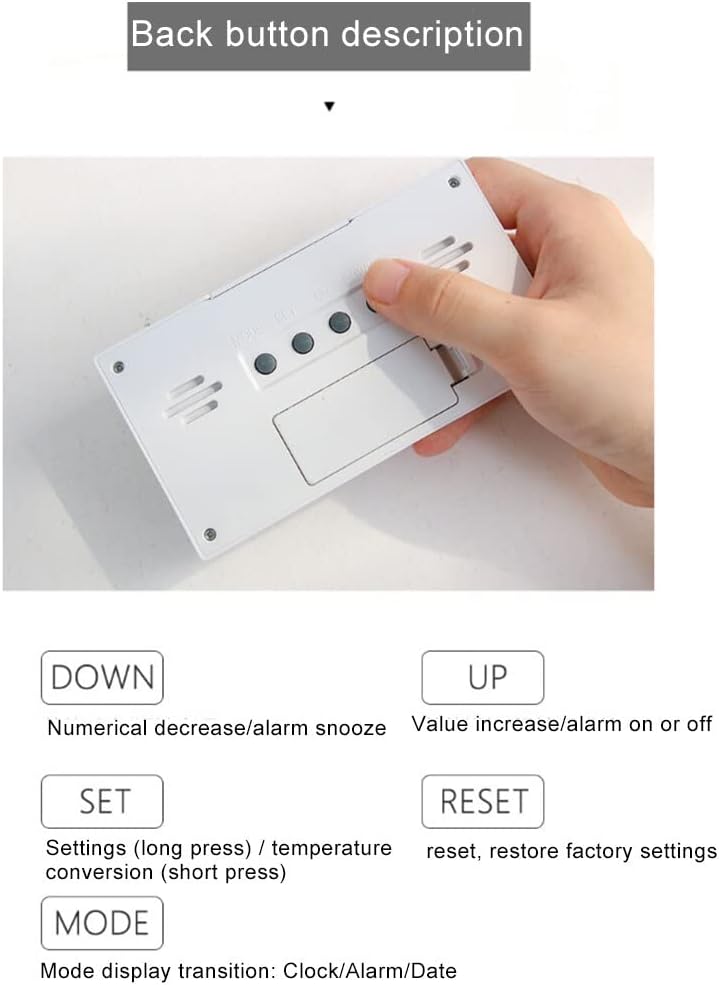
Image: Rear view of the device, illustrating the battery compartment and control buttons for setup and operation.
3. Operating Instructions
3.1 Display Overview
The LCD screen displays various information simultaneously:
- Current Time: Displays the hour and minute.
- Week: Indicates the current day of the week.
- Date: Shows the month and day.
- Weather Map: An icon representing current weather conditions (e.g., sunny, cloudy, rainy).
- Humidity: Percentage of relative humidity.
- Temperature: Current ambient temperature.

Image: Front display of the device, highlighting the different informational segments such as time, date, temperature, and humidity.
3.2 Button Functions
The device features several buttons on the back for configuration:
- SET: Long press to enter settings mode. Short press to convert temperature units (Celsius/Fahrenheit).
- MODE: Transitions between display modes: Clock, Alarm, Date.
- UP: Increases numerical values during settings. Turns alarm on or off.
- DOWN: Decreases numerical values during settings. Activates alarm snooze function.
- RESET: Restores the device to factory default settings.
3.3 Setting Time and Date
- Press the MODE button until the clock display is active.
- Long press the SET button until the time digits begin to flash.
- Use the UP or DOWN buttons to adjust the hour.
- Press SET again to move to the minutes, then adjust with UP or DOWN.
- Continue pressing SET to cycle through year, month, and day settings, adjusting each with UP or DOWN.
- Once all settings are complete, press SET again or wait a few seconds for the device to exit settings mode automatically.
3.4 Setting the Alarm
- Press the MODE button until the alarm display is active.
- Long press the SET button until the alarm time digits flash.
- Use the UP or DOWN buttons to set the desired alarm hour and minutes.
- Press SET to confirm.
- To activate or deactivate the alarm, press the UP button while in alarm display mode. An alarm icon will appear/disappear on the screen.
3.5 Temperature Unit Conversion
To switch between Celsius (°C) and Fahrenheit (°F), short press the SET button while in normal display mode.
4. Maintenance
4.1 Cleaning
To clean the device, use a soft, dry cloth. Do not use abrasive cleaners, solvents, or immerse the device in water. Avoid spraying cleaning solutions directly onto the display.
4.2 Battery Replacement
When the display becomes dim or the device stops functioning, replace the AAA batteries. Refer to Section 2.1 for battery installation instructions. Dispose of used batteries responsibly according to local regulations.
5. Troubleshooting
- Device does not power on:
Ensure batteries are inserted correctly with the correct polarity. Check if batteries are new or fully charged. - Display is dim or blank:
Replace the batteries. - Incorrect temperature/humidity readings:
Ensure the device is placed in a location with good air circulation, away from direct sunlight, heat sources, or extreme drafts. Allow some time for the sensor to stabilize after placement or battery change. - Buttons are unresponsive:
Try removing and reinserting the batteries to perform a soft reset. If issues persist, use the RESET button on the back of the device to restore factory settings.
6. Specifications
| Feature | Detail |
|---|---|
| Model Number | JKHFDDIG8753 |
| Material | ABS |
| Temperature Range | 0°C to 50°C (32°F to 122°F) |
| Humidity Range | 20% to 89% RH |
| Power Source | Battery Powered (AAA batteries, not included) |
| Display Type | LED |
| Color | White |
| Item Weight | 1 Grams |
| Manufacturer | JKHFDDIG |
7. Warranty and Support
For warranty information or technical support, please refer to the documentation provided at the time of purchase or contact your retailer. Keep your purchase receipt as proof of purchase.