
ULTRA POWER EPF150-12N
ULTRAPOWER 10-Amp Battery Charger User Manual
Model: EPF150-12N
1. Introduction
Thank you for choosing the ULTRAPOWER Upgraded 10-Amp Battery Charger. This intelligent charger is designed to efficiently and safely charge both 12V-14.6V LiFePO4 (Lithium Iron Phosphate) batteries and 12V Lead-Acid (SLA, GEL) batteries. With its advanced microprocessor technology, it provides optimal charging performance and extends battery life. This manual provides essential information for the safe and effective use of your charger.

Figure 1.1: ULTRAPOWER 10-Amp Battery Charger with included accessories.
2. Safety Instructions
Please read and understand all safety instructions before operating the charger. Failure to follow these instructions may result in electric shock, fire, or serious injury.
- Indoor Use Only: This charger is designed for indoor use. Do not expose it to rain, moisture, or extreme temperatures.
- Ventilation: Ensure adequate ventilation around the charger during operation. The charger may generate heat, and proper airflow prevents overheating.
- Battery Compatibility: Only use this charger with 12V-14.6V LiFePO4 batteries and 12V Lead-Acid batteries. Do not attempt to charge other battery types.
- Polarity: Always connect the charger to the correct battery terminals (red to positive, black to negative). Incorrect polarity can damage the charger and battery.
- Disconnect Power: Always disconnect the AC power from the charger before making or breaking connections to the battery.
- Supervision: Do not leave the charger unattended for extended periods, especially during the initial charging phase.
- Damaged Cables: Do not operate the charger with damaged cords or cables. Contact customer support for replacement.
- Children and Pets: Keep the charger and batteries out of reach of children and pets.
3. Product Features
The ULTRAPOWER 10-Amp Battery Charger offers a range of advanced features for efficient and safe battery charging:
- Dual Battery Compatibility: Charges both 12V-14.6V LiFePO4 and 12V Lead-Acid (SLA, GEL) batteries.
- 10-Amp Fast Charging: Delivers a high output of 10 Amps (150 Watts) for quick and efficient charging.
- 2-in-1 Smart Charging Technology: Microprocessor-controlled to automatically detect battery status and type, adjusting charging rate and mode accordingly.
- 4-Stage Charging Process: Optimizes battery charging for longevity and performance.
- Multi-Protection Features: Includes protection against overcharging, short-circuiting, overheating, and reverse polarity.
- Automatic Cut-Off: Automatically stops charging when LiFePO4 batteries are full and enters float mode for Lead-Acid batteries.
- 0V Battery Reactivation: Capable of reactivating deeply discharged 0V batteries.
- LED Indicators: Clear 4-LED display shows charging status (25%-100%).
- Compact and Lightweight Design: Easy to transport and store.

Figure 3.1: The charger features 6 types of protection for safe operation.
4. Package Contents
Verify that all items are present in your package:
- 1 x ULTRAPOWER 10-Amp Battery Charger (Main Unit)
- 1 x Alligator Clips Cable (2-foot)
- 1 x XLR Connector Cable (2-foot)
- 1 x AC Power Cord (4-foot)
- 1 x User Manual

Figure 4.1: All components included in the product package.
5. Setup and Connection
Follow these steps to set up and connect your battery charger:
- Choose the Right Cable: Select either the Alligator Clips Cable or the XLR Connector Cable based on your battery's connection type.
- Connect to Charger: Plug the chosen accessory cable into the output port of the ULTRAPOWER charger.
- Connect to Battery:
- For Alligator Clips: Connect the RED clip to the battery's POSITIVE (+) terminal and the BLACK clip to the battery's NEGATIVE (-) terminal.
- For XLR Connector: Plug the XLR connector directly into the compatible battery port.
- Verify Connection: Ensure a secure and correct polarity connection. If reversed polarity is detected, the charger's LEDs will flash simultaneously (refer to Troubleshooting).
- Connect to Power: Plug the AC power cord into a standard AC 100-240V wall outlet. The charger will automatically begin the charging process.
6. Operating Instructions
Once connected, the charger operates automatically. The 4-LED display provides real-time charging status:
- Power LED: A red LED indicates the charger is powered on.
- Charging Status LEDs: Four green LEDs indicate the battery's charge level:
- 25% LED: Illuminates when charge reaches 25%.
- 50% LED: Illuminates when charge reaches 50%.
- 75% LED: Illuminates when charge reaches 75%.
- 100% LED: Illuminates when charge reaches 100%.
The charger will automatically manage the battery's health, including activating sleep batteries and cutting off power once fully charged (for LiFePO4) or entering float mode (for Lead-Acid).
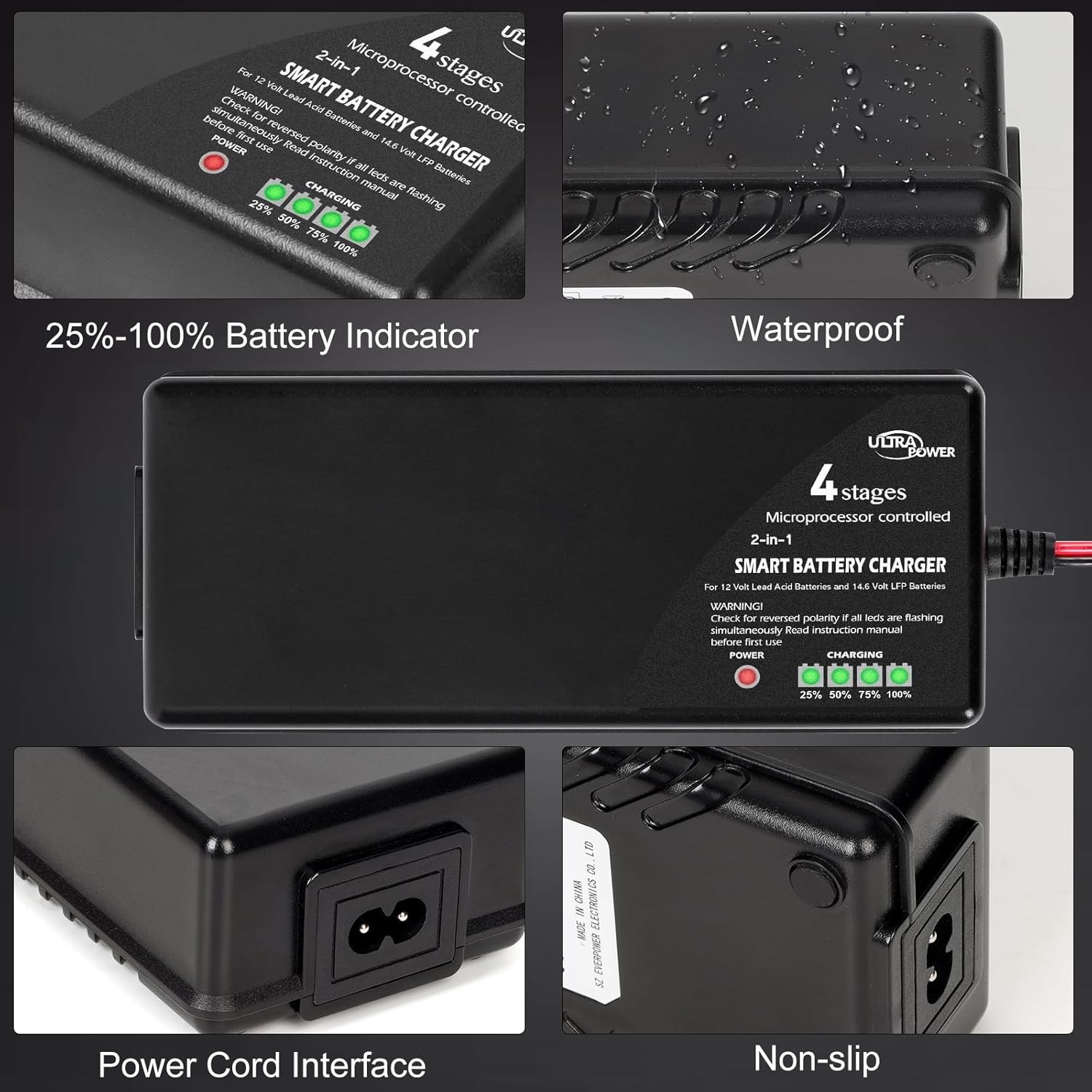
Figure 6.1: Charger display and physical features.
7. 4-Stage Charging Process
The ULTRAPOWER charger employs an intelligent 4-stage charging process to optimize battery performance and lifespan:
- Stage 1: Pre-Charge
The charger initiates a small current charge if it detects a deeply discharged battery. This stage helps to safely prepare the battery for bulk charging.
- Stage 2: Bulk Charge
The charger delivers its highest rated current (10 Amps) to the battery until it reaches approximately 80% of its capacity. This is the fastest charging stage.
- Stage 3: Constant Voltage (Absorption)
The output voltage is limited to 14.6 Volts (for LiFePO4) or 14.4 Volts (for Lead-Acid), while the charging current gradually declines as the battery approaches full capacity. This prevents overcharging and overheating.
- Stage 4: Cut-Off / Float Mode
For LiFePO4 batteries, the charger will automatically cut off power once the battery is fully charged. For Lead-Acid batteries, it enters a floating mode, maintaining the battery at an optimal voltage without overcharging, allowing the charger to be connected indefinitely.
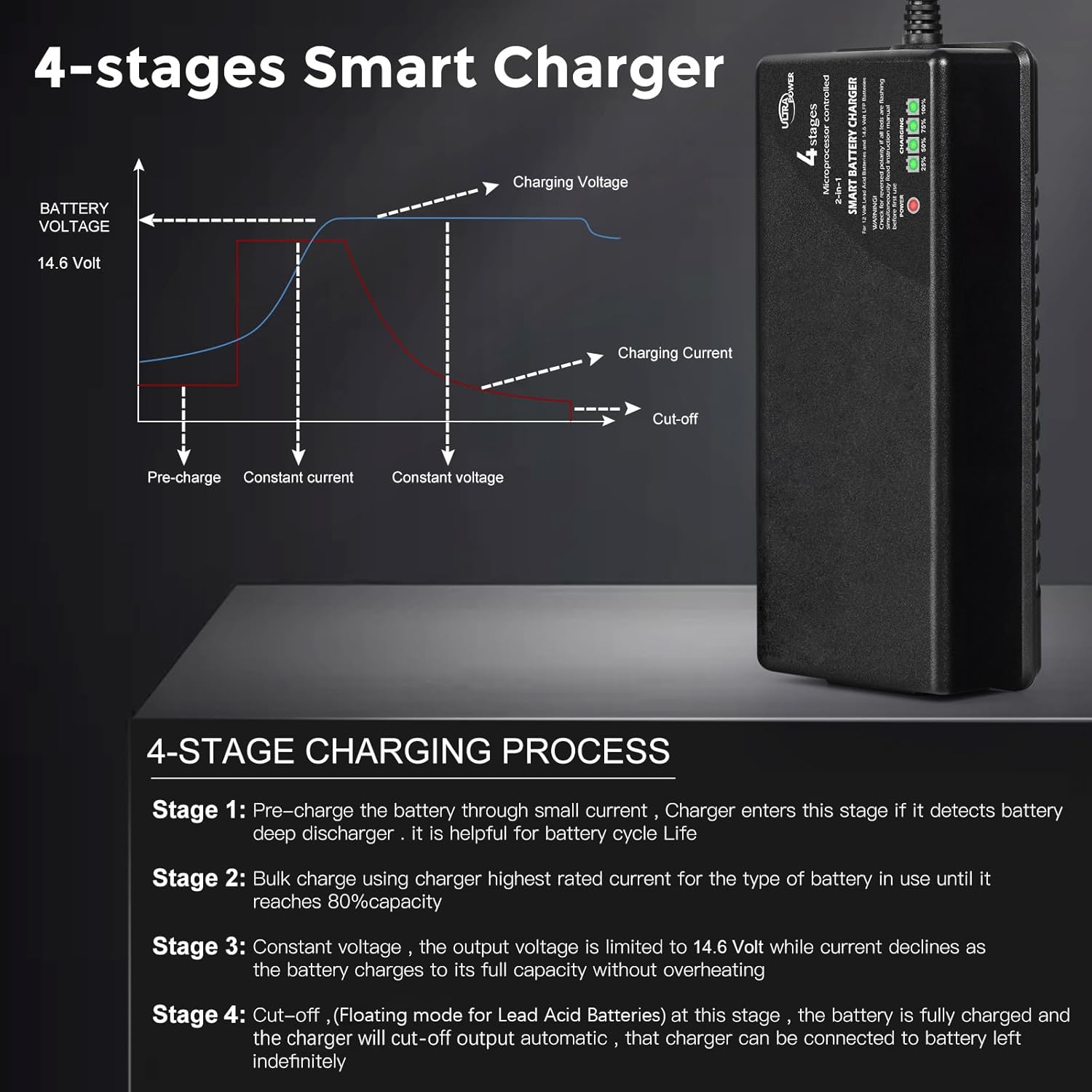
Figure 7.1: Visual representation of the 4-stage charging process.
8. Multi-Protection Features
The ULTRAPOWER charger is equipped with multiple safety features to protect both the charger and your battery:
- Overcharge Protection: Prevents battery damage from excessive charging.
- Short-Circuit Protection: Automatically shuts off in case of a short circuit.
- Overheating Protection: Monitors internal temperature and reduces output or shuts down if it gets too hot.
- Reverse Polarity Protection: Prevents damage if the battery connections are reversed.
- Over-Current Protection: Limits the charging current to safe levels.
- Over-Voltage Protection: Ensures the output voltage does not exceed safe limits.
9. Compatibility and Wide Use
This versatile charger is suitable for a wide range of applications using 12V-14.6V LiFePO4 and 12V Lead-Acid batteries, including but not limited to:
- Cars
- Racing vehicles
- ATVs and UTVs
- Trucks
- Boats and RVs
- Lawn tractors and mowers
- Electric bicycles and scooters
- Motorcycles and snowmobiles
- Drones (UAVs)
- Golf carts
- Backup generator systems
- Alarm system batteries

Figure 9.1: Examples of applications for the ULTRAPOWER battery charger.
10. Maintenance
Proper maintenance ensures the longevity and optimal performance of your charger:
- Cleaning: Disconnect the charger from power and battery before cleaning. Use a soft, dry cloth to wipe the exterior. Do not use harsh chemicals or abrasives.
- Storage: Store the charger in a cool, dry place when not in use. Keep it away from direct sunlight and moisture.
- Cable Inspection: Regularly inspect the power cord and accessory cables for any signs of damage, fraying, or corrosion. Replace if necessary.
- Ventilation: Ensure the charger's ventilation openings are clear of dust and debris to prevent overheating.
11. Troubleshooting
If you encounter issues with your ULTRAPOWER charger, refer to the following common problems and solutions:
| Problem | Possible Cause | Solution |
|---|---|---|
| Charger not turning on / No LEDs lit | No power from outlet; Loose power cord connection; Faulty outlet. | Check power outlet; Ensure power cord is securely plugged into charger and wall; Try a different outlet. |
| All LEDs flashing simultaneously | Reverse polarity connection. | Disconnect from power and battery. Reconnect RED clip to positive (+) and BLACK clip to negative (-) terminals. |
| Charger gets very hot during operation | Normal operation for high-power chargers; Insufficient ventilation. | Ensure charger is placed in a well-ventilated area, away from heat-sensitive materials. If excessively hot or emitting smoke/smell, disconnect immediately and contact support. |
| Battery not charging / Charging LEDs not progressing | Poor connection; Battery is severely discharged (below 0V); Battery is faulty; Incorrect battery type. | Check all connections for tightness; Allow time for 0V battery reactivation (if applicable); Test battery with another device; Ensure battery is 12V LiFePO4 or Lead-Acid. |
| Charger cuts off prematurely (LiFePO4) | Battery is already full; Battery Management System (BMS) in battery is triggering cut-off. | This is normal if the battery is full. If not, check battery's BMS status. |
12. Specifications
Detailed technical specifications for the ULTRAPOWER 10-Amp Battery Charger:
| Specification | Value |
|---|---|
| Model Number | EPF150-12N |
| Input Voltage | AC 100-240V |
| Output Voltage | 14.6 Volts (DC) |
| Output Current | 10 Amps |
| Power Output | 150 Watts |
| Compatible Battery Types | 12V-14.6V LiFePO4, 12V Lead-Acid (SLA, GEL) |
| Product Dimensions | 6.69 x 2.75 x 1.77 inches |
| Item Weight | 1.2 pounds |
| Color | Black |
13. Warranty and Support
For warranty information, technical support, or any questions regarding your ULTRAPOWER 10-Amp Battery Charger, please refer to the contact information provided on the product packaging or visit the official ULTRAPOWER website. Keep your purchase receipt as proof of purchase for warranty claims.
Ask a question about this manual
Ask about setup, troubleshooting, compatibility, parts, safety, or missing instructions. Manuals+ will review the question and use this page’s manual context to help answer it.