
1. Product Overview
The SKMEI Model 1841 is a versatile digital sports watch designed for daily wear and active lifestyles. It features a clear LED display, multiple functions including dual time, chronograph, alarm, date, week, and countdown timer, all housed in a durable, water-resistant casing.

Figure 1: Front view of the SKMEI Model 1841 Digital Sports Watch.
2. Button Functions
Familiarize yourself with the watch's buttons to operate its various functions. Refer to Figure 2 for button identification.
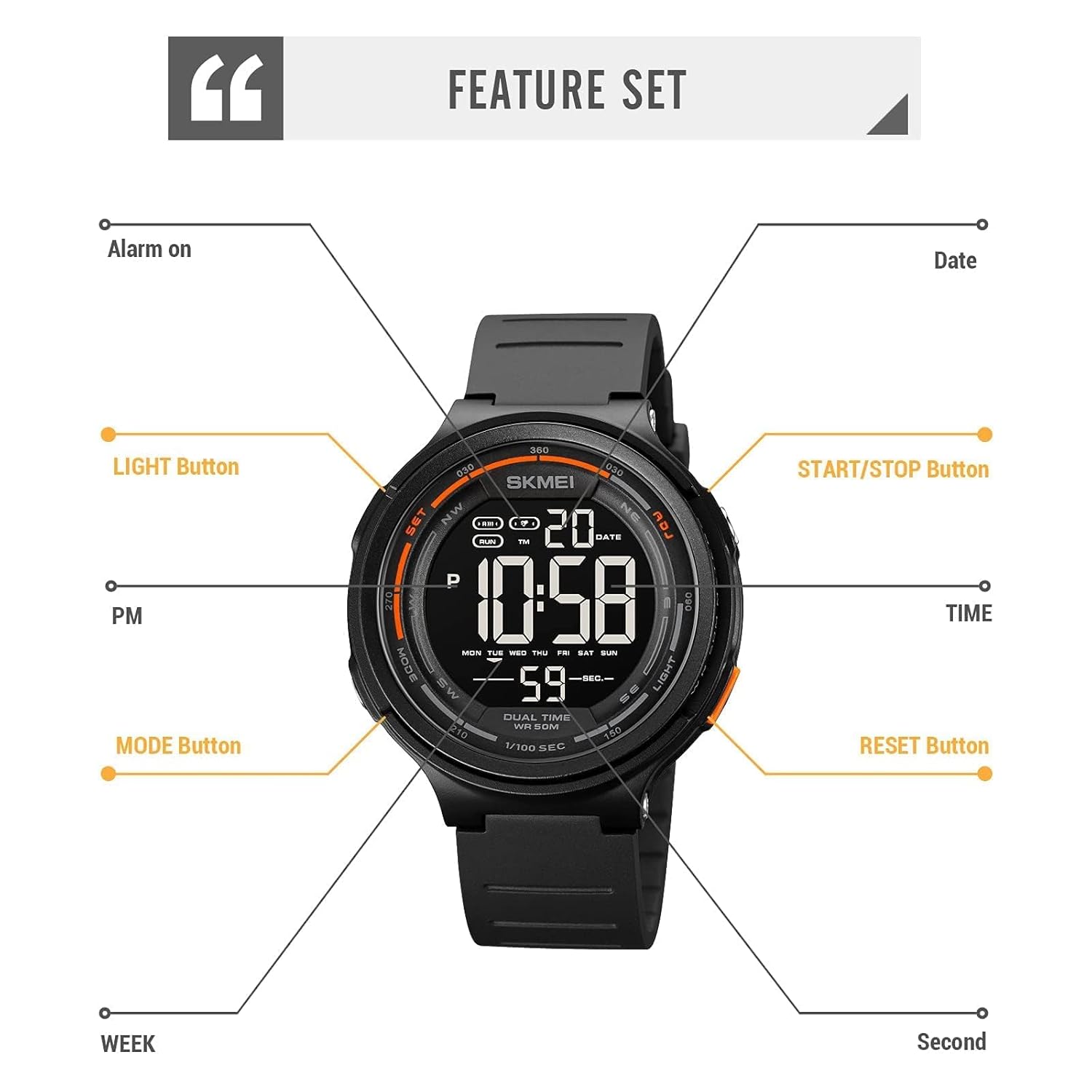
Figure 2: SKMEI Model 1841 Feature Set and Button Layout.
- MODE Button (Bottom Left): Cycles through different modes: Time, Chronograph (Stopwatch), Alarm, and Countdown.
- LIGHT Button (Bottom Right): Activates the LED backlight for improved visibility in low-light conditions.
- SET Button (Top Left): Used to enter setting mode and confirm selections.
- ADJ Button (Top Right): Used to adjust values (e.g., hours, minutes, date) when in setting mode. Also functions as START/STOP for Chronograph and Countdown.
3. Setup and Initial Configuration
3.1 Setting Time and Date
- From the Time display mode, press and hold the SET button until the seconds begin to flash. This indicates you are in setting mode.
- Press the MODE button to cycle through the settings: Seconds → Hours → Minutes → Year → Month → Day.
- Use the ADJ button to increase the flashing value. Hold the ADJ button to rapidly advance the value.
- Once all settings are adjusted, press the SET button to exit the setting mode.
3.2 Setting the Alarm
- From the Time display mode, press the MODE button until you reach the Alarm mode (indicated by an alarm icon).
- Press and hold the SET button until the alarm hours begin to flash.
- Use the ADJ button to set the desired alarm hour.
- Press the MODE button to move to the alarm minutes, then use the ADJ button to set the minutes.
- Press the SET button to confirm and exit alarm setting mode.
- To turn the alarm ON/OFF, press the ADJ button while in Alarm mode. An alarm icon will appear/disappear on the display.
4. Operating Functions
4.1 Chronograph (Stopwatch)
- Press the MODE button to enter Chronograph mode. The display will show '00:00:00'.
- Press the ADJ button to start the stopwatch.
- Press the ADJ button again to pause the stopwatch.
- To reset the stopwatch to zero, press the SET button while the stopwatch is paused.
4.2 Countdown Timer
- Press the MODE button repeatedly until you reach the Countdown mode.
- Press and hold the SET button to enter countdown setting mode. The hours will flash.
- Use the ADJ button to set the desired hours, then press MODE to move to minutes, and then seconds.
- Press SET to confirm the countdown time.
- Press the ADJ button to start or pause the countdown.
- When the countdown reaches zero, an alarm will sound. Press any button to stop the alarm.
4.3 LED Backlight
Press the LIGHT button to illuminate the display. The backlight will remain active for a few seconds. This feature is particularly useful in dark environments.

Figure 3: Watch display with activated LED backlight.
5. Maintenance and Care
5.1 Water Resistance
The SKMEI Model 1841 is water-resistant up to 50 meters (5 ATM / 165 feet). This means it is suitable for hand washing, rain, and sweating. It is NOT suitable for diving, swimming, snorkeling, or water-related work where prolonged submersion occurs.
IMPORTANT: Do not press any buttons while the watch is submerged in water. Doing so can compromise the water resistance seal and lead to internal damage.

Figure 4: Water resistance guidelines for the watch.
5.2 Cleaning
To clean your watch, wipe it gently with a soft, damp cloth. Avoid using harsh chemicals, solvents, or abrasive cleaners, as these can damage the watch's finish or internal components.
5.3 Battery Replacement
The watch is powered by a standard watch battery. When the display dims or functions become erratic, it may be time for a battery replacement. It is recommended to have the battery replaced by a qualified watch technician to ensure the water resistance seal is properly maintained.
6. Troubleshooting
6.1 Display Not Visible in Low Light
The watch display may appear less vibrant in very low light conditions without the backlight. Press the LIGHT button to activate the LED backlight for improved visibility.
6.2 Buttons Not Responding
If buttons are unresponsive, ensure the watch is not wet. If the issue persists, a low battery might be the cause. Consider a battery replacement.
6.3 Time Inaccuracy
If the time becomes inaccurate, reset the time and date as described in Section 3.1. Persistent inaccuracy may indicate a need for battery replacement or professional inspection.
7. Specifications
Detailed specifications for the SKMEI Model 1841 watch:

Figure 5: Product parameters and dimensions.
| Feature | Detail |
|---|---|
| Brand | SKMEI |
| Model Number | 1841 |
| Product Dimensions | 26 x 4.7 x 1.5 cm |
| Item Weight | 50 g |
| Case Diameter | 47 Millimetres |
| Band Width | 22 Millimetres |
| Band Material Type | Polyurethane |
| Band Colour | Gray |
| Watch Movement Type | Quartz |
| Water Resistance Depth | 50 Meters (5 ATM) |
| Crystal Material | Resin |
| Case Material | ABS |
| Buckle Material | Stainless Steel |
| Functions | Dual Time, Chronograph, Alarm, Date, Week, LED Light, Countdown, 12/24-hour format |
8. Warranty and Support
8.1 Warranty Information
This SKMEI watch comes with a Limited Warranty. Please refer to the warranty card included in your product packaging for specific terms and conditions, including coverage duration and what is covered.
8.2 Customer Support
For any questions, technical assistance, or warranty claims, please contact SKMEI customer support through the retailer where the product was purchased or refer to the official SKMEI website for contact information.


