
1. Introduction
This manual provides essential instructions for the proper setup, operation, and maintenance of your Generic infrared remote control. This remote is designed to be a functional replacement for specific Comfort Zone and ZOKOP electric fireplace infrared heater models. Please read this manual thoroughly before use to ensure correct functionality and to prevent damage.
2. Product Overview
The remote control allows for convenient operation of your compatible electric fireplace infrared heater from a distance. It features a compact design with clearly marked buttons for various functions.

Figure 2.1: Front view of the remote control, showing the button layout for power, flame, fan, temperature, timer, and mode functions.
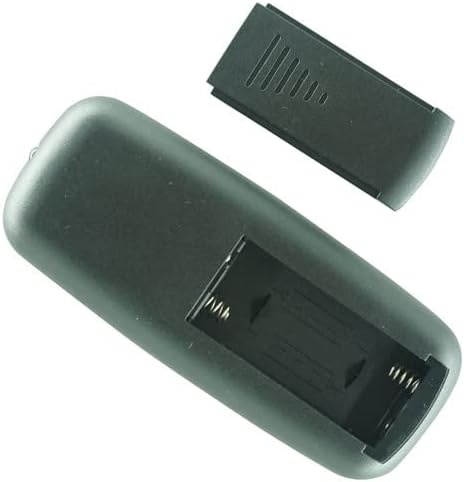
Figure 2.2: Back view of the remote control, illustrating the battery compartment with the cover removed, ready for battery insertion.
3. Setup
3.1 Battery Installation
The remote control requires two (2) AAA batteries (not included) for operation. Follow these steps to install the batteries:
- Locate the battery compartment cover on the back of the remote control.
- Gently slide the battery compartment cover downwards or outwards to remove it.
- Insert two AAA batteries, ensuring the positive (+) and negative (-) terminals align correctly with the markings inside the compartment.
- Replace the battery compartment cover by sliding it back into position until it clicks securely.
Note: Always use new batteries and ensure correct polarity. Do not mix old and new batteries or different types of batteries.
4. Operating Instructions
Point the remote control directly at the infrared receiver on your electric fireplace infrared heater. Ensure there are no obstructions between the remote and the heater.
4.1 Button Functions
- Power Button (⏻): Press to turn the heater ON or OFF.
- Flame Button (🔥): Controls the flame effect settings (e.g., intensity, color, or on/off).
- Fan Button (💨): Adjusts the fan speed or turns the fan function on/off.
- Temperature/Heat Button (☀️): Cycles through heat settings or adjusts the desired temperature.
- Timer Button (⏱️): Activates or adjusts the heater's timer function for automatic shut-off.
- Mode Button (M): Selects different operating modes (if applicable to your heater model).
5. Maintenance
5.1 Cleaning
To clean the remote control, wipe it with a soft, dry cloth. Do not use abrasive cleaners, waxes, or solvents as they may damage the surface or internal components.
5.2 Battery Replacement and Storage
Replace batteries when the remote control's range decreases or it stops responding. If the remote control will not be used for an extended period, remove the batteries to prevent leakage and corrosion.
6. Troubleshooting
- Remote not responding:
- Ensure batteries are installed correctly with proper polarity.
- Replace old batteries with new ones.
- Check for any obstructions between the remote and the heater's infrared receiver.
- Ensure you are within the effective operating range of the heater.
- Intermittent operation:
- This may indicate low battery power. Replace batteries.
- Ensure a clear line of sight to the heater.
7. Specifications
| Brand | Generic |
| Model Number | Easytry16784 |
| Connectivity Technology | Infrared |
| Controller Type | Button Control |
| Number of Batteries Required | 2 AAA batteries |
8. Warranty and Support
This product is a functional replacement remote control. For specific warranty information regarding your original electric fireplace infrared heater, please refer to the manual provided with your heater or contact its manufacturer. For support regarding this remote control, please contact the seller directly through your purchase platform.