
1. Introduction
This manual provides detailed instructions for the installation, operation, and maintenance of your Losuudy L-A2 Wired Backup Camera System. This system is designed to enhance driving safety and convenience for large vehicles such as trucks, RVs, trailers, and buses. It features a 10.1-inch IPS monitor and four AHD 1080P cameras with night vision and recording capabilities.
2. Product Overview
2.1 System Components
The Losuudy L-A2 system includes the following components:
- 10.1-inch IPS Monitor
- Two Front/Rear Cameras (AHD 1080P, Night Vision)
- Two Side View Cameras (AHD 1080P, Night Vision)
- One 49 ft Cable
- Three 23 ft Cables
- Cigarette Lighter Adapter for power supply

Image 2.1.1: Overview of the Losuudy L-A2 Wired Backup Camera System, showing the 10.1-inch monitor, four cameras (two with brackets, two dome-style), and four connection cables of varying lengths.

Image 2.1.2: Detailed view of the system components including the 10.1-inch monitor, front/rear cameras, side view cameras, and wired cables, with their approximate dimensions.
2.2 Key Features
- 1080P AHD Cameras: All four cameras provide high-definition 1080P video quality with advanced AHD technology.
- Night Vision: All cameras are equipped with night vision capabilities for clear visibility in low-light conditions.
- Recording Function: The system supports simultaneous video recording from all four cameras, capturing your journeys.
- 10.1-inch IPS Monitor: A large display area ensures clear visibility, even in 4-segment split-screen mode, with a wide 178-degree viewing angle.
- Image Mirror Switch: Individually adjust each camera's display to front view or mirror view from the menu.
- Adjustable Guide Lines: Customize parking guide lines to be always on, triggered, or off as needed.
- IP69 Waterproof Cameras: Cameras are designed to withstand harsh weather conditions.
- Easy Installation: Simple power supply via cigarette lighter adapter and single-cable connection for monitor and cameras.
3. Setup and Installation
Proper installation is crucial for optimal performance. Please follow these steps carefully.
3.1 Wiring Diagram
The system utilizes a wired connection for stable signal transmission. Connect the cameras to the monitor using the provided cables. The monitor receives power via the cigarette lighter adapter. Trigger wires for CH2 and CH3 can be connected to reverse lights or turn signals for automatic display switching.

Image 3.1.1: Wiring diagram illustrating the connections between the 10.1-inch monitor, the four cameras (CH1, CH2, CH3, CH4), and the power supply via the cigarette lighter adapter. Trigger wires for CH2 and CH3 are also shown.
3.2 Camera Placement and Mounting
Strategically mount the cameras to cover desired viewing angles. The system is suitable for various vehicle types, including RVs, trucks, buses, and trailers, providing comprehensive coverage for front, rear, and side views.

Image 3.2.1: Examples of camera placement on different vehicle types (RV, truck, bus, construction vehicle, trailer) for optimal front, rear, left, and right side views.
4. Operating Instructions
4.1 Monitor Functions
The 10.1-inch IPS monitor provides a clear display and various customizable settings.
4.1.1 Split Screen Display
The monitor supports multiple display modes, including single camera view, two-camera split, and four-camera split screen, allowing for a 360-degree view around your vehicle without blind spots.
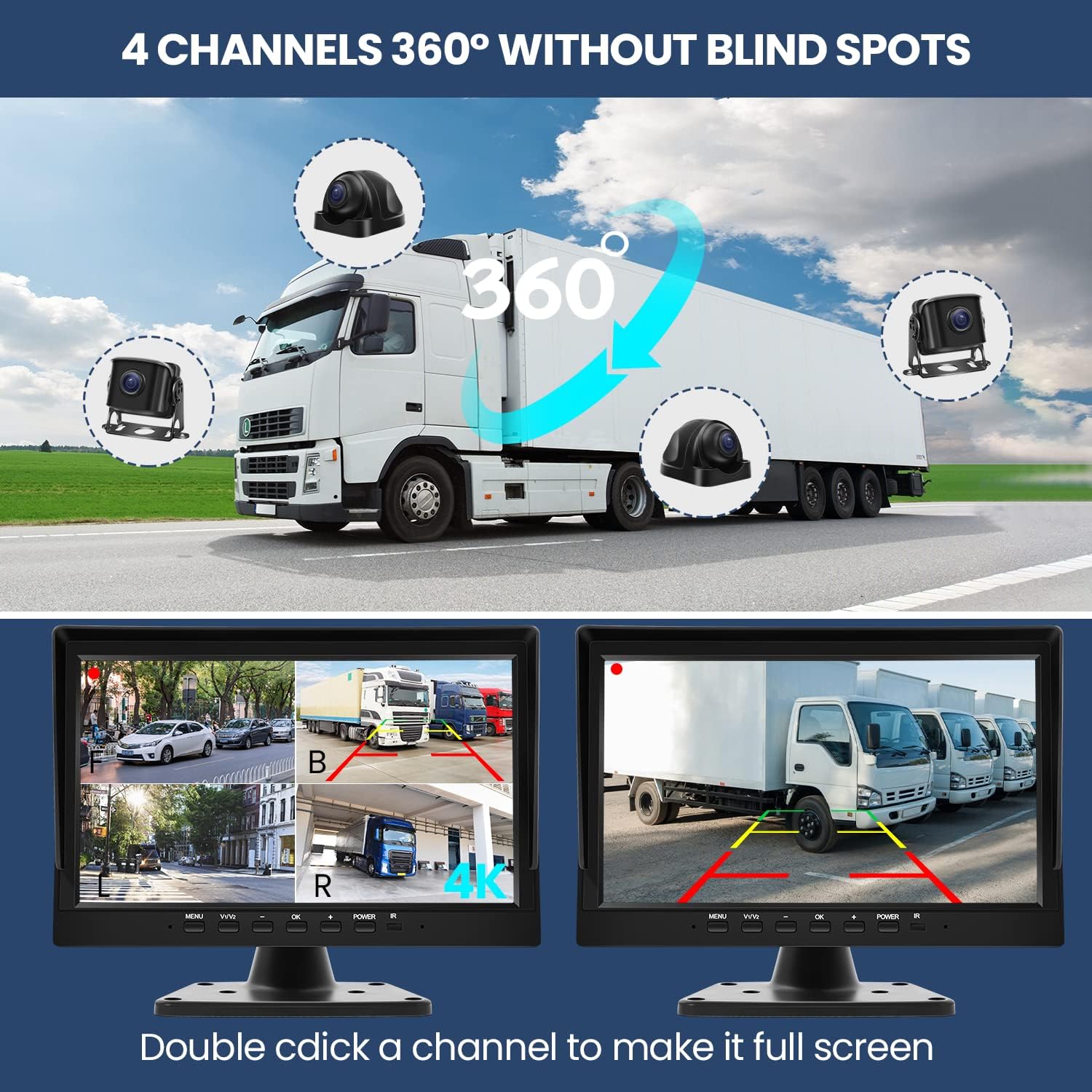
Image 4.1.1: The monitor displaying various split-screen configurations, including a full 360-degree view with four cameras and a single camera view with adjustable guide lines.
4.1.2 Image Mirroring and Guide Lines
You can adjust each camera's display to show a front view or a mirrored view. Additionally, parking guide lines can be toggled on or off, or customized to appear only when triggered (e.g., when reversing).

Image 4.1.2: Demonstrates the monitor's ability to display guide lines (on/off) and switch between mirror image and normal image for each camera view.
4.1.3 Recording Function
The system supports simultaneous recording from all four cameras. Ensure a compatible storage device (not included) is inserted into the monitor for this feature to function. Recorded footage can be played back directly on the monitor.

Image 4.1.3: The monitor displaying a video playback interface, indicating the DVR recording function. A timeline of recorded footage is shown at the bottom.
4.1.4 Night Vision
All cameras are equipped with infrared night vision, providing clear images even in complete darkness. This feature significantly improves visibility during nighttime driving or parking maneuvers.

Image 4.1.4: Illustrates the IP69 waterproof rating of the cameras under a water spray, and a comparison between day and night vision, highlighting the clarity provided by infrared technology.
5. Maintenance
To ensure the longevity and optimal performance of your Losuudy L-A2 system, follow these maintenance guidelines:
- Cleaning: Regularly clean the camera lenses and monitor screen with a soft, damp cloth. Avoid abrasive cleaners or solvents that could damage surfaces.
- Cable Inspection: Periodically check all cables for any signs of wear, fraying, or damage. Ensure connections are secure.
- Camera Housing: Inspect camera housings for any cracks or damage, especially after exposure to harsh weather or impacts.
- Monitor Placement: Ensure the monitor is securely mounted and not exposed to extreme temperatures or direct sunlight for prolonged periods when not in use.
6. Troubleshooting
If you encounter issues with your Losuudy L-A2 system, refer to the following common problems and solutions:
- No Image on Monitor:
- Check if the monitor is powered on and the cigarette lighter adapter is securely connected.
- Verify all camera cables are properly connected to the monitor.
- Ensure the correct camera channel is selected on the monitor.
- Flickering or Distorted Image:
- Check for loose cable connections.
- Ensure cables are not damaged or pinched.
- Verify the power supply is stable (12V-36V).
- Screen Too Bright at Night:
- Adjust the brightness settings of the monitor through the menu. Note that some users may find the lowest setting still bright in absolute darkness.
- Recording Not Working:
- Ensure a compatible SD card (not included) is properly inserted into the monitor.
- Check if the SD card has sufficient free space.
- Verify recording settings in the monitor menu.
- Guide Lines Not Appearing/Adjusting:
- Access the monitor's menu to enable or adjust guide line settings.
If these steps do not resolve the issue, please contact Losuudy customer support for further assistance.
7. Specifications
| Brand | Losuudy |
| Model Number | L-A2 |
| Monitor Screen Size | 10.1 Inches |
| Display Technology | LCD (IPS Panel) |
| Camera Resolution | AHD 1080P |
| Optical Sensor Technology | CCD, CMOS |
| Real Angle of View | 170 Degrees |
| Voltage | 12V-36V |
| Installation Type | Dashboard Mount, Surface Mount |
| Connector Type | Cigarette Lighter Adaptor |
| Product Dimensions | 4.13 x 17.3 x 11 inches |
| Item Weight | 6.87 pounds |
8. Warranty and Support
The Losuudy L-A2 Wired Backup Camera System comes with a 2-year manufacturer's warranty. This warranty covers defects in materials and workmanship under normal use.
For technical support, warranty claims, or any questions regarding your product, please contact Losuudy customer service. Refer to the contact information provided with your purchase or visit the official Losuudy store on Amazon for support options.
Losuudy Store: Visit the Losuudy Store on Amazon