
ATEngeus TAD07-B
ATEngeus Compressed Air Duster
User Manual
Introduction
Welcome to the user manual for your ATEngeus Compressed Air Duster, model TAD07-B. This manual provides detailed instructions on how to set up, operate, maintain, and troubleshoot your device to ensure optimal performance and longevity. Please read this manual thoroughly before using the product.
Product Overview
Components
- ATEngeus Compressed Air Duster Unit
- 5 x Nozzles (various types including round, flat, and inflatable)
- 3 x Brushes (for detailed cleaning)
- 1 x Keyboard Puller
- 1 x Storage Bag
- 1 x Type-C Charging Cable
Key Features
- Brushless DC Motor for stable performance and long service life.
- Stepless Knob Speed Control for precise airflow adjustment.
- 6000mAh Rechargeable Battery providing 18-30 minutes of continuous use.
- Type-C Fast Charging capability.
- Multi-use design with various nozzles and brushes for diverse cleaning tasks.
- Eco-friendly alternative to canned air.

Image: The ATEngeus Compressed Air Duster unit shown with its complete set of accessories, including various nozzles, brushes, a keyboard puller, and a storage bag.
Setup
1. Charging the Device
Before first use, fully charge the air duster. Connect the provided Type-C charging cable to the charging port on the device and plug the other end into a compatible USB power source (e.g., wall adapter, computer USB port, power bank, car charger). A full charge typically takes approximately 3 hours. The indicator light will show charging status.
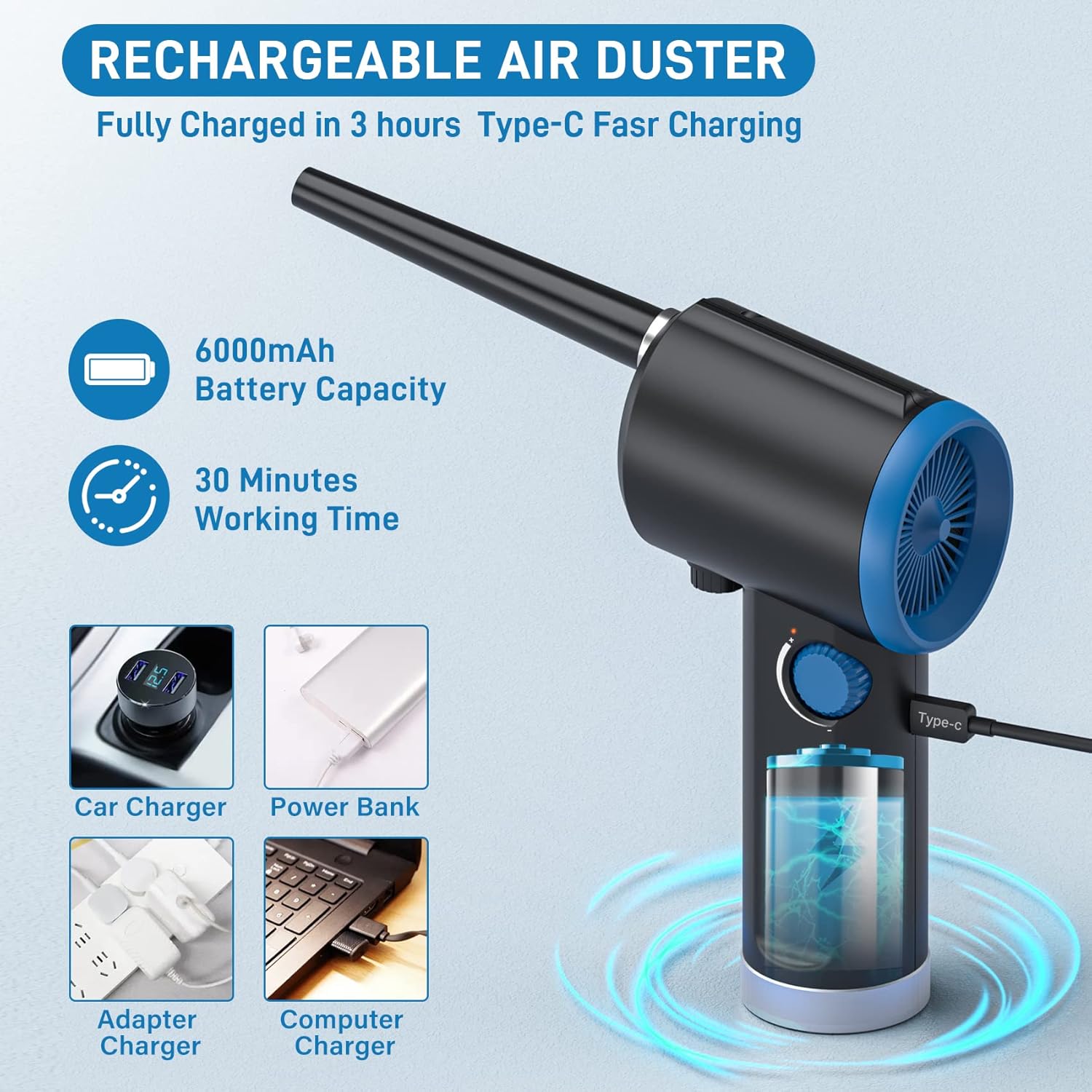
Image: The air duster connected to a Type-C charging cable, illustrating various charging methods such as car charger, power bank, adapter, and computer charger.
2. Attaching Nozzles and Brushes
Select the appropriate nozzle or brush for your cleaning task. Align the nozzle or brush with the air outlet of the duster and push it firmly until it clicks into place. Ensure it is securely attached before operation.

Image: A display of the different nozzles (round, flat, inflatable) and brushes included with the air duster, along with a keyboard puller, demonstrating their multi-use capabilities.
Operating Instructions
1. Powering On/Off
To turn on the air duster, press the power button. The device features a one-button fast start and stop function. Press the button again to turn off the device.
2. Adjusting Wind Speed
The ATEngeus Air Duster is equipped with a unique stepless knob speed control. Rotate the knob to freely adjust the wind speed from minimum to maximum power. This allows for precise control over the airflow, preventing damage to delicate items.

Image: An illustration demonstrating the stepless speed regulation feature, showing the knob being adjusted to control the airflow for various cleaning needs.
3. Usage Scenarios
The air duster is versatile and can be used for various cleaning tasks:
- Computer and Keyboard Cleaning: Use the appropriate nozzle and brush to remove dust from computer cases, keyboards, and other electronic components.
- Household Cleaning: Ideal for cleaning hard-to-reach areas like window sills, blinds, and delicate ornaments.
- Inflatables: Attach the inflatable nozzle to use the duster as an air pump for inflating swimming rings, air mattresses, and other inflatables.
- Car Interior: Effectively clean dust and debris from car dashboards, vents, and seats.

Image: The air duster in action, demonstrating its effectiveness in cleaning dust from a computer keyboard and the interior of a PC case.

Image: The air duster being used with the 3-in-1 inflatable interface to inflate an air mattress, showcasing its dual functionality.
Maintenance
1. Cleaning the Duster
Periodically wipe the exterior of the air duster with a soft, dry cloth. For the nozzles and brushes, remove them from the unit and clean them as needed. Ensure all parts are dry before reattaching or storing.
2. Battery Care
To prolong battery life, avoid fully discharging the battery frequently. Store the device in a cool, dry place when not in use for extended periods. Charge the device at least once every three months if it's not used regularly.
Troubleshooting
Common Issues and Solutions
- Device not turning on:
- Ensure the battery is charged. Connect the Type-C cable and charge for at least 30 minutes.
- Verify the power button is pressed firmly.
- Weak airflow:
- Check the battery level; a low battery can result in reduced power.
- Ensure the nozzle is securely attached and not obstructed.
- Rotate the stepless speed knob to increase the wind speed.
- Device not charging:
- Verify the Type-C cable is properly connected to both the duster and the power source.
- Try a different USB power adapter or port.
- Ensure the charging cable is not damaged.
If you encounter issues not listed here or if the problem persists, please contact ATEngeus customer support for assistance.
Specifications
| Attribute | Detail |
|---|---|
| Model Number | TAD07-B |
| Motor Type | Brushless DC Motor |
| Battery Capacity | 6000mAh Lithium Polymer |
| Charging Port | Type-C |
| Charging Time | Approx. 3 hours |
| Continuous Working Time | 18-30 minutes (depending on speed) |
| Item Weight | 11.6 ounces (approx. 330 grams) |
| Product Dimensions | 2.4 x 2.4 x 7.01 inches (approx. 6.1 x 6.1 x 17.8 cm) |
| Material Type | Plastic |
Warranty & Support
Warranty Information
For information regarding the product warranty, please refer to the purchase documentation or contact ATEngeus customer support directly. Keep your proof of purchase for warranty claims.
Customer Support
If you have any questions, concerns, or require technical assistance with your ATEngeus Compressed Air Duster, please contact ATEngeus customer support. Contact details can typically be found on the product packaging or the official ATEngeus website.
Related documentsTAD07-B

Ask a question about this manual
Ask about setup, troubleshooting, compatibility, parts, safety, or missing instructions. Manuals+ will review the question and use this page’s manual context to help answer it.