
1. Introduction
The PEAKPULSE LC1200AG(Slope) Golf Rangefinder is an advanced optical instrument designed to provide accurate distance measurements for golf and disc golf. Featuring 6X magnification and multiple ranging modes, it assists users in making precise shot selections based on distance, angle, and slope compensation.

Figure 1: PEAKPULSE LC1200AG(Slope) Golf Rangefinder, showcasing its sleek design and dual lenses.
2. Product Features
- Newly Upgraded LC1200AG: Maximum range of 1400 yards with an error accuracy of ±0.5 m. Includes functions for vertical distance (VD) and horizontal distance (HD) measurements.
- 6X Optical Zoom: Adjustable knob for clear target viewing. Provides fast focus and vibrates upon successful target acquisition.
- 4 Ranging Modes:
- M1: Flagpole Locking + Slope Correction + Vibration
- M2: Distance + Angle + Vibration + Continuous Measurement
- M3: Distance + VD + Vibration + Continuous Measurement
- M4: Distance + HD + Vibration + Continuous Measurement
- Continuous Measurement Function: Allows for efficient scanning of multiple targets.
- IP56 Waterproof & Dustproof: Designed for durability in various outdoor conditions.

Figure 2: Overview of the rangefinder's multi-functional capabilities, including 6X magnification, HD+VD+Angle, 1400 Yards range, Flagpole Lock, Vibration Reminder, Slope Compensation, IP56 Waterproof, and Unit Yd/M.

Figure 3: Visual representation of the four distinct ranging modes (M1-M4) available on the device, showing their respective display indicators.
3. Package Contents
The PEAKPULSE LC1200AG(Slope) Golf Rangefinder package includes:
- PEAKPULSE LC1200AG(Slope) Rangefinder Unit
- Storage Bag
- User Manual
- Lens Cloth
- AAA Batteries (Included)
4. Setup
4.1 Battery Installation
The rangefinder uses AAA batteries. To install or replace batteries:
- Locate the battery compartment cover on the device.
- Open the cover by twisting it counter-clockwise or sliding it open as indicated.
- Insert the AAA batteries, ensuring correct polarity (+ and - ends).
- Close the battery compartment cover securely.
4.2 Attaching the Lanyard
To prevent accidental drops, attach the included lanyard:
- Locate the lanyard attachment point on the rangefinder.
- Thread the thin loop of the lanyard through the attachment point.
- Pass the larger end of the lanyard through the thin loop and pull tight to secure.
5. Operating Instructions
5.1 Power On/Off
Press the Power button (⏻) once to turn on the device. The display will activate. The device will automatically power off after approximately 10-15 seconds of inactivity to conserve battery life.
5.2 Adjusting Focus
Rotate the eyepiece knob (located at the rear of the device) to adjust the focus until the view appears clear and sharp.
5.3 Changing Ranging Modes
Press the Mode button (MODE) to cycle through the 4 available ranging modes (M1, M2, M3, M4). Select the mode appropriate for your measurement needs.
5.4 Taking a Measurement
- Look through the eyepiece and align the crosshairs with your target.
- Press the Power button (⏻) once. The distance measurement will appear in the display.
- For continuous measurement (in M2, M3, M4 modes), press and hold the Power button (⏻) for more than 2 seconds while scanning across targets.
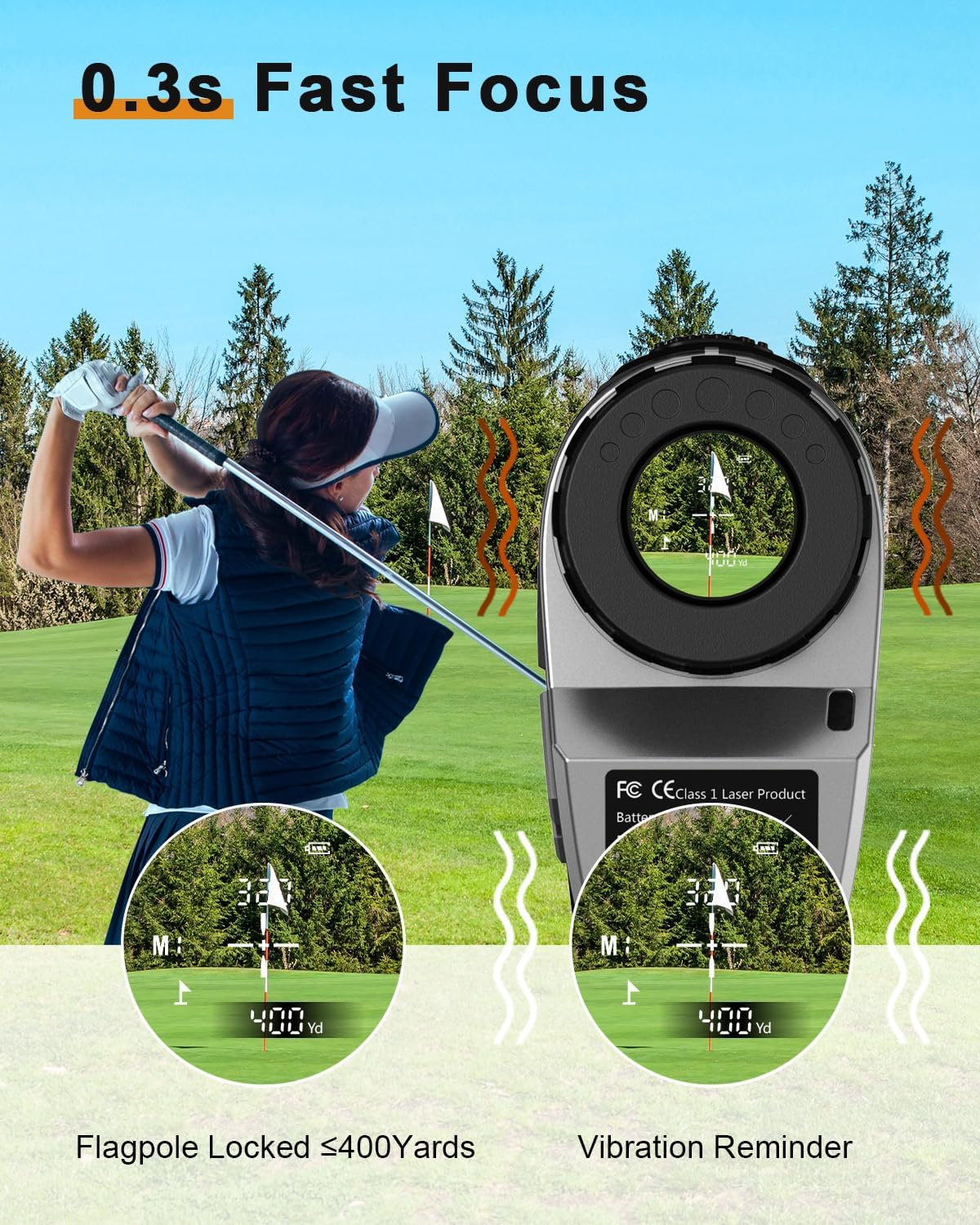
Figure 4: Demonstrates the rapid 0.3-second focus capability and the vibration reminder feature when the flagpole is locked within 400 yards.

Figure 5: Close-up view of the rangefinder's top panel, highlighting the Power and Mode buttons for easy operation.
5.5 Slope Switch Function (M1 Mode)
The LC1200AG(Slope) model includes a physical slope switch. This switch is located on the side of the device near the eyepiece. Slide the switch to enable or disable the slope compensation feature. When enabled, the device will provide slope-adjusted distances, which is useful for practice rounds. When disabled, it provides linear distance, making it tournament legal.

Figure 6: Illustration of the physical slope switch on the side of the rangefinder, allowing users to toggle slope compensation on or off.
6. Maintenance
- Cleaning: Use the provided lens cloth to gently wipe the lenses. For stubborn dirt, use a soft, clean cloth slightly dampened with water. Avoid abrasive materials or harsh chemicals.
- Storage: Store the rangefinder in its protective storage bag when not in use. Keep it in a cool, dry place away from direct sunlight and extreme temperatures.
- Battery Care: If the device will not be used for an extended period, remove the batteries to prevent leakage and damage.
7. Troubleshooting
- No Display/Power:
- Ensure batteries are correctly installed with proper polarity.
- Replace batteries with fresh ones if needed.
- Inaccurate Readings:
- Ensure lenses are clean and free from smudges or debris.
- Confirm you are targeting a reflective surface or a clear object.
- Check for environmental factors like heavy fog or rain, which can affect accuracy.
- Difficulty Locking onto Flag:
- Ensure you are in M1 (Flagpole Locking) mode.
- Keep your hand steady or use a tripod if available.
- Ensure the flagpole is within the effective range for flagpole locking (e.g., up to 400 yards).
8. Specifications
| Specification | Detail |
|---|---|
| Brand | PEAKPULSE |
| Model Name | LC1200AG(Slope) |
| Measuring Range | Up to 1400 meters (approx. 1531 yards) |
| Accuracy | ±0.5 m |
| Magnification | 6X |
| Battery Type | AAA (Included) |
| Material | Plastic |
| Item Weight | 147 Grams |
| Product Dimensions | 4.67"L x 1.46"W x 2.95"H |
| Water/Dust Resistance | IP56 |
9. Warranty and Support
PEAKPULSE offers a 1-Year Quality Guarantee for this rangefinder. If you have any questions or require support, please contact PEAKPULSE customer service. They provide 24-hour online service to assist you.