
VoleStay VS01F
VoleStay Biometric Fingerprint Smart Slider Handgun Safe VS01F User Manual
Model: VS01F
1. Introduction
This manual provides essential instructions for the safe and effective use of your VoleStay Biometric Fingerprint Smart Slider Handgun Safe, Model VS01F. This safe is designed to provide secure storage for handguns and other valuables, featuring multiple access methods including biometric fingerprint recognition, a PIN code, and traditional keys. Its robust construction and quick-access design make it suitable for various discreet installations.

Image 1.1: The VoleStay VS01F safe with its auto-sliding drawer open, revealing a handgun stored inside. The control panel with numeric buttons and a fingerprint sensor is visible on top.
2. Safety Information
WARNING: Always practice responsible firearm storage. Keep firearms unloaded when stored in the safe unless immediate access to a loaded firearm is legally and safely required for self-defense. Ensure the safe is securely mounted to prevent unauthorized removal.
DO NOT STORE LOADED GUNS IN THIS UNIT unless you are fully aware of and accept the risks associated with storing a loaded firearm, and it is in compliance with all local, state, and federal laws.
- Keep keys in a secure location away from the safe and out of reach of children and unauthorized individuals.
- Ensure children and unauthorized persons do not have access to the safe's PIN code or registered fingerprints.
- Verify the safe is securely closed and locked after each use.
- Regularly check battery levels to ensure proper operation.
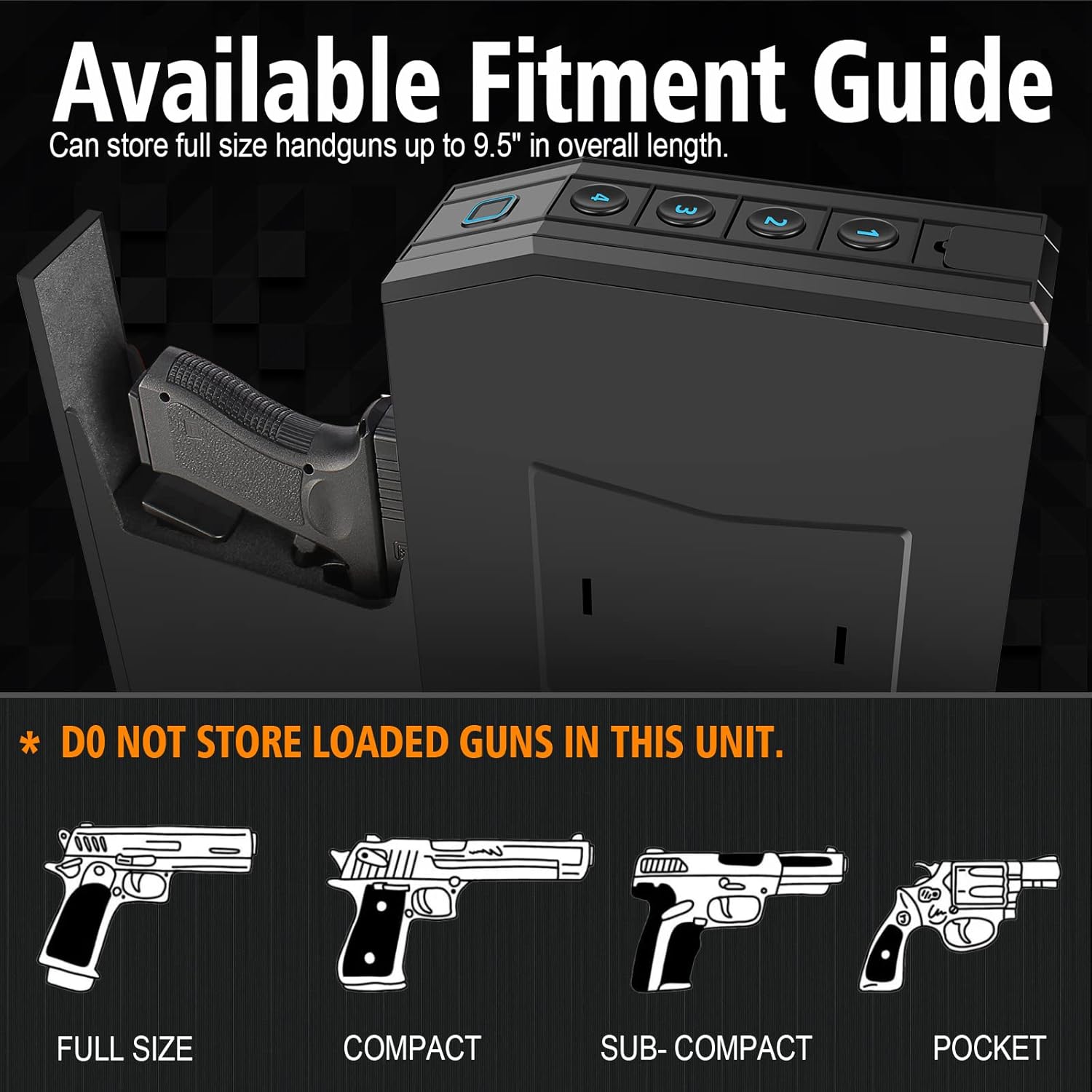
Image 2.1: A visual guide illustrating the types of handguns (Full Size, Compact, Sub-Compact, Pocket) that fit within the safe, along with a critical safety warning.
3. Package Contents
Please check the package for the following items:
- VoleStay Biometric Fingerprint Smart Slider Handgun Safe (VS01F)
- Emergency Keys (2)
- Mounting Plate
- Mounting Hardware (screws)
- User Manual (this document)
4. Product Features
- Robust Construction: Made from 16-gauge carbon steel with a durable finish, weighing approximately 10 lbs, providing enhanced security.
- Auto-Sliding Door: Features an anti-theft hidden latch and an automatic sliding door mechanism for quick access.
- Multiple Access Methods:
- Biometric Fingerprint Sensor: High-resolution sensor capable of storing up to 20 unique fingerprints with an access speed of less than 0.2 seconds.
- PIN Code: Supports 4-8 digit programmable PIN codes.
- Emergency Key Access: Two physical keys for manual override.
- Interior LED Light: Built-in LED light illuminates the interior for improved visibility in low-light conditions.
- Silent Mode: Option to disable audible beeps for discreet operation.
- Wrong Access Alarm: The safe will beep and temporarily deny PIN access after 3 incorrect attempts.
- Padded Interior: Thick foam lining prevents movement and shaking of contents.
- Versatile Mounting: Designed for installation in multiple locations such as under a desk, nightstand, bookshelf, or wall.

Image 4.1: Three quick access methods.
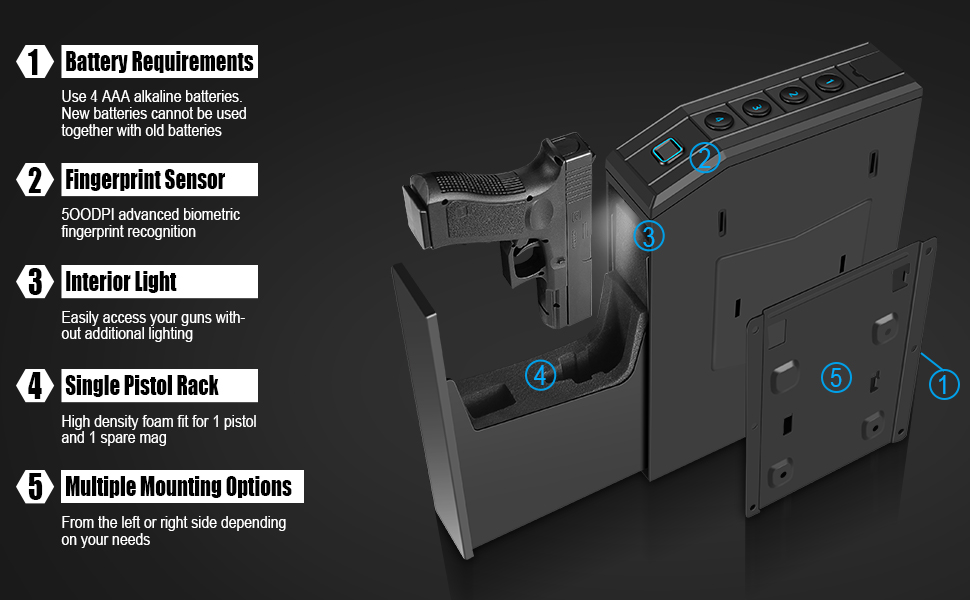
Image 4.2: Key features overview.
5. Setup
5.1. Battery Installation
- Locate the battery compartment, typically on the underside or rear of the control panel.
- Open the compartment and insert 4 AAA alkaline batteries. Ensure correct polarity (+/-).
- Close the battery compartment securely. The safe will emit a beep indicating power is on.
- Note: Do not mix new batteries with old ones. Replace all 4 batteries simultaneously when needed.
5.2. Mounting the Safe
The safe can be mounted in various locations using the included mounting plate and hardware. Choose a secure, flat surface.
- Identify a suitable mounting location (e.g., under a desk, inside a cabinet, on a wall, beside a nightstand).
- Position the mounting plate against the desired surface and mark the screw holes.
- Drill pilot holes if necessary.
- Secure the mounting plate to the surface using the provided screws. For enhanced security, consider using heavier duty screws or carriage bolts with nuts and washers, especially when mounting to furniture.
- Align the safe with the mounting plate and slide it into place until it locks securely. The safe can only be removed from the plate when its door is open.

Image 5.1: Safe components including the mounting plate.
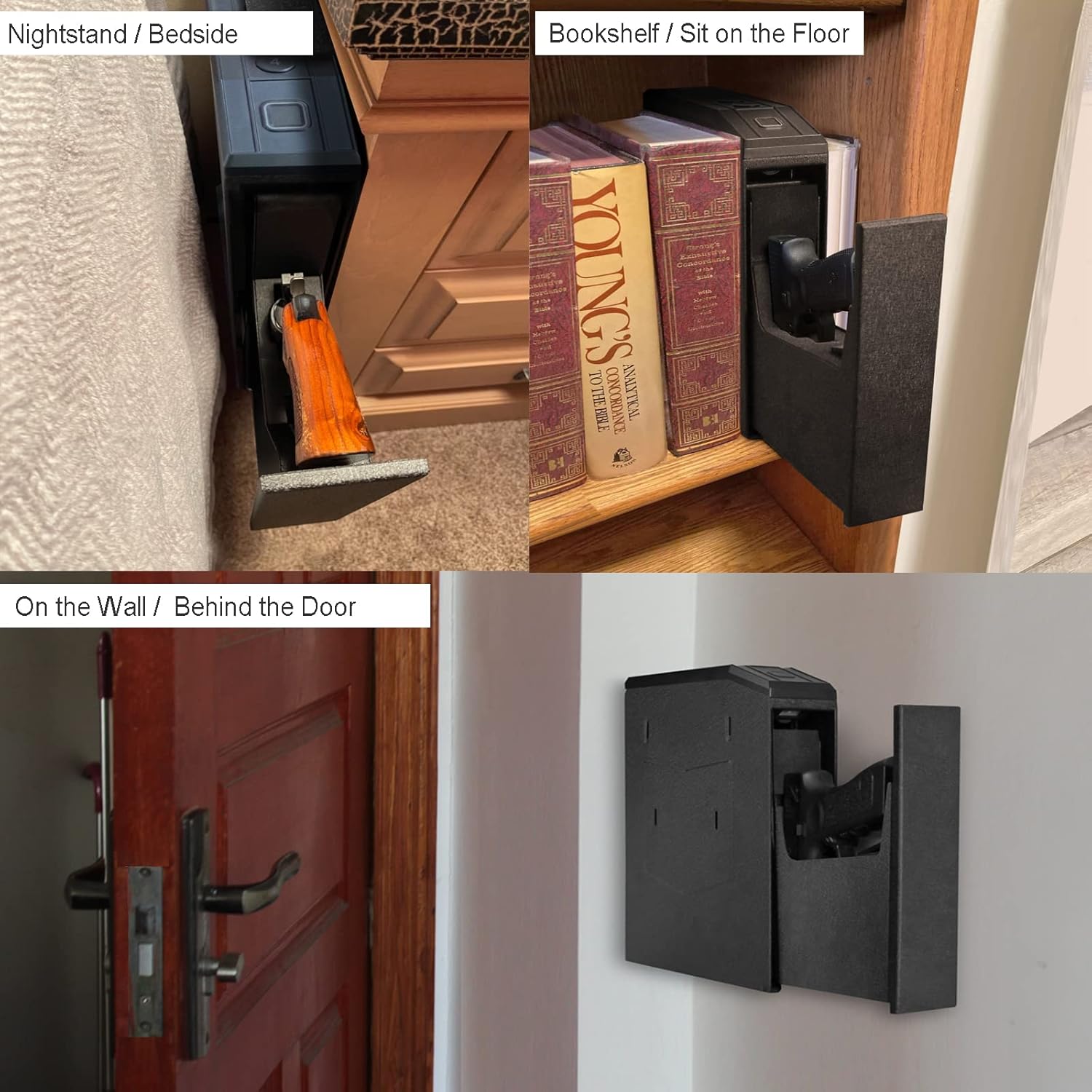
Image 5.2: Examples of installed locations.
5.3. Programming Fingerprints
The safe can store up to 20 unique fingerprints.
- Open the safe using the emergency key or a pre-programmed method.
- Locate the programming button (refer to the safe's internal diagram if unsure). Press and hold it until the indicator light changes (e.g., blue light flashes).
- Place your finger firmly on the fingerprint sensor. Lift and repeat several times (typically 5-10 times) from different angles until the indicator light confirms successful registration (e.g., green light).
- Repeat for additional fingerprints.
- Test the newly registered fingerprint to ensure it opens the safe reliably.
5.4. Setting a PIN Code
The safe supports a 4-8 digit PIN code.
- Open the safe.
- Press the programming button (or a designated 'Code Set' button). The indicator light will change.
- Enter your desired 4-8 digit PIN code, then press the '#' or 'Confirm' button.
- Re-enter the same PIN code and press '#' or 'Confirm' again to verify.
- The indicator light will confirm successful programming.
- Test the new PIN code to ensure it opens the safe.
6. Operating Instructions
6.1. Opening the Safe
- Using Fingerprint: Place a registered finger firmly on the biometric sensor. The safe will unlock and the drawer will slide open automatically.
- Using PIN Code: Enter your 4-8 digit PIN code on the keypad, then press the '#' or 'Confirm' button. The safe will unlock and the drawer will slide open automatically.
- Using Emergency Key: Insert one of the provided keys into the keyhole (usually discreetly located) and turn it to unlock the safe. Manually pull the drawer open.

Image 6.1: Visual representation of quick access options.
6.2. Closing the Safe
Gently push the drawer back into the safe until it clicks shut. The safe will automatically lock.
6.3. Silent Mode
To enable or disable silent mode (turning off audible beeps), refer to your safe's specific programming instructions, usually involving a combination of button presses or a dedicated mute button. This feature is useful for discreet access.
7. Maintenance
- Cleaning: Wipe the exterior of the safe with a soft, dry cloth. Avoid abrasive cleaners or solvents. Keep the fingerprint sensor clean and free of debris for optimal performance.
- Battery Replacement: When the batteries are low, the safe will typically indicate this with a warning light or a series of beeps. Replace all 4 AAA alkaline batteries promptly to ensure continuous functionality. Refer to Section 5.1 for battery installation.
- Key Storage: Store emergency keys in a secure, separate location, not inside the safe.
8. Troubleshooting
- Safe does not open with fingerprint:
- Ensure your finger is clean and dry.
- Place your entire finger pad firmly on the sensor.
- Try different angles or re-register your fingerprint if issues persist.
- Check battery levels.
- Safe does not open with PIN code:
- Ensure you are entering the correct 4-8 digit code.
- After 3 incorrect attempts, the safe will temporarily deny PIN access. Wait a few moments before trying again.
- Check battery levels.
- Safe is unresponsive:
- Replace all 4 AAA batteries with new ones.
- Use the emergency key to open the safe.
- Rattling sound inside the safe:
- This may indicate a loose internal component. If the safe is new, contact customer support. If it has been dropped or impacted, inspect for damage.
- Drawer does not slide out or is stuck:
- Ensure there are no obstructions.
- Check battery levels.
- If using the key, ensure it is fully turned.
9. Specifications
| Feature | Detail |
|---|---|
| Model Number | VS01F |
| Material | 16-gauge Carbon Steel, Alloy Steel |
| Exterior Dimensions (L x W x H) | 9.1 x 2.6 x 12.6 inches |
| Interior Dimensions (L x W x H) | Approximately 10.5 x 6 x 2.2 inches (for handgun compartment) |
| Item Weight | 10 pounds |
| Max Handgun Length | 9.5 inches |
| Access Methods | Biometric Fingerprint, PIN Code (4-8 digits), Emergency Key |
| Fingerprint Capacity | Up to 20 unique fingerprints |
| Battery Type | 4 x AAA Alkaline Batteries (not included) |
| Special Features | Interior LED Light, Silent Mode, Wrong Access Beep, Anti-theft Latch |
| Mounting Type | Wall Mount, Surface Mount (left or right side) |
| UPC | 792933219160 |

Image 9.1: Detailed dimensions of the safe.
10. Warranty Information
VoleStay products are manufactured to high-quality standards. For specific warranty details, please refer to the warranty card included with your product or contact VoleStay customer service directly. Keep your purchase receipt as proof of purchase for any warranty claims.
11. Customer Support
If you have any questions, require assistance with setup, or encounter any issues with your VoleStay Biometric Fingerprint Smart Slider Handgun Safe, please do not hesitate to contact our customer service team. We provide 24/7 customer support.
Contact Information:
- Refer to your order details for direct contact options.
- Email: Check the product packaging or VoleStay's official website for the support email address.
Related Documents - VS01F
 |
HOLEWOR Biometric Pistol Safe User Manual Comprehensive user manual for the HOLEWOR Biometric Pistol Safe, detailing product contents, diagrams, unlock methods, fingerprint and password setup, time setting, low power prompts, external power, steel cable installation, and warranty information. |
 |
Biometric Handgun Safe User Manual - Setup, Operation, and Maintenance Comprehensive user manual for the Biometric Handgun Safe (Model GSB-HGSB-01). Learn about safety precautions, specifications, installation, operation of fingerprint and passcode access, and maintenance. |
 |
Union Safe Company Biometric Fingerprint Handgun Safe Owner's Manual & Safety Instructions This manual provides essential safety warnings, assembly, operating, inspection, maintenance, and cleaning procedures for the Union Safe Company Biometric Fingerprint Handgun Safe (Item 59549). Includes setup, fingerprint registration, security code programming, mounting, and warranty information. |
 |
HOLEWOR Biometric Pistol Safe: User Manual & Operating Guide Comprehensive user manual for the HOLEWOR Biometric Pistol Safe, detailing package contents, product features, setup instructions for passwords and fingerprints, security settings, external power options, steel cable installation, and warranty information. |
 |
Moutec Biometric Gun Safe User Manual - Setup, Operation, and Maintenance Comprehensive user manual for the Moutec Biometric Gun Safe. Learn how to install batteries, set codes, register fingerprints, mount the safe, and perform care and maintenance. Includes safety warnings and troubleshooting tips. |
 |
HOLEWOR Biometric Pistol Safe User Manual User manual for the HOLEWOR Biometric Pistol Safe, detailing product contents, diagrams, unlock methods, password and fingerprint entry, deletion, voice settings, factory reset, low power prompts, external power supply, and installation. |
Ask a question about this manual
Ask about setup, troubleshooting, compatibility, parts, safety, or missing instructions. Manuals+ will review the question and use this page’s manual context to help answer it.