
Introduction
Thank you for choosing the Taylor Glass Digital Scale. This manual provides essential information for the proper setup, operation, maintenance, and troubleshooting of your new scale. Please read these instructions carefully before use and retain them for future reference.
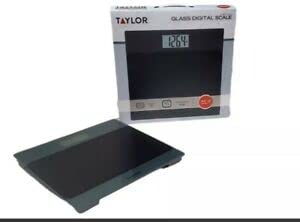
Image: The Taylor Glass Digital Scale, featuring its tempered glass platform and digital display. This image illustrates the overall design and appearance of the scale.
Setup
1. Battery Installation
Your scale requires 2 AAA batteries (included). To install:
- Locate the battery compartment on the underside of the scale.
- Open the battery compartment cover.
- Insert the 2 AAA batteries, ensuring the correct polarity (+ and -) as indicated inside the compartment.
- Close the battery compartment cover securely.
2. Scale Placement
For accurate readings, place the scale on a hard, flat, and level surface. Avoid carpets or uneven flooring, as this can affect measurement precision.
3. Initial Calibration
Before first use or after moving the scale, it is recommended to perform an initial calibration:
- Gently tap the center of the scale platform with your foot.
- The display will show "0.0" or "0.00" and then turn off. This indicates the scale is calibrated and ready for use.
Operating Instructions
1. Weighing Procedure
- Ensure the scale is on a flat, stable surface.
- Gently step onto the scale platform. The scale will automatically turn on.
- Stand still on the platform until your weight is displayed and stabilizes.
- The display will hold the reading for a few seconds before automatically turning off.
2. Unit Conversion
This scale measures in pounds (lbs). If your model supports other units, a unit conversion button (often labeled "UNIT" or "MODE") is typically located on the underside of the scale or near the display. Press this button to cycle through available units.
3. TARE Function (if applicable)
Some models feature a TARE button for weighing items in a container. If your scale has this feature:
- Place the empty container on the scale.
- Press the "TARE" button. The display will reset to zero.
- Add the item(s) to be weighed into the container. The display will show the net weight of the item(s).
Maintenance
1. Cleaning
The tempered glass platform and anti-slip mat can be cleaned with a damp cloth and mild detergent. Avoid abrasive cleaners or harsh chemicals, as these may damage the surface. Do not immerse the scale in water.
2. Storage
Store the scale in a cool, dry place. Avoid extreme temperatures or high humidity. Do not place heavy objects on the scale when not in use.
3. Battery Replacement
If the display shows a "Lo" indicator or becomes dim, it is time to replace the batteries. Follow the battery installation steps in the "Setup" section.
Troubleshooting
- No Display / Scale Not Turning On:
- Check if batteries are installed correctly with proper polarity.
- Replace old or depleted batteries with new ones.
- Inaccurate Readings:
- Ensure the scale is on a hard, flat, and level surface.
- Perform initial calibration by gently tapping the scale and waiting for "0.0" to appear.
- Avoid moving the scale during measurement.
- "Err" or Overload Indicator:
- The scale's capacity is 400 lbs. Remove any weight exceeding this limit.
- If "Err" persists, try replacing batteries or recalibrating.
Specifications
| Model Number | 5274503 |
| Brand | Generic (Manufactured by Taylor) |
| Weight Capacity | 400 lbs (180 kg) |
| Readout Accuracy | 0.2 lbs (0.1 kg) |
| Display Type | LCD (3.2" x 1.5") |
| Platform Material | Tempered Glass |
| Power Source | 2 x AAA Batteries (included) |
| Dimensions | 11.8" x 11.8" (Platform) |
| Special Features | Anti-slip mat, TARE Button, Unit Convert |
Warranty and Support
Warranty Information
This product is covered by a limited warranty against defects in materials and workmanship. Please refer to the warranty card included with your purchase or contact customer support for specific details regarding warranty duration and terms. Keep your proof of purchase for warranty claims.
Customer Support
If you have any questions, require assistance, or encounter issues not covered in this manual, please contact our customer support. Contact information can typically be found on the product packaging or the manufacturer's official website.
