
iMeshbean 09554
iMeshbean 4400lbs 750W Automatic Sliding Gate Opener Instruction Manual
Model: 09554
1. Introduction and Overview
This manual provides detailed instructions for the installation, operation, and maintenance of your iMeshbean 4400lbs 750W Automatic Sliding Gate Opener. This system is designed for sliding gates weighing up to 4400lbs and up to 40 feet in length, offering convenience and security through multiple control options including APP, remote, wireless keyboard, and manual key.
2. Safety Information
WARNING: Failure to follow these safety instructions may result in serious injury or property damage.
- Ensure all electrical connections are made by a qualified professional and comply with local codes.
- Keep hands, feet, and clothing clear of the gate and opener mechanism during operation.
- Do not allow children to play with or operate the gate opener controls.
- Regularly inspect the gate and opener for signs of wear, damage, or misalignment.
- The motor is equipped with a temperature protector and motor time protection to prevent overheating and prolonged operation in case of failure.
- Infrared sensors are included for obstruction detection; ensure they are installed and functioning correctly to prevent the gate from closing on people or objects.

Image: Infrared sensors for smart obstruction detection.
3. Package Contents
Verify that all components listed below are present in your package:
- 1 x Sliding Gate Opener Unit
- 1 x Wireless Keyboard
- Instruction Manual
- 2 x Infrared Sensors
- 2 x Manual Release Keys
- 4 x Remote Controls
- 1 x 20 ft of Chain (Can be split into 2 x 10 ft Chains)
- Various mounting accessories (bolts, brackets, washers, U-bolts, etc.)

Image: Complete kit of the iMeshbean Sliding Gate Opener and its accessories.
4. Specifications
| Motor Power | 750W (1HP) |
| Max. Gate Weight | 4400 lbs |
| Gate Move Speed | 40 ft/min (8 inches/second) |
| Voltage | 110V |
| Noise Level | ≤56dB |
| Working Temperature | -4°F ~ +122°F (-20°C ~ 50°C) |
| Protection Class | IP44 |
| Remote Control Mode | 4-Button |
| Max # of Remotes | 100 ft / 30 m range |
| Frequency | 433.92 MHz |
| Limit Switch | Magnetic Limit Switch |
| Product Dimensions | 19 x 13 x 10 inches |

Image: Detailed product specifications and dimensions.
5. Installation
The iMeshbean gate opener is designed for straightforward installation without the need for specialized electrical or welding skills. Basic tools are required.
5.1 Mounting the Opener Unit
- Choose a stable, level surface near your gate for mounting the opener unit. Ensure it is positioned correctly relative to the gate's travel path.
- Secure the opener unit to the ground using the provided mounting hardware.
5.2 Chain Installation
- Attach the provided chain to your sliding gate. The 20 ft chain can be split into two 10 ft sections if needed.
- Route the chain around the drive sprocket on the opener unit.
- Adjust the chain tension to ensure smooth operation without excessive slack or tightness.
5.3 Electrical Connection
- Connect the opener unit to a 110V power supply.
- Install the infrared sensors on either side of the gate opening, ensuring they are aligned and free from obstructions.

Image: Gate opener installed with chain for smooth operation.
6. Operation
Your iMeshbean gate opener offers multiple convenient ways to control your gate.
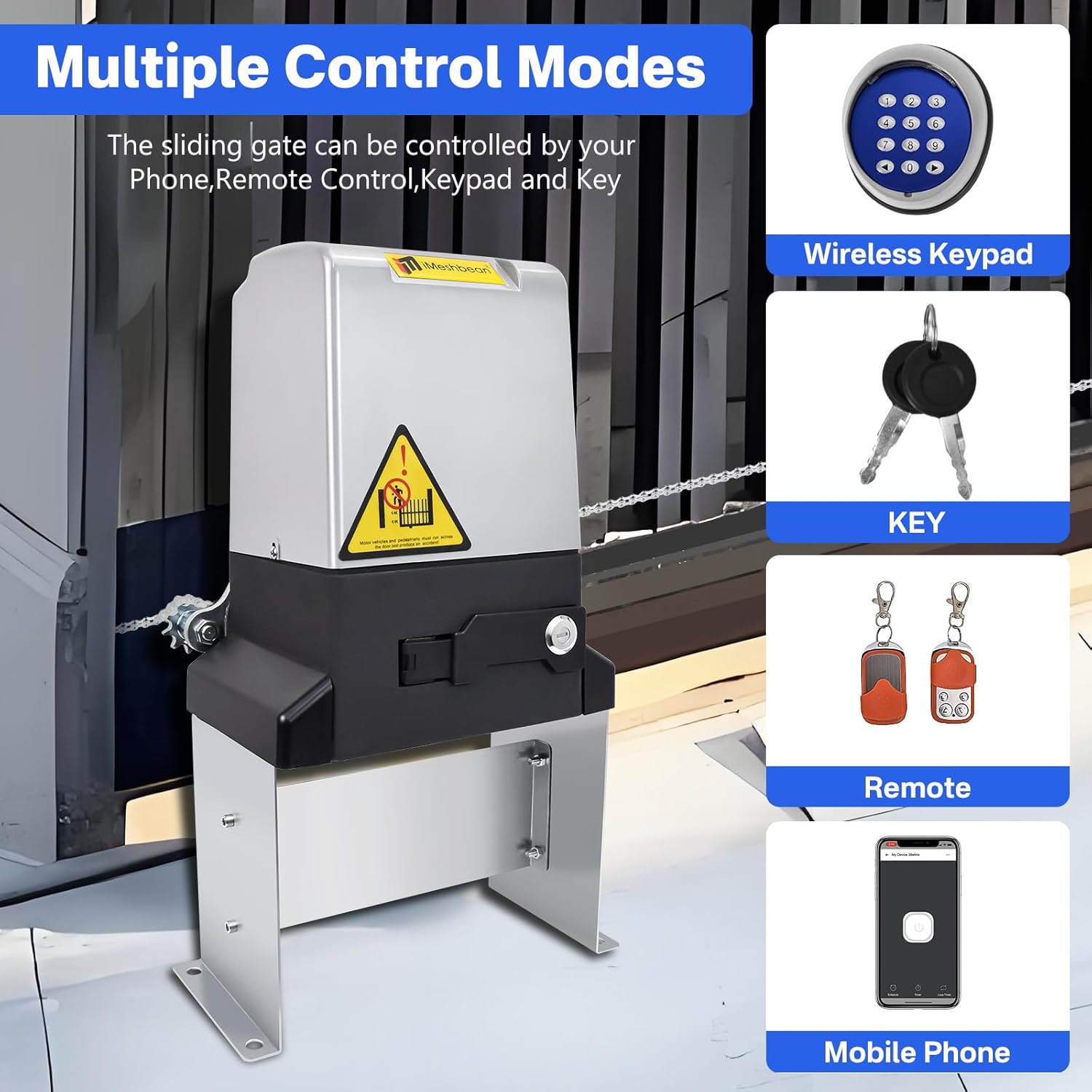
Image: Multiple control modes for the gate opener.
6.1 Remote Control
The system includes four 4-button remote controls. These remotes can operate the gate from up to 100 feet away. Refer to the programming section in the full manual for pairing instructions.
6.2 APP Control
The gate opener features APP control functionality. Once the app is installed and paired with your device, you can control the gate from anywhere with internet access (Wi-Fi, 3G, or 4G). The app also allows you to set schedule timers for gate operation.

Image: Smartphone controlling the gate opener via the app.
6.3 Wireless Keyboard
Use the wireless keyboard for convenient access. Refer to the full manual for programming access codes.
6.4 Manual Release
In case of a power outage or if remote controls are lost, use the provided emergency release keys to manually disengage the motor and open/close the gate.

Image: Manual release mechanism with key for power outages.
7. Maintenance
Regular maintenance ensures the longevity and reliable operation of your gate opener.
- Cleanliness: Keep the opener unit and chain free from dirt, debris, and obstructions.
- Chain Tension: Periodically check the chain tension. It should be taut enough to prevent sagging but not so tight as to strain the motor.
- Lubrication: Lubricate the chain and moving parts as recommended in the full manual.
- Sensor Check: Test the infrared sensors regularly to ensure they detect obstructions correctly.
- Motor Protection: The motor features built-in temperature and overload protection. If the motor cuts off, allow it to cool before attempting further operation.

Image: Internal view of the 750W motor with protection features.
8. Troubleshooting
This section provides solutions to common issues you might encounter.

Image: Troubleshooting guide.
A. The power indicators are off
- No 110V power input.
- Check the output line for short circuit.
- The fuse is broken. The connector is not in place.
- Replace the same specification after troubleshooting (12A250V).
B. Power indicator light is on, press open/and close key, door does not respond
- The clutch is not closed.
- Re-close the clutch.
- Circuit board damage due to short circuit or severe overload of external devices.
- Back for repair.
C. By pressing the "Open" button and the "Close" button, the door will stop automatically or without reaching the limit.
- Limit sensor cable short circuit or break or sensor away from magnet.
- Check the circuit and troubleshoot. Bring the sensor to the point magnet.
- Limit the damage.
- Replace sensor. Adjustment to single limit according to (v.2).
D. Press the "on" infrared sensor light turns green, press the "off" button to stop and return to the
- Short circuit of infrared probe line.
- Check the circuit and troubleshoot the probe line.
- Infrared probe damaged.
- Replace the infrared probe.
E. The remote control becomes shorter
- Battery is low.
- Interference from iron fences, walls, etc.
- Receiving antenna bending.
- Replace the remote-control battery 23A or 27A 12V.
- Minimize interference from fences, walls, etc.
- Antenna is straightened up as much as possible.
F. Motor does not stop at end of run
- Limit the damage.
- Replace sensor. Adjustment to single limit according to (v.2).
- The height of the magnet is not adjusted properly.
- Adjust the height of the magnet according to the instructions.
G. Motor does not work
- No power to control board.
- Check if there is power input and Check if the fuse is blown.
- Bad motor.
- Measure whether the value of the two sets of coils of the motor is the same.
- Bad capacitor.
- Measure the value of capacitance is consistent with the value of the body.
H. Resistance does not stop
- Not set properly.
- 4 downward dial, turn the knob counterclockwise to minimize the test.
I. Remote control does not work
- Battery installed upside down or not in good contact.
- Not set properly.
- Cannot receive.
- Check the battery.
- Re-set.
- Check whether the antenna and receiver module are damaged.
J. Cannot connect WiFi
- Poor 4G line number. Wrong step.
- Motor close to the WiFi, according to the instructions step by step connection.
K. Base shaking
- Uneven floor without locking bolts.
- Flatten floor and lock bolts.
9. Warranty and Support
The iMeshbean 4400lbs 750W Automatic Sliding Gate Opener typically comes with a limited warranty. Based on customer feedback, this may be around 6 months from the date of purchase. For specific warranty terms, claims, or technical support, please contact the manufacturer directly. It is recommended to retain your proof of purchase for warranty purposes.
Ask a question about this manual
Ask about setup, troubleshooting, compatibility, parts, safety, or missing instructions. Manuals+ will review the question and use this page’s manual context to help answer it.