
1. Introduction
This manual provides detailed instructions for the installation, operation, and maintenance of your BTF-LIGHTING Tuya Zigbee 3.0 C01Z Single Color LED Controller. This device is designed to control single-color PWM LED strips, LED strings, and LED bulbs, integrating seamlessly into Zigbee 3.0 smart home systems. Please read this manual thoroughly before use to ensure proper functionality and safety.

2. Product Overview
Key Features:
- Control Type: Designed for PWM monochrome (single color) V+ V- LED strips, LED strings, and LED bulbs.
- Wide Voltage Compatibility: Supports DC5V, DC12V, and DC24V power inputs.
- High Output Capacity: 6A per channel, with a total output maximum of 15A.
- Smart Home Integration: Compatible with Zigbee 3.0 gateways, including Echo Plus, Echo (4th Gen), and Home-Kit.
- Tuya Gateway Support: Works with Tuya Bluetooth/WiFi Dual-Mode Gateway for third-party voice control (Alexa, Google Home).
- Auto-Transmitting Function: Extends control range by transmitting signals to other controllers within 99ft (30 meters).
- Auto-Synchronization Function: Allows multiple controllers to work synchronously.
- Multiple Functions: Supports group control, device sharing, tap-to-run automation, and brightness dimming.
- Memory Function: Retains last settings after power-down.
What's in the Box:
- 1x BTF-LIGHTING Tuya Zigbee 3.0 C01Z Single Color LED Controller
- 1x User Manual
3. Specifications
| Parameter | Value |
|---|---|
| Model Number | C01Z |
| Input Voltage | DC5V / DC12V / DC24V |
| Output Current | 6A/Channel, Max 15A Total |
| Max Output Wattage | DC5V: 75W | DC12V: 180W | DC24V: 360W |
| Working Temperature | -25℃ to 45℃ |
| Control Method | App Control, Voice Control (via compatible gateway) |
| Connectivity | Zigbee 3.0 |
| Indoor/Outdoor Usage | Indoor |
| Material | Plastic |
| Dimensions | 3.07 x 1.42 x 0.94 inches |
| Item Weight | 1.13 ounces |
4. Setup and Installation
4.1 Wiring the Controller
Ensure all power is disconnected before wiring. The C01Z controller has clearly labeled input and output terminals. Connect your power supply to the 'INPUT' terminals and your single-color LED strip to the 'OUTPUT' terminals.
- Power Input: Connect the positive (+) wire from your DC power supply to the V+ input terminal and the negative (-) wire to the V- input terminal. Ensure your power supply voltage (DC5V, DC12V, or DC24V) matches the requirements of your LED strip.
- LED Strip Output: Connect the positive (+) wire from your single-color LED strip to the V+ output terminal and the negative (-) wire to the V- output terminal.
- Secure Connections: Use a small screwdriver to tighten the terminal screws, ensuring all wires are securely fastened to prevent loose connections.
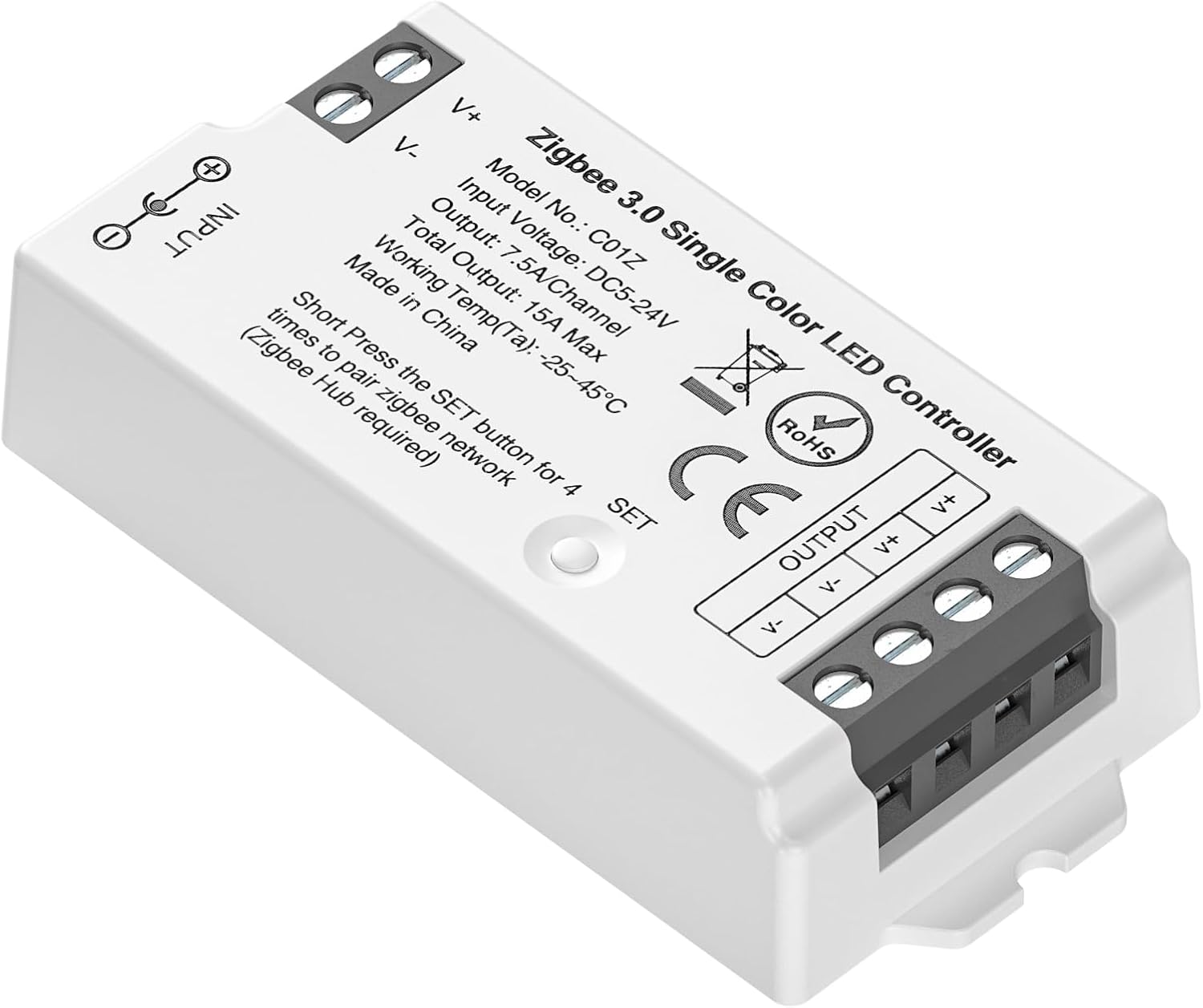
4.2 Pairing with a Zigbee Gateway
The C01Z controller requires a Zigbee 3.0 compatible gateway (hub) for smart control. Follow these general steps to pair your device:
- Power Your Light Sources: Connect the LED controller and strip to the appropriate power supply and turn on the power.
- Set Up Your Bridge/Gateway: Ensure your Zigbee gateway (e.g., Philips Bridge, Tuya Bluetooth/WiFi Dual-Mode Gateway, Echo Plus) is properly set up and connected to your network.
- Initiate Pairing on Gateway: Open your smart home app (e.g., Tuya Smart, Smart Life, Philips Hue app) and start the device search or pairing process for a new Zigbee device.
- Activate Controller Pairing Mode: While the gateway is searching, quickly press the 'SET' button on the C01Z controller four (4) times in succession. The LED indicator on the controller may flash to confirm pairing mode.
- Confirm Pairing: The controller should appear in your app. If the device is not found, try power cycling the controller (turn off and on five times) to reset it, then repeat the pairing steps.

5. Operating Instructions
Once paired with your Zigbee gateway, the C01Z controller can be managed through your smart home application or voice commands.
5.1 App Control
Using your compatible smart home app (e.g., Tuya Smart, Smart Life), you can access various control features:
- Brightness Adjustment: Adjust the brightness of your single-color LED strip from 1% to 100%.
- Group Control: Group multiple C01Z controllers together to control them simultaneously.
- Device Sharing: Share control of the device with other users in your household.
- Automation & Tap-to-Run: Create custom scenes and automated routines based on schedules, environmental conditions, or other smart devices.

5.2 Voice Control
If connected via a Tuya Bluetooth/WiFi Dual-Mode Gateway, the controller supports voice commands through platforms like Amazon Alexa and Google Home. Examples of commands include:
- "Alexa, turn on the [device name]."
- "Hey Google, dim [device name] to 50%."
- "Alexa, turn off the [device name]."

5.3 Auto-Transmitting and Auto-Synchronization
The C01Z controller features an auto-transmitting function, allowing it to relay control signals to other C01Z controllers within a 99ft (30 meter) range. This effectively extends the control distance for your LED setup. Additionally, the auto-synchronization function ensures that multiple controllers can operate in unison, even if activated at different times, when controlled by the same remote (via app) and set to the same dynamic mode and speed.
5.4 Memory Function
The controller is equipped with a memory function, which means it will recall and restore the last brightness setting after a power interruption.
6. Compatibility
The BTF-LIGHTING C01Z controller is designed for broad compatibility within the Zigbee 3.0 ecosystem:
- Zigbee 3.0 Gateways: Fully compatible with standard Zigbee 3.0 bridges, including Philips Bridge, Amazon Echo Plus, and Amazon Echo (4th Gen).
- Tuya Ecosystem: Works seamlessly with Tuya Bluetooth/WiFi Dual-Mode Gateways, enabling integration with Tuya Smart and Smart Life apps, and third-party voice assistants.
- Home-Kit Gateway: Supports Home-Kit gateways for integration into Apple HomeKit environments.
- Important Note: This controller is not compatible with RF remotes. For RF remote control, please refer to specific RF-compatible models like the LM052 5in1 controller. Direct compatibility with SmartThings is not supported by this model.
7. Troubleshooting
If you encounter issues with your C01Z controller, please refer to the following common troubleshooting steps:
- Device Not Pairing:
- Ensure the controller is powered on and within range of your Zigbee gateway.
- Verify your gateway is in pairing mode.
- Press the 'SET' button on the controller four times rapidly to activate pairing mode.
- If pairing fails, try power cycling the controller by turning it off and on five times, then attempt pairing again.
- LED Strip Not Lighting Up:
- Check all wiring connections (input power and LED strip output) for secure contact.
- Confirm that the power supply voltage matches the voltage requirement of your LED strip (e.g., a 12V LED strip requires a 12V power supply).
- Ensure the power supply is functioning correctly.
- Intermittent Connectivity:
- Relocate the controller closer to the Zigbee gateway or consider adding a Zigbee repeater to strengthen the network signal.
- Ensure there are no significant physical obstructions (e.g., thick walls, metal objects) between the controller and the gateway.
- High-Pitched Noise:
- While rare, some electronic components can produce a faint high-pitched noise. If noticeable and persistent, ensure all connections are tight and the power supply is stable. If the issue persists, contact customer support.
8. Maintenance
The BTF-LIGHTING C01Z controller is designed for durability and requires minimal maintenance.
- Cleaning: Gently wipe the controller with a dry, soft cloth to remove dust. Do not use liquid cleaners or abrasive materials.
- Environment: Ensure the controller is installed in a dry, indoor environment, away from direct sunlight, high temperatures, and moisture. It is not water resistant.
- Connections: Periodically check wiring connections to ensure they remain secure.
9. Warranty and Support
For warranty information and technical support, please refer to the documentation provided with your purchase or contact BTF-LIGHTING customer service directly. The manufacturer, BTF-LIGHTING Technology Co., Limited, is committed to providing quality products and assistance.