
1. Safety Information
Please read and understand all safety instructions before installation or operation of the medicine cabinet.
- Always unplug the cabinet before installation or maintenance.
- Use appropriate safety gear when handling the cabinet to prevent injury from glass components.
- Ensure the wall can support the weight of the cabinet before installation.
- Consult a professional if you are unsure about the installation process.
- Keep the cabinet dry to prevent electrical hazards.
2. Product Overview
The KWW LED Lighted Bathroom Medicine Cabinet is designed to provide functional storage and enhanced lighting for your bathroom. It features adjustable LED lighting, an anti-fog function, internal power outlets, and USB ports.
Dimensions

Detailed dimensions of the KWW medicine cabinet, showing height, width, and depth in centimeters and inches.
- Overall Dimensions: 5"D x 30"W x 28"H
- Material: Glass, Aluminum
- Number of Doors: 2
- Number of Shelves: 2 (Adjustable)
3. Setup and Installation
The KWW medicine cabinet is designed for wall-mounted installation. Detailed instructions are included with the product. It is recommended to have two people for installation due to the weight of the cabinet.
Installation Steps
- Prepare the Wall: Ensure the wall is structurally sound and can support the cabinet's weight (up to 38 pounds). Identify the desired mounting location.
- Positioning: Use the provided cardboard template to mark the drilling points accurately on the wall.

Illustration of the installation process, showing how to use the provided cardboard template for accurate wall positioning before mounting the cabinet.
- Drill Holes: Drill holes at the marked positions and insert wall anchors if necessary.
- Mount the Cabinet: Secure the mounting brackets to the wall and carefully hang the cabinet.

Diagram illustrating the wall-mounting process, including marking positions, drilling, and securing the cabinet. It also shows the reserved wire groove for power connection.
- Electrical Connection: Connect the power cord. The wire is 70.87 inches long and can be pulled out from all four corners of the cabinet.
- Adjust Doors: If needed, adjust the cabinet doors using the hinge screws for proper alignment.

Diagram showing how to adjust the cabinet doors using hinge screws to ensure proper alignment and closure.
Internal Features

View of the medicine cabinet interior, highlighting 105-degree wide-open soft-close hinges, anti-collision pads, and adjustable glass shelves for customized storage.
- Adjustable Shelves: The two glass shelves can be adjusted to two different heights to accommodate various items.
- Soft-Close Hinges: The doors are equipped with 105-degree wide-open soft-close hinges for quiet operation.
- Anti-collision Pads: Six anti-collision pads are integrated for door protection.
4. Operating Instructions
The cabinet features touch controls on the mirror surface for lighting and defogging functions.
Lighting Control

Illustration of the medicine cabinet's lighting features, including adjustable brightness from 10% to 100% and three color temperature options: 3000K (warm), 4000K (neutral), and 6500K (cool).
- Turn On/Off: Tap the light icon on the mirror to turn the LED lights on or off.
- Adjust Brightness: Long press the light icon to adjust the brightness from 10% to 100%.
- Change Color Temperature: Double-click the light icon to cycle through three color temperatures: 3000K (warm white), 4000K (neutral white), and 6500K (cool white).
- Memory Function: The light settings (brightness and color temperature) are saved for convenience.
- Additional Bottom Light: An LED light strip at the bottom provides additional illumination.
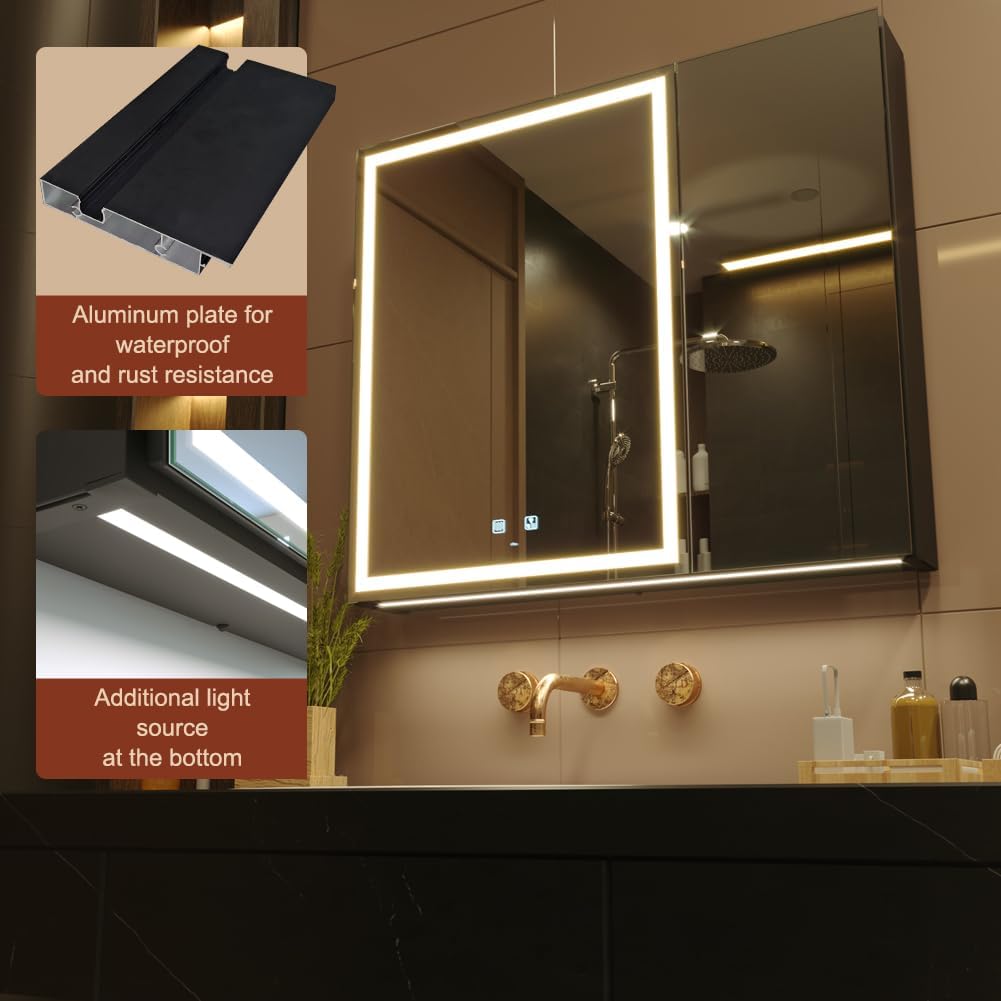
Image showing the aluminum plate construction for waterproofing and rust resistance, along with an additional LED light source located at the bottom of the cabinet.

Close-up of the additional LED light strip at the bottom of the cabinet, noting its energy conservation and long lifespan of 50,000 hours.
Defogger Function

A user looking into the mirror, demonstrating the anti-fog function. The image also indicates IP44 waterproof rating for bathroom use.
- Activate Defogger: Tap the defogger button on the mirror to activate the anti-fog function. This will clear condensation from the mirror surface.
Internal Power Outlets & USB Ports

Close-up of the internal power distribution unit, featuring UL listed outlets and USB ports for charging devices inside the cabinet.
Image highlighting the integrated USB charging ports and power outlet located inside the medicine cabinet for convenient device charging.
- The cabinet includes internal UL listed power outlets and USB ports for charging electric toothbrushes, shavers, or other small electronic devices.
- Ensure devices are compatible with the provided voltage (125Vac 50-60Hz 12A) and USB output (DC5V, 2.1A).
5. Maintenance
Proper maintenance ensures the longevity and optimal performance of your medicine cabinet.
- Cleaning: Wipe the mirror and cabinet surfaces with a damp cloth. Avoid abrasive cleaners or harsh chemicals that may damage the finish or mirror coating.
- Electrical Safety: Always unplug the cabinet before performing any cleaning or maintenance that involves internal components.
- Hinge Care: Periodically check the soft-close hinges for smooth operation. If needed, gently clean any dust or debris.
6. Troubleshooting
If you encounter any issues with your KWW medicine cabinet, please refer to the following common solutions or contact customer support.
- Lights Not Working: Check if the cabinet is properly plugged into a power source. Ensure the power outlet is functional.
- Defogger Not Activating: Verify that the defogger button has been pressed. Allow a few moments for the heating element to warm up.
- Doors Not Closing Properly: Refer to the door adjustment instructions in Section 3 to realign the hinges.
- Outlets/USBs Not Functioning: Confirm the cabinet is powered on. Ensure devices are correctly plugged in and compatible.
For persistent issues or concerns not addressed here, please contact KWW customer support.
7. Specifications
| Feature | Detail |
|---|---|
| Brand | KWW |
| Model Number | KWWMC01 |
| Product Dimensions | 5"D x 30"W x 28"H |
| Item Weight | 16 Kilograms (approx. 35.27 lbs) |
| Material | Glass, Aluminum |
| Special Features | Illuminated, Anti-fog, Dimmable, 3 Color Light, Outlets & USBs |
| Light Color Temperature | 3000K, 4000K, 6500K |
| Brightness Adjustment | 10% to 100% |
| Installation Type | Wall Mount |
| Power Input | 125Vac 50-60Hz 12A (for outlets) |
| USB Output | DC5V, 2.1A |
| Waterproof Rating | IP44 |
| Weight Capacity Maximum | 38 Pounds |
| UPC | 754168950157 |
Energy Information

EU energy label for the KWW medicine cabinet, showing its energy efficiency class and consumption.
For detailed product data, please refer to the EPREL Product Database.
8. Warranty and Support
- Warranty: This product comes with a 1-year warranty, including free replacement of parts for one year.
- Returns: Enjoy a 30-day free return policy.
- Customer Support: For any questions or assistance, please utilize our 24/7 Email Assistant service. Contact information can be found on the KWW official website or through your purchase platform.