
1. Introduction
This document provides essential information for the use and maintenance of your new replacement IR remote control. This remote is designed to function with specific Pyle Audio and Bauhn sound bar models, including PSBV600BT, ASBW-0716, ASBWS-0419, ASBW-0718, and ASBW-1018. Please ensure your original device model is listed for compatibility.
This remote is an infrared (IR) replacement and may not offer all functions present on your original remote. It is intended to provide core functionalities for your audio system.
2. Setup: Battery Installation
The remote control requires one CR2025 coin cell battery (not included). Follow these steps to install or replace the battery:
- Locate the battery compartment on the back of the remote control.
- Gently push the tab marked "OPEN" and slide the battery tray out.
- Insert one CR2025 battery with the positive (+) side facing upwards, as indicated inside the compartment.
- Slide the battery tray back into the compartment until it clicks securely into place.

Figure 2.1: Rear view of the replacement remote control, illustrating the battery compartment and the correct orientation for CR2025 battery insertion.
3. Operating Instructions
Point the remote control directly at the IR receiver on your sound bar system. Ensure there are no obstructions between the remote and the sound bar.
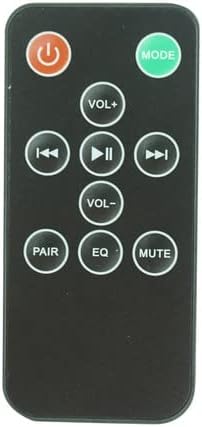
Figure 3.1: Front view of the replacement remote control with all buttons clearly visible.
Button Functions:
| Button | Function |
|---|---|
| Power (⏻) | Turns the sound bar system On or Off. |
| MODE | Cycles through input modes (e.g., Bluetooth, AUX, Optical, USB). |
| VOL+ | Increases the volume level. |
| VOL- | Decreases the volume level. |
| Previous Track (⏮) | Skips to the beginning of the current track or to the previous track. |
| Play/Pause (⏸) | Plays or pauses the current audio playback. |
| Next Track (⏭) | Skips to the next track. |
| PAIR | Initiates Bluetooth pairing mode for compatible sound bar models. |
| EQ | Cycles through equalizer presets (e.g., Movie, Music, News). |
| MUTE | Mutes or unmutes the sound. |
4. Maintenance
- Cleaning: Wipe the remote control with a soft, dry cloth. Do not use liquid cleaners or abrasive materials.
- Battery Replacement: Replace the CR2025 battery when the remote's range decreases or it stops responding. Refer to Section 2 for battery installation instructions.
- Storage: If the remote will not be used for an extended period, remove the battery to prevent leakage. Store in a cool, dry place.
5. Troubleshooting
| Problem | Possible Solution |
|---|---|
| Remote is not responding. |
|
| Some functions do not work. |
|
6. Specifications
- Product Type: Replacement IR Remote Control
- Compatibility: Pyle Audio PSBV600BT, Bauhn ASBW-0716, ASBWS-0419, ASBW-0718, ASBW-1018 Sound Bar Systems
- Connectivity: Infrared (IR)
- Power Source: 1 x CR2025 Coin Cell Battery (not included)
- Material: ABS Plastic
7. Warranty and Support
This product is a replacement remote control. For any questions or concerns regarding its functionality or compatibility, please contact the seller directly through the platform where the purchase was made. Please note that specific warranty terms may vary and are typically provided by the seller at the time of purchase.
It is recommended to retain your purchase receipt for any support inquiries.

