Introduction
This manual provides essential information for the safe and effective use of your Gabba Goods Karaoke Night Set. This set includes a karaoke microphone speaker and a 10-inch table top ring light, designed to enhance your singing and video recording experience.
Please read this manual thoroughly before operating the device and retain it for future reference.
Package Contents
- Karaoke Microphone Speaker
- 10-inch Table Top Ring Light
- USB Charging Cable (for microphone)
- 3.5mm Audio Cable (for microphone)
- Phone Holder (integrated with ring light)

Image: The complete Gabba Goods Karaoke Night Set in its packaging, highlighting the microphone speaker and ring light components.
Safety Precautions
- Do not expose the device to water or excessive moisture.
- Keep away from heat sources and direct sunlight.
- Do not attempt to disassemble or repair the device yourself. Refer to qualified service personnel.
- Use only the provided or recommended charging cables.
- Keep out of reach of small children.
Setup
Karaoke Microphone Speaker Setup
- Charging the Microphone: Connect the provided USB charging cable to the microphone's charging port and the other end to a USB power adapter (not included) or a computer USB port. The charging indicator light will illuminate. A full charge typically takes 2-3 hours.
- Powering On: Press and hold the power button on the microphone until you hear a power-on prompt.
- Bluetooth Pairing:
- Ensure Bluetooth is enabled on your smartphone, tablet, or other compatible device.
- Search for "Gabba Goods Karaoke Mic" (or similar name) in your device's Bluetooth settings.
- Select the microphone to pair. A successful connection will be indicated by an audible prompt.
- Wired Connection (Optional): Use the 3.5mm audio cable to connect the microphone to a device with a 3.5mm audio output.
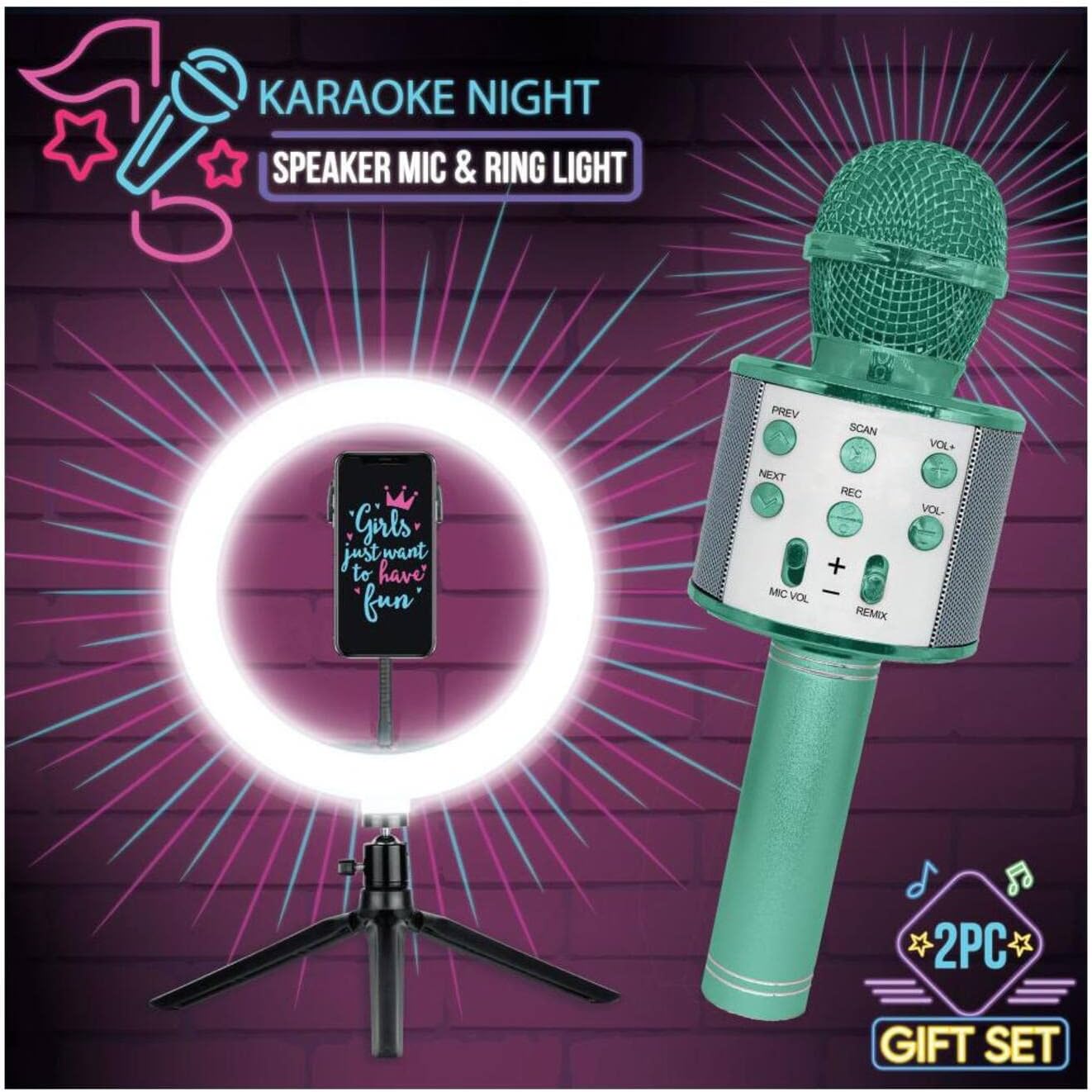
Image: The Gabba Goods Karaoke Microphone Speaker and the 10-inch Ring Light, showing their assembled state ready for use.
10-inch Ring Light Setup
- Assemble the Stand: Extend the tripod legs of the ring light stand to a stable position.
- Attach Phone Holder: Secure your smartphone into the adjustable phone holder located within the center of the ring light. Ensure it is firmly gripped.
- Powering the Ring Light: Connect the USB cable of the ring light to a USB power source (e.g., USB wall adapter, power bank, computer USB port).

Image: Two children using the Gabba Goods Karaoke Night Set, demonstrating the ring light illuminating a phone and the microphone in use.
Operating Instructions
Using the Karaoke Microphone Speaker
- Playing Music: Once paired via Bluetooth, play music from your connected device. The music will play through the microphone's built-in speaker.
- Microphone Volume: Use the "MIC VOL" slider or buttons on the microphone to adjust your voice volume.
- Music Volume: Use the "VOL+" and "VOL-" buttons to adjust the music playback volume.
- Echo Effect: Use the "REMIX" slider or button to adjust the echo effect on your voice.
- Track Control: Use "PREV" and "NEXT" buttons to skip tracks. Use "SCAN" or play/pause button to play or pause music.
- Recording: Some models may support recording directly to a connected device or a memory card (if slot available). Refer to specific model features.
Using the 10-inch Ring Light
- Power Button: Press the power button on the inline remote to turn the ring light on/off.
- Brightness Adjustment: Use the brightness control buttons (+/-) on the inline remote to increase or decrease the light intensity.
- Color Temperature Modes: The ring light typically offers multiple color temperature modes (e.g., warm, cool, natural). Use the mode button on the inline remote to cycle through these options.
Maintenance
- Cleaning: Wipe the microphone and ring light with a soft, dry cloth. Do not use abrasive cleaners or solvents.
- Storage: Store the device in a cool, dry place away from direct sunlight when not in use.
- Battery Care (Microphone): To prolong battery life, avoid fully discharging the microphone frequently. Charge it regularly, even if not in constant use.
Troubleshooting
| Problem | Possible Cause | Solution |
|---|---|---|
| Microphone not turning on. | Low battery. | Charge the microphone fully. |
| Cannot pair microphone via Bluetooth. | Microphone not in pairing mode; Bluetooth off on device; too far from device. | Ensure microphone is on and in pairing mode. Turn Bluetooth on/off on your device. Move closer to the microphone. Forget previous pairings and try again. |
| No sound from microphone speaker. | Volume too low; not connected; incorrect mode. | Increase microphone and device volume. Ensure proper Bluetooth or wired connection. |
| Ring light not turning on. | Not connected to power; faulty USB cable/power source. | Ensure USB cable is securely connected to a working power source. Try a different USB port or power adapter. |
Specifications
- Product Name: Gabba Goods Karaoke Night Set
- Model: B0BP9BYLGN
- Dimensions: Approximately 13.5 x 24 cm (Karaoke Mic Speaker)
- Compatible Devices: Smartphone, Tablet, Speaker
- Connector Type: 3.5 mm Jack (for microphone audio output/input)
- Speaker Count: 1 (integrated into microphone)
- Power Source: Battery Powered (Microphone), USB Powered (Ring Light)
- Included Components: Microphone, 10" Ring Light
- Color: Green (as per product variant)
Warranty and Support
For warranty information or technical support, please refer to the retailer where the product was purchased or visit the official Gabba Goods website. Keep your proof of purchase for warranty claims.
Gabba Goods Store: Visit Gabba Goods Store on Amazon