
Introduction
This manual provides detailed instructions for the installation, operation, and maintenance of your SALCAR RV11 WiFi Smart Thermostatic Radiator Valve. This device allows for precise temperature control in individual rooms, enhancing comfort and energy efficiency through smart home integration.
Package Contents
Please verify that all items listed below are included in your package:
- 3x SALCAR RV11 Thermostatic Radiator Valves
- 18x Adapters (3x RA, 3x RAV, 3x RAVL, 3x Canleffi, 3x Giacomini, 3x M28)
- 3x Adapter Screws
- 1x User Manual

Image: Contents of the SALCAR RV11 package, showing the three smart radiator valves, a selection of adapters for different radiator types, mounting screws, and the instruction manual.
Product Features
The SALCAR RV11 Smart Thermostatic Radiator Valve offers a range of features designed to optimize your home heating system:
- WiFi Connectivity: Control your heating remotely via a 2.4 GHz WLAN network using the Smart Life or Tuya app.
- Energy Saving: Reduce energy consumption by up to 30% through precise temperature settings and programmable schedules for individual heating zones.
- Remote & Voice Control: Manage your heating anytime, anywhere via the Smart Life app. Compatible with Amazon Alexa and Google Assistant for voice commands.
- Window Open Detection: Automatically detects open windows and adjusts the temperature to 12°C for 30 minutes to prevent energy waste.
- Child Lock Function: Prevents unauthorized changes to settings. Activate by long-pressing the middle button for 3 seconds.
- Frost Protection: Activates when the room temperature drops below 5°C, heating until it reaches 8°C to prevent pipe damage.
- Anti-Calcification Function: Performs a routine descaling cycle every Monday at 12:00 PM to prevent valve rust and extend product lifespan.
- Sleep Function: The display darkens after 5 seconds of inactivity to save energy and prolong battery life.
- Low Battery Alarm: Notifies you when batteries need replacement.

Image: The SALCAR RV11 thermostat head on a radiator, highlighting its key features such as WiFi connectivity, frost protection, and app control.
Setup and Installation
1. Battery Installation
The SALCAR RV11 requires three AAA batteries (not included). Open the battery compartment, insert the batteries according to the polarity markings, and close the compartment securely.
2. Mounting the Thermostat
The thermostat comes with various adapters to ensure compatibility with most radiator valves. Follow these steps:
- Remove your existing thermostatic head from the radiator valve.
- Select the appropriate adapter for your valve type (e.g., RA, RAV, RAVL, Canleffi, Giacomini, M28).
- Attach the chosen adapter to the radiator valve. Ensure it is securely fastened.
- Screw the SALCAR RV11 thermostatic head onto the adapter. Tighten it firmly but do not overtighten.

Image: Step-by-step illustration of how to install the SALCAR RV11 thermostat head onto a radiator valve using different adapters.
3. Connecting to WiFi and App
To enable smart control, connect your thermostat to your home's 2.4 GHz WiFi network via the Smart Life or Tuya Smart app:
- Download the "Smart Life" or "Tuya Smart" app from your smartphone's app store (available for iOS and Android).
- Register or log in to your account.
- Add a new device in the app. Select "Thermostat" or "Radiator Valve" from the device list.
- Follow the in-app instructions to put the thermostat into pairing mode (usually involves a button press sequence on the device).
- Enter your 2.4 GHz WiFi network credentials when prompted by the app.
- Once connected, you can rename your thermostat and begin controlling it remotely.
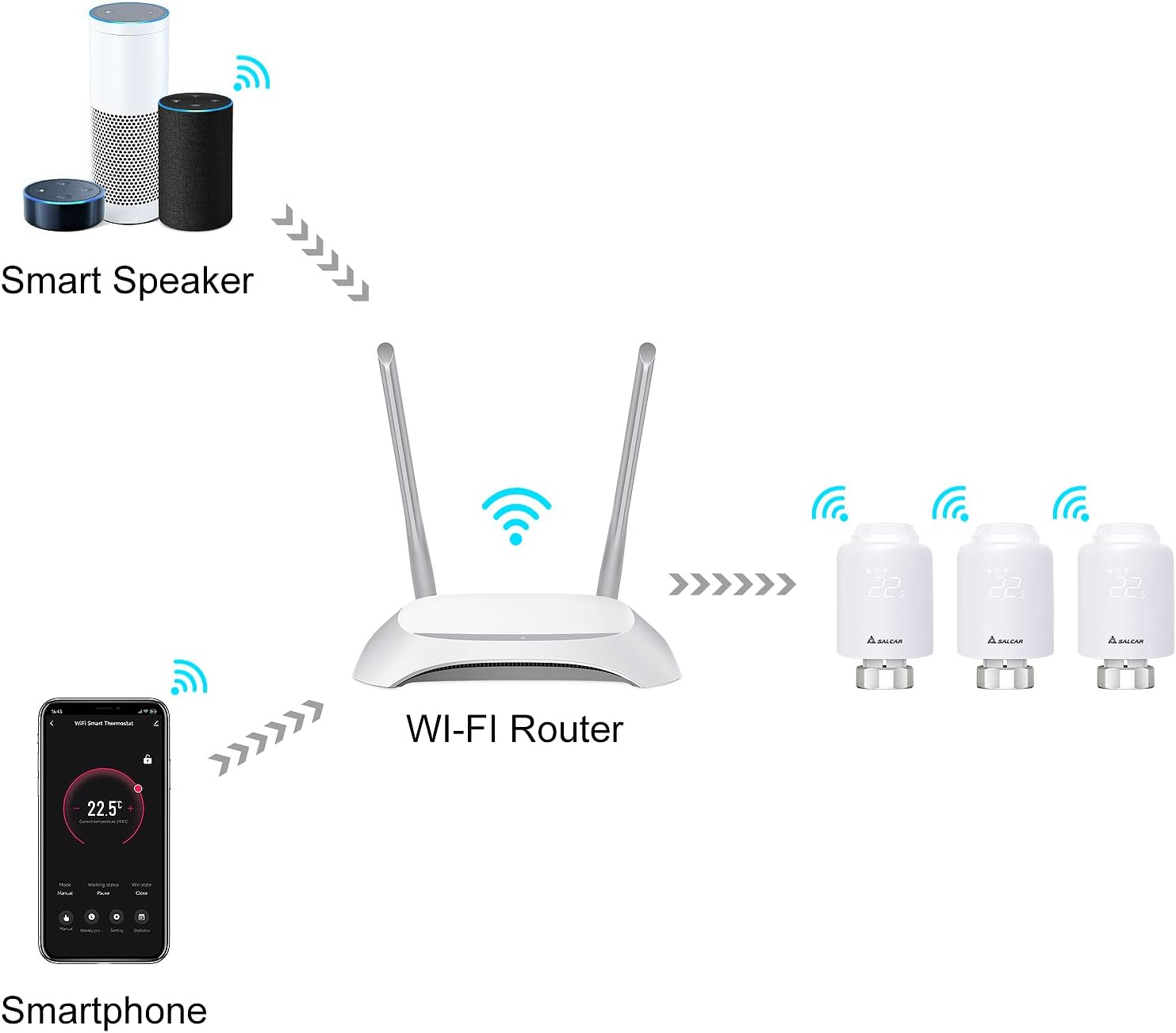
Image: Network diagram illustrating the connection flow from a smartphone to the WiFi router, and then to multiple SALCAR RV11 thermostats and smart speakers for integrated control.
Operating Instructions
Manual Control
You can adjust the temperature directly on the device:
- Rotate the outer ring of the thermostat clockwise to increase the temperature.
- Rotate the outer ring counter-clockwise to decrease the temperature.
- The current set temperature will be displayed on the screen.

Image: Demonstrates manual temperature adjustment by rotating the outer ring of the SALCAR RV11 thermostat.
App Control (Smart Life / Tuya Smart)
The app provides comprehensive control and scheduling options:
- Temperature Adjustment: Use the app interface to set your desired temperature.
- Scheduling: Create custom heating schedules for different days and times to match your routine.
- Mode Selection: Switch between manual, automatic, or holiday modes.
- Feature Activation: Enable or disable features like Window Open Detection, Child Lock, and Frost Protection directly from the app.

Image: The Smart Life app interface on a smartphone, demonstrating remote control capabilities for the SALCAR RV11 thermostat.
Device Sharing Function
You can share control of your SALCAR RV11 thermostats with other family members through the Smart Life or Tuya Smart app. This allows multiple users to remotely manage the heating settings.

Image: Visual representation of the device sharing feature, enabling multiple users to control the thermostat via their smartphones.
Smart Home Integration
The SALCAR RV11 is compatible with popular voice assistants, allowing for convenient hands-free control.
Connecting with Amazon Alexa & Google Assistant
- Ensure your SALCAR RV11 thermostat is successfully connected to the Smart Life or Tuya Smart app.
- Open the Amazon Alexa app or Google Home app on your smartphone.
- Navigate to the "Skills & Games" section (Alexa) or "Works with Google" section (Google Home).
- Search for "Smart Life" or "Tuya Smart" and enable the skill/service.
- Link your Smart Life/Tuya Smart account with your Alexa/Google account.
- Discover devices. Your SALCAR RV11 thermostats should now appear and be controllable via voice commands.
Voice Commands Examples:
- "Alexa, set living room temperature to 22 degrees."
- "Hey Google, what is the temperature in the bedroom?"
- "Alexa, turn on the heating in the kitchen."

Image: A user interacting with smart speakers (Google Home and Amazon Alexa) to control the SALCAR RV11 thermostat using voice commands.
Maintenance
Battery Replacement
When the low battery alarm is triggered, replace the three AAA batteries promptly to ensure continuous operation. The device will display a low battery warning. Ensure correct polarity when inserting new batteries.
Anti-Calcification Cycle
The SALCAR RV11 automatically performs an anti-calcification cycle every Monday at 12:00 PM. This function helps prevent the valve from seizing due to mineral buildup, especially during periods of non-use, thereby extending the lifespan of the valve.
Cleaning
Wipe the exterior of the thermostat with a soft, dry cloth. Do not use abrasive cleaners or solvents, as these can damage the device's surface.
Troubleshooting
| Problem | Possible Cause | Solution |
|---|---|---|
| Device not connecting to WiFi | Incorrect WiFi password; 5GHz network used; device too far from router; router issues. | Ensure correct 2.4 GHz WiFi password. Move device closer to router. Restart router. Re-attempt pairing process. |
| Thermostat not responding to commands | Low batteries; device offline; app issue. | Replace batteries. Check WiFi connection. Restart the app. |
| Temperature reading inaccurate | Thermostat is too close to the radiator or in a draft. | The thermostat measures temperature at its location. Consider the placement relative to heat sources or drafts. Adjust set temperature accordingly. |
| Child Lock activated unexpectedly | Accidental long press of the middle button. | Long-press the middle button for 3 seconds to deactivate the child lock. |
| Radiator heating when it shouldn't (e.g., low battery) | When batteries are critically low, the valve may default to an open position to prevent freezing. | Replace batteries immediately. |
Specifications
| Feature | Detail |
|---|---|
| Brand | SALCAR |
| Model Number | RV11 |
| Connectivity Technology | Wi-Fi (2.4 GHz) |
| Power Source | Battery Powered (3x AAA, not included) |
| Voltage | 15 Volts (internal operating voltage) |
| Controller Type | Google Assistant, Amazon Alexa, Smart Life/Tuya App |
| Specific Uses | Temperature Control |
| Backlight | Yes |
| Package Dimensions | 13.5 x 13.2 x 11.1 cm |
| Item Weight | 660 grams (for the pack of 3) |
Warranty and Support
For warranty information or technical support, please refer to the contact details provided with your purchase documentation or visit the official SALCAR website. Keep your purchase receipt as proof of purchase.
