
1. Product Overview
The Cozy Bread Sourdough Bread Proofing Mat (Model JCHMF001) is designed to provide a consistent, temperature-controlled environment for various baking and fermenting needs. This mat ensures optimal conditions for sourdough bread, pizza dough, rolls, and enriched doughs, leading to more predictable rises and improved results. It features a digital thermostat for precise temperature adjustments and a water-resistant surface for easy cleaning.

Image: The Cozy Bread Proofing Mat, measuring 10 inches by 21 inches, with a 6.5 ft power cord. It is shown with icons indicating its versatile uses for dough proofing, sourdough starter, and yogurt fermenting.
Key Features:
- Consistent Dough Proofing: Creates a warm, controlled surface for various dough types.
- Thermostat Controlled Warmth: Adjustable temperature control (70°F - 120°F) for steady proofing conditions.
- Fast Preheat: Warms up in 1-2 minutes.
- Compact Design: Measures 10" x 21" for easy storage and versatile placement.
- Even Heat Distribution: High-quality heating element ensures uniform warmth without hot spots.
- Water-Resistant Surface: Easy to wipe clean (note: digital thermostat is not water-resistant).
2. Setup Instructions
Follow these steps to set up your Cozy Bread Proofing Mat for optimal performance:
- Place the Mat: Place the mat onto a dry, flat, insulated surface (e.g., a towel) to prevent heat loss to the countertop. For enhanced insulation, consider using the Cozy Bread Insulation Box (sold separately).
- Connect Power: Plug the mat into a standard 120-volt power source.
- Power On & Adjust Temperature: Press the power button on the handheld controller. Use the '+' and '-' buttons to adjust the desired temperature in 1°F increments. The mat preheats in approximately 3-5 minutes.
- Place Dough: Place your dough in a proofing basket or container directly onto the proofing mat.
- Insulate (Optional but Recommended): Cover containers placed on the mat with a towel to retain warmth and maintain humidity control. If using the Cozy Bread Insulation Box, zip it up around the dough container.

Image: A visual guide illustrating the 4-step proofing process: 1. Place mat on an insulated surface, 2. Set desired temperature, 3. Place dough, 4. Insulate and proof with a towel or insulation box.
3. Operating Instructions
The Cozy Bread Proofing Mat is designed for straightforward operation to ensure consistent results.
Temperature Control:
The mat features an adjustable digital thermostat with a temperature range of 70°F to 120°F. The controller displays both the 'REAL TEMP' (current temperature) and 'SET TEMP' (desired temperature). Use the '+' and '-' buttons to set your target temperature. The mat will automatically heat to maintain this setting.

Image: Close-up of the digital thermostat controller, displaying real-time and set temperatures, and indicating an adjustable range from 70°F to 120°F.
Applications:
- Dough Proofing: Ideal for bulk fermentation and final proofing of various bread doughs.
- Sourdough Starter Maintenance: Provides a stable warm environment for active sourdough starters.
- Yogurt Fermenting: Can be used to maintain the necessary temperature for yogurt fermentation.
Even Heat Distribution:
The mat is constructed with a high-quality heating element that ensures reliable and consistent heat distribution across its entire surface, preventing hot spots and ensuring uniform proofing.
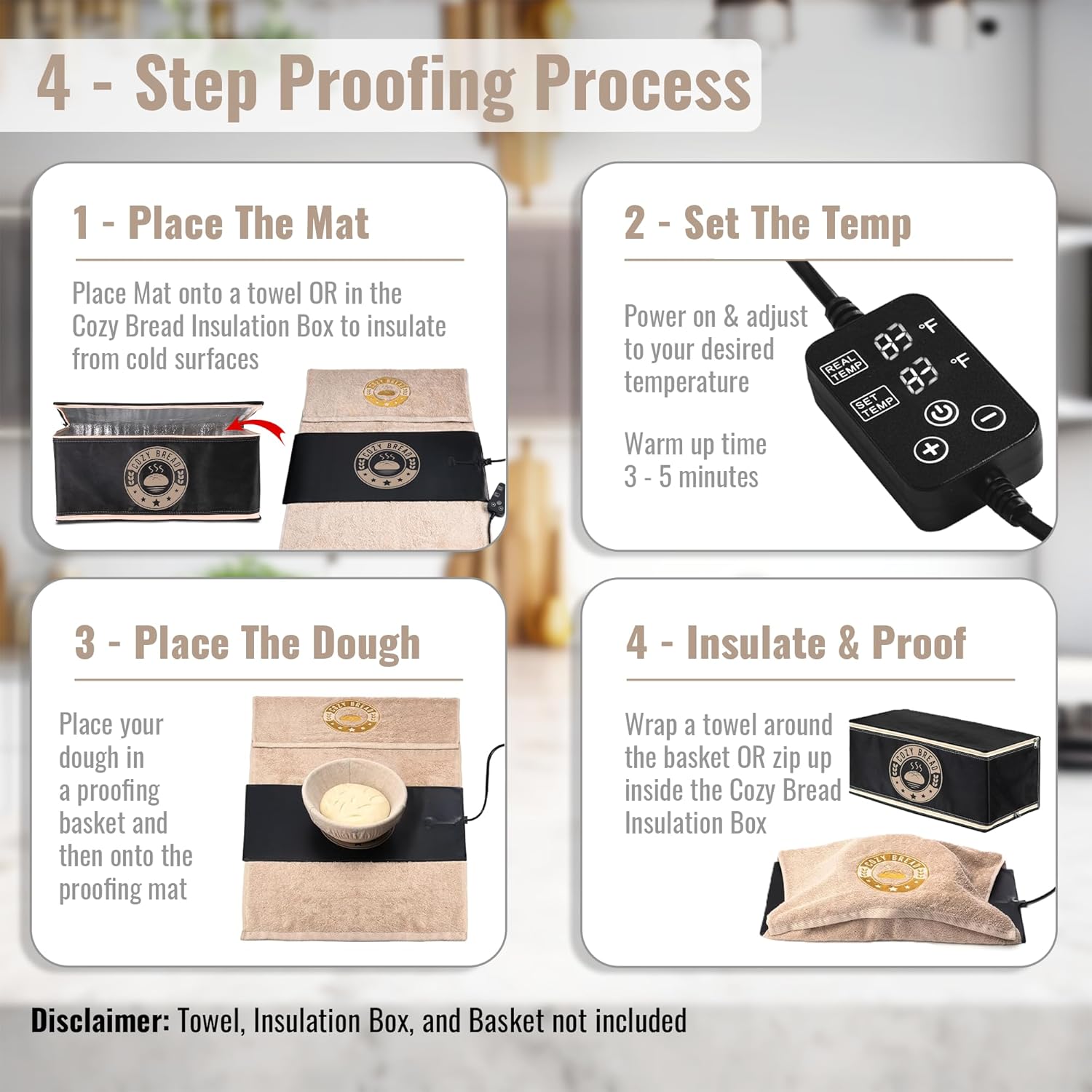
Image: A cutaway diagram showing the internal layers of the proofing mat, highlighting the even heat distribution technology with small orange arrows indicating heat flow.
4. Care and Maintenance
Proper care ensures the longevity and performance of your proofing mat.
- Cleaning: The mat features a water-resistant, non-stick surface that is easy to wipe clean with a damp cloth.
- Washing: This product is for Hand Wash Only. Do not immerse the mat or the digital thermostat in water.
- Digital Thermostat: The digital thermostat is not water-resistant. Ensure it remains dry during cleaning and operation.
- Storage: When not in use, the slim and lightweight mat can be rolled up for easy storage.
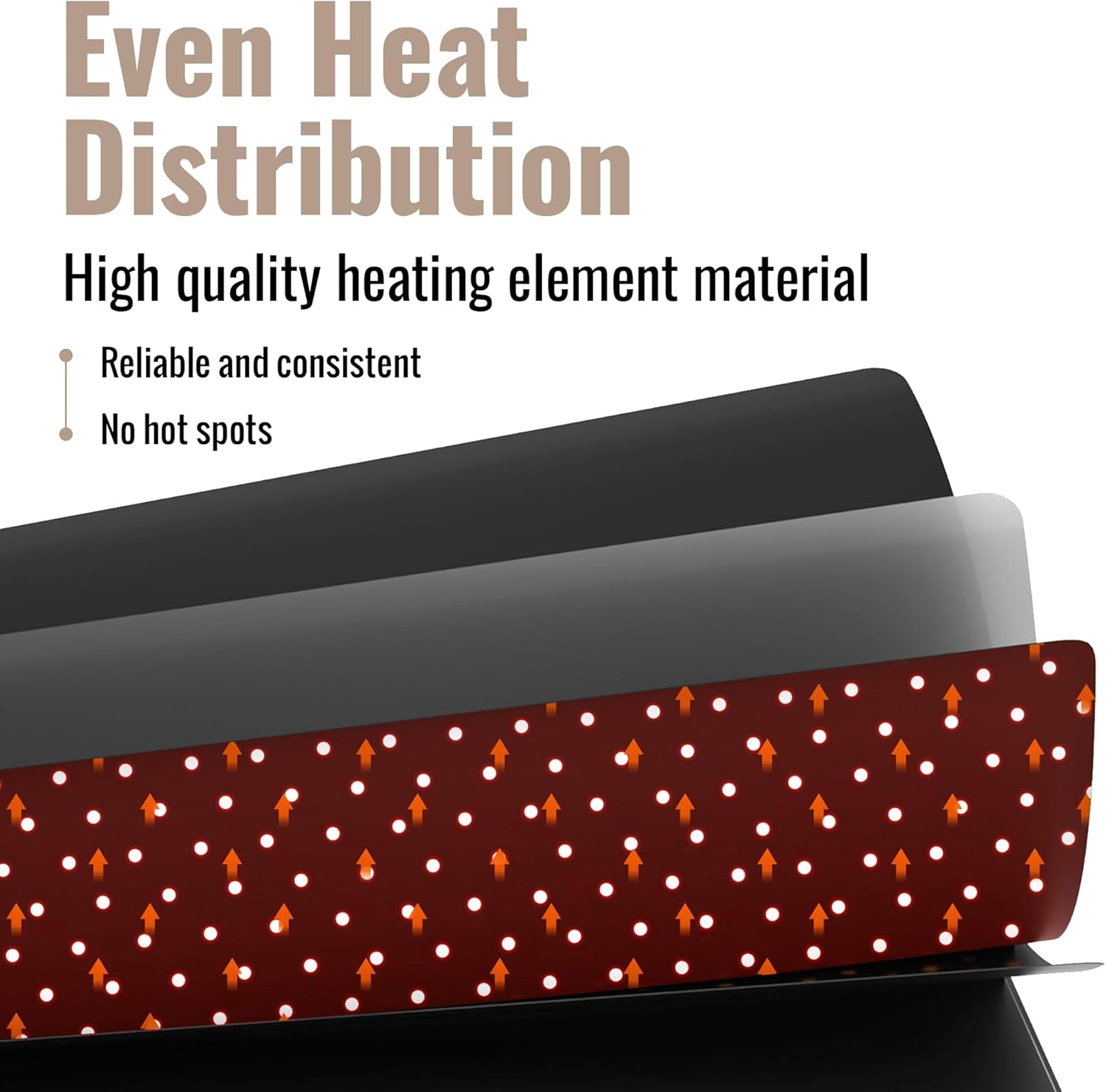
Image: A close-up of the mat's surface with water droplets, demonstrating its water-resistant property. Printed instructions are visible on the mat's back, and a disclaimer notes the thermostat is not water-resistant.
5. Troubleshooting
If you encounter issues with your Cozy Bread Proofing Mat, refer to the following common solutions:
- Mat Not Heating / Inconsistent Temperature:
- Ensure the mat is securely plugged into a functional 120-volt power outlet.
- Perform a hard reset: While the mat is plugged into a power outlet, press and hold the power button on the controller. Keep pressing the button as you unplug the mat from the outlet, and continue pressing it for up to 30 seconds thereafter.
- Ensure the thermostat module is positioned near the dough or within an enclosed space to accurately sense the temperature and prevent overheating or underheating.
- Place the mat on an insulated surface (like a towel) to prevent heat loss to cold countertops, which can affect the mat's ability to reach and maintain the set temperature.
- For optimal heat retention, cover your dough bowl or container with a towel or use an insulation box.
- Power Plug Warning: The appliance has a polarized plug (one blade is wider than the other). To reduce the risk of electric shock, this plug is intended to fit in a polarized outlet only one way. If the plug does not fit fully in the outlet, reverse the plug. If it still does not fit, contact a qualified electrician. Do not modify the plug in any way.
Helpful Videos:
Video: Discover the Cozy Bread Proofing Mat. This video provides an overview of the product and its features, demonstrating how it can be used for various proofing needs.
Video: Product Review + How To. This video offers a practical demonstration of the proofing mat's use, including setup and temperature adjustment.
6. Product Specifications
| Feature | Detail |
|---|---|
| Brand | Cozy Bread |
| Model Number | JCHMF001 |
| Product Dimensions | 12"D x 8"W x 10"H (Note: This appears to be package dimensions, actual mat is 10" x 21") |
| Mat Dimensions | 10" x 21" |
| Material | Silicone |
| Color | Black (Mat), White (Controller) |
| Voltage | 120 Volts (AC) |
| Temperature Range | 70°F - 120°F |
| Included Components | Proofing Mat, Digital Thermostat Controller |
| Product Care | Hand Wash Only |
| UPC | 196852022151 |
7. Warranty and Support
Specific warranty details for the Cozy Bread Sourdough Bread Proofing Mat (Model JCHMF001) are not provided in this manual. Please refer to the product packaging or the official Cozy Bread website for the most current warranty information.
Customer Support:
For any questions, concerns, or technical assistance, please contact Cozy Bread customer support through their official website or the retailer where the product was purchased. Have your model number (JCHMF001) and purchase date ready when contacting support.
You can visit the Cozy Bread Store for more information and products: Cozy Bread Store on Amazon