
Product Overview
This manual provides detailed instructions for the installation and care of the LYZRC L700 PRO GPS Drone arm set. This set includes four replacement arms (A1, A2, B1, B2) with integrated brushless motors, designed to provide stable and powerful flight performance for your drone. These accessories are professional-grade, ensuring high quality and durability.
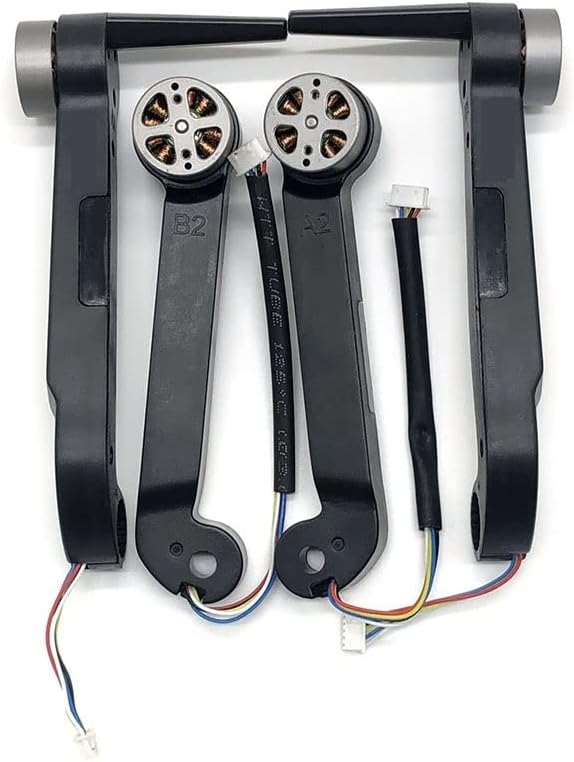
Image: A complete set of four black drone arms, each featuring an integrated brushless motor and corresponding wiring. The arms are labeled A1, A2, B1, and B2, indicating their specific positions on the drone. The motors show copper windings, and the wiring includes multi-colored strands with white connectors, ready for installation.
Installation Guide
Proper installation of the arm set is crucial for the drone's performance and safety. Follow these steps carefully:
- Preparation: Ensure the drone's power is off and the battery is disconnected. Place the drone on a clean, flat surface.
- Identify Arms: Each arm is labeled (A1, A2, B1, B2). Refer to your drone's original manual or markings to identify the correct position for each replacement arm. Typically, A1 and A2 are front arms, and B1 and B2 are rear arms, but specific placement may vary.
- Remove Old Arms (if applicable): Carefully unscrew and disconnect the wiring of the old arms. Note the routing of the wires.
- Install New Arms:
- Align the new arm with its designated mounting point on the drone frame.
- Secure the arm using the appropriate screws. Do not overtighten.
- Connect the motor's wiring harness to the corresponding port on the drone's flight controller or ESC board. Ensure the connectors are fully seated and secure.
- Route the wires neatly to prevent interference with moving parts or damage during flight.
- Repeat for all Arms: Follow the same procedure for all four arms (A1, A2, B1, B2).
- Final Check: Before powering on, visually inspect all connections and ensure the arms are securely fastened and wires are properly routed.
Operation
Once installed, these arm sets function as integral components of your LYZRC L700 PRO GPS Drone's propulsion system. They house the brushless motors responsible for spinning the propellers and generating lift. No specific operational steps are required for the arms themselves beyond their proper installation and connection to the drone's flight system. The drone's flight controller will manage the motor operation based on your commands.
Ensure that propellers are correctly attached to the motors before flight. Always perform a pre-flight check to confirm all components are secure and functioning as expected.
Maintenance and Care
Regular maintenance will extend the lifespan of your drone arm set and ensure optimal performance:
- Cleaning: After each flight, especially in dusty or sandy environments, gently wipe down the arms and motors with a soft, dry cloth. Avoid using liquid cleaners directly on the motors or electrical connections.
- Inspection: Periodically inspect the arms for any signs of damage, cracks, or loose connections. Check the motor shafts for any debris or obstructions.
- Wire Integrity: Ensure all wiring harnesses are intact and not frayed or pinched. Secure any loose wires.
- Motor Bearings: While brushless motors are generally low maintenance, listen for any unusual noises during operation, which might indicate an issue with the motor bearings.
- Storage: Store the drone and its accessories in a cool, dry place, away from direct sunlight and extreme temperatures.
Troubleshooting
If you encounter issues with your drone's arm set, refer to the table below for common problems and solutions:
| Problem | Possible Cause | Solution |
|---|---|---|
| Motor not spinning or spinning intermittently. | Loose wire connection, motor obstruction, damaged motor, ESC issue. | Check all wire connections. Remove any debris from the motor. If problem persists, the motor or ESC may need replacement. |
| Drone unstable or drifting. | Damaged arm/motor, unbalanced propeller, calibration issue. | Inspect arms and motors for damage. Ensure propellers are balanced and correctly installed. Recalibrate the drone's flight controller. |
| Unusual noise from a motor. | Debris in motor, worn bearings, loose propeller. | Clean the motor. Check propeller tightness. If noise persists, motor bearings may be worn and require replacement of the arm. |
| Arm feels loose after installation. | Screws not tightened sufficiently. | Ensure all mounting screws are securely tightened. Do not overtighten to avoid stripping threads. |
Technical Specifications
| Feature | Detail |
|---|---|
| Brand | ABZEKH |
| Model Number | ABZEKH234 |
| Color | Black Arm Set |
| Item Weight | 1 gram (per arm, approximate) |
| Compatibility | LYZRC L700 PRO GPS Drone (A1, A2, B1, B2 arms) |
| Motor Type | Brushless Motor |
| Country of Origin | China |
Warranty Information
Specific warranty details for this product are not provided in the available information. Please refer to the seller's or manufacturer's official website for the most up-to-date warranty policy. Typically, drone accessories may come with a limited warranty covering manufacturing defects.
Customer Support
For further assistance, technical support, or inquiries regarding this product, please contact the manufacturer, ABZEKH, or the retailer from whom you purchased the item. Keep your purchase receipt or order number handy for faster service.
You may also visit the ABZEKH brand store on Amazon for more information or to find contact details.