
Introduction
Thank you for choosing the Gardway Bluetooth Speaker. This wireless wearable speaker is designed for comfort and high-fidelity audio, featuring a lightweight design, 3D stereo sound, and extended playtime. It is suitable for various environments including home, office, and outdoor activities. This manual provides detailed instructions to help you get the most out of your speaker.
Product Overview
The Gardway Bluetooth Speaker (Model GL-929s) is a neckband-style wearable speaker engineered for an immersive audio experience. Its ergonomic design ensures comfort for prolonged use, while advanced features like Bluetooth 5.3 and IPX4 waterproofing enhance its versatility.

Figure 1: Gardway Neckband Bluetooth Speaker (Model GL-929s)
Key Features:
- Bluetooth 5.3 Technology: Ensures stable connection, faster communication, and lower power consumption. Supports multi-point connection for two devices simultaneously.
- Ergonomic & Lightweight Design: Weighs only 78g, designed for comfortable all-day wear around the neck.
- Immersive 3D Surround Sound: Equipped with 4 strategically placed speaker units for 360-degree audio.
- Soft TPU Rubber Neckband & Metal Mesh Design: Durable and fashionable construction.
- Hands-Free Calls: Built-in noise-canceling microphone for clear call quality.
- Upward-Facing Sound: Directs audio towards the ears for a private listening experience without disturbing others.
- 7 Button Controls: Easy access to volume, track control, play/pause, and call management.
- IPX4 Waterproof: Resistant to water splashes and drips, suitable for outdoor activities.
- Extended Battery Life: Up to 15 hours of music playback with a 500mAh lithium-ion battery.
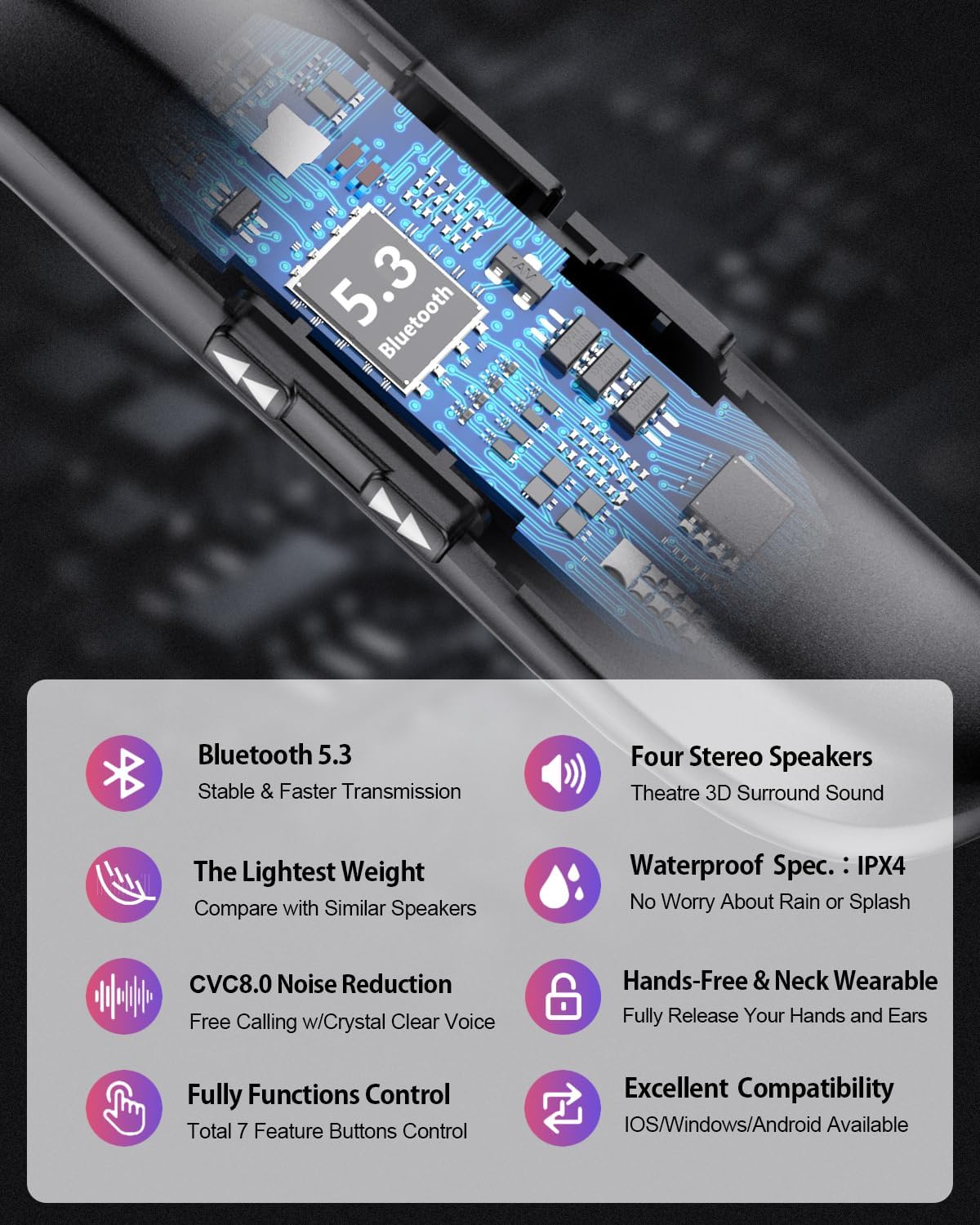
Figure 2: Internal Bluetooth 5.3 Technology and Feature Highlights

Figure 3: Quadruple Speakers System for 3D Surround Sound
Setup
1. Charging the Speaker
Before first use, fully charge your Gardway Bluetooth Speaker. Connect the provided charging cable to the speaker's charging port and a USB power source. The charging indicator light will show the charging status. A full charge typically takes approximately 2 hours.

Figure 4: Battery and Charging Information
2. Bluetooth Pairing
- Ensure the speaker is charged and powered off.
- Press and hold the Power button until the indicator light flashes, indicating it's in pairing mode.
- On your device (smartphone, tablet, laptop), enable Bluetooth and search for available devices.
- Select "Gardway GL-929s" (or similar name) from the list of found devices.
- Once connected, the indicator light will change, and you may hear an audible confirmation.
The speaker supports multi-point connection, allowing you to connect to two devices simultaneously. After pairing the first device, put the speaker back into pairing mode and connect the second device. The speaker will then be connected to both.

Figure 5: Multi-Device Connection Capability
Operating Instructions
Button Controls:
The Gardway speaker features 7 intuitive buttons/switches for effortless control:
| Button/Switch | Function |
|---|---|
| Power Button | Power On/Off, Enter Pairing Mode |
| Volume Up (+) | Increase Volume |
| Volume Down (-) | Decrease Volume |
| Play/Pause Button | Play/Pause Music, Answer/End Calls |
| Next Track Button | Skip to Next Song |
| Previous Track Button | Go to Previous Song |
| Multi-function Button | Redial Last Number, Reject Call (specific models/functions may vary) |
Making and Receiving Calls:
- Answering a Call: Press the Play/Pause button once.
- Ending a Call: Press the Play/Pause button once during a call.
- Rejecting a Call: Press and hold the Play/Pause button (or specific Multi-function button) for 2 seconds.
- Redialing: Double-press the Play/Pause button (or specific Multi-function button) to redial the last number.
The built-in noise-canceling microphone ensures clear communication during calls.
Maintenance
To ensure the longevity and optimal performance of your Gardway Bluetooth Speaker, follow these maintenance guidelines:
- Cleaning: Use a soft, dry cloth to wipe the speaker. For stubborn dirt, a slightly damp cloth can be used, but ensure no liquid enters the speaker openings. Do not use harsh chemicals or abrasive cleaners.
- Water Resistance (IPX4): The speaker is IPX4 waterproof, meaning it is resistant to splashes and light rain. Do not submerge the speaker in water or expose it to strong jets of water. Ensure the charging port cover is securely closed when not charging to maintain water resistance.
- Storage: Store the speaker in a cool, dry place away from direct sunlight, extreme temperatures, and high humidity.
- Battery Care: To preserve battery life, avoid fully discharging the battery frequently. If storing for an extended period, charge the speaker to about 50% every few months.
- Avoid Impact: Protect the speaker from drops and impacts, which can damage internal components.

Figure 6: Speaker Usage in Various Environments, highlighting IPX4 rating
Troubleshooting
If you encounter issues with your Gardway Bluetooth Speaker, please refer to the following common problems and solutions:
| Problem | Possible Solution |
|---|---|
| Speaker does not turn on. | Ensure the battery is charged. Connect to a power source and try again. |
| Cannot pair with device. | Ensure the speaker is in pairing mode. Turn off and on Bluetooth on your device. Move speaker closer to device. Clear previous Bluetooth connections on your device. |
| No sound or low volume. | Increase volume on both the speaker and your connected device. Ensure speaker is connected. Check if audio is playing from another source. |
| Sound distortion or crackling. | Move speaker closer to your device. Avoid obstacles between speaker and device. Check for interference from other wireless devices. |
| Speaker disconnects frequently. | Ensure speaker is within Bluetooth range (10 meters). Check for low battery. Re-pair the speaker with your device. |
| Microphone not working during calls. | Ensure the speaker is properly connected for calls. Check microphone settings on your connected device. |
Specifications
Detailed technical specifications for the Gardway Bluetooth Speaker (Model GL-929s):
| Feature | Detail |
|---|---|
| Model Name | GL-929s |
| Brand | Gardway |
| Connectivity Technology | Bluetooth 5.3 |
| Wireless Communication Range | Up to 10 meters (33 feet) |
| Speaker Type | 3D Surround Sound, Quadruple Speakers |
| Audio Output Mode | Stereo 2.0 |
| Speaker Maximum Output Power | 1.5 Watts |
| Frequency Response | 20000 Hz |
| Signal-to-Noise Ratio | 102 dB |
| Battery Type | 1 Lithium Polymer battery (included) |
| Battery Capacity | 500 Milliamp Hours |
| Battery Life (Playtime) | Up to 15 hours (advertised), 10 hours (specification) |
| Charging Time | Approximately 2 hours |
| Item Weight | 78g (2.75 ounces) / 85 Grams (3 ounces) |
| Product Dimensions | 7"D x 1"W x 6"H |
| Water Resistance Level | IPX4 (Waterproof) |
| Included Components | Microphone |
| UPC | 794094697702 |
Warranty and Support
Warranty Information:
The Gardway Bluetooth Speaker comes with a one-year warranty from the date of purchase. This warranty covers manufacturing defects and workmanship under normal use. It does not cover damage caused by misuse, accidents, unauthorized modifications, or natural disasters. Please retain your proof of purchase for warranty claims.
Customer Support:
For technical assistance, warranty claims, or any questions regarding your Gardway Bluetooth Speaker, please contact Gardway customer support. Refer to the product packaging or the official Gardway website for the most current contact information.
When contacting support, please be prepared to provide your product model (GL-929s), purchase date, and a detailed description of the issue.