
Introduction
This manual provides comprehensive instructions for the VINABTY AKB75875305 Replacement Remote Control, specifically designed for use with various LG Smart TV models. Please read this guide carefully to ensure proper setup and operation of your new remote control.
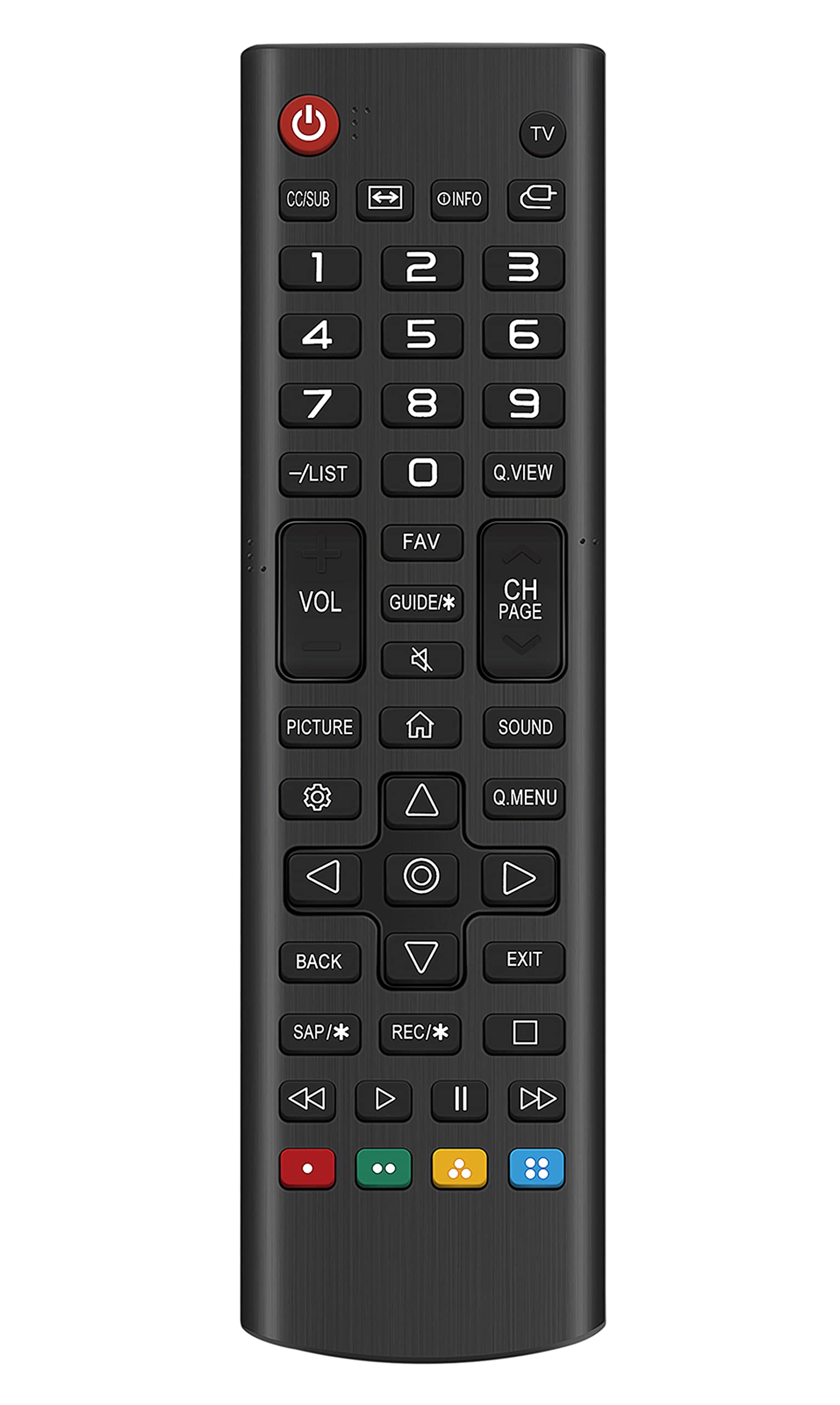
Image: Front view of the VINABTY AKB75875305 replacement remote control, showcasing its button layout and ergonomic design.
Setup
The VINABTY AKB75875305 remote control is designed for immediate use with compatible LG Smart TVs without requiring any complex programming.
Battery Installation
The remote control requires two AAA batteries (not included) for operation.
- Locate the battery compartment on the back of the remote control.
- Slide the battery compartment cover downwards or press the latch to open it.
- Insert two AAA batteries, ensuring the positive (+) and negative (-) terminals align correctly with the markings inside the compartment.
- Close the battery compartment cover securely until it clicks into place.

Image: Back view of the remote control, highlighting the battery compartment and 'Made in China' label.
Initial Use
Once batteries are correctly installed, the remote control is ready to operate your compatible LG Smart TV. No programming or pairing steps are necessary.
Operating Instructions
Point the remote control directly towards the infrared (IR) receiver on your LG Smart TV. Ensure there are no obstructions between the remote and the TV.
Basic Functions
- Power Button (Red): Turns the TV on or off.
- Number Buttons (0-9): Directly select channels.
- VOL +/-: Adjusts the volume level.
- CH PAGE +/-: Changes channels sequentially.
- Navigation Pad (Up, Down, Left, Right, OK): Navigates through menus and confirms selections.
- BACK: Returns to the previous screen or menu.
- EXIT: Exits the current menu or application.
- MENU/SETTINGS: Accesses the TV's main menu or settings.
- GUIDE: Displays the electronic program guide.
- FAV: Accesses favorite channels.
- Q.VIEW: Quickly switches between two previously viewed channels.
- SAP/*: Selects Secondary Audio Program (SAP) or other audio options.
- REC/*: Initiates recording (if supported by TV and external device).
- Colored Buttons (Red, Green, Yellow, Blue): Functionality varies depending on the TV model or application.

Image: A person holding the VINABTY AKB75875305 remote control, demonstrating its use while pointing towards a television screen.
Compatible LG TV Models
This remote control is compatible with, but not limited to, the following LG Smart TV models:
- 28LM400B-PU, 32LM500BPUA, 28TL430D-PU, 28LM430B-PU, 32LM505BBUA, 43LM5000PUA
- 28LM400BPU, 28TL430DPU, 32LT340HBUA, 43LT340H0UA, 49LT340H0UA, 49LT340C0UB
- 43LT340C, 32LT340C, 43LT340C0UB, 49LT340H0UA.AUS, 32LT340CBUB
Maintenance
Proper care will extend the life of your remote control.
- Cleaning: Wipe the remote control with a soft, dry cloth. Do not use liquid cleaners, solvents, or abrasive materials, as these can damage the surface or internal components.
- Battery Replacement: Replace batteries when the remote control's response becomes sluggish or stops working. Always replace both batteries at the same time with new AAA batteries. Do not mix old and new batteries or different types of batteries.
- Storage: If the remote control will not be used for an extended period (e.g., more than one month), remove the batteries to prevent potential leakage and damage to the device. Store the remote in a cool, dry place away from direct sunlight.
Troubleshooting
If you encounter issues with your remote control, please refer to the following common solutions:
- Remote not responding:
- Ensure the batteries are inserted correctly with the correct polarity (+/-).
- Replace old batteries with fresh AAA batteries.
- Check for any obstructions between the remote control and the TV's infrared (IR) sensor.
- Confirm that the remote control is compatible with your specific LG TV model.
- Buttons unresponsive or delayed:
- This often indicates low battery power. Replace the batteries.
- Clean the remote control surface, especially around buttons, to ensure no debris is interfering with button presses.
- Limited functionality:
- This remote provides standard control for compatible LG TVs. Some advanced Smart TV features, such as voice control or motion sensing, may require the original LG Magic Remote or specific TV settings.
Specifications
| Feature | Detail |
|---|---|
| Model Number | AKB75875305 |
| Brand | VINABTY |
| Product Dimensions | 7.8 x 2 x 0.7 inches |
| Item Weight | 2.6 ounces |
| Battery Type | 2 x AAA (not included) |
| Compatible Devices | LG Smart Televisions |
| Special Feature | Ergonomic design |
| Color | Black |
Warranty and Support
For warranty information or technical support regarding your VINABTY AKB75875305 Replacement Remote Control, please refer to the seller's policy or contact the retailer from whom the product was purchased. Specific warranty details are not provided within this instruction manual.