YESKAMO 3MP Wireless Outdoor Security Camera
Model: ZS-GX2S
1. Introduction
Thank you for choosing the YESKAMO 3MP Wireless Outdoor Security Camera. This manual provides detailed instructions for setting up, operating, and maintaining your camera to ensure optimal performance and security. This camera features a powerful built-in battery, 360° pan and tilt capabilities, 3MP Full HD resolution, and advanced night vision, making it an ideal solution for outdoor surveillance.

This image displays the YESKAMO outdoor security camera, highlighting its sleek white design and dual antennas. An inset shows a smartphone screen displaying a live 2K video feed from the camera, demonstrating its high-resolution capabilities and remote viewing feature.
2. Package Contents
Please check the package for the following items:
- YESKAMO 3MP Wireless Outdoor Security Camera
- Mounting Bracket
- Mounting Screws and Wall Plugs
- USB Charging Cable (3 meters)
- User Manual
Note: A compatible solar panel may be included or sold separately for continuous charging.
3. Product Overview
Familiarize yourself with the main components of your YESKAMO camera:
- Camera Lens: Captures video footage.
- Infrared (IR) Lights: Provide illumination for night vision.
- Spotlights: Enhance color night vision and act as a deterrent.
- Microphone: Captures audio for two-way communication.
- Speaker: Outputs audio for two-way communication and alarms.
- Antennas: Enhance Wi-Fi signal reception.
- Battery Compartment: Houses the rechargeable battery.
- Reset Button: Used to reset the camera to factory settings.
- SD Card Slot: For local video storage (supports up to 128GB, card not included).
4. Setup Guide
4.1 Initial Charging
Before first use, fully charge the camera using the provided USB cable and a 5V/2A power adapter (not included). The charging indicator light will turn off once fully charged.

The camera is shown mounted outdoors, emphasizing its powerful 15000mAh rechargeable battery, designed for extended operation up to 100 days. The image also indicates compatibility with a solar panel for continuous charging, ensuring long-lasting performance without frequent manual recharging.
4.2 App Installation and Account Setup
- Download the 'CloudEdge' app from the App Store (iOS) or Google Play Store (Android).
- Open the app and register a new account, then log in.
4.3 Camera Pairing
- Power on the camera. The indicator light will flash red, indicating it's ready for pairing.
- In the CloudEdge app, tap '+' to add a new device.
- Follow the on-screen instructions to connect the camera to your 2.4GHz Wi-Fi network. Ensure your phone is connected to the same Wi-Fi network.
- Scan the QR code displayed on your phone with the camera lens. You will hear a confirmation sound when successful.
- Name your camera and complete the setup process.
4.4 Mounting the Camera
Choose a suitable outdoor location with good Wi-Fi signal and a clear view of the area you wish to monitor. Use the provided mounting bracket, screws, and wall plugs to securely attach the camera to a wall or ceiling.
5. Operating Your Camera
5.1 Live View and Pan/Tilt Control
Open the CloudEdge app and select your camera to access the live view. Use the on-screen joystick or directional arrows to control the camera's pan (355°) and tilt (120°) movements, allowing you to remotely adjust the viewing angle.
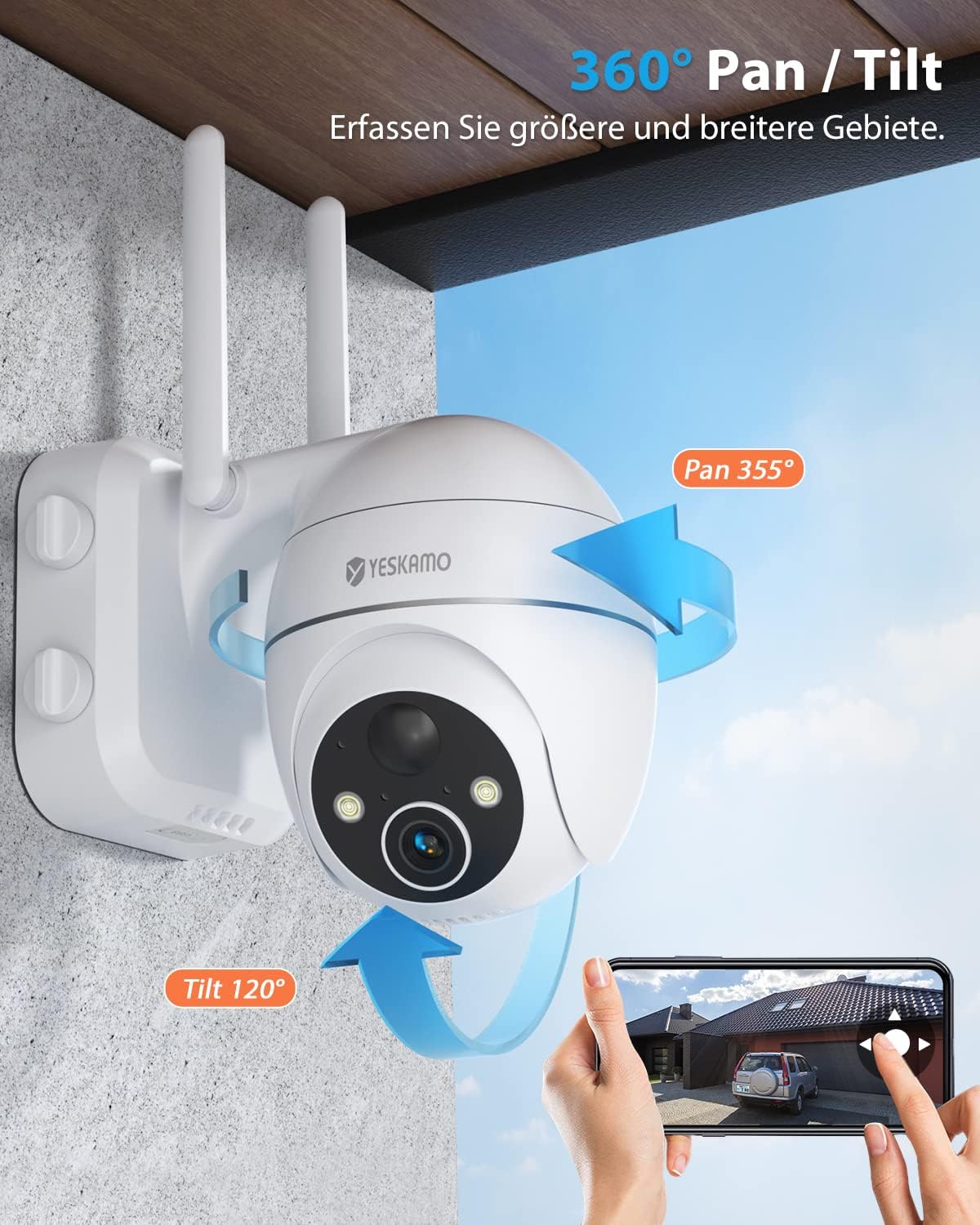
This visual demonstrates the camera's extensive pan (355°) and tilt (120°) rotation range. Arrows indicate the directional movement, and a hand holding a smartphone shows how users can remotely control the camera's viewing angle through the mobile application, providing comprehensive area coverage.
5.2 Two-Way Audio
From the live view, tap the microphone icon to activate two-way audio. You can speak through your phone, and your voice will be heard through the camera's speaker, allowing for remote communication with visitors or deterrence of intruders.

A close-up of a smartphone screen displaying the 'Hold to Talk' interface for the camera's two-way audio feature. This allows users to communicate remotely with individuals near the camera, enhancing interaction and deterrence capabilities.
5.3 Motion Detection and Alerts
The camera features smart PIR detection to identify human motion. You can customize sensitivity levels and detection zones within the app to minimize false alarms. When motion is detected, the camera can trigger spotlights, a siren, and send instant notifications to your smartphone.

This image depicts the camera's smart detection features in action. It shows a person detected by the camera at night, triggering a spotlight, an audible siren, and an alarm message notification on a smartphone, illustrating its multi-layered security response to potential threats.

This diagram illustrates the camera's adjustable motion detection sensitivity, allowing users to define specific detection zones and levels. This feature helps minimize false alarms by focusing detection on critical areas.
5.4 Night Vision
The camera is equipped with IR-CUT technology and infrared lights, automatically switching to night vision mode in low-light conditions. This ensures clear video capture even in complete darkness, with a night vision range of up to 20 meters.

An illustration comparing the clarity of 2K QHD resolution with standard 1080p. The 2K image clearly shows details like a license plate, which is blurred in the 1080p view, emphasizing the camera's superior image quality and 8x digital zoom capability for sharper details and broader coverage.
5.5 Recording and Storage
The camera supports both local storage via an SD card (up to 128GB) and cloud storage (subscription may be required). Recorded events can be reviewed and downloaded through the CloudEdge app.

This image highlights the flexible storage options available for the camera, including both secure cloud storage and local storage via an SD card. Users can choose their preferred method for saving recorded video footage.

An image showing a tablet screen with a multi-view display, indicating the ability to monitor live feeds from several YESKAMO cameras concurrently. This feature is useful for comprehensive surveillance of larger properties.
6. Maintenance
6.1 Battery Management
The camera's 15000mAh battery can last up to 100 days on a single charge, depending on usage and motion detection frequency. For continuous power, connect the camera to a compatible solar panel (sold separately or included in some packages). Monitor battery levels via the CloudEdge app and recharge as needed.
6.2 Weather Protection
The camera has an IP67 waterproof rating, ensuring it is protected against dust and water immersion. It is designed to operate reliably in outdoor environments with temperatures ranging from -20°C to 60°C. Regularly check for any debris or blockages around the lens and clean gently with a soft, dry cloth if necessary.

The camera is shown enduring outdoor elements, specifically rain, highlighting its IP67 waterproof and dustproof rating. This indicates the camera's robust design, capable of withstanding harsh weather conditions and operating reliably in temperatures ranging from -20°C to 60°C.
7. Troubleshooting
- Camera not connecting to Wi-Fi: Ensure your Wi-Fi is 2.4GHz. Check Wi-Fi signal strength at the camera's location. Reset the camera and try pairing again.
- Poor image quality: Ensure the lens is clean. Check for obstructions. Verify the camera is within optimal Wi-Fi range.
- Motion detection issues: Adjust motion sensitivity settings in the app. Ensure detection zones are correctly configured. Avoid placing the camera where frequent non-human motion (e.g., tree branches) might trigger false alarms.
- Battery not charging: Ensure the USB cable is securely connected to both the camera and the power adapter/solar panel. Check if the power adapter is working correctly.
- No audio: Check volume settings on your phone and in the app. Ensure the camera's microphone and speaker are not obstructed.
8. Specifications
| Feature | Specification |
|---|
| Effective Video Resolution | 3 Megapixels |
| Viewing Angle | 360 degrees (Pan 355°, Tilt 120°) |
| Power | 5 Watts |
| Item Dimensions (L x W x H) | 15.3 x 12.8 x 9.1 cm |
| Weight | 900 grams |
| Item Model Number | ZS-GX2S |
| Special Features | Night Vision, HD Resolution, Two-Way Audio, Motion Detection |
| Indoor/Outdoor Usage | Outdoor |
| Power Source | Battery Powered |
| Mounting Type | Wall Mount |
| Video Recording Resolution | 3 MP |
| Connectivity Technology | Wireless (Wi-Fi 2.4GHz) |
9. Warranty and Support
Your YESKAMO camera comes with a standard manufacturer's warranty. For detailed warranty information, please refer to the warranty card included in your package or visit the official YESKAMO website. For technical support, troubleshooting assistance, or any inquiries, please contact YESKAMO customer service through the contact information provided on their official website or within the CloudEdge app.