
Fydeamer MYH04001WB
Universal Tripod Easel TV Stand User Manual
Brand: Fydeamer | Model: MYH04001WB
1. Introduction
Thank you for choosing the Fydeamer Universal Tripod Easel TV Stand. This stand offers a stylish and functional alternative to traditional wall mounts, designed to enhance your viewing experience in various settings. Its robust construction of solid wood and steel ensures stability and durability, supporting TVs from 32 to 65 inches.
This manual provides detailed instructions for assembly, operation, maintenance, and troubleshooting to ensure safe and optimal use of your TV stand. Please read it thoroughly before beginning assembly or operation.
What's in the Box
Please verify that all components are present before assembly:
- TV stand components (main pole, tripod legs, central support)
- Wood legs
- Mounting hardware (screws, washers, spacers)
- Cable management accessories
- Heart-shaped accessory tray
- Assembly tools (Allen wrench)
- Instruction manual (this document and PDF version)

Figure 1: Fydeamer Universal Tripod Easel TV Stand with a mounted television.
2. Setup and Assembly
For detailed, step-by-step visual instructions, please refer to the official PDF Installation Manual available here. The following provides a summary of the assembly process.
Assembly Steps Overview:
- Unpack and Identify Components: Carefully remove all parts from the packaging. Lay them out and compare them against the "What's in the Box" list to ensure nothing is missing.

Figure 2: Overview of TV stand components and dimensions.
- Assemble the Tripod Base: Attach the three wooden legs to the central white tripod hub using the provided screws and Allen wrench. Ensure they are securely fastened.
- Install the Main Support Pole: Insert the main vertical support pole into the central opening of the tripod base. Secure it with the golden decorative ring and appropriate fasteners.
- Attach the Accessory Tray: Slide the heart-shaped accessory tray onto the main support pole at your desired height. This tray is ideal for small media devices or remote controls.
- Mount the TV Bracket: Attach the VESA-compatible TV mounting brackets to the back of your television. Ensure the correct screw size and spacers are used for your TV model. The stand supports VESA patterns: 200x200, 200x300, 200x400, 300x300, 300x400, 400x400, and 600x400.

Figure 3: VESA compatibility and swivel range.
- Hang the TV: Carefully lift your television and hook the mounted brackets onto the main support pole of the stand. Secure the TV to the stand using the provided locking mechanisms.
- Cable Management: Utilize the integrated cable management features on the back of the stand and along the legs to neatly route and conceal cables, maintaining a clean aesthetic.
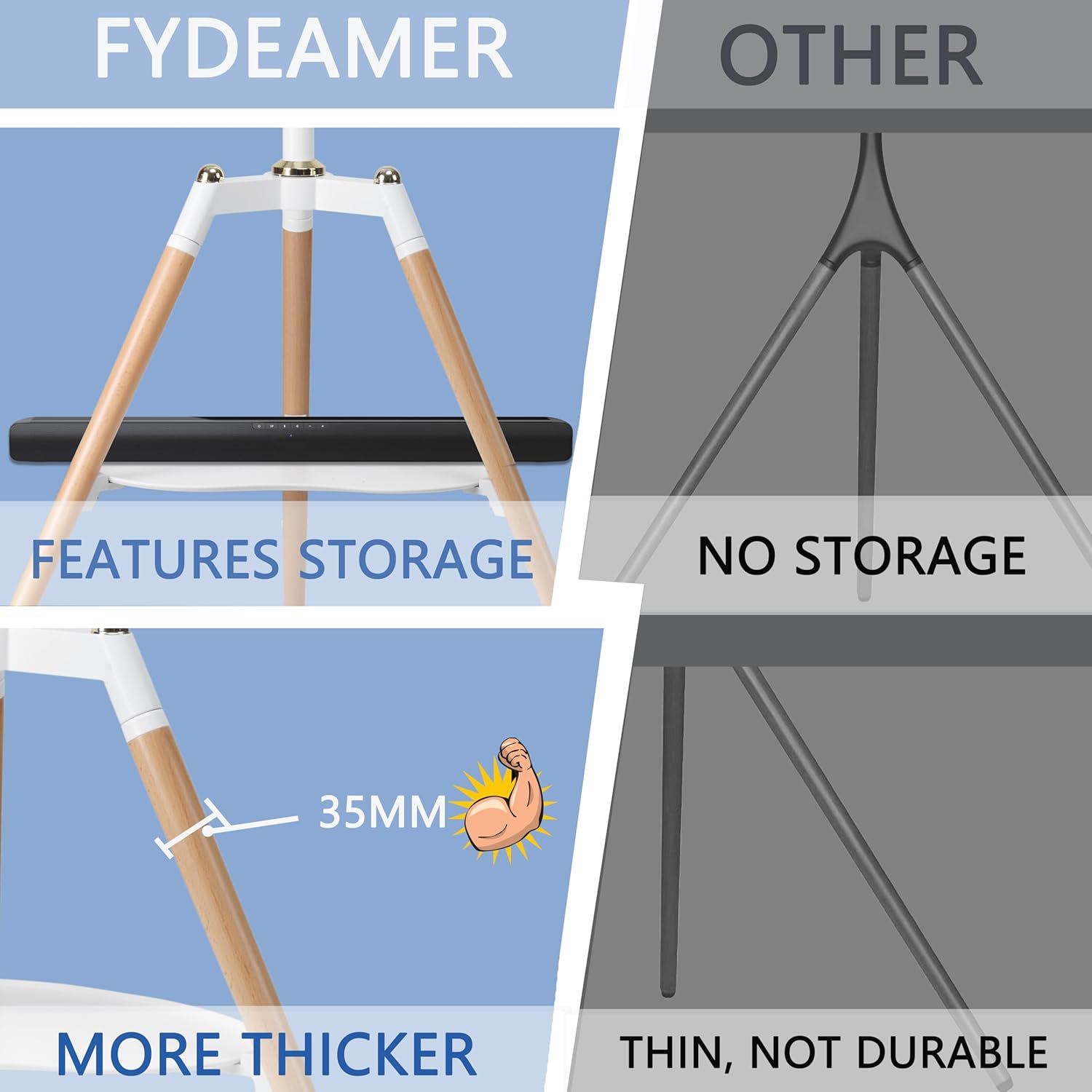
Figure 4: Features of the Fydeamer stand, including integrated storage and robust design.
Assembly Video Guide:
Video 1: Official Fydeamer installation guide for the TV stand. This video demonstrates the step-by-step assembly process, from unpacking to final TV mounting and cable management.
3. Operating Your TV Stand
The Fydeamer Tripod Easel TV Stand is designed for ease of use and flexibility.
Height Adjustment:
The TV stand allows for height adjustment to achieve your optimal viewing level. The height can be adjusted from 45.47 inches to 55.51 inches. To adjust, loosen the locking mechanism on the main pole, slide the TV to the desired height, and then securely tighten the mechanism.
Swivel Function:
The TV tripod stand features a 140° swivel range (+70° to -70°). This allows you to easily adjust the viewing angle of your television to suit different seating arrangements or room layouts, ensuring the best viewing experience from anywhere in the room.

Figure 5: Enjoying media with the Fydeamer TV stand's flexible viewing angles.
4. Maintenance
To ensure the longevity and appearance of your Fydeamer TV stand, follow these simple maintenance guidelines:
- Cleaning: Wipe down the stand with a soft, damp cloth. Avoid using harsh chemicals or abrasive cleaners, which can damage the finish.
- Inspections: Periodically check all screws and fasteners to ensure they remain tight. Loose connections can affect stability.
- Placement: Avoid placing the stand in direct sunlight or in areas with extreme temperature fluctuations, which can affect the wood components.
- Weight Limit: Do not exceed the maximum weight capacity of 71 lbs (32.2 kg) for the TV.
5. Troubleshooting
If you encounter any issues with your Fydeamer TV stand, please refer to the following common solutions:
- Stand feels wobbly: Ensure all screws are tightened securely. Check that the tripod legs are fully extended and evenly placed on a flat, stable surface.
- TV is not level: Verify that the TV mounting brackets are correctly aligned and secured to the TV and the stand. Adjust the height and angle as needed.
- Cables are messy: Re-route cables through the integrated cable management channels and use the provided clips to keep them tidy.
- Difficulty with assembly: Double-check the assembly steps in this manual or the PDF manual. Ensure all parts are correctly oriented. If issues persist, contact customer support.
6. Specifications
| Feature | Detail |
|---|---|
| Brand | Fydeamer |
| Model Number | MYH04001WB |
| Compatible TV Sizes | 32 - 65 inches |
| VESA Compatibility | 200x200, 200x300, 200x400, 300x300, 300x400, 400x400, 600x400 |
| Maximum Weight Capacity | 71 lbs (32.2 kg) |
| Height Adjustment Range | 45.47 inches to 55.51 inches |
| Swivel Angle | ±70° (140° total) |
| Materials | Solid Wood, Steel |
| Product Dimensions | 34.9 x 19.7 x 54.5 inches (L x W x H) |
| Item Weight | 16.1 pounds |
| Color | White/Wood |

Figure 6: TV size compatibility (32" to 65").
7. Warranty and Support
Fydeamer products are manufactured with high-quality materials and craftsmanship. For specific warranty information regarding your Universal Tripod Easel TV Stand, please refer to the documentation included with your purchase or contact Fydeamer customer support.
For further assistance, technical support, or to report any issues, please visit the official Fydeamer store on Amazon or refer to the comprehensive Installation Manual (PDF).
Ask a question about this manual
Ask about setup, troubleshooting, compatibility, parts, safety, or missing instructions. Manuals+ will review the question and use this page’s manual context to help answer it.