Introduction
This manual provides detailed instructions for the safe and effective use of your FULLIFE YS-223 Portable Bluetooth Karaoke Machine. Please read this manual thoroughly before operating the device and retain it for future reference.

The FULLIFE YS-223 portable karaoke machine in black, shown with its two wireless microphones. The speaker features a control panel on top and an LED light bar on the front.
What's Included
Verify that all items listed below are present in your package:
- Karaoke Machine × 1
- Wireless Microphone × 2
- USB-C Charging Cable × 2
- AUX Cable × 1
- User Manual × 1

An image displaying the items included in the package: the karaoke machine, two wireless microphones, two USB-C charging cables, an AUX cable, and the user manual.
Product Features
Compact Design with Powerful Sound
The FULLIFE YS-223 features a compact and portable design (6.3 inches) while delivering robust audio. Equipped with an audio driver and advanced digital signal processor, it provides precise, balanced sound without noise. The volume can be adjusted by long-pressing the volume button.

An internal view highlighting the 6-inch woofer, indicating powerful sound with bass enhancement and noise cancellation.
Dual Wireless Microphones with Sound Effects
Two wireless UHF microphones are included, ideal for duets. They feature seven distinct magic voice effects: original, monster, baby, female, male, and two mixing options. Advanced active noise reduction technology and a professional DSP audio processor ensure clear vocal output.
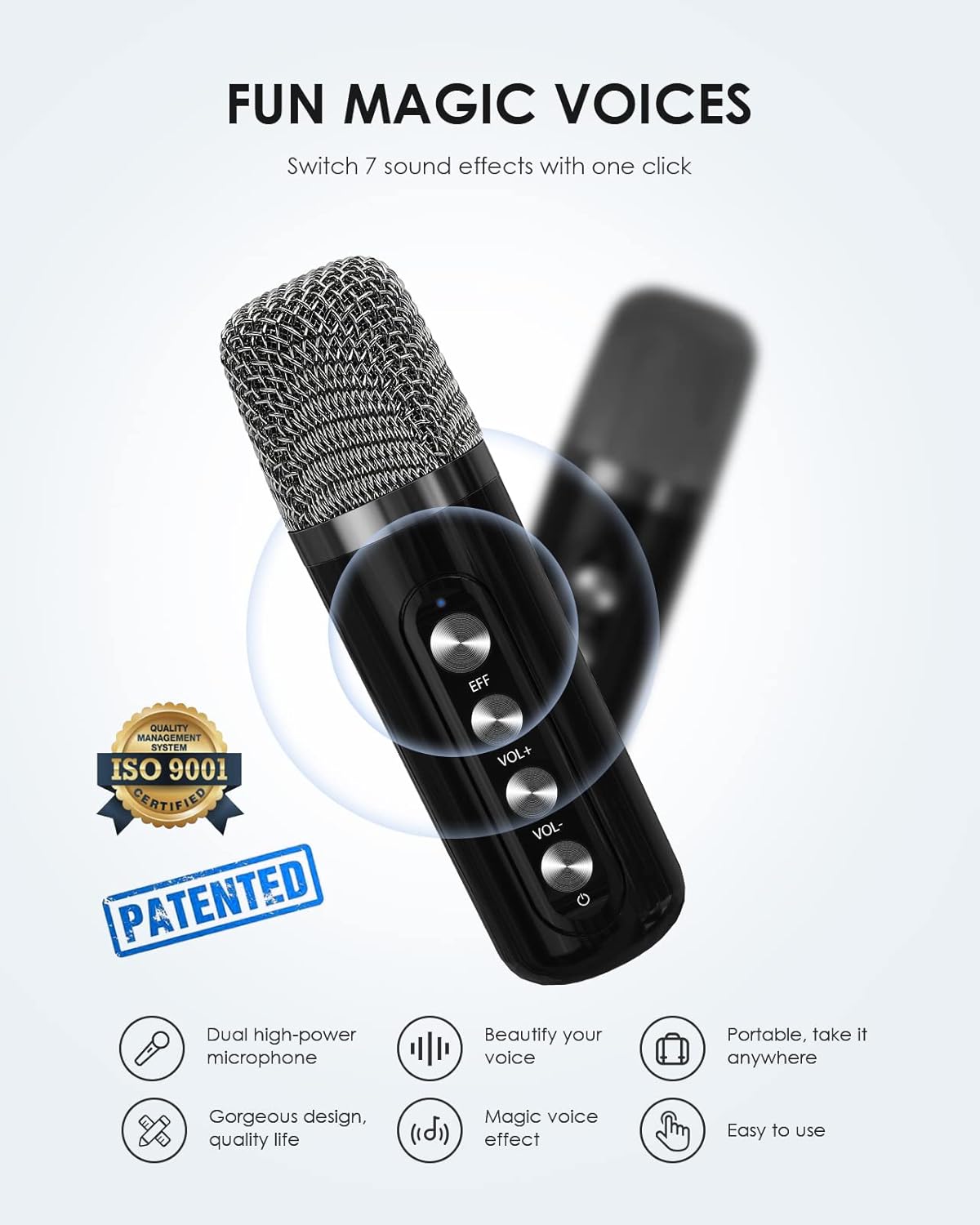
One of the two wireless microphones, showing buttons for sound effects (EFF), volume control, and power. It features a metallic mesh head and a sleek black body.
Versatile Connectivity Options
The karaoke machine incorporates Bluetooth 5.0 for stable wireless streaming up to 49 feet. It also supports Micro TF card, Flash USB, and AUX-in connections. Compatibility extends to Android mobile phones, TVs, iPads, tablets, and PCs. A USB port allows for power bank functionality to recharge smartphones or tablets.

A woman using her smartphone, with icons illustrating the various connectivity options of the karaoke machine: Bluetooth 5.0, AUX, USB, Micro(SD) card, PA, and TV compatibility.
Dynamic LED Light Display
The speaker features colorful LED lights that synchronize with the rhythm of the music, enhancing the audio experience. This visual element is suitable for various settings, including parties, gatherings, and casual listening.

A father playing guitar while a child claps, with the karaoke machine in the foreground displaying dynamic, colorful LED lights that change with the music.
Extended Battery Life
The karaoke speaker is equipped with a 3000mAh Li-ion battery, providing up to 8 hours of playtime at 50% volume. Each microphone has a built-in 1500mAh Li-ion battery. The speaker can also function as a charging station for external devices via its USB port.

A mother and child happily singing into wireless microphones, demonstrating the portable nature and extended battery life of the karaoke machine for prolonged use.
Setup Guide
- Charging the Device: Connect the karaoke machine and both microphones to a power source using the provided USB-C charging cables. The charging indicator lights will show charging status. Ensure devices are fully charged before first use for optimal battery life.
- Power On: Press and hold the power button on the karaoke machine and each microphone until the indicator lights illuminate.
- Microphone Pairing: The wireless microphones should automatically pair with the karaoke machine upon power-on. If pairing fails, power cycle both the machine and microphones.
- Bluetooth Connection:
- Ensure the karaoke machine is in Bluetooth mode (indicated by 'BT' light).
- Enable Bluetooth on your smartphone, tablet, or other device.
- Search for 'YS-223' in the list of available devices and select it to pair.
- A confirmation sound will indicate successful pairing.
- AUX Connection: Insert one end of the AUX cable into the AUX-in port on the karaoke machine and the other end into the audio output of your external device. The machine will automatically switch to AUX mode.
- USB/TF Card Playback: Insert a USB flash drive or a Micro TF card containing audio files into the respective port. The machine will automatically detect and play the audio.
Operating Instructions
Karaoke Machine Controls:
- Power Button: Press and hold to turn on/off. Short press to switch input modes (Bluetooth, USB, TF, AUX).
- Volume Control: Long press the '+' or '-' buttons on the top panel to adjust the main speaker volume.
- Playback Controls: Use the 'Play/Pause', 'Previous Track', and 'Next Track' buttons for media control.
- Sound Effects: Buttons for 'TONE', 'REVERB', 'ECHO', and 'VOCAL CUT' are located on the top panel to modify audio output.
- LED Lights: The colorful LED lights automatically change with the music rhythm. There is no manual control for light patterns.
Microphone Controls:
- Power Button: Press and hold to turn on/off.
- Volume Control: Use the 'VOL+' and 'VOL-' buttons to adjust microphone volume.
- Sound Effects (EFF): Press the 'EFF' button to cycle through the 7 magic voice effects (original, monster, baby, female, male, 2 mixing).
Maintenance
- Cleaning: Use a soft, dry cloth to clean the exterior of the karaoke machine and microphones. Do not use liquid cleaners or abrasive materials.
- Storage: Store the device in a cool, dry place away from direct sunlight and extreme temperatures.
- Battery Care: To prolong battery life, avoid fully discharging the device frequently. Recharge the device regularly, even if not in use for extended periods.
- Water Exposure: This device is not waterproof. Avoid exposure to water or high humidity.
Troubleshooting
- Microphone Feedback (Sharp, Strange Sounds): This is common sound feedback. Ensure microphones are not too close (within 11.8 inches) to the speaker to prevent this.
- No Sound Output:
- Check if the karaoke machine and microphones are powered on and charged.
- Verify the volume levels on both the machine and microphones.
- Ensure the correct input mode (Bluetooth, AUX, USB, TF) is selected.
- Check the connection to your external device (e.g., Bluetooth paired, AUX cable fully inserted).
- Bluetooth Connection Issues:
- Make sure the karaoke machine is in Bluetooth pairing mode.
- Disable and re-enable Bluetooth on your external device.
- Move the devices closer to each other (within 49ft) and ensure no obstructions.
- Forget the device from your external device's Bluetooth list and try pairing again.
- Device Not Charging:
- Ensure the USB-C cable is securely connected to both the device and the power adapter.
- Try a different USB-C cable or power adapter.
- Check the power source (wall outlet, USB port) is functional.
Product Specifications
| Feature | Specification |
|---|---|
| Brand | FULLIFE |
| Model Number | YS-223 |
| Dimensions (L x W x H) | 6.3 x 5.91 x 6.3 inches |
| Item Weight | 2.64 pounds (1.2 Kilograms) |
| Power Source | Battery Powered |
| Speaker Output Wattage | 10 Watts |
| Speaker Count | 1 |
| Connectivity Technology | Bluetooth 5.0 |
| Connector Type | USB Type-C |
| Material | Acrylonitrile Butadiene Styrene (ABS) |
| Audio Input | Microphone, AUX, USB, Micro TF Card |
| Compatible Devices | Personal Computer, Tablet, Smartphone, TV with Bluetooth, iPhone, iPad |
| Speaker Battery Capacity | 3000mAh Li-ion |
| Microphone Battery Capacity | 1500mAh Li-ion |
| UPC | 798610174470 |
Warranty and Support
FULLIFE provides a 365-Day No-Reason Replacement Service for this product. If you encounter any issues during use, please contact FULLIFE customer service directly for assistance. Our professional customer service team is available to resolve any problems you may have. If a problem cannot be resolved, a replacement or full refund will be offered.
For returns, the standard return policy allows for returns within 30 days of purchase.
For customer support, please refer to the contact information provided in your product packaging or visit the official FULLIFE website.


