
1. Introduction
Thank you for choosing the Teskee P60 Portable EV Charger. This manual provides essential information for the safe and efficient operation, installation, and maintenance of your charging device. Please read this manual thoroughly before using the product and keep it for future reference. This charger is designed to provide a reliable and flexible charging solution for all Type 2 electric vehicles and plug-in hybrid cars across Europe.

An overview of the Teskee P60 Portable EV Charger system, including the main control unit, Type 2 charging cable, CEE 3-phase power plug, and a portable carrying bag for convenience.
2. Safety Instructions
Always adhere to the following safety guidelines to prevent injury or damage to the product and vehicle:
- Do not use the charger if it is visibly damaged, wet, or has frayed cables.
- Ensure the power outlet is properly grounded and rated for the charger's specifications (380V AC, 16A, 3-phase).
- Never attempt to open, disassemble, or modify the charger unit.
- Keep children and pets away from the charging area.
- Avoid submerging the charger or its components in water. The IP66 rating provides protection against water jets, but not submersion.
- Do not use extension cords or adapters with the CEE plug.
- In case of smoke, unusual odors, or excessive heat, immediately disconnect the power and contact support.
- Ensure the charging cable is not kinked, pinched, or run over by vehicles.
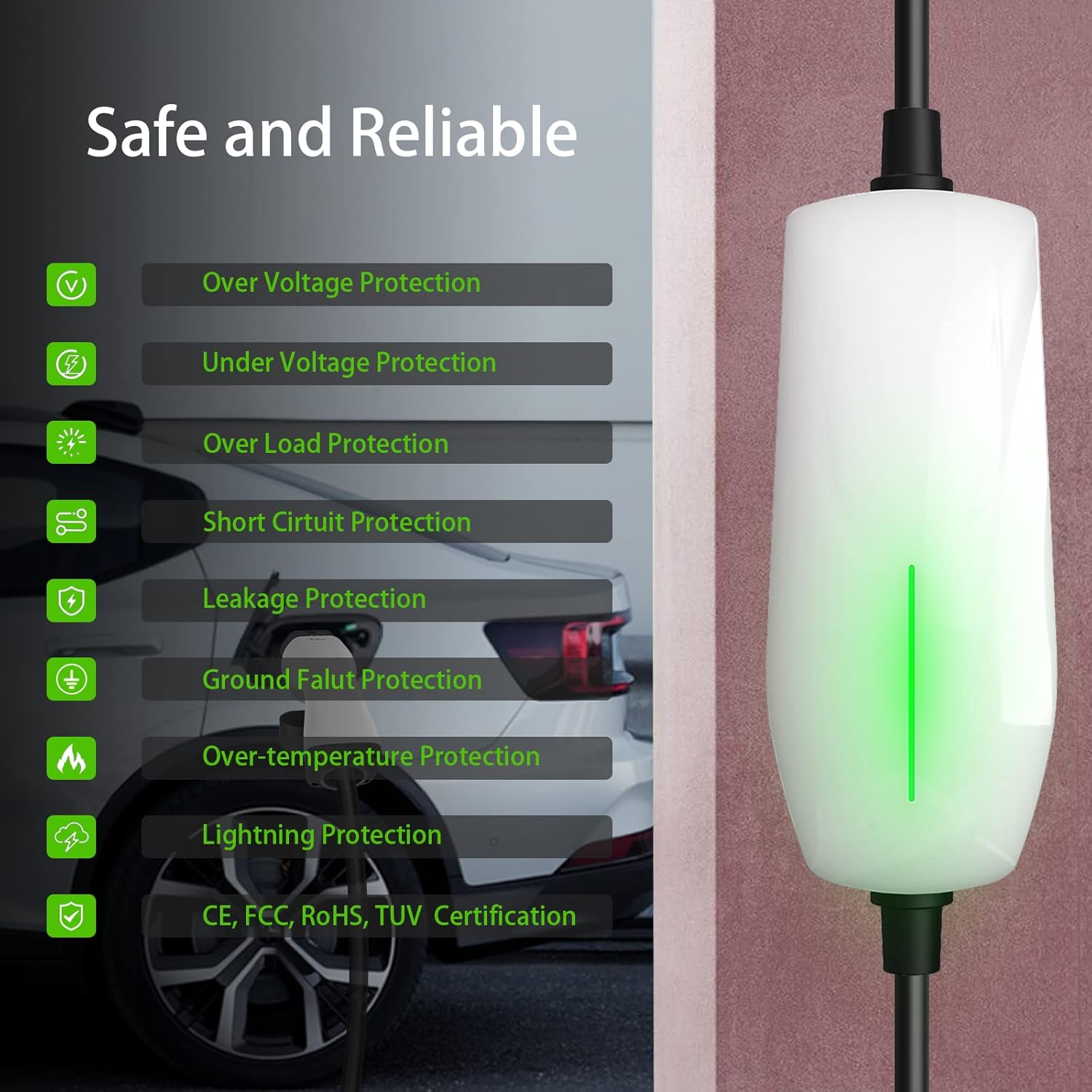
The Teskee P60 charger's control unit, accompanied by a comprehensive list of its integrated safety features, including protection against various electrical faults and environmental hazards, ensuring safe and reliable operation. It also highlights compliance with CE, FCC, RoHS, and TUV certifications.
3. Product Overview
Key Features:
- Fast and Stable Charging: Max 11 kW charging power, 16A output current, 3-phase, 6-meter cable for Mode 2 EV charging.
- Unique Design: Indicator lights on the control box show charging status. Advanced chip automatically corrects common charging errors for stable operation.
- Safe and Reliable: Equipped with vehicle communication and multiple safety protections including over/under-voltage, overload, short-circuit, leakage, ground fault, over-temperature, and lightning protection. IP66 rated for water and dust resistance. CE, FCC, RoHS, and TUV certified.
- Durable and Eco-friendly: TPU shell for wear resistance, anti-aging, and excellent heat/cold resistance. IK10 impact protection.
- Universal and Portable: Compatible with all Type 2 (IEC 62196-2) EV and plug-in hybrid cars in Europe. Includes a portable carrying bag for convenience at home, work, or travel.
Components:
- Control Box: The main unit housing the charging electronics and user interface.
- CEE 3-Phase Plug (Red 16A): Connects to the power source.
- Type 2 Connector: Connects to your electric vehicle.
- Charging Cable: Connects the control box to the CEE plug and the Type 2 connector.
- Carrying Bag: For convenient storage and transport.

A visual representation of the Teskee P60 charging cable's total length, indicating the individual segments: 1.2 meters for the CEE plug to control box, 0.26 meters for the control box itself, and 4.7 meters for the cable from the control box to the Type 2 connector, totaling over 6 meters.
4. Setup
4.1 Initial Inspection
Before first use, inspect all components for any signs of damage. Ensure the cables are intact and the connectors are clean and free of debris.
4.2 Connecting to Power Source
- Locate a suitable 3-phase CEE 16A power outlet (typically red).
- Ensure the power outlet is clean and dry.
- Firmly insert the Teskee P60's CEE 3-phase plug into the power outlet. Ensure a secure connection.
- The control box will power on, and indicator lights will show its status.

The Teskee P60 charger unit securely mounted on a wall, demonstrating its compact installation. The image shows the CEE 3-phase plug connected to the power source and the Type 2 connector hanging, ready to be plugged into an electric vehicle.
4.3 Optional Wall Mounting
The charger can be mounted on a wall for convenience. Use appropriate screws and anchors for your wall type. Ensure the mounting location is dry, protected from direct sunlight, and allows for proper cable management.
5. Operating Instructions
5.1 Connecting to Your Vehicle
- Ensure the charger is connected to the power source as described in Section 4.2.
- Open the charging port cover on your electric vehicle.
- Firmly insert the Type 2 connector into your vehicle's charging port until it clicks into place.
- The charger will initiate communication with the vehicle. The indicator lights on the control box will change to reflect the charging status.
5.2 Adjusting Charging Current
The Teskee P60 allows you to adjust the charging current. By default, the output current is 6A. To change it:
- Before connecting to the vehicle, or during charging, press the 'Current Switch' button on the control box.
- Each press will cycle through the available current options: 6A, 8A, 10A, 13A, 16A.
- The corresponding LED indicator will illuminate to show the selected current.
- Select the desired current based on your vehicle's requirements and the capacity of your electrical circuit.

The control box of the Teskee P60 charger, highlighting the current selection button and LED indicators for adjustable charging amperage, ranging from 6A to 16A.
5.3 Charging Status Indicators
Refer to the LED indicators on the control box for charging status:
- Solid Green: Ready to charge / Fully charged.
- Flashing Green: Charging in progress.
- Solid Red: Error detected. Refer to Troubleshooting section.
5.4 Disconnecting After Charging
- Once charging is complete (indicated by the vehicle or charger), unlock the Type 2 connector from your vehicle's charging port.
- Carefully remove the Type 2 connector from the vehicle.
- Close the vehicle's charging port cover.
- Disconnect the CEE 3-phase plug from the power outlet if the charger is not needed for extended periods.
6. Maintenance
6.1 Cleaning
- Ensure the charger is disconnected from both the power source and the vehicle before cleaning.
- Wipe the control box and cables with a soft, damp cloth. Do not use harsh chemicals, solvents, or abrasive cleaners.
- Keep the connectors clean and free of dust and debris. Use a dry cloth or compressed air if necessary.
6.2 Storage
- When not in use, store the charger in a dry, cool place, away from direct sunlight and extreme temperatures.
- Coil the cables neatly to prevent kinks or damage.
- Utilize the provided carrying bag for organized storage and transport.
6.3 Cable Care
- Avoid bending or twisting the cables sharply.
- Do not drive over the cables with a vehicle.
- Regularly inspect the cables for any cuts, abrasions, or signs of wear. Discontinue use if damage is found.
7. Troubleshooting
If you encounter issues with your Teskee P60 charger, refer to the following common problems and solutions:
| Problem | Possible Cause | Solution |
|---|---|---|
| Charger not powering on | No power from outlet; CEE plug not fully inserted. | Check the power outlet; ensure CEE plug is securely connected. |
| Vehicle not charging / Red error light | Vehicle not properly connected; charger error; vehicle fault. | Reconnect Type 2 plug; check vehicle's charging status; disconnect and reconnect charger to power. |
| Charging stops unexpectedly | Over-temperature protection; power fluctuation; vehicle communication error. | Ensure charger is in a well-ventilated area; check power supply stability; restart charging process. |
| Cannot change charging current | Button malfunction; charger in an error state. | Ensure charger is not in an error state; try disconnecting and reconnecting power. |
If the problem persists after attempting these solutions, please contact Teskee customer support for further assistance.
8. Specifications
| Feature | Specification |
|---|---|
| Brand | Teskee |
| Model | P60-11KW |
| Manufacturer | Nanjing Wissenergy Technology Co., Ltd |
| Charging Standard | Type 2 (IEC 62196-2) |
| Input/Output Voltage | 380 Volts (AC) |
| Max Current | 16 A |
| Max Power | 11 kW |
| Phases | 3-phase |
| Cable Length | 6 meters |
| Ingress Protection (IP) Rating | IP66 (Water and dust resistant) |
| Impact Protection (IK) Rating | IK10 |
| Item Weight | 3.2 Kilograms |
| Package Dimensions | 40.7 x 40.4 x 10.5 cm |
| Certifications | CE, FCC, RoHS, TUV |

A detailed view of the Type 2 charging connector, emphasizing its technical specifications: a maximum current of 16 Amperes, a maximum power output of 11 kilowatts, support for 3-phase charging, and an IP66 rating for water and dust resistance.
9. Warranty and Support
Teskee products are designed for reliability and performance. For warranty information, please refer to the documentation provided with your purchase or contact your retailer. For technical support, troubleshooting assistance, or inquiries about replacement parts, please contact Teskee customer service through the official website or your purchase platform.