Introduction
Thank you for choosing the Brondi BRAVO MOON cordless phone. This manual provides essential information for setting up, operating, and maintaining your new phone. The BRAVO MOON is designed for ease of use, featuring a large illuminated display, a comfortable raised keypad, and high-volume options, making it suitable for various users.
Package Contents
Please check that all items are present in your package:
- Brondi BRAVO MOON Handset
- Base Station
- Power Adapter for Base Station
- Telephone Line Cord
- User Manual (this document)
- Rechargeable Batteries (Note: Batteries are required but not included in the package. Please purchase separately.)
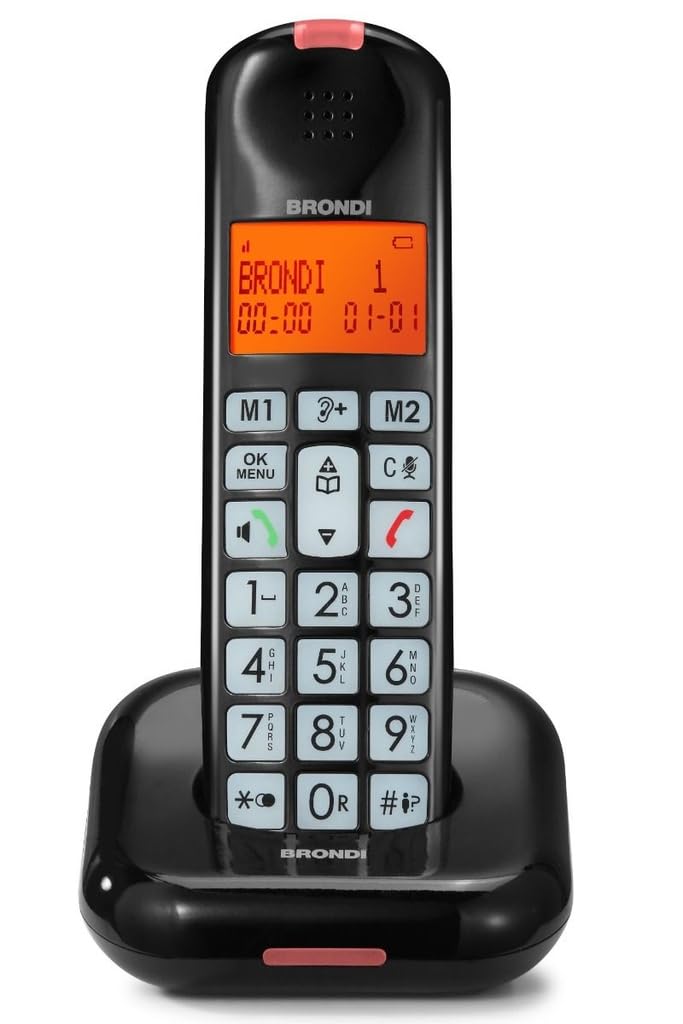
Image: Brondi BRAVO MOON cordless phone, black, showing the handset and base station.
Setup
1. Battery Installation
- Locate the battery compartment cover on the back of the handset.
- Slide the cover off.
- Insert the required rechargeable batteries (e.g., AAA NiMH) according to the polarity markings (+ and -).
- Replace the battery compartment cover, ensuring it clicks into place.
2. Base Station Connection
- Connect one end of the power adapter to the DC IN socket on the base station.
- Plug the other end of the power adapter into a standard electrical outlet.
- Connect one end of the telephone line cord to the LINE socket on the base station.
- Plug the other end of the telephone line cord into your telephone wall jack.
3. Initial Charging
Place the handset on the base station. Ensure the charging indicator on the handset or base illuminates. For optimal battery performance, allow the handset to charge continuously for at least 12-15 hours before its first use, even if the display indicates a full charge earlier.
Operating Instructions
Making a Call
- Pick up the handset or press the CALL button.
- Dial the desired phone number using the keypad. The numbers will appear on the illuminated display.
- Press the CALL button again to initiate the call.
- To end the call, press the END button or place the handset back on the base station.
Receiving a Call
When the phone rings, press the CALL button to answer. To end the call, press the END button or return the handset to the base station.
Hands-Free Function (Speakerphone)
During a call, press the SPEAKER button (often indicated by a speaker icon) to activate the hands-free function. Press it again to switch back to the handset earpiece.
Adjusting Ringer and Call Volume
Use the dedicated volume buttons (often UP/DOWN arrows) on the side or front of the handset to adjust the ringer volume when the phone is idle, or the call volume during a conversation. The Brondi BRAVO MOON features a high ringer volume for improved audibility.
Caller ID
When an incoming call is received, the caller's number (and name, if available and subscribed to Caller ID service) will be displayed on the handset's screen. You can review a list of recent calls by accessing the call log feature (refer to your phone's on-screen menu for navigation).
Ringtone Selection
The phone offers 5 polyphonic melodies and 5 standard ringtones. To change the ringtone, navigate through the phone's menu settings. Typically, this involves pressing a MENU button, selecting 'Settings' or 'Ringtone', and then choosing your preferred melody.
Maintenance
Cleaning
To clean your phone, use a soft, dry cloth. Do not use liquid or abrasive cleaners, as these can damage the phone's surface or internal components. Keep the charging contacts on the handset and base station clean to ensure proper charging.
Battery Care
- Always use the recommended type of rechargeable batteries (e.g., NiMH AAA).
- If the phone will not be used for an extended period, remove the batteries to prevent leakage.
- Replace batteries when their performance significantly degrades (e.g., shorter talk time, frequent low battery warnings).
- Dispose of old batteries responsibly according to local regulations.
Troubleshooting
| Problem | Possible Cause | Solution |
|---|---|---|
| No power/Handset display is blank | Batteries not installed or discharged; Power adapter not connected. | Ensure batteries are correctly installed and charged. Check power adapter connection to base and electrical outlet. |
| No dial tone | Telephone line cord disconnected; Service issue. | Check that the telephone line cord is securely connected to the base and the wall jack. Test with another phone if possible. |
| Poor reception, crackling, or dropped calls | Handset too far from base; Interference from other electronic devices. | Move closer to the base station. Relocate the base station away from other electronic devices (Wi-Fi routers, microwaves, computers). |
| Short battery life or handset not charging | Batteries not fully charged; Old or faulty batteries; Dirty charging contacts. | Ensure handset is properly seated on the base for charging. Clean charging contacts. Replace old batteries with new rechargeable ones. |
| Caller ID not displayed | Caller ID service not subscribed; Caller blocked their number. | Contact your telephone service provider to ensure Caller ID service is active on your line. |
Specifications
- Brand: Brondi
- Model: BRAVO MOON (BRO-BRAVOMOON)
- Phone Type: Cordless
- Color: Black
- Material: Acrylonitrile Butadiene Styrene (ABS)
- Display: Large illuminated display with large numbers
- Keypad: Large raised keypad
- Ringtones: 5 polyphonic melodies + 5 standard ringtones
- Features: High ringer volume, Hands-free function, Caller ID indicator, LED notification on handset
- Compatible Peripherals: Public Switched Telephone Network (PSTN)
- Power Source: Battery (rechargeable, not included)
- Talk Time: Up to 10 hours
- Standby Time: Up to 50 hours
- Item Weight: 1 Kilogram
- Package Dimensions: 19 x 12 x 8 cm
Warranty and Support
The Brondi BRAVO MOON cordless phone comes with a standard manufacturer's warranty. For specific warranty terms and conditions, please refer to the warranty card included with your purchase or visit the official Brondi website. For technical support, troubleshooting assistance beyond this manual, or to inquire about replacement parts, please contact Brondi customer service through their official channels.


