
1. Introduction
The DSTE VG-C4EM Vertical Battery Grip is designed to enhance the functionality and ergonomics of compatible Sony Alpha cameras. This grip provides extended battery life, allowing for longer shooting sessions, and offers improved handling for vertical orientation photography. It integrates seamlessly with your camera, providing duplicate controls for a comfortable and intuitive shooting experience.
This manual provides detailed instructions for the proper installation, operation, and maintenance of your DSTE VG-C4EM Vertical Battery Grip.
2. Safety Information
- Read all instructions thoroughly before using the product.
- Do not expose the battery grip to water, moisture, or extreme temperatures.
- Use only NP-FZ100 batteries (not included) with this grip. Using incompatible batteries may cause damage or malfunction.
- Do not attempt to disassemble or modify the grip. Repairs should only be performed by qualified personnel.
- Keep out of reach of children.
3. Package Contents
Please check that all items are present in your package:
- 1x DSTE VG-C4EM Vertical Battery Grip
4. Product Overview
Familiarize yourself with the components and controls of your DSTE VG-C4EM Vertical Battery Grip.
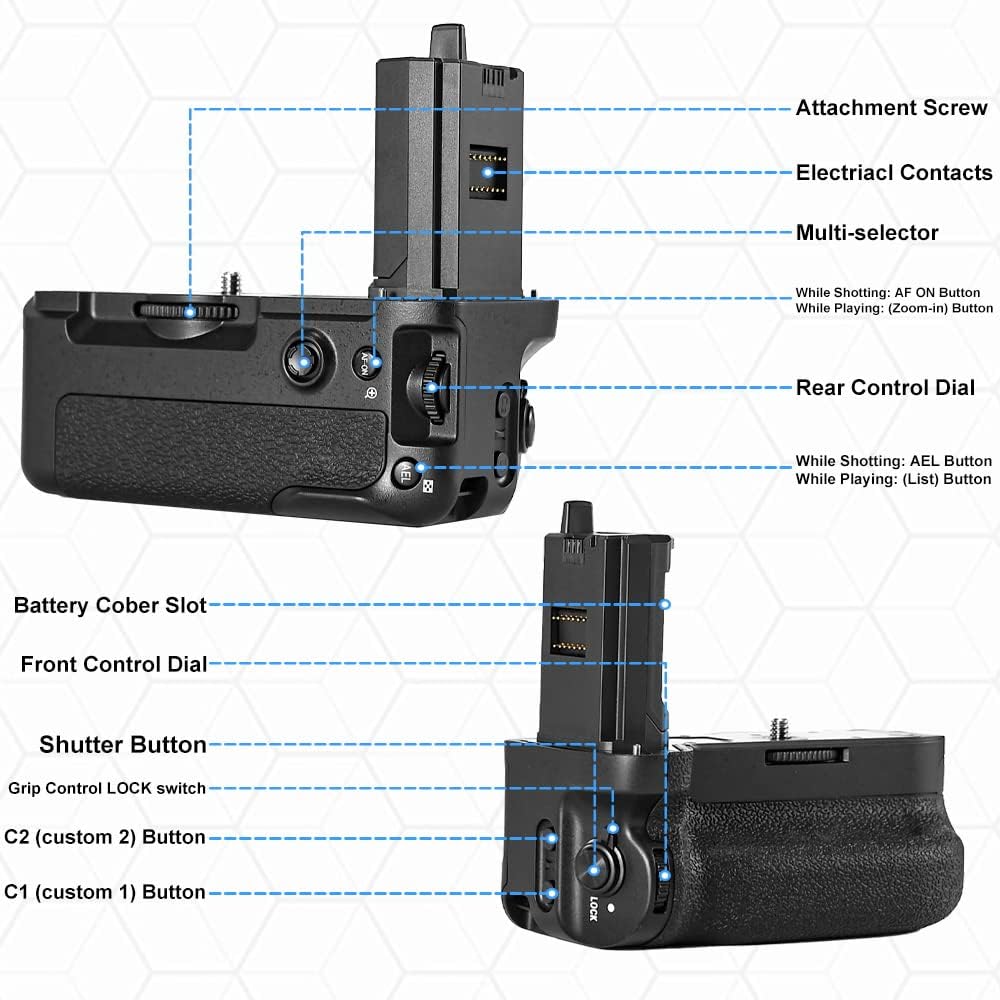
Figure 4.1: Labeled diagram of the DSTE VG-C4EM Battery Grip showing its various controls and components.
Key Components and Controls:
- Attachment Screw: Used to secure the grip to the camera's tripod socket.
- Electrical Contacts: Connects the grip to the camera for power and control signals.
- Multi-selector: Functions as AF ON button during shooting and Zoom-in button during playback.
- Rear Control Dial: Functions as AEL button during shooting and List button during playback.
- Battery Cover Slot: Area where the camera's battery cover is stored when the grip is attached.
- Front Control Dial: Provides additional control for camera settings.
- Shutter Button: Duplicates the camera's shutter button for comfortable vertical shooting.
- Grip Control LOCK switch: Disables the grip's controls to prevent accidental operation.
- C2 (custom 2) Button: Assignable custom function button.
- C1 (custom 1) Button: Assignable custom function button.
5. Setup
5.1. Installing Batteries
The DSTE VG-C4EM grip accommodates two NP-FZ100 batteries (not included) to extend your camera's operating time.
- Locate the battery tray release lever on the side of the grip.
- Slide the lever to unlock and pull out the battery tray.
- Insert one or two NP-FZ100 batteries into the tray, ensuring correct polarity as indicated inside the tray.
- Slide the battery tray back into the grip until it locks securely in place.

Figure 5.1: Battery tray fully extended from the grip, ready for battery insertion.

Figure 5.2: Diagram illustrating the correct method for inserting batteries into the battery holder.
5.2. Attaching the Grip to the Camera
Before attaching the grip, ensure your camera's battery compartment is empty and the battery door is removed.
- Turn off your camera.
- Open the camera's battery compartment door.
- Remove the camera's battery.
- Detach the camera's battery compartment door. Most Sony Alpha cameras allow the door to be easily removed and stored in the grip's designated slot.
- Align the grip's electrical contacts with the camera's battery compartment contacts.
- Insert the grip's connector into the camera's battery compartment.
- Align the grip's attachment screw with the camera's tripod socket.
- Rotate the attachment wheel on the grip clockwise until the grip is securely fastened to the camera. Do not overtighten.

Figure 5.3: The DSTE VG-C4EM Battery Grip showing the camera connection point and attachment screw.
6. Operating Instructions
6.1. Vertical Shooting
The primary benefit of the DSTE VG-C4EM grip is to provide comfortable and stable handling when shooting in portrait (vertical) orientation. The grip duplicates key camera controls, allowing for a natural shooting posture.

Figure 6.1: A camera equipped with the DSTE VG-C4EM Battery Grip, demonstrating its use for both horizontal and vertical shooting.
6.2. Battery Switching
When two NP-FZ100 batteries are installed in the grip, the camera will automatically switch to the second battery once the first one is depleted. This transition occurs seamlessly without interrupting camera operation, ensuring continuous shooting.
6.3. Using Grip Controls
The grip features duplicate controls for convenience:
- Shutter Button: Functions identically to the camera's shutter button.
- Front and Rear Control Dials: Replicate the camera's control dials for adjusting settings.
- Multi-selector: Provides AF ON functionality during shooting and zoom-in during playback.
- C1 and C2 Custom Buttons: These buttons can be assigned custom functions via your camera's menu, mirroring the functionality of the camera's own custom buttons.
To prevent accidental operation of the grip's controls, use the Grip Control LOCK switch. Set it to the 'LOCK' position when not actively using the grip's controls.
7. Maintenance
- Keep the battery grip clean by wiping it with a soft, dry cloth.
- Avoid using harsh chemicals, cleaning solvents, or strong detergents.
- Ensure the electrical contacts on both the grip and your camera are clean and free of dust or debris.
- When not in use for extended periods, remove batteries from the grip and store the grip in a cool, dry place away from direct sunlight.
8. Troubleshooting
8.1. Grip Not Powering On / Camera Not Recognizing Grip
- Ensure batteries are correctly inserted into the grip with proper polarity.
- Check that the grip is securely attached to the camera and the attachment screw is tightened.
- Verify that the electrical contacts on both the grip and the camera are clean and free from obstruction.
- Ensure the camera's battery compartment door is properly removed and stored.
- Try using fully charged batteries.
8.2. Grip Controls Not Responding
- Check the Grip Control LOCK switch on the grip. Ensure it is in the 'UNLOCKED' position.
- Verify that the camera is powered on and functioning correctly.
- Ensure the grip is firmly connected to the camera.
9. Specifications
| Model Number | US-DB135 |
| Compatibility | Sony A7R IV, A7R V, A7 IV, A9 II, A7SIII, A1, A7SM3, A7RM4 Cameras |
| Battery Type | NP-FZ100 (not included) |
| Item Weight | 11.3 ounces (approximately 320 grams) |
| Package Dimensions | 5.91 x 3.54 x 3.15 inches |
| Manufacturer | DST Electron Technological Co., Ltd |
10. Warranty and Support
10.1. Warranty Information
This DSTE VG-C4EM Vertical Battery Grip comes with a Two-Year Warranty from the date of purchase. This warranty covers manufacturing defects and malfunctions under normal use. It does not cover damage caused by misuse, accidents, unauthorized modifications, or natural disasters.
10.2. Customer Support
For technical assistance, warranty claims, or any questions regarding your DSTE VG-C4EM Vertical Battery Grip, please contact DSTE customer support through the retailer where the product was purchased or visit the official DSTE website for contact information.