
Goreit G1695
Goreit G1695 20,000 Lumens Rechargeable LED Flashlight
User Manual
Introduction
Thank you for choosing the Goreit G1695 20,000 Lumens Rechargeable LED Flashlight. This high-performance flashlight is designed for durability and versatility, featuring an upgraded XHM77.2 LED chip for stable and powerful illumination. It includes an LCD power display, five distinct light modes, a zoomable focus function, and an IP67 waterproof rating. Additionally, a 365nm UV black light flashlight is included for specialized detection tasks. This manual provides essential information for the safe and effective use of your new flashlight.
Package Contents
Please verify that all items are present in your package:
- 1x Goreit G1695 High Powered Flashlight
- 1x UV Black Light Flashlight (365nm)
- 1x Rechargeable Battery (for G1695)
- 1x USB Charging Cable
- 3x AAA Batteries (for UV Black Light Flashlight)
- 1x Lanyard
- 1x Holster
- 1x User Manual (this document)
Setup
Initial Charging
Before first use, fully charge the Goreit G1695 flashlight's rechargeable battery. The flashlight features a built-in USB-C input for convenient charging.
- Locate the USB-C charging port on the flashlight body.
- Connect the provided USB charging cable to the flashlight's USB-C input port.
- Connect the other end of the USB cable to a compatible USB power source (e.g., wall adapter, computer USB port, power bank).
- The LCD power display will show the charging progress. Charge until the display indicates 100% or a full charge.

Image: The Goreit G1695 flashlight connected to a USB charging cable, illustrating the charging process and the LCD power display showing battery percentage.
UV Black Light Flashlight Battery Installation
The included mini UV black light flashlight requires 3 AAA batteries. Insert them according to the polarity markings inside the battery compartment.
Operating Instructions
Power On/Off and Mode Selection (G1695 Flashlight)
The G1695 flashlight features five lighting modes: High, Medium, Low, Strobe, and SOS. The brightness transitions gradually between modes to protect your eyes.
- Power On: Press the power button once to turn on the flashlight in High mode.
- Cycle Modes: Press the power button repeatedly to cycle through High → Medium → Low → Strobe → SOS.
- Power Off: Press and hold the power button for approximately 3 seconds in any mode to turn off the flashlight directly, without cycling through all modes.
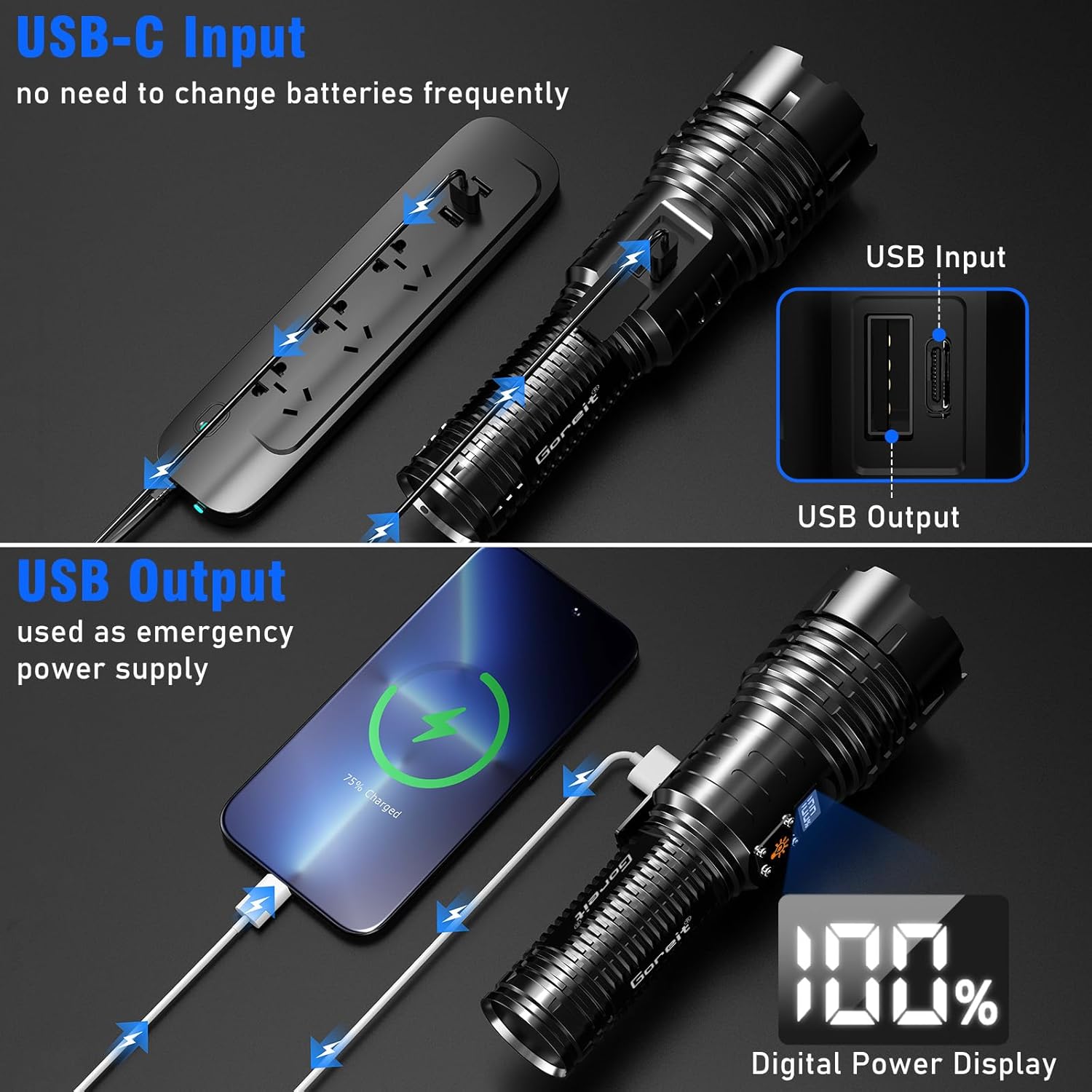
Image: Visual representation of the five light modes (High, Medium, Low, Strobe, SOS) and the 3-second instant off feature of the Goreit G1695 flashlight.
Zoomable Focus
Adjust the beam from a wide floodlight to a focused spotlight by extending or retracting the flashlight head.
- Spotlight: Pull the head forward to narrow the beam for long-range illumination (up to 3937 feet).
- Floodlight: Push the head backward to widen the beam for a broader area of illumination.

Image: The Goreit G1695 flashlight demonstrating its zoomable focus feature, illustrating how to adjust the beam from a wide floodlight to a long-range spotlight.
LCD Power Display
The integrated LCD screen provides an accurate percentage display of the remaining battery power, allowing you to monitor battery status at a glance.

Image: Close-up of the Goreit G1695 flashlight's LCD digital display, showing the accurate battery percentage indicator.
USB Output (Power Bank Function)
The G1695 flashlight can also function as an emergency power bank. Connect your mobile device to the flashlight's USB output port using a compatible cable to charge it.
Using the UV Black Light Flashlight
The mini UV black light flashlight emits a 365nm wavelength, ideal for detecting substances not visible to the naked eye.
- Activation: Press the button on the tail cap to turn the UV light on or off.
- Applications: Use for detecting pet urine stains, verifying currency, inspecting hotel hygiene, or finding scorpions.

Image: The mini UV black light flashlight in use, demonstrating its ability to detect pet urine, verify currency, and reveal hidden details.
Maintenance
- Cleaning: Wipe the flashlight body with a soft, damp cloth. Do not use abrasive cleaners or solvents.
- Battery Care: For optimal battery life, avoid fully discharging the battery frequently. Recharge the flashlight regularly, especially if it will be stored for an extended period.
- Water Resistance: The G1695 flashlight has an IP67 waterproof rating, meaning it is protected from dust and can withstand immersion in water up to 1 meter for 30 minutes. Ensure all ports are securely closed before exposure to water. It is not designed for diving.
- Storage: Store the flashlight in a cool, dry place away from direct sunlight and extreme temperatures.
Troubleshooting
| Problem | Possible Cause | Solution |
|---|---|---|
| Flashlight does not turn on. | Battery is depleted or not properly inserted. | Charge the flashlight fully. Ensure the battery is correctly oriented. |
| Light is dim or flickers. | Low battery charge. Loose connections. | Recharge the battery. Ensure the head and tail cap are tightened. |
| Flashlight not charging. | Faulty cable or power source. Charging port obstruction. | Try a different USB cable and power source. Check the charging port for debris. |
| UV Black Light Flashlight not working. | AAA batteries depleted or incorrectly installed. | Replace AAA batteries. Check battery polarity. |
Specifications
- Model: G1695 (US-G1695)
- Brightness: 20,000 Lumens
- Light Source: XHM77.2 LED Chip
- Material: Aviation-grade Aluminum Alloy
- Waterproof Rating: IP67
- Dimensions: 16.99 x 4.98 x 3.48 cm
- Item Weight: 45 g (0.1 Pounds)
- Power Source: Rechargeable Lithium Ion Battery
- Battery Life: Up to 12 hours (in Low mode)
- Special Features: LCD Power Display, USB Output (Power Bank), Zoomable Focus, 365nm UV Black Light
- Included Components: Flashlight, UV Flashlight, Battery, USB Charging Cable, AAA Batteries, Lanyard, Holster
Warranty and Support
Goreit is committed to providing high-quality products. If you encounter any issues or have questions regarding your Goreit G1695 flashlight, please do not hesitate to contact our customer support. We are dedicated to assisting you and ensuring your satisfaction.
Please refer to your purchase documentation or the Goreit official website for specific warranty details and contact information.
Related Documents - G1695
 |
Goreit G1695 LED Tactical Flashlight User Manual User manual for the Goreit G1695 LED Tactical Flashlight, detailing product features, specifications, usage instructions, and safety precautions. Features include an intelligent digital display, XHM77.2 LED, USB charging/output, and multiple light modes. |
 |
Goreit G1695 LED Tactical Flashlight User Manual User manual for the Goreit G1695 LED Tactical Flashlight, detailing its features, specifications, instructions for use, and precautions. Includes information on its durable aluminum alloy construction, XHM77.2 LED, digital power display, and USB charging capabilities. |
Ask a question about this manual
Ask about setup, troubleshooting, compatibility, parts, safety, or missing instructions. Manuals+ will review the question and use this page’s manual context to help answer it.