
Gamalta For 18~24inch Fish Tank
Aquarium Light User Manual
Model: For 18~24inch Fish Tank

Introduction
Thank you for choosing the Gamalta Aquarium Light. This 18W light is designed to enhance your aquatic environment with its versatile lighting modes, including a 24/7 natural simulation, and customizable settings. Its expandable bracket ensures compatibility with various fish tank sizes. This manual provides detailed instructions for setup, operation, and maintenance to ensure optimal performance and longevity of your aquarium light.

Gamalta Aquarium Light: 24/7 Lighting Cycles, Sunrise/Sunlight/Moonlight Modes and Custom Modes with Expandable Stand, Adjustable Timer and 7 Color Brightness.
Safety Information
- Ensure the power supply is disconnected before installation or maintenance.
- Do not immerse the light fixture or power adapter in water. The lamp beads are glue-filled for water resistance, but the entire unit is not submersible.
- Keep out of reach of children.
- Do not operate if the light or power cord is damaged.
- Use only with the provided power adapter.
- Avoid direct eye exposure to the LED lights for prolonged periods.
- Ensure proper ventilation around the light to aid heat dissipation.
Package Contents
Verify that all items are present in the package:
- Gamalta Aquarium Light (1 unit)
- Expandable Brackets (2 units, pre-attached or separate)
- Power Adapter with Integrated Controller (1 unit)
Product Overview
The Gamalta Aquarium Light features high-quality LED lamp beads and a durable aluminum housing. The integrated controller allows for easy mode selection and brightness adjustment.
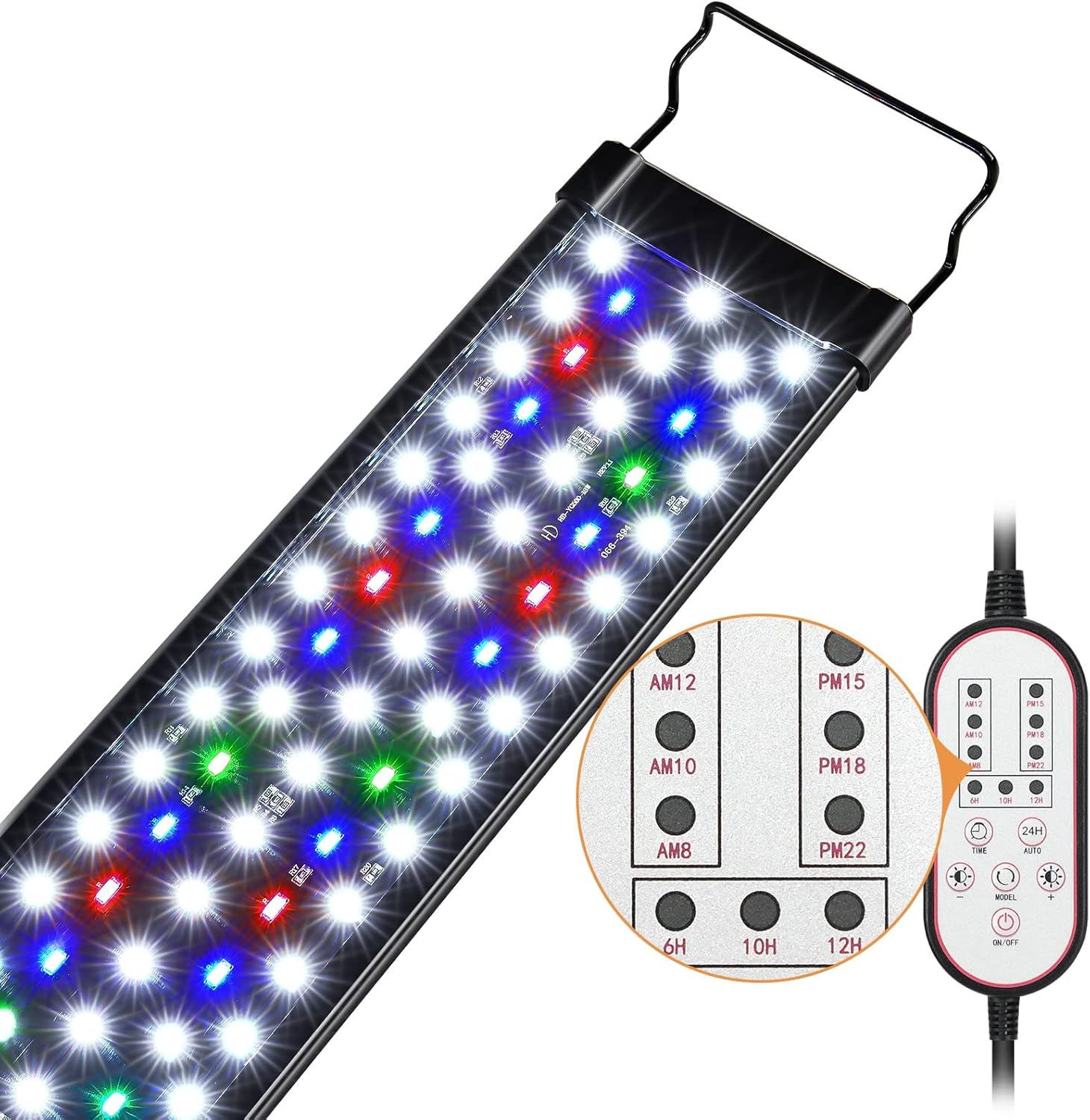
Overall view of the Gamalta Aquarium Light, showing the LED array and the wired controller with various buttons.

Detailed view of the light's control panel, highlighting the buttons for setting time, 24-hour cycle, mode selection, brightness adjustment, and power.
Key Features:
- Upgrade Version: Larger lamp beads and a shiny surface for improved stability and visual comfort.
- Retractable Bracket: Extends up to 6 inches, fitting most freshwater tanks (18-24 inches) with or without lids.
- Durable Construction: Aluminum housing with grooves for excellent water resistance and heat dissipation.
- High-Quality Lamp Beads: Utilizes 5730+5050 type lamp beads for stable, strobe-free light.
- Eye Safe & Bio-Friendly: 85% color rendering index (CRI) close to natural light, beneficial for fish and plant growth.
- Waterproof Technology: Glue-filled lamp beads and acrylic baffle prevent water vapor entry, extending lifespan.

The light's spectrum is designed to be eye-safe and bio-friendly, promoting healthy aquatic life.

Illustration of the light's waterproof design, featuring an acrylic barrier and glue-filled ultra-bright LED chips for durability.
Setup Instructions
- Unpack: Carefully remove the aquarium light and all components from the packaging.
- Adjust Brackets: The light comes with expandable brackets. Adjust the brackets to fit the width of your fish tank. The brackets can extend up to 3.9 inches (approximately 10 cm) on each side.
- Position Light: Place the light securely on top of your fish tank. Ensure the light is stable and centered.
- Connect Power: Plug the power adapter into a suitable electrical outlet.

The retractable bracket allows for easy adjustment to fit various tank sizes.

Detailed view of the retractable bracket, illustrating its 3.9-inch extension capability.
Operating Instructions
The Gamalta Aquarium Light offers both a pre-programmed 24/7 natural mode and a customizable mode.
1. 24/7 Natural Mode
This mode simulates a natural light cycle from sunrise to moonlight. By default, the light follows a pre-set schedule:
- 6:00 AM - 8:00 AM: Gold Yellow light (simulating sunrise)
- 8:00 AM - 6:00 PM: White light (simulating daylight)
- 6:00 PM - 10:50 PM: Blue light (simulating moonlight)
- Rest of the day: Off
To set the first running time, use the 24H button in conjunction with the 6 time point indicators on the controller. By default, it turns on at 6 o'clock. The entire time period can be advanced or delayed from this initial setting.

Visual representation of the 24/7 natural mode, showing the transition from gold yellow to white to blue light throughout the day.

Sunrise simulation with gold yellow light (6 AM - 8 AM).

Daylight simulation with white light (8 AM - 6 PM).

Moonlight simulation with blue light (6 PM - 10:50 PM).
2. Customization Mode (DIY Modes)
You can personalize the light's color, time, and brightness settings.

Controller layout for DIY modes, indicating the function of each button for customization.
Setting Running Time (Timer Key):
Press the TIME button to cycle through preset running times: 6H, 10H, or 12H.

Time setting options available on the controller: 6 hours, 10 hours, and 12 hours.
Setting Color (Mode Key):
Press the MODEL button to select from eight available colors or a cycle mode:
- White
- Red
- Green
- Blue
- Purple
- Gold Yellow
- Cyan
- Cycle (changes colors every 2 minutes)

Visual display of the 7 individual color options and the cycle setting for the aquarium light.

A visual guide to the DIY mode color display, showing white, gold yellow, blue, cyan, red, purple, green, and cycle options.

The mode key allows selection from 8 distinct color settings, including a cycling option.
Adjusting Brightness (Brightness +/- Key):
Use the Brightness +/- buttons to adjust the light intensity. There are five preset brightness levels (10%, 25%, 50%, 75%, 100%). Long press the button for stepless dimming to achieve precise brightness.

Brightness can be adjusted in five levels (10%, 25%, 50%, 75%, 100%) or steplessly by long-pressing the brightness buttons.
Official Product Video:
This official video from Gamalta US demonstrates the features and operation of the Aquarium Light, including its 24/7 Natural Mode.
Maintenance
- Cleaning: Regularly wipe the light fixture with a soft, damp cloth to remove dust and water spots. Ensure the light is unplugged before cleaning. Do not use abrasive cleaners or solvents.
- Inspection: Periodically check the power cord and light fixture for any signs of damage. If damage is found, discontinue use and contact customer support.
- Storage: If storing the light for an extended period, ensure it is clean, dry, and stored in a cool, dry place away from direct sunlight.
Troubleshooting
| Problem | Possible Cause | Solution |
|---|---|---|
| Light does not turn on. | No power, loose connection, faulty adapter. | Check power outlet. Ensure all connections are secure. Try a different outlet. |
| Timer not working correctly. | Incorrect time setting, interference. | Re-read the "24/7 Natural Mode" section and reset the initial running time carefully. Ensure no external timers are conflicting. |
| Light flickers or is unstable. | Power fluctuation, internal issue. | Ensure stable power supply. If problem persists, contact customer support. |
| Brightness or color adjustment not responding. | Controller issue, mode conflict. | Ensure you are in the correct mode for customization. If in 24/7 mode, brightness/time adjustment is unavailable. Try unplugging and replugging the light. |
Specifications
| Brand | Gamalta |
| Model | For 18~24inch Fish Tank |
| Product Dimensions | 18"D x 4"W x 1.46"H |
| Item Weight | 0.69 Kilograms (1.52 pounds) |
| Wattage | 18 Watts |
| Light Source Type | LED |
| Color Temperature | 6500 Kelvin |
| Color Rendering Index (CRI) | 85 |
| Brightness | 636 Lumen |
| Material | Aluminum |
| Control Method | Touch (via integrated controller) |
| Connectivity Technology | USB |
| Included Components | Aquarium light |
Warranty and Support
Gamalta is committed to providing high-quality products and excellent customer service. If you encounter any issues or have questions regarding your aquarium light, please do not hesitate to contact our service team.
We will be happy to provide you with timely assistance.

Our customer service team is ready to assist you.
Customer Service Email: Support@gamalta-home.com
Ask a question about this manual
Ask about setup, troubleshooting, compatibility, parts, safety, or missing instructions. Manuals+ will review the question and use this page’s manual context to help answer it.