
1. Product Overview
The Gamalta Aquarium Light is an advanced lighting system designed for freshwater fish tanks, offering a range of features to simulate natural light cycles and provide optimal conditions for aquatic life. This upgraded version features larger, more stable lamp beads and a durable aluminum housing for excellent water resistance and heat dissipation.

Image: The Gamalta Aquarium Light unit with its integrated controller. The light features multiple LED beads for various color outputs, and the controller allows for mode and setting adjustments.
Key Features:
- 24/7 Natural Mode: Simulates sunrise, daylight, and moonlight cycles automatically.
- Customization Mode: Allows manual adjustment of light color, time, and brightness.
- High-Quality LED Beads: Utilizes 5730+5050 type lamp beads for stable, flicker-free illumination with a high Color Rendering Index (CRI).
- Expandable Bracket: Retractable stand extends up to 6 inches, fitting various tank sizes (12-18 inches for this model).
- Durable Construction: Aluminum housing with glue-filled lamp beads and an acrylic baffle ensures water resistance and extended service life.
2. Setup Instructions
- Unpack the Light: Carefully remove the aquarium light and all components from the packaging. Inspect for any damage.
- Adjust the Bracket: Extend the retractable brackets on both ends of the light fixture to match the width of your fish tank. The brackets can extend up to 6 inches. Ensure the light is centered and stable on the tank edges.
- Position the Light: Place the light fixture securely on the top edges of your aquarium. Ensure it is level and does not obstruct the tank lid (if applicable).
- Connect Power: Plug the power adapter into a suitable electrical outlet. Ensure your hands are dry before handling electrical connections.
- Initial Power On: Press the ON/OFF button on the controller to turn on the light. The light will typically default to a standard mode upon first use.

Image: The Gamalta Aquarium Light showcasing its retractable bracket, which allows for adjustment to fit various tank sizes. The bracket can extend up to 3.9 inches (approximately 10 cm) from its base length.
3. Operating Instructions
Controller Overview:

Image: Detailed view of the light's controller, indicating buttons for 24-hour cycle, timing, brightness adjustment, color modes, and power switch.
- ON/OFF Button: Powers the light on or off.
- TIME Button: Used to set custom running times (6H/10H/12H).
- 24H AUTO Button: Activates the 24/7 Natural Mode.
- MODEL Button: Cycles through 8 different color settings (White, Red, Green, Blue, Purple, Gold Yellow, Cyan, Cycle).
- Brightness Buttons (+/-): Adjusts light brightness. Long press for stepless dimming (10%-100%).
3.1. 24/7 Natural Mode:
This mode simulates a natural day-night cycle, automatically adjusting light color and intensity throughout a 24-hour period. By default, the light changes as follows:
- 6:00 AM - 8:00 AM: Gold Yellow light (simulating sunrise).
- 8:00 AM - 6:00 PM: White light (simulating daylight).
- 6:00 PM - 10:50 PM: Blue light (simulating moonlight/dusk).
- 10:50 PM - 6:00 AM: Light remains off.
To activate this mode:
- Press the 24H AUTO button.
- Set the first running time using the 24H button + 6 time point indication on the controller. By default, it turns on at 6 o'clock. The entire time period can be advanced or delayed from this initial setting.

Image: A graphical representation of the 24/7 Natural Mode, showing the transition from gold yellow (sunrise) to white (daylight) and then blue (moonlight) throughout the day, with specific time markers.
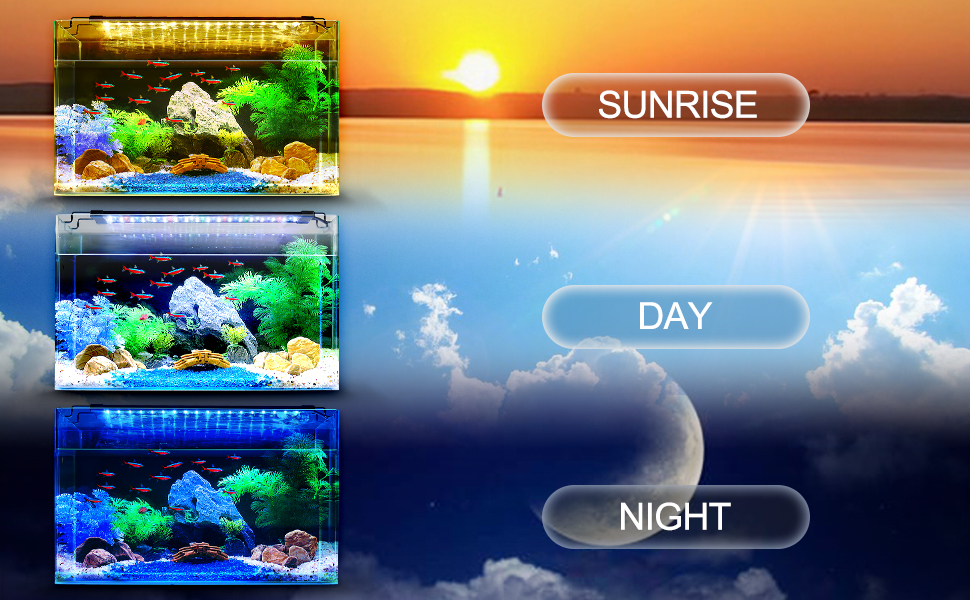
Image: Visual examples of an aquarium under different light settings: gold yellow for sunrise, bright white for day, and deep blue for night, illustrating the 24/7 natural mode.
3.2. Customization Mode:
This mode allows you to manually set the light's color, duration, and brightness.
- Setting Run Time: Press the TIME button to cycle through available durations: 6 hours (6H), 10 hours (10H), or 12 hours (12H).
- Selecting Color: Press the MODEL button to cycle through the 8 available colors: White, Red, Green, Blue, Purple, Gold Yellow, Cyan, and a continuous Cycle mode.
- Adjusting Brightness: Use the Brightness + or Brightness - buttons to adjust the light intensity. There are five preset brightness levels (10%, 25%, 50%, 75%, 100%). For stepless dimming, long press either brightness button.

Image: The controller displaying the 7 individual color options (white, red, green, blue, purple, gold yellow, cyan) and a cycle setting, demonstrating the light's versatility.
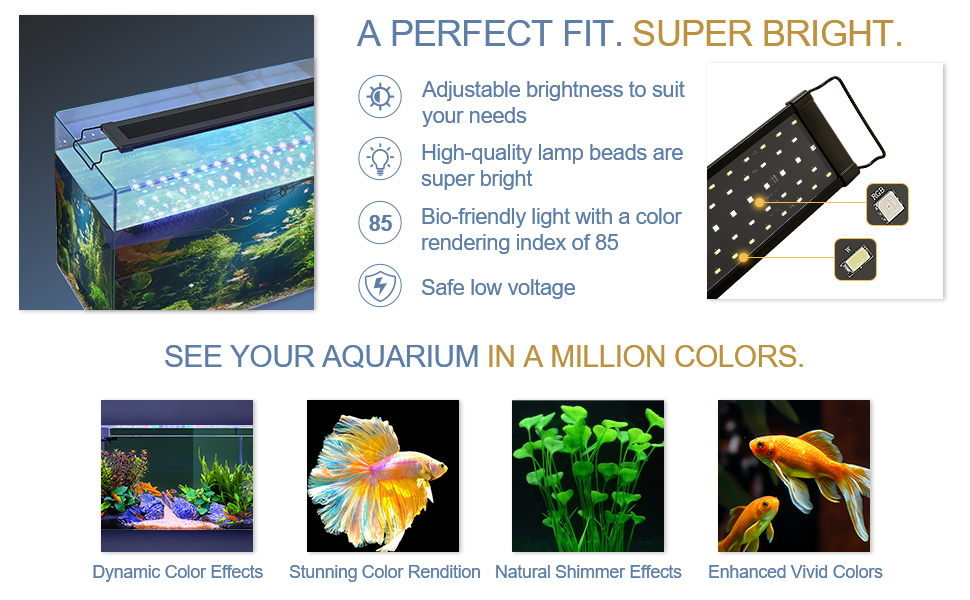
Image: An aquarium illuminated by various color settings, including white, red, blue, green, purple, orange, and cyan, showcasing the light's ability to create diverse visual effects.
4. Maintenance
- Regular Cleaning: Periodically wipe the light fixture and LED surface with a soft, damp cloth to remove dust, water spots, or algae buildup. Ensure the light is unplugged before cleaning. Do not use abrasive cleaners or solvents.
- Check Connections: Ensure all electrical connections are secure and free from moisture.
- Water Resistance: While the lamp beads are glue-filled and protected by an acrylic baffle, avoid submerging the light fixture or its controller in water.
- Heat Dissipation: The aluminum housing is designed for heat dissipation. Ensure the light is not covered or placed in an enclosed space that would impede airflow.

Image: A close-up of the light fixture with water droplets on its surface, illustrating its three layers of waterproof protection and increased lamp bead design.
5. Troubleshooting
| Problem | Possible Cause | Solution |
|---|---|---|
| Light does not turn on. | No power supply; loose connection; faulty power adapter. | Check if the power adapter is securely plugged into the outlet and the light. Try a different outlet. Ensure the ON/OFF button is pressed. |
| Light flickers or is unstable. | Unstable power supply; internal component issue. | Ensure the power source is stable. Unplug and replug the light. If the issue persists, contact customer support. |
| 24/7 Natural Mode not working correctly. | Incorrect initial time setting; interference. | Re-set the initial time using the 24H button. Ensure no other settings are overriding the automatic mode. |
| Cannot change color or brightness. | Buttons not responding; light in an overriding mode. | Ensure the light is not in 24/7 Natural Mode if attempting manual changes. Press buttons firmly. If unresponsive, try unplugging and replugging the light. |
6. Specifications
| Attribute | Detail |
|---|---|
| Brand | Gamalta |
| Model Number | YD-HG-300 |
| Product Dimensions (approx.) | 11 x 27.43 x 5.21 cm (4.33 x 10.8 x 2.05 inches) |
| Item Weight | 454 g |
| Material | Aluminium |
| Number of Lights (LEDs) | 58 |
| Type of Bulb | LED (5730+5050 type) |
| Wattage | 14W (as per title), 11.8 watts / 10 Watts (as per specs) |
| Voltage | 110 Volts |
| Luminous Flux | 489 Lumen |
| Color Temperature | 6500 Kelvin |
| Color Rendering Index (CRI) | 85% (approx. 71 from specs) |
| Special Features | Full Spectrum, Color Changing, Adjustable Timer, Expandable Bracket |
| Power Source | Corded Electric |
| Compatible Tank Size | 12-18 inch (for this specific model) |

Image: Diagram showing the dimensions of the Gamalta Aquarium Light, including its base length and extended length with the retractable brackets.
7. Warranty and Support
For any issues or assistance, please contact the Gamalta service team. They are available to provide timely support for your product.
Refer to your purchase documentation or the retailer's website for specific warranty terms and contact information.
Note: Information regarding specific warranty duration was not provided in the product details. Please consult your point of purchase for warranty specifics.